


 View Profile
 View Forum Posts
 Private Message


Yes, that's it.Originally Posted by Jyri
The left bottom corner input on mine is AV2.Originally Posted by Jyri
As Doman suggested, give that a go. Depending on the SCART adapter, it will have an In/Out switch. Put it to Out.Originally Posted by Jyri
There are differences in the various outputs from these types of units. For example, on the ES-15, the video output from AV4 is different to that from the SCART; AV4 has a momentary brightness boost, whereas the SCART doesn't have the boost. Also, my ES-35V doesn't have any SCART connectors at all, so there could be variations in how the internals work.
+ Reply to Thread
Results 481 to 510 of 511
-
-
I now changed the setup to use Panasonic Scart AV1 to output the signal to I-O Data capture device. Well, the first issue is that the AV1 does not support S-Video so I get just a black & white signal with S-video cable. Scart AV1 can output composite or RGB. Despite this I tested connecting the LG to the different Panasonic inputs with either composite or S-video and none of them would give a result where the top of the frame is straightened. So the only way to get a straight top frame is to play the tape directly on Panasonic. So just a head-up for anyone else wanting to use this as a passthrough device.
Attached is the back of the Panasonic DMR-ES35V. Looks like the full model is DMR-ES35VECS. -
Deleted due to info from Sharc's post following.
Last edited by Alwyn; 2nd May 2026 at 03:37.
-
Being a late entrant so it may have already been said and tried, but anyway:
For passthrough, use the connectors on the FRONT (AV3) of the ES35VECS as inputs, and the S-Video connector (not the SCART because this may work for DVD playback only (?)) at the BACK as output. (And enable the Comb Filter of the ES35VECS in case of Composite input signals coming from the VCR).
I think this worked here, but I don't have the model any more for trying myself ....Last edited by Sharc; 2nd May 2026 at 03:49.
-
Changes were, more stable picture and sound because I replace all of them.Originally Posted by TOM11

-
I tested this already and it doesn't work. Top of the frame is still skewed. The result images are visible in my original post: https://forum.videohelp.com/threads/403635-Panasonic-DVD-recorder-passthrough-settings...16#post2796406Originally Posted by Sharc
-
Well, turning on Edit on the JVC's S-VHS (HR-S7600 and derivatives) doesn't do much.Originally Posted by Skiller
Temporal smoothing is still extremely active, literally destroying the picture and causing bizarre effects.
* - yes, I know I'm replying to an old post
-
You're right -- but using TBC on a JVC VCR, I got exactly 0 drops+inserts for 1 hour of recording with some corrupted frames. (The same applies to using a FireWire camcorder as a passthrough).Originally Posted by lollo
-
Yes. For tapes in nice conditions the external TBC is not needed. You can get a clean capture without inserted and dropped frames an d with audio and video in synch. As you probably know, I have verified that across many many captures comparing the Analog material with the same content available on dvd or dvb-s/dvb-t, so quite confident about that.
Sometimes, for tapes not in good shape an external TBC is needed for a proper capture.
In the FireWire approach the camera is playing the role of the “digitizer”, so it does not perform any time base correction (although is somehow more resilient than the Analog capture card we use in case of instability); so you still rely on the TBC of the VCR, which can be sufficient or not, according to the conditions of the tape. -
You should not use the SCART output on the PAL version, only the RCA or s-video outputs for capture, component can also be used if you can convert/capture that.
The NTSC model of the ES35V has the advantage you can set IRE on in and output, in the form of bright/dark adjustment,
The PAL version needs to be switched between RGB(scart) or set for Component/S-video.
So video menu settings are different on these PAL or NTSC machines.
btw the SCART connection is handy for monitor use, in both PAL or NTSC mode picture is fine on the SCART connection the RCA and s-video connections do need the correct mode setting for PAL/NTSC on the RCA component connection progressive mode is also an option if needed.
Originally Posted by The_Doman
Last edited by Eric-jan; 7th May 2026 at 16:00.
-
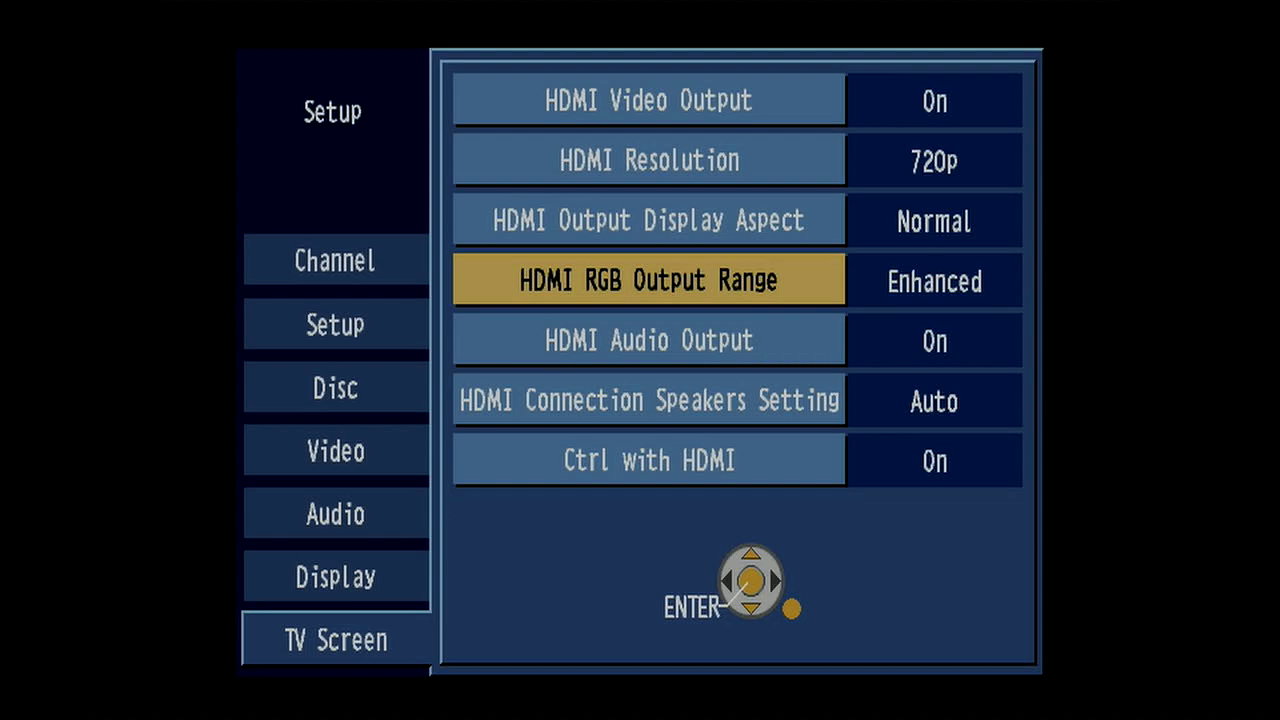
Is this the PAL version? I wonder about the HDMI option (enhanced, "normal"?). Do you have any sample captures with both settings?Originally Posted by Xhumeka
-
On mine, ES35V, i have to disable rgb in the menu, rgb sits in the SCART connector, depending HDMI or Component, you cant use both in the same time , if you want to use Component YUV RCA, you must unplug the HDMI cable, check the manual (download? ) how to proceed for your model.Originally Posted by rgr
if you want to use HDMI as output, you leave HDMI output ON , for Component you switch it OFF.
just scroll through all menu options.
HDMI can give handshake or Macrovision problems, component in progressive mode defeats Macrovision.
The HDMI RGB enhancement option is for bright/dark levels on some NTSC models this can be done for in and output, component does not need adjustment, as far as i know.
My (PAL) DMR-ES35V has no HDMI.Last edited by Eric-jan; 31st May 2026 at 15:23.
-
Do these Panasonic DMR-ES* models break easily? Last time I could not get passthrough to work on my PAL DMR-ES35V (tbc-ish works when playing tape directly on the machine) and now I purchased PAL DMR-ES10 and the passthrough is not working on it either.
-
I assume the DMR-ES10 is operating normally, passing through the signal correctly but not stabilizing the image at all?Originally Posted by Jyri
Also no/any effect when passing through the signal with other tapes?
A good check to see the stabilizing works is a recorded TV logo or (sub)title.
But a known problem with those, not only Panasonic, older devices are failing capacitors causing the device to fail/operating normally.
I have several Panasonic DMR ES/EH recorders here (thrift/flea/car boot sale etc) including 1 DMR-ES10 set aside for later repair because the capacitors need replacing.
I always check first the inside for a visual indication of the capacitors when getting/finding a new recorder.
Some examples in this topic:
Panasonic ES10 display very low -
A-ha! Seems like the issue was the LG RC278 VCR which I was using to play the tape and outputting the signal to DMR-ES10 for passthrough. When I replaced the LG with Panasonic NV-HD640, there are no issues with passthrough and the image is stabilized. I wonder if the LG has some built-in quirks that cause issues with the signal...
-
Nice!Originally Posted by Jyri
Probably the LG RC278 VCR processed the video signal already in a way the DMR-ES10 could/would not stabilize/change it anymore?
As i now see it is a DVD-VCR combo deck recorder.
And the Panasonic NV-HD640/NV-HD630/NV-HD620's are my favorite VCR's in overall picture quality in combination with the DMR-ES10.
Last edited by The_Doman; 4th Jul 2026 at 07:19.
-
That is what I was thinking as well. The issue I was trying to fix with passthrough was the bent top part of the frame. My older test pictures are shown in this post: https://forum.videohelp.com/threads/403635-Panasonic-DVD-recorder-passthrough-settings...16#post2796406Originally Posted by The_Doman
As you can see, in all LG pictures the top is bent and that was still the case when passing the signal through DMR-ES10. With Panasonic NV-HD640 passing through DMR-ES10 or DMR-ES35V there is no such issue at all. A bit weird but happy to find the culprit. -
I made a test video showcasing some differences between different devices and combos:
https://www.youtube.com/watch?v=nIQNv57WFMY -
They're pretty good (except they only have a composite). Compared to JVC, they give a more pleasant image, less filtered, less sharper (but more detailled), but above all, devoid of that terrible JVC' temporal denoising.Originally Posted by The_Doman
The sound is better too.
But unfortunately they tend to show flickering on weaker tapes. -
I have the DMR-ES10EG PAL version... Does it works for "pass-through" by connecting the camera/vcr to the s-video input of the front (AV3) and SCART to s-video output from the back then s-video from the SCART adapter to the capture card or DV camera? Or you still get mpeg2 DVD compression as if you were recording the incoming video signal to a DVD disc?
About other things such as the "posterization" effect and more, i think i didn't saw any of this but now i'm not 100% sure, i always have the AV-In noise reduction turned off too so maybe that plays a role in this.
PAL DMR-ES10 apparently crops a bit the left side of the screen too but is not an issue to me, maybe because of 704x576 in analog videos.
However, if in the future i can find a good Pioneer or Sony DVD recorders with good TBC/Synchronizer capabilities too and possibly with HDMI output too i think i will get one, but for now i will keep using my PAL DMR-ES10EG for all my videos, and by "all my videos" i mean all, from better and worse tapes, i can't stand analog video without using any TBC, and the integrated TBC/DNR functions of my Hi8 CCD-TRV95E camera damages a lot the colors and overall quality of the video so i always have the TBC/DNR of the camcorder turned off and EDIT turned on. -
Yes, provided your camera/vcr has an S-Video outputOriginally Posted by Joscraft_05
Yes. You could also use the S-Video out of the ES10 but it may produce slight "pumping" for hard black/white transitions. For natural video not an issue IMO....and SCART to s-video output from the back then s-video from the SCART adapter to the capture card
(Poorly wired SCART adaptors - and poorly screened S-Video cables - may produce unwanted Y<->C crosstalk. So choose your poison.)
No. Your capture device determines the compression format, not the ES10 in passthrough.... Or you still get mpeg2 DVD compression as if you were recording the incoming video signal to a DVD disc?
nor did I (posterization). But depends what you understand by "more"....About other things such as the "posterization" effect and more, i think i didn't saw any of this ...
Also my ES15 outputs exactly 700mV above blanking level on the Y-wire for PAL 'Reference White' which is according to the standard.
For PAL my ES15 outputs scanlines of exactly 52 microseconds duration for the picture, which gives for 13.5MHz standard luma sampling rate 52*13.5=702 pixels for the digitized video. The rest to 704 or 720 is black which you will see as small borders (pretty tiny for 704 picture width).PAL DMR-ES10 apparently crops a bit the left side of the screen too but is not an issue to me, maybe because of 704x576 in analog videos.
I think the ES10 is much the same as the ES15 in very most aspects.Last edited by Sharc; 10th Jul 2026 at 14:27.
-
I use a Philips SCART adapter that have the typical "input/output" switch and for the cables i use a s-video cable i use is a "Profigold" shielded cable and the other is a s-video cable that was included with a Panasonic camcorder and I found out it works good and i didn't saw any issues with that cable for now.Yes. You could also use the S-Video out of the ES10 but it may produce slight "pumping" for hard black/white transitions. For natural video not an issue IMO.
(Poorly wired SCART adaptors - and poorly screened S-Video cables - may produce unwanted Y<->C crosstalk. So choose your poison.)
This is the Profigold cable i use in the back for the output of the dmr-es10eg.
[Attachment 92975 - Click to enlarge]
And this is the Philips SCART adapter (which seems to work good and i haven't found any issues with this, issues could be found with strange crappy adapters from no-name brands or chinese stores maybe).
[Attachment 92976 - Click to enlarge]
By "more" i did mean other things like the "pumping" for the black/white transitions, but since i use a good SCART adapter from Philips i haven't noticed this issue so... And for the noise reduction... I just have it turned off too.nor did I (posterization). But depends what you understand by "more"....
Also my ES15 outputs exactly 700mV above blanking level on the Y-wire for PAL 'Reference White' which is according to the standard.
I did comparisons side by side between a Hi8 video captured directly to my PAL Digital 8 camera using the integrated TBC function of the Hi8 camera and other video with the TBC/DNR functions of the Hi8 camera turned off, EDIT turned on and using my DMR-ES10EG (AV-In NR turned off too and configured properly) and the captured video using the DMR-ES10EG looked a lot better to me because the integrated TBC/DNR functions of the Hi8 camera degrades a lot the colors so using the TBC of the Hi8 camera the colors were a lot worse and more "dull" or desaturated and i think the image being a bit brighter too, while with the TBC/DNR in the camera turned off, EDIT on and using the DMR-ES10EG it did a far better job and the video had a lot more quality and way better and more accurate colors, (and i think the captured video using the DMR-ES10EG being slightly sharper but i'm not too sure about this).
I'm curious that you didn't saw any posterization at all using your PAL ES15 too because i was reading the comments of Lordsmurf and he talked like these had a pretty noticeable posterization effect being a huge drawback but now i'm not too sure... Maybe PAL models are different from NTSC models for this? Maybe he used the AV-In noise reduction that could noticeable amplify that? Idk. -
So let's assume your cables and adaptor are ok.
This strongly points to a video levels issue, especially the black level being too high. Use the histogram or waveform monitor to analyze your captures, or upload a sample to collect more comments....using the TBC of the Hi8 camera the colors were a lot worse and more "dull" or desaturated and i think the image being a bit brighter too,...
Re. posterization: Trust your eyes. Some posterization is possible when the levels are badly off the kilter. Also the ES10 has 10bit DACs whereas the ES15 is 12 bits which may make the ES15 slightly more resilient against "posterization". Anyway, nothing to really worry about in practice, IMO.Last edited by Sharc; 11th Jul 2026 at 01:48. Reason: typo
-
Oof, i don't have any of the equipment required for this... But here i have a few samples, these 2 screenshots of the video were taken in the exact same frame and i kept the videos interlaced untouched.This strongly points to a video levels issue, especially the black level being too high. Use the histogram or waveform monitor to analyze your captures, or upload a sample to collect more comments.
Capture using the TBC of the Hi8 camera connected directly to my D8 camera:
[Attachment 92987 - Click to enlarge]
Capture using my DMR-ES10EG (you can see the crop of the DMR-ES10 with the black border) and the integrated TBC/DNR functions of the Hi8 camera turned off and EDIT on:
[Attachment 92988 - Click to enlarge]
I think the difference is very big when comparing them side by side, the image less brighter using my PAL ES10 and the colors of the tree looking a lot better having a better and more natural green.
Also, this comparison can be also used to see if the ES10 here did some noticeable posterization, but i'm not sure and i don't see any posterization still here. (But maybe i could be wrong and there is some that i don't see apparently). -
You don't need special equipment. Use Avisynth's (or your NLE's) histograms and monitors.
Both have slightly clipped brights which may result in a minor loss of details for the brights. The range of the levels (darks<->brights "swing") cannot be really assessed based on these screenshots only. But anyway neither has obvious defects so you just keep the one you prefer. Good to go IMO.
And forget about the "posterization". -
By "forget about the posterization" you mean that there's no visible posterization issues at least based on these images? Because i just can't see it either.Originally Posted by Sharc
And yes, turning off the TBC/DNR functions of the camera, EDIT on and using my DMR-ES10EG gives me a way better image, a bit less brighter than the TBC of the Hi8 camera and way better and more accurate colors so i'm going to use at least for now my DMR-ES10EG with the SCART to s-video adapter for all my captures from good and worse tapes.Last edited by Joscraft_05; 11th Jul 2026 at 10:05.
-
For me, the green from the D8 camera is more natural.Originally Posted by Joscraft_05
But that's a matter of preference, or even the monitor. -
I, on the other hand, see some disadvantages of the DV format here.Originally Posted by Sharc
However, this will probably disappear in postprocessing anyway.

-
PAL DV in my case. But what do you mean? Both videos were captured with my DV camera, it was a comparison between using my DMR-ES10EG as a good external TBC/Synchronizer machine and the other without using it and just using the integrated TBC of the Hi8 camera, then s-video from the Hi8 camera directly to the DV camera.Originally Posted by rgr
-
OK, I read it more carefully.
So you connect Hi8->ES10->D8->PC?
Overcomplicated (D8 cameras tended to have TBC too), but since it works for you...
However, colors are better improved in post-processing, especially since recorders are known (and invaluable) due to strange changes in brightness.
And I would have paid more attention to the vertical jumps, but this problem didn't seem to occur in the Hi8 recordings.
And I'm surprised you didn't get a luma range of 16-255 from D8.
 Quote
Quote




Similar Threads
-
Panasonic DMR-ES15 PAL - how to setup for TBC passthrough
By spotty in forum Capturing and VCRReplies: 9Last Post: 30th May 2023, 05:06 -
Panasonic DMR-ES15 DVD Recorder Remote Control Programming
By czarship in forum DVD & Blu-ray RecordersReplies: 11Last Post: 14th Jul 2020, 19:12 -
Panasonic DMR-ES10/ES15/ES20 PAL-N compatibility
By Crisrodd in forum Capturing and VCRReplies: 5Last Post: 26th Oct 2019, 14:05 -
Settings Panasonic DMR-ES10 for pass through
By GovertdeKat in forum Capturing and VCRReplies: 4Last Post: 17th Oct 2018, 11:58 -
Turn off Panasonic DMR-ES10, ES15 power-off feature
By bhershey in forum Capturing and VCRReplies: 2Last Post: 24th Apr 2018, 18:33