


 View Profile
 View Forum Posts
 Private Message


I have just purchased a new Sony DVP-NC875 standalone player.The player is listed as being a region 1 player. I recently got a DVD that seems to have been produced in Asia. My PC plays it fine, When I try to play it in the sony I get this error (playback prohibited by area limitations). I figured I could backup the DVD and remove region or make region free. Well When I burned it with DVD Shrink, I selected Region 1 only, still doesnt play same error. I ran DVDInfo it shows DVD as multi region (1,2,3,4,5,6,7,8). Is this a bug in Shrink?
+ Reply to Thread
Results 1 to 9 of 9
-
-
Are you sure your pc is REGION FREE? In other words your operating system should also be REGION FREE. Download DVD REGION KILLER, here is the link & use mirror 3 to download it.
http://www.digital-digest.com/dvd/downloads/dvdrk.html -
Just make it region-free, in Shrink, then you shouldn't have a problem.
I've purposely encoded R0 films in R3 and R6 before, in DVD Shrink, to play on my NOVA 311 standalone, and I've never had a problem.
- MJ(1)BenQ 1620 w/ B7u9 w/ MCSE speed patch
(2)Philips 8631 @ BenQ1620 w/ B7U9 w/ MCSE speed patch
GET MCSE HERE
BenQ Ownz j00 -
I tried to ensure that a DVDR was a Region 1 using the DVDShrink settings and mine came out as region free also. I thought that I had just done something wrong. Glad to see it is not only me.
And making a backup Region Free is NOT the universal answer in some DVD players. SOME will only play a DVD with a region code....the same region code it is programmed for. -
Some players will give a response like this if the format is incompatible (i.e. PAL instead of NTSC).
Read my blog here.
-
What else could I use (besides shrink) to make a DVD Region 1 only. I use CloneDVD/AnyDVD for most of my backups but it doesnt let you specify region> AnyDVD wither makes it multi region or region free. Whats the difference. Anyway is there any other program to use?And making a backup Region Free is NOT the universal answer in some DVD players. SOME will only play a DVD with a region code....the same region code it is programmed for.
-
The man is correct!!! Sony's are notorious for this message with pal disc'sOriginally Posted by guns1inger
(playback prohibited by area limitations)
Even made region free, or more correctly, all region encoded.
And as far as making a dvdr one specific region, i have yet to see it done
8)
I have been trying and looking for over a year, me and jimmalenko went through this once before,
https://www.videohelp.com/forum/viewtopic.php?t=248261&highlight=
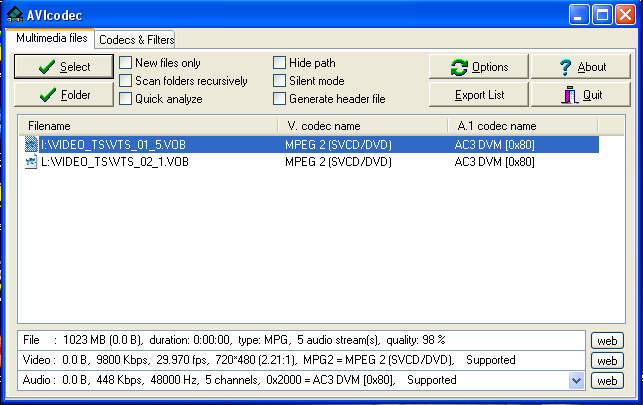
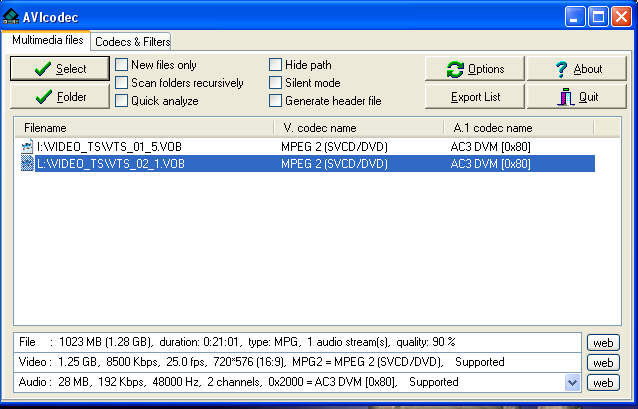
use AVIcodec to check what the frame rate is...
NTSC
PAL
-
Well the DVD in question works on my 3 year old apex which I hacked to be region free. So if it was PAL I dont think it would play would it?
-
Odd's are very high as apex's are also well known for converting pal to ntsc same as the cyberhomes.Originally Posted by gguerra3
I even have a standalone GE player that i flashed with apex firmware to make it region free and it also converts pal to ntsc & vice versa.
 Quote
Quote


Similar Threads
-
Multisession DVD Burner and Burning Files into Specific Folders
By Disco Makberto in forum ComputerReplies: 9Last Post: 23rd Feb 2010, 01:48 -
Does law require DVD players to be sold as region specific to country ?
By Panchogun in forum DVD & Blu-ray PlayersReplies: 14Last Post: 28th Dec 2008, 07:47 -
Strange region problem with DVD Shrink re-author
By Jetter68 in forum DVD RippingReplies: 7Last Post: 30th Aug 2008, 14:14 -
DVD non-region specific
By Musica in forum Newbie / General discussionsReplies: 3Last Post: 12th Jun 2008, 12:34 -
false dvd region mismatch with Dvd Shrink
By DB83 in forum DVD RippingReplies: 3Last Post: 27th May 2008, 13:09