


 View Profile
 View Forum Posts

Hi all,
I just bought a Sony DV-cam and I want to make CDs playable on regular DVD-players. I use Adobe Premiere 6.5 and I did some tests concerning formats and I found a strange difference between VCD and SVCD. The object was a fast flying seagull and some nice almost calm water.
With VCD the general qualiry was too low but the seagull was pretty OK when in motion. The SVCD gave much better overall quality, the water looked very nice but the seagull in motion was kind of pixelated and highlighted. What did I do wrong? Is there a web site which has the most general settings for a good output? As for now I can't use VCD nor SVCD... It's okay for me to get abut 30-40 minutes on a CD. And, I'm not gonna buy a DVD-burner...
Thankx,
/Mat
+ Reply to Thread
Results 1 to 21 of 21
-
-
Video Restorer

- Jun 2003
- dFAQ.us/lordsmurf


Use CVD settings, which is Half D1 MPEG2 interlaced with 44.1hz audio.
That should do quite well for you.
Not VCD, XVCD or SVCD ... bu CVD (Chinese Video Disc ... which is like SVCD).Want my help? Ask here! (not via PM!)
FAQs: Best Blank Discs • Best TBCs • Best VCRs for capture • Restore VHS -
Well, I want to use a format that most players will support. Is my observation about the difference between vcd and svcd correct? It shouldn't be since I've seen lots of perfectly fine svcd videos made by others...hmpf...Originally Posted by lordsmurf
? -
Upping the bitrate and/or using two pass VBR might fix the problem. What bitrate did you use?
-
Video Restorer
- Jun 2003
- dFAQ.us/lordsmurf
-
CVD is just as compatible as SVCD, maybe even moreso since it has Half D1 as base video.
CVD is 352x480 (Half D1) VBR 2520 interlaced with 44.1hz stereo MP2 audio
SVCD is 480x480 VBR 2520 interlaced with 44.1hz stereo MP2 audio.
I bet you're not interlacing. Or using too low bitrate. Or using CBR bitrate.Want my help? Ask here! (not via PM!)
FAQs: Best Blank Discs • Best TBCs • Best VCRs for capture • Restore VHS -
Well, I've tried the maximum bitrate. I even made a custom MPEG-2 video 720*540 with CBR 3500 and it started to look like something I could use. The problem was filesize...only about 15 minutes on a regular CD. I will test the same bitrate but decrease the image size to that of svcd and cvd. This is getting on my nerves and I just took two aspirins to get rid of the fever shaking. Luckily I'm not working since I'm sick but it's a great waste om time running fromthe computer to the tv all time with this little success. I tried TMPGenc but my version had an expired mpeg export...duh.... Shouldn't I be able to make a decent TV-viewablemovie with Premier 6.5?Originally Posted by teegee420
A friend of mie did a pretty perfect avi with moviemaker...pity I dont use XP (98ME).
Thanx for all your tips btw. I've learned a lot this evening.

-
Stick with 480x480. And for SVCD you can't use a bitrate greater than 2520 for it to be standard compliant. I'm really surprised you were able to play the other disc on your DVD player. Most players choke on non-standard specs.Originally Posted by matknu
-
The Old One

- Aug 2000
- Hellas (Greece), E.U.
-

Load your final project to Virualdub and minnor filter it, just for those details we don't see but the encoder do see.
I suggest you the typical combo for filtering: Static Noise Reduction 6 / Dynamic Noise Reduction 8, Sharpness 4.
Also resize your source to 352 x 480 (for NTSC) and frameserve to TMPGenc Plus.
There, encode to CVD with CBR 2520 (352 x 480 framesize, audio 129Kb/s with 44100khz).
Burn your final mpeg 2 as non standard SVCD with NERO
This is the best you can do with your source for CD based formats.
CVD is about same compatible with SVCD, less compatible compared to VCD and it has a benefit: Later, you can convert it direct to DVD, without the need of re-encoding. -
Thanx SatStorm,Originally Posted by SatStorm
I read what you say but why don't I get the result I want from Premiere? It's an expensive software even if 6.5 isn't the newest one. It should do the trick or am I out cycling!?!?!? I re-tried vcd and svcd today and the motion pixelation (or blocking) was of course there in the scvd format...with CBR 2520. I maxed the bitrate with no success.
I will try the way you described so excellent but for me it seems like going over the stream to get water... Why is there not a "save for movie CD" option which makes the captured DV movie end up on a regular CD, untouched apart from the compression!?
/Mats
P.S. MY DVD-player that I have connected to my TV plays all sort of weird data formats such as avi, dix, xvid...unfortunately it's bad at playing real dvd's bought in a shop. 2 of 5 works for me.... -
The Old One
- Aug 2000
- Hellas (Greece), E.U.
-
The reason programs like virtualdub exist, and the reason users made filters, is because the commercial solutions doens't always work for us, the enthusiasts.
Converting home movies and DV to CD based media, needs advance steps which automatic solutions fail to do the best possible way. -
I tried to open the captured avi in Virtualdub1.5 and got an error message (see attachment). I have tried before to download this VFW codec without success. The download and all seemed OK but it didn't work in VDUB. Can i change the captured avi file in Premiere to anoterh uncompressed format that I can open in VDUB?Originally Posted by SatStorm
I don't have an extremely large HD so I can't keep all of my movies uncompressed on the HD. Instead my original idea was to convert all of the tapes (normal Sony 60 minutes) to single files about one or two GB and then use these files in Premiere to make the finished movies.
/Mats -
The Old One
- Aug 2000
- Hellas (Greece), E.U.
-
I can't understand why this happens. Probably a codec is missing on your set up.
Uncompressed format no. But you can export to Huffyuv or PicVideo, but that gonna have some kind of quality loss (unoticable in your final mpeg 2). -
I can't seem to get anything right... With Huffyuv 2.1.1. the filesize grows from 590 MB to 1.9 GB....Originally Posted by SatStorm
Btw, I'm a PAL person.
 Mats
Mats
-
The Huffy codec is lossless, meaning you loss no quality by compressing with it. That's why you output is so much larger. You did nothing wrong
 It's the preferred format for a temporary file, but as you said, it takes up a large amount of space.
Why don't you post an example of the pixelation your seeing? I suspect it's just mesquito noise, but that's just it. I'm guessing. Also, what error did you get in VDub? You mentioned it, but I don't see the error here.
I agree with Satstorm. CVD will give you more bitrate for your buck due to the slightly lower horizontal resolution (more bitrate for picture quality, less for the extra resolution). It's a good thing.Impossible to see the future is. The Dark Side clouds everything... -
Then I don't understand why I should use Huffyuv... My idea was to change the captured film which is about 15 GB direct from my Digicam to something with a filesize about 1-2 GB so that I could store it on my HD as an "original" from which I can do my philm editing... anyways...I will try to post a tiny clip or an image or something. It's pretty simple ...things that move fast gets pixelated (or more like blocky...large pixels...). The noice in the calm areas is OK for viewing. To explain further..in one single frame the calm water looks just fine but the flying seagull looks bad. It also looks bad when I'm panning the camera to fast.Originally Posted by DJRumpy
I have to admit I havent found out how to create a CVD yet... -
If you want something to store on your HD, you could try to compress that 15 GB footage using xvid. You can set the codec so that you tell what filesize you want (2 GB) and it will encode it so that the size is exactly what you specify. 2 GB for a 60 minute video using xvid should give good results.Then I don't understand why I should use Huffyuv... My idea was to change the captured film which is about 15 GB direct from my Digicam to something with a filesize about 1-2 GB so that I could store it on my HD as an "original" from which I can do my philm editing... anyways...I will try to post a tiny clip or an image or something. It's pretty simple ...things that move fast gets pixelated (or more like blocky...large pixels...). The noice in the calm areas is OK for viewing. To explain further..in one single frame the calm water looks just fine but the flying seagull looks bad. It also looks bad when I'm panning the camera to fast.
I have to admit I havent found out how to create a CVD yet...
Other than that, I would suggest just keeping the original tapes. DV tapes aren't that expensive now and you have your full quality DV source available to transfer back to your HD whenever you want. -
I said Huffy is good only as a Temporary file. It's not a good permanent format due to it's size.
Since you don't have a lot of drive space, then you'll have to frameserve. The problem you describe sounds like a plain old bit shortage. Typically bad encoders will do this. If that is the case, then CVD will indeed help with the bit shortage. CVD is pretty much the exact same thing as SVCD, except the resolution is different.
SVCD: MPEG-2 480x480, 44.1 Khz Audio
CVD: MPEG-2 352x480, 44.1 Khz Audio
The lower resolution lets you take the bitrate that would have been applied to the higher resolution and apply it to the video quality (or audio) instead.
You should try another encoder if yours isn't giving you good results. Either that, or ensure that you have your encoder setup properly for your source material. If your source is interlaced, use 'Alternate' for the block scanning order. Also check to see if they offer a lower bitrate matrix. I've never used Premiere, but someone here should be able to help you with any specific settings.Impossible to see the future is. The Dark Side clouds everything... -
Here comes a sample image which describes my problem (soon a nightmare). This was the best I could come up with. I took my digital still camera and took the photos straight on the tv-screen, therefore all the patterns.. You can clearly see the clutter/pixels/blocks around the edges of the seagull. I use 2520 CBR SVCD and this is the best I could get from SVCD. As I've said before in this thread this phenomena doesn't occur with VCD (which on the other hand gives a lousy overall qualty compared to SVCD).Originally Posted by DJRumpy
Lets sy the gull takes up 1/3 of the TV-screen and this clutter appears all the time. (Some rare times when I pushed the pause button on my DVD the gull was pretty sharp...)
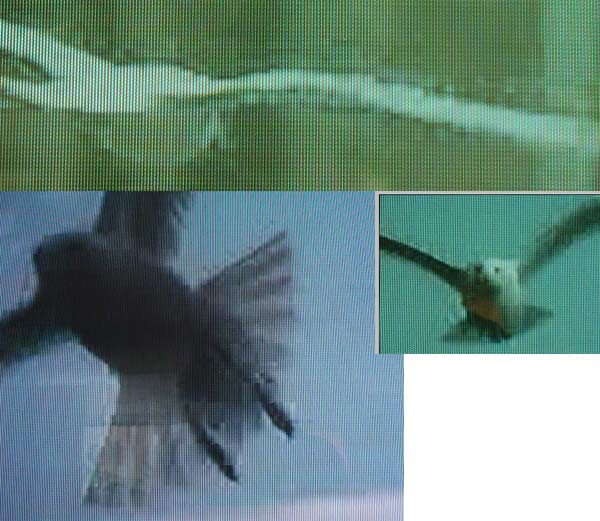
I'm in your hands....
 Mats
Mats
-
Hi Satstorm,Originally Posted by SatStorm
Where can I find these filters? I feel like really stupid...
Mats
-
The Old One
- Aug 2000
- Hellas (Greece), E.U.
-
Don't feel like stupid, all once were like you on this.
Virtualdub filters here: http://neuron2.net/
Those pixels you have are natural: SVCD's highest bitrate is to low to support a picture with motion like this!
Using filters gonna impove a lot the picture, but don't expect total elimination for bitrates >3200
You need a DVD burner soon.... -
Sorry for posting in another thread. I wasn't reaaly sure if my problems was of "advanced" nature. I just felt stupid... I actually looked at neuron2.net but didn't find you static an dynamic noice reduction. HOWEVER I started searching for macroblocks (I found the macroblock issue somewhere) and found a text saying basically that less resolution gives less problems with macroblocks. So I made a custom mpeg-2 in Premiere with the bitrate of a svcd but with the resolution of a vcd (right about that CVD you've told me to to do but I haven't figured out how to...) and...my gosh it worked. Guess I'm relieaved and thank you SatStorm plus all others that guided me forward in this jungle and sorry again for taking up more than necessary forum space. I've learned a lot and now I know I need to learn even more. I also figure this videomaking is really an immature area of software since there are zillions of more or less hobby-made software doing a little bit of this and a little bit of that. Now I can start to make something decent out of my DV-tapes.Originally Posted by SatStorm
Mats
 Quote
Quote Visit Homepage


Similar Threads
-
How come you didn't need an RF Modulator with a VCR?
By snafubaby in forum Newbie / General discussionsReplies: 2Last Post: 23rd Mar 2012, 17:38 -
Trying to modify .VOB file - why didn't this work?
By brassplyer in forum Authoring (DVD)Replies: 8Last Post: 7th Feb 2011, 22:03 -
Captured VHS to DVD didn't turn out so well...
By snafubaby in forum Capturing and VCRReplies: 3Last Post: 24th Dec 2010, 07:20 -
menu button didn't work
By pcb in forum Authoring (DVD)Replies: 6Last Post: 13th Oct 2010, 15:07 -
DVDShrink didn't shrink enough?
By JudgeGarth in forum Newbie / General discussionsReplies: 6Last Post: 27th Aug 2007, 11:21