


 View Profile
 View Forum Posts
 Private Message


I tried using DVD Audio Ripper to rip audio from the DVD of Dido Live at Brixton Academy. The set includes an audio CD, but not all the songs are included. The sound quality was terrible. When I opened the files in Goldwave, it appeared that they exceeded my sound card's capacity to play them, all though the DVD sounds fine if I just play it on my PC. The sound is clipped and distorted at its highest levels (which is most of each track.) Is there a better tool I should be using? Is there a way to preset the recording level?
+ Reply to Thread
Results 1 to 17 of 17
-
-
You can extract just the audio using dvd decrypter in stream processing mode. Then you can use besweet to convert it to wav or mp3 or whatever you need.
 Donatello - The Shredder? Michelangelo - Maybe all that hardware is for making coleslaw?
 -
Thanks for the suggestions. I think I was able to extract audio using DVD Decryptor, but is there a good guidefor using BeSweet to convert VOB to wav? I've been trying to figure it out, and I think I get the input and output files set, but nothing seems to happen then, so I'm obviously missing a step or two.Originally Posted by yoda313
-
If you extracted the audio you would have an audio file (AC3 or something else), not VOBs. How did you extract the audio ?
Read my blog here.
-
I did what Yoda313 suggested, assuming I understood him correctly. I extracted it in stream processing mode. It definitely made VOB files, not AC3 or wav or anything else. Maybe I misunderstood him.Originally Posted by guns1inger
-
To get just the ac3 audio stream with DVD Decrypter you have to use the IFO mode and enable "Stream Processing" and choose which stream and how you want to save it.
When you used dvd audio extractor did you mess with any of the settings ?
It has alot of settings depending on what you want to do & formats.
Did you check "normalization" which at it's highest level when turned on would cause "clipping".
Did you try and burn the music to a cd and see what it suond's like in a standalone player ?
I have used dvd audio extractor on many many concert dvd's to make audio cd's (and movie's) and have never had a problem, they always sound great
-
To clarify, select the stream you want and make sure you select Demux (a radio button below the streams list). If you want to demux multiple streams, you have to select each stream indiviually, then click the demux radio button.
Read my blog here.
-
I used #1 DVD Audio Ripper, not DVD Audio Extractor. Maybe I should try DVD Audio Extractor instead.Originally Posted by Noahtuck
-
You don't need to pay for more software....DVDDecrypter CAN give you an AC3 music file....then you can use another free program like AC3Tool to convert to .wav or .mp3.
It takes a bit of time to get used to doing it but it WILL give you better results.
The guides are your friend. -
I did not think anyone said that you could NOT get an ac3 file from DVD Decrypter, and to say say by doing it that way it WILL give you better result'sOriginally Posted by hech54
 and i ASSUME you came to this conclusion by trying both
DVD Audio Extractor is a great program, and i have used/tried pretty much every way there is to make audio cd's from dvd's in the last 5 years and this program gives you pretty much every option and format you could need 8)
It will let you rip by chapter, raw audio tracks, DTS to 6 single wav files, 5.1 to single wav files, DTS/5.1 to stereo wav's, mp3's, ogg, ect. it will even let you rip right to an image and cue to burn back to a cd-r
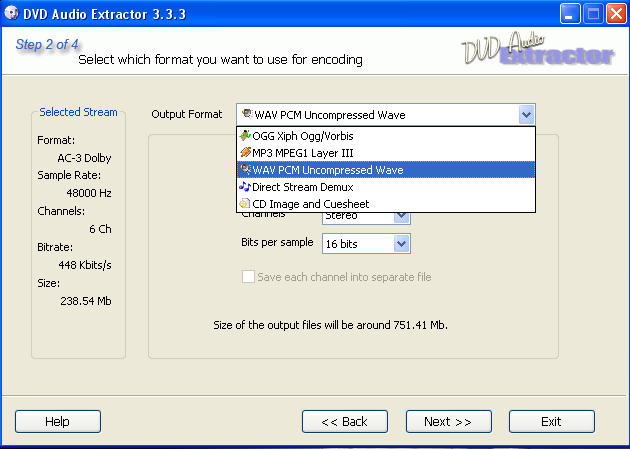
This program is well worth it 8) -
No but people here keep mentioning .VOB files. If done properly with DVDDecrypter....you will end up with a "lone" AC3 file and no video to contend with. That was my point.Originally Posted by Noahtuck
I have tried (even purchased) DVD Audio Ripper and it was complete garbage and unnecessary software. It failed to recognize most of the chapter breaks in the concert DVD's I ripped and in my opinion the audio quality was terrible. If you have 16 songs(or chapters) in a concert DVD....DVDDecrypter will give you exactly 16 AC3 audio files....nothing more and nothing less. Once the AC3 files are in the folder of your choice Ciler's AC3Tool takes care of the AC3 to .WAV process and allows you to do things like increase the volume level....etc etc etc.
I love one-click software as much as the next guy but as aften as most people rip concert DVD's in order to create audio CD's (which I think is not too often)...more software is not necessary. -
OK, I used DVD Decrypter, selected IFO, Stream Processing, and selected the audio 2.0ch English channel. I also selected the Demux radio button. But it still outputs .vob files. Is there a decent guide for using these programs? I just want to use them to extract audio and eventually convert it to .wav files.
-
Ok I tried doing the same thing since its been awhile since I've done it myself.
Here's a guide:
http://www.doom9.org/index.html?/dvddec.htm
What I finally realized what the problem was is that you have to select EVERYTHING to get a ac3 file. If you select JUST the audio track it spits out a vob. But if you select EVERYTHING in the streamprocessing window you will get a vob AND an ac3 file.
Here is what I mean:

Hope that helps.Donatello - The Shredder? Michelangelo - Maybe all that hardware is for making coleslaw? -
CorrectOriginally Posted by hech54
I was not talking about "DVD Audio Ripper", if you look at my screen shot and what i WROTE, i said, "DVD Audio Extractor" which is a diff. programOriginally Posted by hech54
Originally Posted by yoda313WRONG!!!!Originally Posted by yoda313
Keep practicing :P
Because i use DVD Decrypter all the time to get JUST the ac3, DTS, video with NO audio, ect, stream with no VOB....
It makes an IFO file but you dont need it....
You want to only have ONLY the part you want checked.... not "everything".
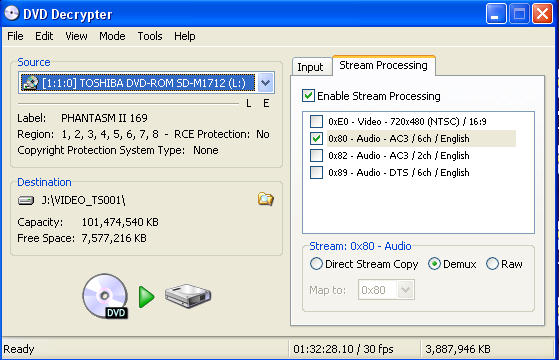
what you end up with......

1 IFO file, 1 Stream Information.txt, & 1 .ac3 file,
and you can delete everything but the .ac3 file as you wont need them...
But DVD Audio Extractor is still the easiest and fastest way to get them into whatever format you need for editing or converting
8) -
I think what he meant was that you still need to highlight the AC3 audio and click/check "demux".....even though you are only requesting that DVDDecrypter give you that particular AC3 audio.Originally Posted by Noahtuck
-
Umm...I never said that you used DVD Audio Ripper. Please show me in this thread where I said that:Originally Posted by Noahtuck
https://www.videohelp.com/forum/viewtopic.php?p=1415942#1415942
And I also never said that your beloved DVD Audio Extractor was complete garbage and unnecessary software either. The original poster mentioned DVD Audio Ripper by name....the same software I tried and it completely sucked. One can only assume however that he meant #1 DVD Audio Ripper/Extractor....whatever...which to those of us who have tried it are one and the same....junk.
Have a nice day....
-
I did mean #1 DVD Audio Ripper, and I agree, it is junk. Don't know anything about DVD Audio Extractor.
 Quote
Quote


Similar Threads
-
Audio quality very poor in 360p...but only on some vids. Help please!
By amb in forum Video Streaming DownloadingReplies: 0Last Post: 19th Sep 2010, 14:06 -
best audio video quality of youtube poor quality and not hq flv videos.
By nusratjaveid in forum Video ConversionReplies: 3Last Post: 20th Jun 2010, 19:23 -
Poor Video Quality
By itsernst in forum Capturing and VCRReplies: 20Last Post: 10th Feb 2010, 16:32 -
audio quality poor on ripped movie DVDs
By JohnnyBob in forum Newbie / General discussionsReplies: 2Last Post: 9th Aug 2009, 18:01 -
Poor Quality
By Net_Bug in forum Capturing and VCRReplies: 3Last Post: 29th Mar 2008, 16:37