


 View Profile
 View Forum Posts
 Visit Homepage

Excerpt from this article:
http://dvd-hq.info/Compression.html
Set the Stream type to ES (video-only). ES stands for "elementary stream"; this tells TMPGEnc that we are only going to use it to encode video, and that we want the resulting file to have no audio information. There is also an option named System (video-only) that tells TMPGEnc to create a file with audio and video information (also called a "system stream"), but leave the audio stream empty. This results in a file with a slightly different structure. Generally, it's best to use elementary streams.
My question: When done this way, how do you add the audio back to the video when you author?
+ Reply to Thread
Results 1 to 12 of 12
-
Member

- Dec 2004
- Wake Forest, NC


-
Depends on how you are going to author,with s(vcd) you remux and with dvd you just add the video and audio to the program and the dvd authoring program will do the rest.
I think,therefore i am a hamster. -
Member
- Dec 2004
- Wake Forest, NC
-
How do you do it with TMPGEnc DVD Author? I'm looking at the guide right now and don't see it. I want to clean up the audio in Adobe Audition 1.5 and then add it back. Thanks for your help.Originally Posted by johns0 -
With tda create new project and add file,if the audio name is the same as the video then both will be added automatically,if not manually add the audio after you have added the video.
I think,therefore i am a hamster. -
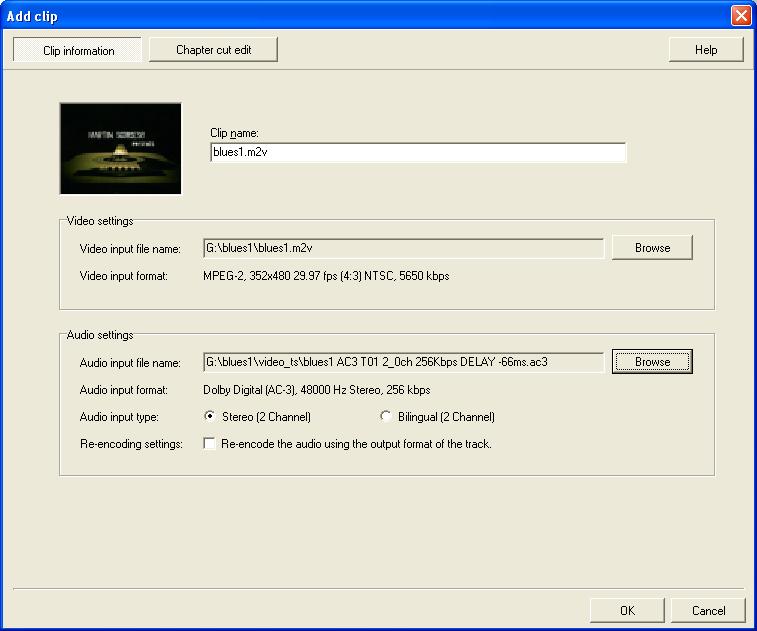
Yup, after you select the video a box will open where you can input your video, like this:Originally Posted by johns0
 "Art is making something out of nothing and selling it." - Frank Zappa
 -
Member
- Dec 2004
- Wake Forest, NC
-
Okay, so Source Set Up, ADD FILE, add encoded video and audio.Originally Posted by johns0
If the audio starts off as 16 bit, 48,000 htz .wav in Adobe Audition, when I'm done cleaning it up, what should I convert it to to be able to add to TDA? -
Member
- Dec 2004
- Wake Forest, NC
-
In this screen shot, why is VIDEO INPUT FORMAT set to 352x480 instead of 720x480 (NTSC)? I know that 352 is half-resolution mode, but why would someone choose that?Originally Posted by ZippyP. -
My source was a capture from VHS tape and I wanted to get 3+ hours on a DVD with an average bitrate of 2800 kbps. So basically my source wasn't high res. and my bitrate was too low for full DVD.Originally Posted by clothesburner626

Edit: I noticed that TDA reported my bitrate was 5650 kbps. That's wrong. I was using 2-pass VBR so that might be the cause of that error."Art is making something out of nothing and selling it." - Frank Zappa -
Member
- Dec 2004
- Wake Forest, NC
-
Why this way instead of with DVD Shrink or Nero Recode? Keep in mind, I've never used either of these programs, but...Originally Posted by ZippyP.
Here's what I thought:
I have a 3 hour video tape I want to put on DVD.
Capture/Edit/Encode/Author/Burn to hard drive/shrink with DVDshrink/burn to DVD... is that not right? -
You're having to encode the video anyway, why not encode it using 2-pass VBR with an average bit rate that fits on a disc?Originally Posted by clothesburner626
The way you're suggesting, using DVDShrink (which is a transcoder) could result in quality degradation if you have to shrink it too much. If you barely miss the disc target size your first time, then shrink, but I'd suggest trying to get the size right during the initial encode. -
As above...when you use DVDShrink (or any transcoder) you cause some quality loss so it's best to get it right the first time. Shrinking works very good if your compression rate isn't too high, for higher compression amounts an mpeg encoder with proper settings will give superior quality. In my case, a bitrate of 2,800 would make full DVD resolution look very bad - all blocky and ugly. I reduced the resolution giving up some sharpness, although VHS isn't that great to start out, and this will look much better than having a full resolution video that is bitrate-starved.
"Art is making something out of nothing and selling it." - Frank Zappa -
Member
- Dec 2004
- Wake Forest, NC
-
Learn something everyday. Thanks for these screen shots, zippy.Originally Posted by ZippyP.
 Quote
Quote


Similar Threads
-
TMPGENC question
By triumph2004 in forum Newbie / General discussionsReplies: 0Last Post: 23rd Aug 2008, 00:21 -
TMPGEnc question.
By Hal05154 in forum Newbie / General discussionsReplies: 1Last Post: 14th Nov 2007, 09:20 -
TMPGEnc Question
By dafoe in forum EditingReplies: 5Last Post: 12th Oct 2007, 05:38 -
FitCD / TMPGEnc question
By Seroster in forum Video ConversionReplies: 4Last Post: 3rd Sep 2007, 13:34 -
TMPGEnc XPress 4 Question
By Anakin in forum DVD RippingReplies: 1Last Post: 25th Aug 2007, 00:08