


 View Profile
 View Forum Posts
 Private Message


when i encode stuff that 's in wmv , asf , and mpeg format using tmpegnc
i do not get any sound . anybody has any ideas on how to fix this problem....thanks
+ Reply to Thread
Results 1 to 10 of 10
-
-
Identify What audio type you have. You can then extract your audio to a WAV file (for asf/wmv, you might to try virtualdub 1.4c).
Post a screenshot back here so we cans ee what sort of audio you've got.If in doubt, Google it. -
the name of the audio that is used in the files is voxware metasound ,unsuppported......what's the next step
-
Never heard of it. Sorry.
If in doubt, Google it. -
Get a Voxware Metasound codec:Originally Posted by spiderman03
http://www.free-codecs.com/download/VoxWare_MetaSound_Audio_CoDec.htm -
how do i install this voxware metasound, i can't seem to do it
-
Once you've downloaded the RAR file, open it with WinRAR.
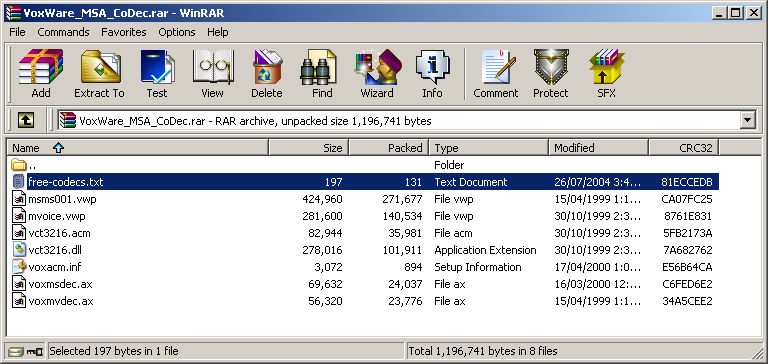
Press Ctrl-A to select all files. Press the Extract To button, and specify a directory to extract these files to. Once you've extracted the files, browse to that directory, right-click on the voxacm.inf file and go to Install.If in doubt, Google it. -
ok! io got it install now , so if i encode the movie file using tmpegnc will i have sound when it comes out
-
You should. If you don't want to go through an entire encode to find out, set the source range to the first 30 seconds or so and let it encode just that. Then play the new video off your hard drive. You'll soon see(hear) if you've got sound or not.Originally Posted by spiderman03If in doubt, Google it.
-
thanks , i will give it a shot
 Quote
Quote
Similar Threads
-
Codec problem in ASF/wmv file (wvc1)
By ezzeee1 in forum EditingReplies: 7Last Post: 25th Feb 2011, 21:16 -
Curious problem. WMV to AVI no sound.
By sebblewich in forum Video ConversionReplies: 1Last Post: 3rd Jan 2011, 05:49 -
HD WMV w/5.1 Sound Conversion to iPod Format Problem -- Help Please!
By VixenofVenus in forum Video ConversionReplies: 10Last Post: 2nd Oct 2008, 13:59 -
Anyone knows how to convert ASF / WMV to Mpeg2
By macuser1960 in forum ffmpegX general discussionReplies: 3Last Post: 9th Feb 2008, 17:38 -
Converting an ASF (WMV) file
By yadda in forum Newbie / General discussionsReplies: 1Last Post: 7th Nov 2007, 07:16