


 View Profile
 View Forum Posts

Hello!
As you've read from the title, I've been trying to remove heavy dot crawl and rainbowing, but I haven't gotten much luck with.
[Attachment 94272 - Click to enlarge]
As you can see, the dot crawl and rainbowing is very aggressive so I can see why it's difficult to remove.
The best results I've gotten iswhich doesn't remove too much, but it's a start.Code:clip = core.dotkill.DotKillT(clip, offset=3, dupthresh=45, tratio=1)
I don't really have much too say, I just need help with the source.
+ Reply to Thread
Results 1 to 5 of 5
-
Member
- Nov 2025
- Unites States of America


-
Because they are inherent part of color encoding and eventual color decoding - part of spectrum for luminance signal is shared with chrominance - proper separation may be not possible.
You can try filtering in frequency domain - use some plugin or software allowing to perform signal processing in frequency domain - in avisynth you can use for example http://avisynth.nl/index.php/FFTQuiver - alternatively you can try to separate luminance and chrominance and process independently. -
Problem is that the image was reencoded and resized multiple times and thus normal decrawler detection methods do not catch the crawlers.
applying other denoisers / grain removers on the separated fields before applying IVTC or similar might help.
i.e. TemporalDegrain2 with temporal radius 3
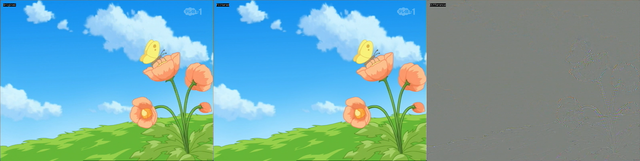
helps quite a bit
using TemporalDegrain and TemporalDegrain2 in succession seems to work even better.Last edited by Selur; 8th Nov 2026 at 10:47.
users currently on my ignore list: deadrats, Stears555, marcorocchini -
Member
- Nov 2025
- Unites States of America
-
I know the source was re-encoded a couple of times, I can tell because of the bad deinterlacing and the original SD scaled to HD (to fit TV resolution). That makes sense why any of these plugins wouldn't work.Originally Posted by Selur
Also I was able to remove the more of the analog artifacts a little more with this script.
Code:clip = core.bifrost.Bifrost(clip, luma_thresh=6.2, variation=8, interlaced=True, blockx=14, blocky=12) clip = havsfunc.LUTDeRainbow(clip, cthresh=13, ythresh=13, y=True, linkUV=True, mask=False) clip = core.dotkill.DotKillT(clip, offset=3, dupthresh=45, tratio=7) clip = core.vivtc.VFM(clip, 1) clip = core.dotkill.DotKillS(clip, iterations=4) clip = core.vivtc.VDecimate(clip)
-
hmm,...
that does cause ghosting here.Code:clip = core.dotkill.DotKillT(clip, offset=3, dupthresh=45, tratio=7)

Did you try:
befofe the IVTC, like I suggested? That work better here than what you suggested.Code:clip = core.std.SeparateFields(clip, tff=False) # resolution 1440x540 clipEven = clip[::2] clipOdd = clip[1::2] clipOdd = core.std.SetFrameProps(clip=clipOdd, _FieldBased=vs.FIELD_PROGRESSIVE) # scan type: progressive # removing grain using TemporalDegrain2 clipEven = degrain.TemporalDegrain2(clipEven, degrainTR=3, degrainPlane=4, postFFT=0, fftThreads=1) # removing grain using TemporalDegrain2 clipOdd = degrain.TemporalDegrain2(clipOdd, degrainTR=3, degrainPlane=4, postFFT=0, fftThreads=1) # converting half-height progressive to interlaced clip = core.std.Interleave([clipEven, clipOdd]) clip = core.std.DoubleWeave(clip=clip, tff=False) # resolution: 1440x1080 clip = core.std.SelectEvery(clip, 2, 0) # scan type: bottom field first
users currently on my ignore list: deadrats, Stears555, marcorocchini
 Quote
 Visit Homepage
Similar Threads
-
How do i get rid of this DVD dot crawl noise?
By Master Tape in forum RestorationReplies: 3Last Post: 20th Aug 2025, 17:22 -
VHS dot crawl with RGB and S-Video
By Hajker in forum RestorationReplies: 44Last Post: 8th Oct 2023, 09:48 -
ASTDRmc for Dot Crawl?
By colonel0812 in forum RestorationReplies: 3Last Post: 6th Sep 2023, 22:00 -
Help with possible Dot crawl & rainbowing during capture
By HansensUniverse in forum Newbie / General discussionsReplies: 19Last Post: 11th Feb 2022, 03:19 -
Quick Dot Crawl /Antialiasing Avisynth Question
By Vaengence in forum Video ConversionReplies: 6Last Post: 15th Dec 2021, 22:26