


 View Profile
 View Forum Posts
 Private Message


x264 does it by itself (default), or maybe one wants to keep it as 422Originally Posted by rgr
Wrong as an absolute statement. It depends on the destination (and personal preference). YT for example.NEVER UPSCALE SD
The OP - like some others - already had his bad experience with Vdub ....Besides, I advise against AmarecTV - it loses frames.
+ Reply to Thread
Results 31 to 47 of 47
-
-
But he applies it at the beginning of the script.Originally Posted by Sharc
But as a general rule, it is.Wrong as an absolute statement. It depends on the destination (and personal preference). YT for example.NEVER UPSCALE SD
"Never upscale SD unless you have some super important reason (and you consulted it on the forum)."
The OP - like some others - already had his bad experience with Vdub ....[/QUOTE]Besides, I advise against AmarecTV - it loses frames.
Just configure it correctly.
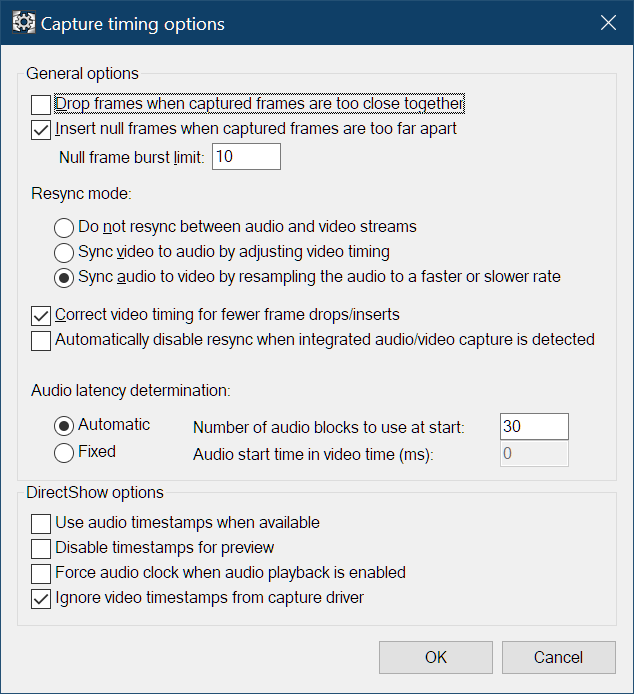
Sometime I need to see what's worse - AmarecTV or OBS
-
To OP (@BullBuchanan): do not listen to false statements. AmarecTV is the best capture software by far, so keep using it

-
Not everyone likes lost frames like you doOriginally Posted by lollo
-
I have 0 dropped frames and 0 inserted frames in 99,9% of my captures. Verified by comparing the captured video versus same source in dvd and/or dvb-s/t. Solid result, the opposite of your (and unique) flawed test!
-
Oh, you're not doing wellOriginally Posted by lollo

For me, AmarecTV reported 0 dropped frames in 100% of the captures.
But I counted these frames and always, even with TBC, it usually came out about 20 lost but not reported frames.
https://forum.videohelp.com/threads/416658-Nero-Video-Grabber-vs-Hauppauge-WinTV-USBli...00#post2765023 -
I do nothing bad or good, simply because there is nothing to do.
I just compare two different videos, one is the analog capture, the other is another source of the same program. And guess what? The match frame-by-frame-by-frame-by-frame-by-frame for more than 2.5 hours!
I ignore if this can help your (crap) experiment, but AmarecTV is sometimes inserting a frame as a consequence of a previous dropped frame (that is in this case not reported as such). I have explained that many times... -
Is this questionable quality test from an "unknown other" source supposed to prove anything?Originally Posted by lollo
Since, as usual, no argument was made as to why the test is "crap", thank you for agreeing with me. Come back with some argumentsI ignore if this can help your (crap) experiment, but AmarecTV is sometimes inserting a frame as a consequence of a previous dropped frame (that is in this case not reported as such). I have explained that many times...
https://forum.videohelp.com/threads/416658-Nero-Video-Grabber-vs-Hauppauge-WinTV-USBli...e2#post2769332 -
Of course. Did you understand the "test"? What do I have to add to the fact "comparing a capture frame-by-frame with a refercence"? Do you want me to draw a picture for you?Originally Posted by rgr
As usual, a crap test which has not confirmed by any other experiment by anybody (and there are a lot of AmarecTV user, not only myself) does not need any more evidence.Originally Posted by rgr
-
[quote]
Test?Originally Posted by lollo
It wasn't even next to the test, I can't even call it a "crap test"
Originally Posted by rgr
Search until you find.Code:So far we have: My 9-year-old post about the older version of AmaRecTV, indicating it doesn't report accurately. rgr's post in this thread, indicating that AmaRecTV doesn't report accurately. Your post here that shows AmaRecTV ending 1 frame shorter than expected and reporting "(-1)". From the log, it appears that more than 1 frame is missing though.
In summary - 100% of tests showed that AmarecTV loses frames after all. If you finally do a test, let me know
-
How can yoube so idiot?Originally Posted by rgr
Mine is the "ultimate test", a comparison with a known and trusted reference, not your crap experiment that nobody is able to reproduce in term of results (the fundamentals of the science)!
Bullshit.Originally Posted by rgr
In the thread you are trying to mention as an evidence, Brad (vaporeon800) was not able to understand the log file of AmarecTV, showing that the inserted frames were in fact a consequence of dropped frames not reported as such (I explained that many times some time later).
Go back to re-read the whole discussion. -
@rgr: I refer to posts #13 ...#18 in your thread. Your testsource is still a secret ....
https://forum.videohelp.com/threads/416658-Nero-Video-Grabber-vs-Hauppauge-WinTV-USBli...00#post2765683
https://forum.videohelp.com/threads/416658-Nero-Video-Grabber-vs-Hauppauge-WinTV-USBli...00#post2765753
Perhaps you can shed some light on it.
On a sidenote: Apart from what is right or wrong, your test is statistically irrelevant (sample size is to low) to draw general conclusions: 1 source, 1 tape, 1 (maybe 2) VCRs, 1 PC/HW configuration, few capture cards and drivers as opposed to the many users posting their experience for many different cases (=constituting a large sample size alltogether). For many desperate users AmarecTV came as a godsend after having pulled their hair (frame drops and AV sync issues) trying all Vdub settings variants .....Last edited by Sharc; 29th Jul 2026 at 08:24.
-
It's no secret to anyone who read that thread.Originally Posted by Sharc
1. source - same for VDub and AmarecTVOn a sidenote: Apart from what is right or wrong, your test is statistically irrelevant (sample size is to low) to draw general conclusions: 1 source, 1 tape, 1 (maybe 2) VCRs, 1 PC/HW configuration, few capture cards and drivers as opposed to the many users posting their experience for many different cases (=constituting a large sample size alltogether). For many desperate users AmarecTV came as a godsend after having pulled their hair (frame drops and AV sync issues) trying all Vdub settings variants .....
2. tape - same for VDub and AmarecTV
3. VCR - same for VDub and AmarecTV
4. PC/HW configuration - same for VDub and AmarecTV
5. capture cards and drivers - same for VDub and AmarecTV
+ several attempts
What one variable distinguished them?
lollo's pseudo-test:
1. different source
2. different "tape"
3. different "VCRs"
4. different hardware (?)
5. different capture cardsLast edited by rgr; 29th Jul 2026 at 11:19.
-
A real distinguishing is missing the understanding of what happens by a deep analysis of log files (in your one-of-a-kind experiment)!Originally Posted by rgr
lollo's test: hundreds and hundred of captures of who knows how many tapes, on many JVC and Panasonic VCRs (with and without internal TBC), with and without Panasonic ES-10/ES15, with and without external TBC, with cards like Canopus-NX, Hauppauge USB-Live 2, IOData GV-USB2, ATI USB-600, Diamond VC-500, Terratec Cynergy 400 PCI, a couple of Blackmagic cards, 2 Windows 7 laptop, 2 Windows 10 laptop, 1 Windows 11 laptop, DELL Desktops, etcOriginally Posted by rgr
In addition, access to who knows how many captures performed by member of my fan organization, dedicated to old sci-fi TV shows, with different workflows.
And comparison with a trusted sorce, i.e. a master provided to us by the TV channels, or a DVD release, or a DVB-S/DVB-T dump of the same program being captured from the analog tapes.
What is really "pseudo" here, is your brain! -
Well, that's what I meant by statistical irrelevance: You are comparing 2 sets of tires (brand A and brand B) by putting them on a single (same) car, driving them on a single specific road in a specific environment (setup), the car driven by a single and same driver etc., and then establish a general conclusion that tire A is better than tire B and discourage others from using B.Originally Posted by rgr
Even when you are convinced from your test result you cannot generalize it, as by changing the test environment (different car model/road/driver) other testers may come to a different result. To validate (or invalidate) your statements the sample size should be much broader. In fact the sample size and test condition variety is pretty huge considering all the many users who have tried both and made their personal choice.
Last edited by Sharc; 29th Jul 2026 at 14:52. Reason: typos
-
It's like testing tires designed for a given car. One breaks with each test, the other performs OK.
Your conclusions: you may need to change driver/car/whatever. -
Originally Posted by BullBuchanan
Hi,
The "washed out" look with HDMI capture devices is usually a YUV range mismatch — the capture card outputs full range (0-255) but the player/editor assumes limited/TV range (16-235), or vice-versa. That crushes the blacks/whites and makes everything look flat and pale compared to a source read directly like VirtualDub does.
Worth checking: does your capture app have a "full range" / "limited range" or "PC level / TV level" toggle? If not, try forcing the color range interpretation on the playback side.
FWIW, I develop Andratek AthenaRecorder, which handles VHS-via-HDMI capture with correct range handling and has a 40-day free trial if you want to compare results — happy to share more details if useful.Last edited by andratek; 31st Aug 2026 at 07:25.
 Quote
Quote

Similar Threads
-
GV-USB2: lots of frame drops with AmaRecTV (VirtualDub okay)
By camilofabregas in forum Capturing and VCRReplies: 81Last Post: 26th Jul 2026, 15:51 -
Hauppauge locking to NTSC in VirtualDub, B/W in AmarecTV
By taigi in forum Capturing and VCRReplies: 4Last Post: 13th Dec 2025, 06:30 -
How to use AmarecTV Live capture to stream in virtual camera
By Hamilthon in forum Capturing and VCRReplies: 0Last Post: 8th Jul 2024, 08:04 -
OBS vs AmarecTV
By techmot in forum Capturing and VCRReplies: 1Last Post: 26th Oct 2023, 07:32 -
any filters for fixing washed out colors in virtualdub?
By DaneClark in forum EditingReplies: 0Last Post: 19th Dec 2022, 10:41