


 View Profile
 View Forum Posts

I've been trying to use QTGMC on SD animation content (Mostly from DVD's) and it's been giving me some weird motion artifacts every time,
When I mean by "motion artifacts", I mean by ghosting, random blackspots, and some weird moving that you can see when comparing two frames apart (I don't know the exact word for that one).
[Attachment 92995 - Click to enlarge]
I can't find a script that fixes this issue without resizing to 1080p which fixes the problem.
[Attachment 92997 - Click to enlarge]
(I used Bilinear to resize to 1080p on the resized image)
It's fine if I resize to 1080p, I just wanna know what's causing this issue and fix it with the new script.
Can anyone help me out here? Thank you!
(Note: This is the QTGMC script I use for normal 1080p/1080i content, which fixes most of the ghosting and some black parts, but not any of the weird moving I mentioned before
Code:QTGMC(preset="Placebo", TR0=2, TR1=2, TR2=3, Rep0=1, Rep1=0, Rep2=5, EdiMode="EEDI3", InputType=2, NoiseRestore=1.0, NoiseProcess=1, Sigma=1.4, StabilizeNoise=True)
[Attachment 92998 - Click to enlarge]
And this is the script I used for the original size on the first image
SAMPLE: https://drive.google.com/file/d/1grL5-NG5A7lGMLIdk4JXuJpEnmRnqo1p/view?usp=sharingCode:QTGMC(InputType=3)
+ Reply to Thread
Results 1 to 6 of 6
-
Member
- Nov 2025
- Unites States of America


-
InputType=2 turns off the deinterlacing. It's normally used to clean up a video that's already been poorly deinterlaced. So there's no wonder why your getting lots of problems. Using your QTGMC settings to clean up after an IVTC:
Code:LWLibavVideoSource("QTGMC_Motion_Artifacts_sampleoriginal.mkv", cache=false, prefer_hw=2) AssumeTFF() TFM() TDecimate() QTGMC(preset="Placebo", TR0=2, TR1=2, TR2=3, Rep0=1, Rep1=0, Rep2=5, EdiMode="EEDI3", InputType=2, NoiseRestore=1.0, NoiseProcess=1, Sigma=1.4, StabilizeNoise=True) -
Member
- Nov 2025
- Unites States of America
-
Forgot to mention this on the post, but I was using AssumeTFF(), TFM(), TDecimate() with QTGMC (There's nothing else on the script besides those 4) seen on the images I posted before, Sorry, I should've been more specific on the script I was using,Originally Posted by jagabo
and too be more specific on the motion artifacts I'm talking about, I encoded the same scenes with and without QTGMC to tell the difference apart.
Without QTGMC (QTGMC Script): https://drive.google.com/file/d/1MOgT_fMZkaQ6tK2iEYdE7EzQqYtCRVxE/view?usp=sharing
With QTGMC (TFM Script): https://drive.google.com/file/d/1SE1-sl7Wmx-gWn1nfnd_75X8Qs9I7Y7S/view?usp=sharing
Take a look at 00:26 on the QTGMC script, see how there's way more movement compared to the TFM script, yeah, that's not supposed to happen,
and I need that movement bug to be fixed (If it's possible).Last edited by themon-master; 11th Jul 2026 at 13:21.
-
Try adding Lossless=2 or Lossless=1 to your QTGMC call,...
using the QTGMC_Motion_Artifacts_sampleoriginal source with TFM, TDecimate und QTGMC:
Lossless=0
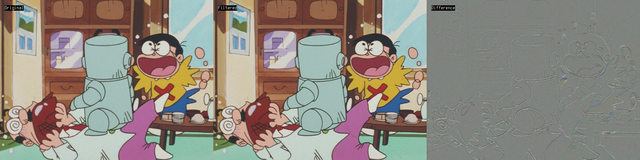
Lossless=1
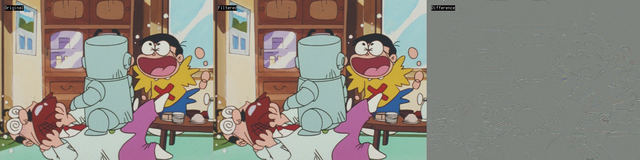
Lossless=2
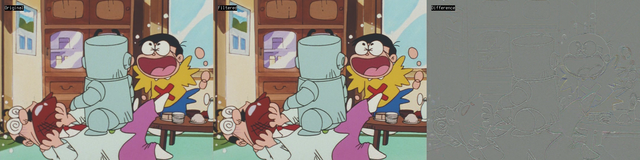
with Lossless=0, ghosting from the previous frame is visible in the trouser and under the table.
Cu Selurusers currently on my ignore list: deadrats, Stears555, marcorocchini -
Member
- Nov 2025
- Unites States of America
-
Despite the lossless command removes the black particles for some frames (including the image sample you sent), it seems to create it's own artifact having little interlaced marks, and they still have that crappy motion artifacts from duplicated frames I've been talking about.Originally Posted by Selur
-
Regarding small residual combing artifacts try vinverse or vinverse2 (or QTGMC with InputType 1/2/3).
=> what does your script look like?users currently on my ignore list: deadrats, Stears555, marcorocchini
 Quote
Quote Visit Homepage

Similar Threads
-
qtgmc() + srestore() not working on animation
By LaserBones in forum Newbie / General discussionsReplies: 5Last Post: 30th Jun 2025, 04:54 -
Understanding visual artifacts in animation DVD
By CrispyJogging in forum DVD RippingReplies: 3Last Post: 10th Sep 2024, 20:56 -
Issues with QTGMC producing visual artifacts
By Downgraded286 in forum Video ConversionReplies: 8Last Post: 25th Nov 2022, 21:26 -
Saturation adjusting causing visible blocky artifacts
By killerteengohan in forum RestorationReplies: 10Last Post: 31st Aug 2022, 15:37 -
(NSFW) What's causing these video artifacts and how do i fix them?
By overhyped in forum Newbie / General discussionsReplies: 9Last Post: 31st Aug 2022, 11:33