


 View Profile
 View Forum Posts


Hello,
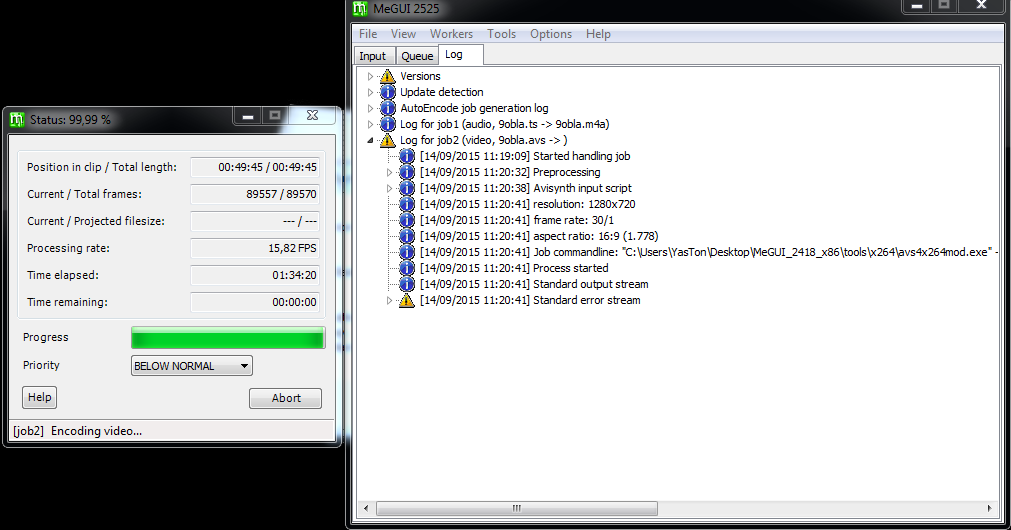
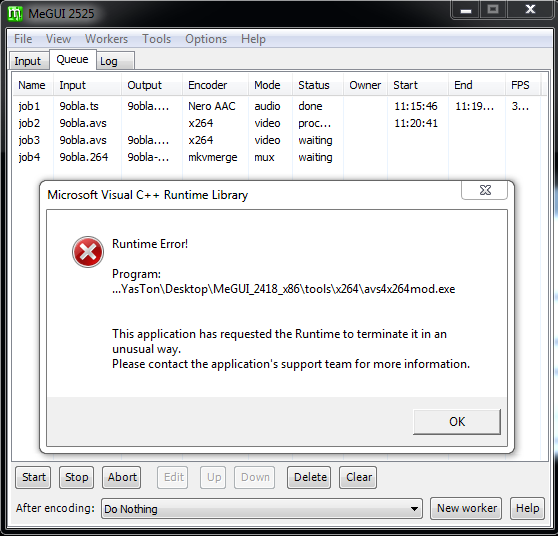
I've got a new error message in MeGUI, when my encode almost finish in the first pass, it shows this error:
+ Reply to Thread
Results 1 to 8 of 8
-
-
I'm a MEGA Super Moderator

- Aug 2000
- Sweden


Does it happen with ALL your video sources? If not this video source might be corrupt or something.
Does it create the video? -
It happened with this video... but i tried with 2 samples from the same video and they've encoded normaly.Originally Posted by Baldrick

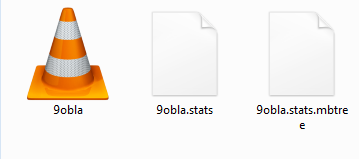
About the creation, it creats these 3 files and then it stop
-
I'm a MEGA Super Moderator
- Aug 2000
- Sweden
-
How big the 9obla file? does it play in vlc?
I would guess that the video is corrupt/broken at the end. Even if it might play ok. -
The file size isOriginally Posted by Baldrick
10.6 GB 1080p 60fps
Length: 00:49:44
It plays normaly in VLC
By the way i've recorded it with Elgato Game Capture it devises the TS file to 4 parts so i've merge'em to one file -
So you recorded a game ... then it is indeed possible that the recording software did not handle the abortion of the recording well and left a slightly incomplete video file.
A pity you did not post all interesting details about this file (a MediaInfo analysis should usually be the minimum satisfying amount of information...). Therefore I cannot give you a certain recommendation; but you could try to use the Trim() function in AviSynth to cut off a few of the last frames, just to avoid the decoder failing there. -
I've recorded from receiver by Capturing and here the InfosOriginally Posted by LigH.de
How do i use Trim() which DLL do i have to import and which codePHP Code:General
Unique ID : 234291512530888693154061107618192942881 (0xB042E76A924BDE5798C075A134BDE721)
Complete name : C:\Users\YasTon\Desktop\Encoded\9obla.mkv
Format : Matroska
Format version : Version 4 / Version 2
File size : 10.6 GiB
Duration : 49mn 44s
Overall bit rate mode : Variable
Overall bit rate : 30.6 Mbps
Encoded date : UTC 2015-09-14 19:20:31
Writing application : [url=http://www.videohelp.com/software/MKVtoolnix]mkvmerge[/url] v8.3.0 ('Over the Horizon') 64bit
Writing library : libebml v1.3.1 + libmatroska v1.4.2
DURATION : 00:49:44.128000000
NUMBER_OF_FRAMES : 139881
NUMBER_OF_BYTES : 82595925
_STATISTICS_WRITING_APP : mkvmerge v8.3.0 ('Over the Horizon') 64bit
_STATISTICS_WRITING_DATE_UT : 2015-09-14 19:20:31
_STATISTICS_TAGS : BPS DURATION NUMBER_OF_FRAMES NUMBER_OF_BYTES
Video
ID : 1
Format : AVC
Format/Info : Advanced Video Codec
Format profile : High@L4
Format settings, CABAC : Yes
Format settings, ReFrames : 2 frames
Codec ID : V_MPEG4/ISO/AVC
Duration : 49mn 44s
Bit rate mode : Variable
Maximum bit rate : 40.0 Mbps
Width : 1 920 pixels
Height : 1 080 pixels
Display aspect ratio : 16:9
Frame rate mode : Constant
Frame rate : 30.000 fps
Color space : YUV
Chroma subsampling : 4:2:0
Bit depth : 8 bits
Scan type : Interlaced
Scan order : Top Field First
Default : Yes
Forced : No
Color range : Limited
Color primaries : BT.709
Transfer characteristics : BT.709
Matrix coefficients : BT.709
Audio #1
ID : 2
Format : AAC
Format/Info : Advanced Audio Codec
Format profile : LC
Codec ID : A_AAC
Duration : 49mn 44s
Channel(s) : 2 channels
Channel positions : Front: L R
Sampling rate : 48.0 KHz
Compression mode : Lossy
Default : Yes
Forced : No
Audio #2
ID : 3
Format : AAC
Format/Info : Advanced Audio Codec
Format profile : LC
Codec ID : A_AAC
Duration : 49mn 44s
Channel(s) : 2 channels
Channel positions : Front: L R
Sampling rate : 48.0 KHz
Compression mode : Lossy
Default : No
Forced : No
Audio #3
ID : 4
Format : AAC
Last edited by yaston; 15th Sep 2015 at 08:26.
-
Ah, you captured DVB(-S2?) HD directly into MKV? And this MediaInfo analysis is of the capture? This is quite strange. DVB captures are usually recorded as M2TS. And they are usually cleaned before processed further, e.g. to cut off leading and trailing incomplete GOPs. — Oh, you wrote that your software created 4 TS files, okay. Missed that earlier. I believe Cypheros TS-Doctor would have cleaned DBV HD recordings; ProjectX does not process AVC video.
Trim() is an AviSynth kernel function, no plugin required. Read about its syntax in the AviSynth Wiki: Trim
We are also missing your AviSynth script, especially which Source plugin you used. I hope you did not use DirectShowSource, but instead the File Indexer with L-SMASH Source (LwLibavVideoSource).Code:Trim(0, FrameCount()-2) # or a different number of frames from the end
Last edited by LigH.de; 15th Sep 2015 at 08:46.
 Quote
Quote Visit Homepage

Similar Threads
-
MeGUI Value error
By Chriscoder in forum Newbie / General discussionsReplies: 2Last Post: 13th Jan 2015, 16:01 -
Megui error??
By vl4d in forum Newbie / General discussionsReplies: 8Last Post: 25th Dec 2014, 18:04 -
Process exits with error code, Indexing error: Audio decoding error (MeGUI)
By JokerX in forum Video ConversionReplies: 7Last Post: 18th May 2012, 18:18 -
MeGUI error
By evilpenis in forum Blu-ray RippingReplies: 3Last Post: 5th Feb 2011, 13:53 -
Megui error
By sheeri in forum Video ConversionReplies: 3Last Post: 3rd Oct 2010, 10:05