


 View Profile
 View Forum Posts
 Private Message


I'm trying to figure out the best resolution to rip my DVDs in.
I own over 440 titles, and I'm tired of having them all on display and prone to people nabbing them when I'm not looking, having to keep refiling them, etc... so I am planning on building a beefy storage machine to store all the movies on.
I know there is no "magic filesize" (there is a "target filesize" you can aim for) for movies, but I guess I'm looking more for target bitrate and/or resolution.
I have a 32" sony trinitron right now, and eventually want to move to a high quality wide-aspect HDTV type display.
I'm just not sure what specs to encode the movies at. I've tried 100% quality (no size restraint), 75% quality and target size of 1400 megs inside of AutoGK... but I'd like if possible to get my movies to be 2 gigs or less. I mean right off the bat I have 440 titles at least (which doesn't include the multiple DVD sets... so I have well over 440 actual DVDs) - and of course I want room to grow.
I've poked around the forums some as well as looked at target resolutions, aspect ratios, codecs, etc. I'm just not sure though what to aim for... I figure XviD would be the codec of choice. But other than that... what tool(s) allow you to set variable bitrate (if it's an option) for the video portion? and/or audio? Perhaps I can use that to cut down on the filesize and also get the quality I want.
I'm looking for DVD quality or "near" DVD quality. That would play on an HDTV (wide aspect) and maybe even a projector (maybe I'll go that route when the time comes?)
Thanks in advance. Links, advice, questions... anything is welcome. Not many people I know have dealt with this at all... so haven't been able to find anyone who's had to research or deal with this yet.
+ Reply to Thread
Results 1 to 9 of 9
-
-
If you don't need an exact file size with XVID, use its single pass Quantization mode -- essentially constant quality. Values between 2 and 4 (lower value = higher quality) will get you video that's nearly indistinguishable from the original DVD with much smaller file sizes.
-
thanks. what would be the best program for this?Originally Posted by junkmalle
i don't see that option in autoGK... is there a way to have autoGK do it's thing but override a specific portion of it?
or... do you know if ImTOO is a good program? i tried it at first and thought it was nice and simple. but GK seems to have such a better reputation and strong following.
i suppose depending on the program it will auto adjust the resolution, but if i'm prompted, what should i choose? i assume i will have to put in something different for widescreen vs. fullscreen. but i've seen a lot of varying numbers on what they are exactly. -
Just use VirtualDubMod, avs2avi or whatever manually. I would suggest encoding at the original resolution, so no resizing and use the original AC3/DTS audio.
-
I don't know AutoGK but it probably uses the standard XVID configuration dialog:Originally Posted by mike503
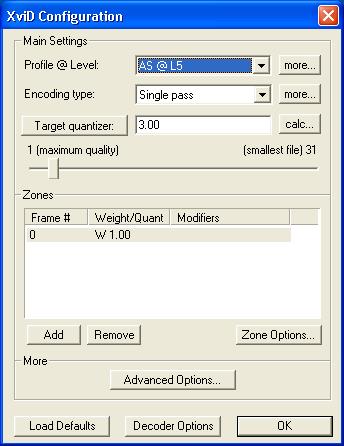
Note the button labeled "Target Quantizer" near the top left. This button can also say "Target Bitrate". Click on it to change states. You must be in "Single Pass" mode.
Frame size is a big issue. A lot depends on how you plan to watch the results. Are you going to be watching on a computer or on TV via a set top Divx/DVD player? 4:3 or 16:9 device?Originally Posted by mike503 -
my plan is to watch it on a wide aspect HDTV. i assume those are 16:9 by default? so a 4:3 would have some letterboxing effect (which is fine) - and i think the next computer monitor i buy will also be a wide aspect.Originally Posted by junkmalle
ripping at original resolution (as celtic_druid suggested) would yield the same results as watching the DVD on a standalone player on the same TV though, right? -
i mean - is there a table somewhere that lists target resolution and "good enough to pass for DVD" quality bitrates? i assume the larger the resolution the higher bitrate you'd need since it needs a lot more "data" behind it.
-
Not really, each video is different. But that's the beauty of using Quantization mode. You pick the quality you want, and the codec uses whatever bitrate is necessary to attain that quality on every frame.Originally Posted by mike503
The only time you need to use 2 pass VBR is when you want a file of a specific size -- say, 700 MB to fit on a CD.
Yes, that is correct. But again, with Quantization mode you don't need to worry about how much bitrate is enough.Originally Posted by mike503 -
Generally, no. AVI doesn't have a standardized display aspect ratio flag like MPEG's. Most players assume a pixel aspect ratio of 1:1 -- square pixels. So a DVD's 720x480 pixel image may not display correctly on either a 4:3 or 19:9 display.Originally Posted by mike503
I record with a Hauppauge WinTV PVR-250 and convert to XVID AVI a lot. It records at 720x480 but I resize to 640x480 to get the proper aspect ratio for 4:3 SDTV. These play properly with all media players under Windows and my DIVX/DVD set top players.
When a broadcast is letterboxed I crop off the black bars at the top and bottom and resize width to 640. For example a 720x480 source may have 64 pixels of black at the top and bottom. I remove the black borders leaving a 720x352 frame, then resize to 640x352.
DVDs are different though, they're usually anamorphic. The full 16:9 (DAR) image is packed into the 720x480 frame size, then adjusted to fit the screen during playback. Will a set top Divx player handle this properly? I don't know, I only have a 4:3 TV...
 Quote
QuoteSimilar Threads
-
winff not following target bitrate
By xero273 in forum Video ConversionReplies: 0Last Post: 28th Dec 2011, 22:23 -
XVid Target quantizer / Bitrate Analogy
By drgt in forum Video ConversionReplies: 3Last Post: 19th Sep 2010, 12:33 -
Low bitrate source to High bitrate target
By sameerdhiman in forum Newbie / General discussionsReplies: 2Last Post: 8th Nov 2008, 00:54 -
Divx 6.8: bitrate vs target quantizer?
By peggypwr1 in forum Video ConversionReplies: 1Last Post: 5th Feb 2008, 22:35 -
Optimal Video Bitrate and target DVD size
By src2206 in forum Authoring (DVD)Replies: 22Last Post: 24th Oct 2007, 07:54