


 View Profile
 View Forum Posts
 Private Message


I have some DV tapes that I want to put on DVD. I captured the tapes using WinDV and then used Power Director 4.0 to create the DVD. I put 2 hours of video on a DVD5 by shrinking with DVD Shrink 3.2. The automatic setting gave me a percentage of 42.6% on main movie and 58.4% on the Menu.
When I watch the DVD on the TV, the quality is very very poor with lot of snow and fuzziness in the video. My VCD's turn out much better than that. I even tried with just putting one hour of AVI on the DVD which gave me 100% quality on the main movie but the improvement was very negligible. When I watch the AVI's on my computer, it doesn't show a crystal clear picture either. Only time I see good picture is when the screen size is small i.e. about 3.5"x2.5" with zoom level of 100%. These settings are for Window Media Player.
These DV tapes were recorded with Canon ZRM70 digital camcorder. I have some other tapes recorded on Sony DCR-HC30 and they come out just fine. Windows Explorer shows a bitrate of 1024kbps for the Canon tapes and 1536kbps for the Sony tapes. I don't know what that means as I am a newbie in video production.
Can someone help me fix this quality problem and suggest what I can do to improve it. I should be able to get 2 hours of video on DVD5 with reasonable quality, at least better than the VCD. Right ?
Thanks in advance for any help....
Subhash.
+ Reply to Thread
Results 1 to 25 of 25
-
-
Are you capturing the footage as DV-AVI via firewire. The file should be about 14 gigs per hour.
The numbers you posated above for the bitrates are either wrong or way too low for DV-AVI. Matter of fact they are way too low for any kind of quality besides VCD. -
Yes. I am capturing as DV-AVI via firewire and the filesize is 13.5 gig per hour.
The bitrate numbers are as shown in the Windows Explorer. I really don't know where they come from but that is what is shown in the bitrate column. -
Keep the DVD to ~1hr per DVD at ~8 to 8.5 Mb/s and all will look good. After that we can quibble over the various encoders.
Forget 2hr per DVD from DV unless you are prepared for major quality loss. Encoders become more important for higher compression and Power Director is not one of the better ones. And you should never be using DVD Shrink for this. Get the bitrate right the first time.
Just keep it to and hour per DVD and all will be OK.Recommends: Kiva.org - Loans that change lives.
http://www.kiva.org/about -
Now that I think about it when using My Computer it doesn't show bitrates for DV-AVI, only WMV. Are you sure you're not capturing as a different format?
Download GSpot and see what it tells you. -
As I mentioned in my initial post, I even tried 1 hour per DVD, but the improvement was not sigficant. I am using WinDV to capture the AVI files and there are not too many settings there that I can change. So I preume that it should give me good quality AVI's.Originally Posted by edDV
-
OK. I downloaded GSpot and here is what I get for one of the files.Originally Posted by thecoalman
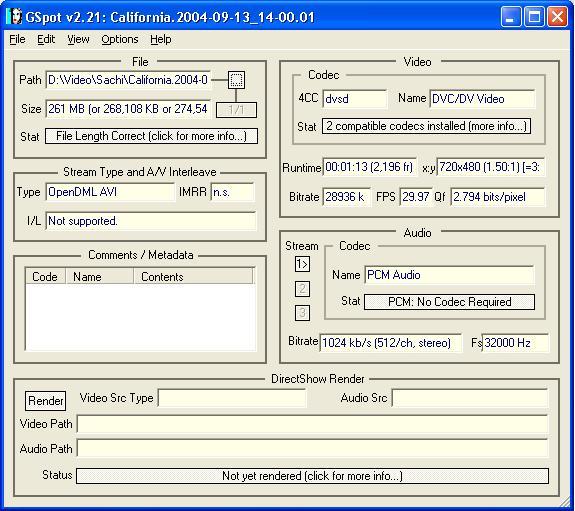
I did learn one thing out of this though. The bitrate shown in Windows Explorer is Audio bitrate and not the Video.
Subhash. -
The DV video was encoded with hardware in the camera. All you are doing during "capture" is transferring the data. It is possible to have data drops during the transfer but otherwise there are no changes to the video or audio.
WinDV is good and simple for doing this transfer of data.
Next you can edit the DV or go straight to encoding the DV to DVD MPeg2. It is this process that squeezes the 25 Mb/s video down to approx 8 Mb/s. Then you author the DVD by adding menus and muxing the MPeg2 video with audio, and other data streams. The result is the Video_TS directory with bup, ifo and vob files that the player will recognize.
If you are getting a decent transfer, then all the other issues concern Power Director settings.
The DV looks normal, how about a GSpot for the MPeg2?Recommends: Kiva.org - Loans that change lives.
http://www.kiva.org/about -
I personally don't think I am getting a decent transfer. Well, as I said that when I play the file, it looks fine if I keep the zoom ratio upto 100%. If I change it to 200%, I start seeing lot of snow and speckels. When I pause the playback, the still frame is very fuzzy and not clear at all. Could it be that the DV tape was recorded on Canon but I am playing it on Sony for capture.Originally Posted by edDV
I encoded one of the avi files to Mpeg2 using TMPGEnc. Here is the Gspot for the Mpeg file.
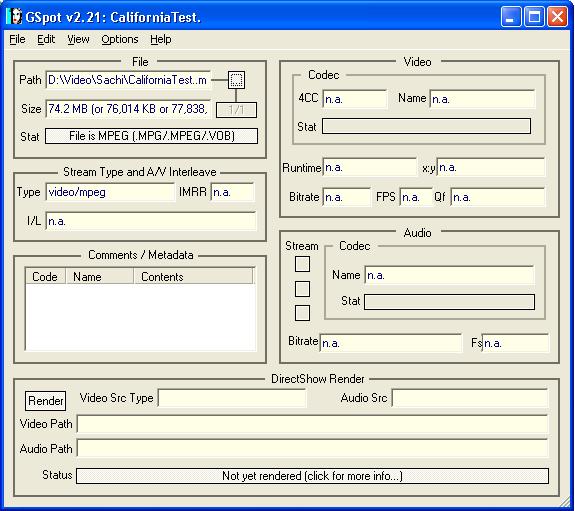
Btw, after encoding, the resulting mpeg file has no audio. Why is that ?
Thanks. -
Afaik DV is DV, having two different cams is of no consequence. As EdDv mentioned it's a transfer, you're just copying the footage from the tape to your harddrive.Originally Posted by Subhash
Have you made a comparison after burning a disc and viewing on TV or are you judging it by what you see on the monitor? -
Yes. I have burned it to DVD 3 times, once with 2 hours and twice with one hour on it. I have a 57" TV and the poor quality is all the more visible on that.Originally Posted by thecoalman
I really don't know what is wrong here. -
If you were having transfer problems you would be losing pixels, lines or frames. I think the problem is the way you are viewing the video and settings in your encoder.
The ultimate transfer test is to transfer with WinDV to the HDD, then transfer back a blank section of DV tape and compare with the original.Recommends: Kiva.org - Loans that change lives.
http://www.kiva.org/about -
Before I do that, I compared same sections of the avi files with the camcorder monitor and they pretty much look the same as long as I keep the screen size on my computer about the same as on the camcorder. I can see the snow and speckels in some sections of the tape while watching on the camcorder as well.Originally Posted by edDV
Now the question is that is it possible that the video data on the tape could have been degraded, due to whatever reason, say the tape was left in the sun or something, which I don't think is the case but could it be possible ? The other possible reason could be that when the movie is shot in less light, you can see more snow as against the footage that was shot in good light. The quality is definitely better in the footage with better lighting conditions. May be Canon doesn't do that great a job of recording in low light conditions as compared to Sony. I don't know, I am just learning and trying to figure out what is going on here.
Should I try to clean the camcorder head and try it again or may be try using another camcorder ? -
How are you viewing the avi files on the camcorder monitor? From the display card?Originally Posted by Subhash
Just put the any questionable sections in a DV clip and transfer it back to tape with WinDV.
Best way to do this is to retransfer the section of interest to a computer file. Then reverse the process and send that file back to the camcorder.
Any of those issues would show up on a playback from the camcorder to a TV.Originally Posted by SubhashRecommends: Kiva.org - Loans that change lives.
http://www.kiva.org/about -
I am viewing the avi files on my computer in Window Media Player.Originally Posted by edDV
OK. I did that. Copied the clip to HD and back to the tape. On the camcorder the clips look the same. So, I figure, there is no loss in avi capture.Originally Posted by edDV
Now the thing is why do the playback of these tapes is not of the same quality as of my other tapes. It can't be camcorder heads because if it was, my other tapes will also play as bad as these. It can't be the quality of the tapes also because they are all the same brand, Sony Minidv tapes.
I am completely lost here and don't know what to do.
Any ideas please.....
Subhash. -
Use VirtualDubMod to extract a frame then post it.
-
I could not open the avi with VirtualDubMod. However, I captured a frame with PowerDVD. Here it is:Originally Posted by jagabo

Thanks.... -
Could it be possible that the snow effect is from using old (time to replace) tapes
Just my 2cents -
It will look brighter played to a TV. The best way to track quality through the process is to play the resulting 1 Hr. 8 Mb/s DVD to the TV and compare the result to direct playback to the same TV off the camcorder. Make sure that it looks comparable first then you can attempt enhancement filters in a second pass.
The picture quality looks like typical low light CCD noise. Video quality is at least 50% about lighting. If you see a significant difference between the DVD playback and camera DV original, then you'll have to look at encoder settings or a different encoder.Recommends: Kiva.org - Loans that change lives.
http://www.kiva.org/about -
Digital recording tape errors don't show up as noise, they show up as lost pixels or lines or full frames. Most often those errors are caused by dirty heads.Originally Posted by dvdfreak123
Like this
 Recommends: Kiva.org - Loans that change lives.
http://www.kiva.org/about -
I agree with edDV -- the problem is the low light conditions leading to noise.
One of the main techniques in MPEG encoding is to only encode the differences from frame to frame. When you have nice clean video this works very well. But with this type of noise every pixel changes with each frame. This totally kills MPEG encoders.
Another technique involves taking advantage of locality of reference. Within small square blocks of a normal picture there is usually a limited amount of detail. For example, if an 8x8 block of pixels is all the same color it will compress very well. Once again, noise makes the video much harder to compress.
You can try using some temporal and spacial filtering. But there's a limit to what you can do without introducing other artifacts. -
I did exactly what you suggested. I have capability in my TV to split the screen in two equal parts side by side. On one screen I played the 8 Mb/s DVD and on the other direct input from the camcorder, even synchronized them almost frame by frame. The result... they looked the same to me. Only certain scenes looked brighter in the original and some other scenes looked brighter in the DVD. The level of snow was almost identical. Every now and then, I will enlarge one of the screens and whichever I enlarged, the snow became more prominent irrespective of the fact whether it was DVD or the Camcorder. So, it appears the problem is with the original itself. I even cleaned my camcorder heads twice with a brand new Sony Head Cleaner. It probable made a slight difference but not heck of a lot. I had a third tape recorder by the same Canon Camcorder and that one also seems to have the snow problem but not as bad as these two tapes. I still don't understand why the Canon tapes have this issue.Originally Posted by edDV
Now that we have nailed down the problem, is there anything that can be done to improve the quality in terms of filters or Video enhancement tools etc. Also, if you have any suggestions to prevent this kind of problem with the Canon camcorder in the future.
Thanks a lot......
Subhash. -
The problem is in the CCD sensor. They have a baseline noise level. As the lighting decreases so does the signal to noise ratio.Originally Posted by Subhash
The best solution is to use more light. Or use a bigger (larger diameter) lens if you can. Or shoot when it's very cold (there is less noise in the CCD when it is cold)! Some cameras have a night mode that takes long exposures (or averages several frames together) -- but this leads to a lower effective frame rate and blurry pictures. -
I agree that in the future you should try more light.
To improve what you have try levels correction and noise reduction filters while still in DV format, before MPeg2 encoding.
Restroration is a complex subject. Best to shoot with good lighting and when possible, from a tripod.Recommends: Kiva.org - Loans that change lives.
http://www.kiva.org/about -
OK. I will try that. What proggy can I use to apply those filters ?Originally Posted by edDV
Thanks.....
 Quote
Quote

Similar Threads
-
Poor Video Image from PAL VHS Capture
By ww12345 in forum Newbie / General discussionsReplies: 4Last Post: 18th Sep 2011, 13:57 -
Poor capture quality. How can I fix it?
By Caprica7 in forum Capturing and VCRReplies: 3Last Post: 23rd Jul 2011, 07:50 -
Poor Xvid video from avi
By akkers in forum Video ConversionReplies: 22Last Post: 15th Mar 2011, 09:34 -
avi to dvd picture poor quality
By dwilson in forum Authoring (DVD)Replies: 2Last Post: 21st Mar 2009, 09:10 -
Sony DCR-TRV285E PAL - poor capture/playback under Linux
By glen.richards in forum LinuxReplies: 2Last Post: 23rd Jun 2007, 09:29