


 View Profile
 View Forum Posts
 Private Message


Hey all,
I captured a 15 gig file of grandpa's 80th birthday form a videotape. When I converted to VCD, the file sounds fine. However, when I convert to work with DVD there is a constant high pitched sound in the background. I have tried converting directly through TMPGEnc and that didn't work. Then I tried having Roxio convert before it burned the DVD and same result. I can only assume it's a codec problem or is it with the original avi capture? If that's the case, why isn't the cound there when I convert to VCD? God, I promised to have three of thse ready so my mom could take them to a family gathering tomorrow but I'm having no luck. Has anyone run into this problem? I'm running 2Ghz, WinXP, 256 RAM. I'm out of ideas! HELP!!
+ Reply to Thread
Results 1 to 14 of 14
-
-
How did you capture the video?
Hello. -
I've got an ATI capture card and just used the video in and line in from the VCR to the computer. The AVI file sounds fine as well. The noise doesn't show up until I convert to DVD.Originally Posted by Tommyknocker
-
Sounds like a finicky encoder. Have you tried to separate the audio before converting to MPEG, and have you tried to use an external audio encoder with TMPGEnc?
Hello. -
Actually, yes. I extracted the wav file using virtualdub and used separate sound and video files for the sources in tmpgenc and the same result. I downloaded the toolame encoder, but how do I tell TMPGEnc to use that? I ahd the page up and now I can't find it again.Originally Posted by Tommyknocker
-
Go to TMPGEnc Envoronmental settings. Go to the audo engine tab. Depending on which layer of audio you will be encoding, select the appropiate Browse button. Now, find the directory you extracted TooLame into, select the .exe file, then okay. Now when you are ready to use the encoder select "external program" on TMPGEnc.
Hello. -
Thanks. Well, I treid that and now I get a message that says illegal audio stream from TMPGEnc after tooLame goes through its thing using the command prompt. Anyone run into this issue before? Is there another third party tool I could use instead? Thanks for the quick replies.Originally Posted by Tommyknocker
-
One more thing: Your version of Virtual Dub. Is it the AC3 mod version?
Hello. -
How can I check?Originally Posted by Tommyknocker
-
Just remember where you got it. If you got if from the Tools section at left, it would have had to have the MPEG-2 AC3 mod. I do not know how to find the link otherwise. If you got you VDub from its home site then you need to get the MPEG from the Tools section.
Hello. -
I'm sure I'm using the one that is in the tools section. That is where I egt the majority of the apps needed for these tutorials.Originally Posted by Tommyknocker
-
Could you check and see if the VDub About file looks like this:
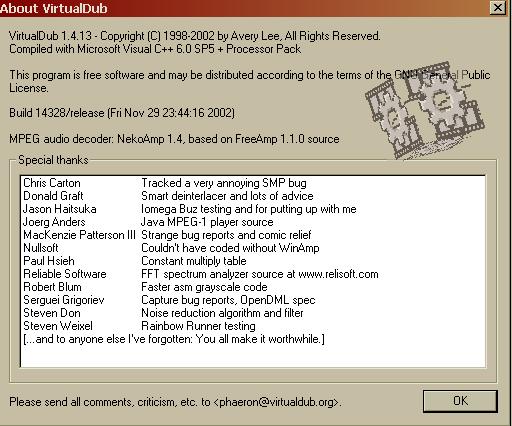 Hello.
 -
That's the one I have ( or the one I captured it in) Mine is 1.4.11, but the screen is still the same.Originally Posted by Tommyknocker
-
Have you tried to load your video into Goldwave and save it as a wave.
Hello.
 Quote
Quote

Similar Threads
-
high-pitched screeching noise when playing back DVD, but video works...
By xSavant in forum ffmpegX general discussionReplies: 1Last Post: 26th Apr 2010, 18:20 -
High pitched background noise...
By bsuska in forum AudioReplies: 2Last Post: 25th Mar 2010, 13:15 -
Audio slightly high pitched in any player...
By Guitar3dt in forum AudioReplies: 20Last Post: 26th Nov 2009, 18:24 -
AVI to DVD: Audio turns out pitched, as in too slow, after converting
By yuh_learn in forum Authoring (DVD)Replies: 7Last Post: 20th Nov 2009, 09:33 -
DVD audio sounds high pitched
By nopulse in forum Newbie / General discussionsReplies: 3Last Post: 19th Nov 2007, 20:31