


 View Profile
 View Forum Posts

Hey, when I encode an avi file to mpeg with TMPGEnc the quality is very good but for some reason when there is fast action the quality gets very bad, why is this?
+ Reply to Thread
Results 1 to 12 of 12
-
-
I'm a MEGA Super Moderator

- Aug 2000
- Sweden


You must give us more information.
What are you converting to? vcd,svcd,dvd
What settings are you using?
What is the source? avi can be everything from very compressed mpeg4 to captured dv,huffyuv, mjpeg. -
Are you usig VBR (variable) bit rate if so if the rate is not high enough for the action scenes then it will become pixalated, try seting the bit rate higher or try using CBR (Constant) Bit rate your better off using CBR.
-
I disagree, VBR at the proper settings will give better quality than CBR for a given size of file. VBR can allocate more bits to the higher action scenes than CBR while lowering the bitrate in scenes where it isn't required. Of course, if you crank up the bitrate in CBR then the difference may be marginal but the file size will be greater requiring more disk space.Originally Posted by CaptainC"Art is making something out of nothing and selling it." - Frank Zappa
-
Well I am making a pal, vcd. I haven't changed any of the settings in TMPGenc....
-
Zippy is right of course. VBR exists specifically to solve this problem (and to perhaps lower file size).
First off Toka are you working off an original source like a raw DVD rip?
If your source is a divx, or xvid file the problem might be with it. If that is the case, it could be badly encoded. check it to see if the action scenes are already pixelated. If the source looks good the problem lies with your encoding.
And regarding your encoding I am going to have to recommend the sweeping do some more reading. Read the TMPGenc vcd guides here at dvdrhelp and read a load of tmpgenc and vcd posts. Learn how to configure tmpgenc like a pro. You won't regret the time you spend
-
VCD's are not good at handling high motion scenes. You can't do much about this. Atmost you could try some VCD templates available in the "Tools" section.Originally Posted by Toka
-
Its the kenshin OVA 1, AVI(divx) and perfect quality(basicly).Originally Posted by Gnerma
-
Whats best, manual, 2-pass, or automatic vbr?
-
what do you click on when in the options
this is what i use
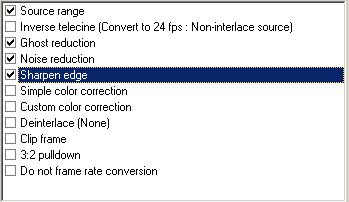
and encoding times are around 6 hours for a 1 1/2 hours film -
I use 2-pass, it can take double the amount of time to process but gives very accurate file size prediction.Originally Posted by Toka"Art is making something out of nothing and selling it." - Frank Zappa
 Quote
Quote Visit Homepage


Similar Threads
-
prob joining VOBs; also sync prob with another movie
By spiritgumm in forum EditingReplies: 5Last Post: 19th Jun 2010, 10:32 -
A hardware prob, but what?
By ahhaa in forum ComputerReplies: 3Last Post: 22nd Sep 2009, 22:00 -
Wireless prob?
By Immortal25 in forum ComputerReplies: 4Last Post: 3rd Jun 2009, 08:55 -
gc prob
By Mr anderson in forum ComputerReplies: 6Last Post: 10th Sep 2007, 06:33 -
MPEG DV prob
By mainegate in forum ffmpegX general discussionReplies: 0Last Post: 24th Aug 2007, 18:01