


 View Profile
 View Forum Posts

Hey guys I am a long time reader first time poster. I love this site it always helps me when i am stuck trying to convert somthing or when i am trying to found software to do it.
Anyways I have a crap load of mkv that i want to convert to divx cause i am getting a divx dvd player for chrismas and have spent hours on the net. All the conversion i found from this site and others always have a audio sync problem. However last week I finally found a way that everything works perfect.
Tools
MKVtoolnix
Dbpoweramp music
River Past Video Cleaner (or another program that converts to divx)
AVIMux GUI
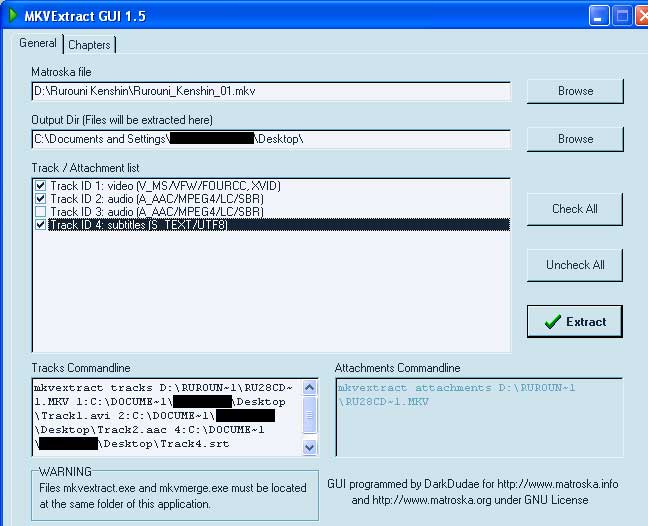
1. MKVtoolnix for me was hard to use cause you have to use it in DOS. However after about 3 days of search I found a GUI for on of the Files. No not for MKVMERGE cause that just creates a MKV file but MKVEXTRACT to extract the video etc.. from the MKV file. D/l it here http://www.portaldivx.com/matroska/programas/MKVEXTRACTGUI.zip
"Got the MKVextract GUI from a post from DarkDudae at http://forum.doom9.org/showthread.php?s=&threadid=73819 check out the forum thanks DarkDudae"
2. Next open MKVExtract. Click browse and open your MKV file then chose where you want to save it. next pick the tracks that you want. "here i pick to have Video, English audio, and subtitle.
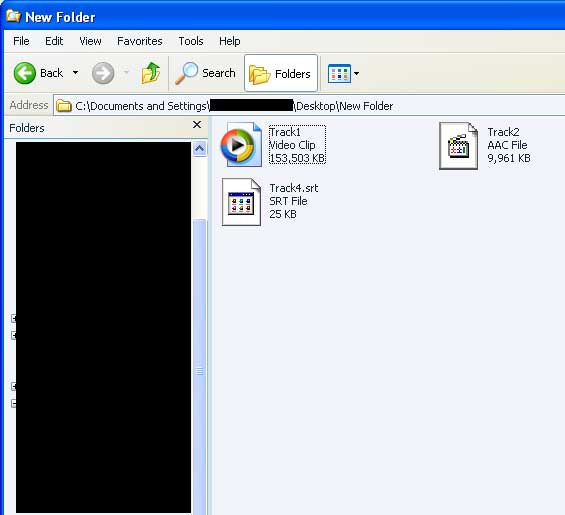
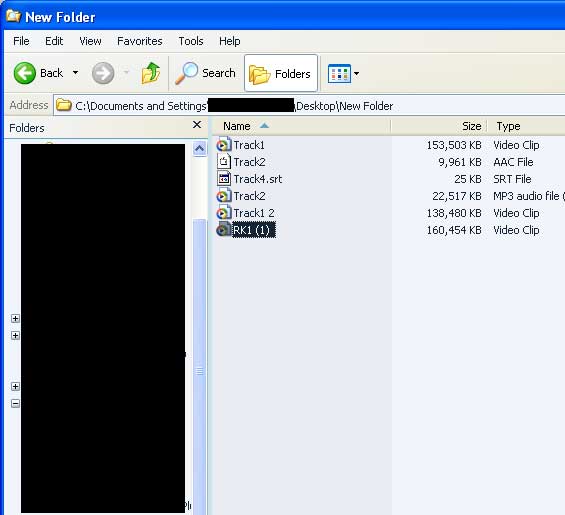
3. If you go to the folder where you saved the file at you will see this
4. You have 1 video file, 1 audio, and 1 subtitle file
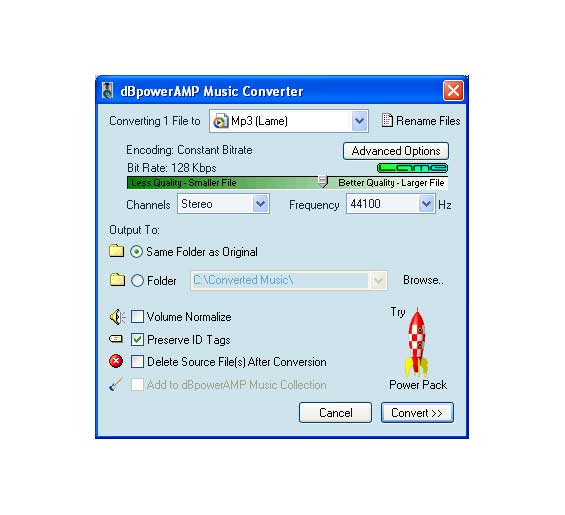
5. Next open up DbpowerAmp however my audio file was a AAC so i had to d/l the codec so that dbpoweramp can read that file. Here the codec http://www.dbpoweramp.com/codecs/dBpowerAMP-codec-mp4-aac-decode.exe
6. Once you install the software just open the program and the open the file you want converted.
7. You can chose from a mp3 or wav format. I like mp3 cause it creates a smaller file size.
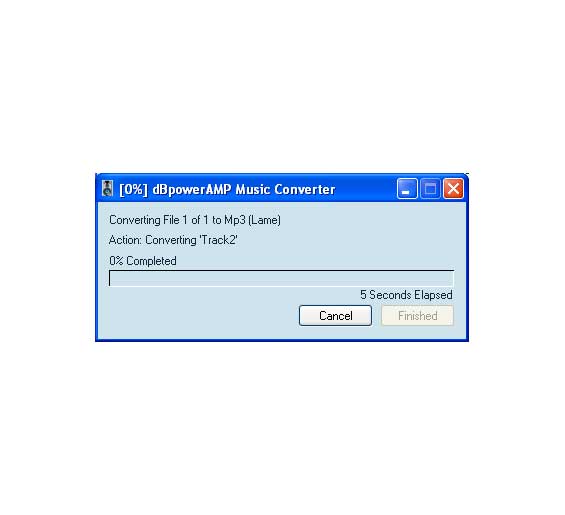
8. Then click convert
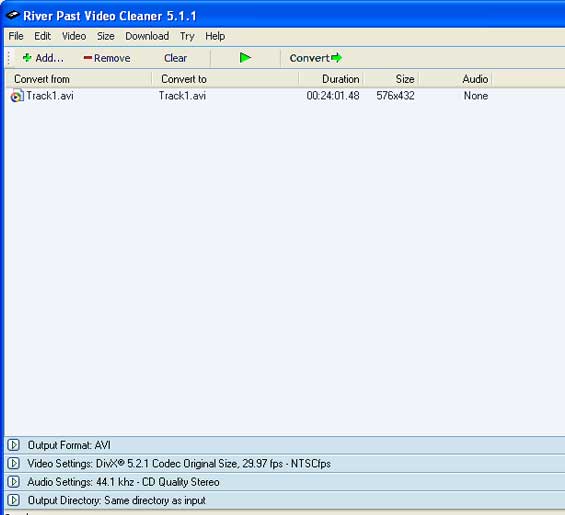
9. Next I used River Past Video Cleaner to create the video file to divx. However you can use what you like to create this to divx or for that matter any other formart. VCD, SVCD, XIVD, etc..
10. Next pick which ever program your going to do the conversion with open it up and convert the video file. (i am using River Past Video Cleaner)
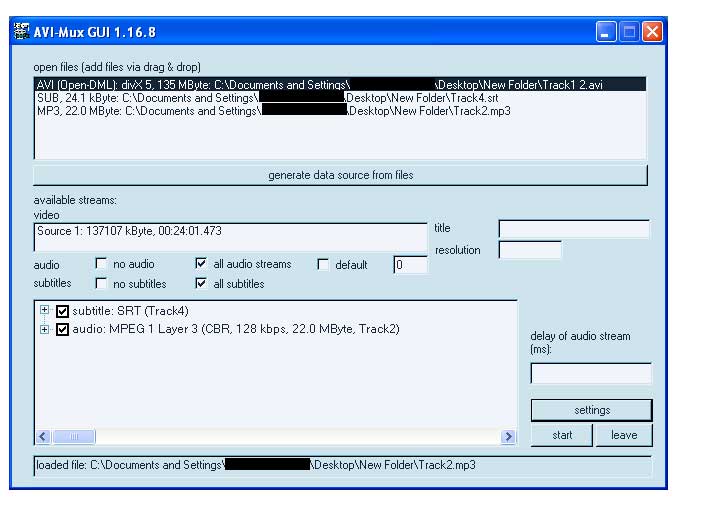
11. After converting the video file all you have to do next is open up AVIMux GUI. Right click on open files box or just drag the video and audio file (and subtitle if you are going to use them) into it.
12. next click on the video file you just open and then click on the button called Generate data source from files. Once you do that you will notice that underneth that you will see something appear in video
13. Click on start and save the file and just sit back and wait
14. After words just sit back a watch you movie.
PS if anyone has a divx dvd player can someone please tell me if it works in the divx DVD player
+ Reply to Thread
Results 1 to 30 of 38
-
-
I'm a MEGA Super Moderator

- Aug 2000
- Sweden


i added a mirror download to mkvextract under the mkvtoolnix in the tool list. i can't get http://enigmax.eresmas.com/MKVEXTRACTGUI.zip to work.
-
Sorry about that i change the link try it again. You unzip the file in the mkvtools folder
-
Hey guys i would like to know some feed back on this method is you guys got the time. I know it work for me and I hope its working for you guys.
Hey Baldrick since i posted the correct link has it work for you please let me know -
Hey there Raven, thanks for the post, this is exactly what I was trying to do myself and was not having much luck (audio out of sync and whatnot).
I'm following your instructions but when I load up River Past Video Cleaner it tells me that it does not recognize my video file... any advice for me? I've tried extracting the video portion of my mkv file twice but with the same result... an unrecognized format. I can play the video track in WMP but it complains about a codec (I'm assuming that's just because it's a raw avi file and has no audio?) Any help is appreciated! -
Make sure that you have all the latest codecs install. I think if you right click on the video file and go to properites then click on the tab summary look under video compression see what it says. For me the video i used the compression was a XVID. Make sure you have all the codecs installed the click here for all codecs listing https://www.videohelp.com/tools?s=6#6
-
Thanks for the quick reply. I did check the Track1.avi file and it does say it's a Xvid file, I installed the latest version of the Xvid codec I could find and it plays just fine in WMP now but still gives the following error in RPVC:
The following files do not contain recognizable video: Track1.avi
Is there anything I have to do to River Past to make it recognize the file? It's a pretty straightforward program unless I'm missing something. -
this is great , although i was unable to convert my AAC file ?
dppoweramp crashes when trying to convert to wave &
saise no codec when converting to mp3
i have dld the aac codec -
Hello,Originally Posted by zero_net
Just burn an audio cd of the aac then rip to mp3
KevinDonatello - The Shredder? Michelangelo - Maybe all that hardware is for making coleslaw? -
really ??
that seems like extreme measures,
let me try -
unfortunately it did not even burn
i used nero with the plugin , it added it, i clicked burn & then said failed -
If you guys are having a tough time with that, you may wanna try this, I did it and it works.it may look like it takes 4ever (but it only takes half)but I havent had one error and I can do some comletely.errr unique thingz at timez! lol ....dont let the guide scare ya, its looks nuts!
https://www.videohelp.com/guides.php?guideid=675&howtoselect=4;10#675
Hope that helps..................also it may be easier being that Anime can be freely found on the net in avi files which is way ez-err if ya ask me, but then what do I know?
-
I have some advice on this.
This Matroska is a piece of trash and I hope none of you use it.
I don't care if Frenchman tell you how wonderful it is, here is the bottom line.
1. It is a propriatary mess.
2. If you look at the tools, it takes forver and several tools to convert it.
3. Stay with the formats that can easily be converted and converted by standard software that we know. To make all these accomidations for this bit of French foolishness is crazy.
4. Keep it simple, and use formats that can be used well for backups that can be used on all equipment, like Divx (I have two standalone DVD/Divx/MP3/Oog/VCD/SVCD/MPEG/MPEG-2/ files. Also of course PC files is easy on all equipment.
5. Anything that is more than two steps is not worth it, nomatter how it works and support formats that are flexible enough to play on commercial DVD players (but not all DVD players). Not this Matruska crap.
It is insanity, unless you have 10 hours to kill each time. -
Hey Raven2260 good guide.
But to be techically correct you did an XviD/ACC > DivX/MP3 guide
Matroska is just a container (a very good one indeed) just like a zip file is a container for files of all sorts, Matroska just contians Audio,Video and other files in it (also containing information on how to play back, aspect rations preferred, default audio and video track etc etc)
So you just needed to move you files from a Matroska container to an AVI container.
For the XviD to DivX, that can be handled by a simple 5 second operation of changing the FOURCC code from 'XVID' to DIX5' or 'DIVX'
(XviD binaries from Koepi include an app for changing fourcc code in windows; in Linux u can use transcode with command "avifix -F DIVX" or whatever fourcc you like)
As for Matroska not being good, there's needs to be some education done here.
There's things you can do with Matroska that cant be done with AVI or any other containers.
Here's a quick FAQ on Matroska.
Quick Examples are:- Improved A/V sync when capturing (i have proved this to myself many times)
- Able to hold all sorts of attachments. Like i put in pictures that relate to that movie, URL's and encoding scripts i used to make the Video file inside it.
- Many different combinations of files can exist and playback from a Matroska container that can'ts from and AVI or MPG container such as a Vorbis and RV9 mix.
But anyway, thats just a touch and for more detailed info and a quick FAQ start
hereAMD 64 X2 6000+ @3,000 Mhz (stock) | MSI K9N Ultra | Corsair Value/Kingston 6,144MB DDR 667 | 8800GT stock | 3710GB of storage | Powered by Mandriva 2009.1
Jabber: DaveQB@jabber.org.au
2.6.29.3-desktop-1mnb -
Does AVI-MUX GUI work for Chinese subtitle??
I follow all step by step and it's look ok unless it show garbage subtitle. I use vobsub and I check the subtilte is good. I try .ssa & .srt format, but no luck at all.
I have a Philip Divx player, and I can play the AVI onto my TV, but I want the subtitle can be seen as well. Is these any other program to rip Chinese subtitle into Avi/Divx? -
I could use some help with this on subtitles too. I have tried several times trying to mux an srt into an avi file I have and every single time it seems to act as if the srt doesn't exist in muxing. Avi-mux sees the audio just fine and runs that, but the subtitle remains at 0 and never seems to run. Anyone know what could be the problem?
-
Thanks for the useful guide! I was trying to convert an MKV to a DVD video but want to do an NTSC to PAL conversion, and was totally stumped on how to convert the AAC audio track to something I can put through BeSweet.
-
Hi,
I've just read this guide, tried stuff and...
1. Nowhere is mentioned that GUI MUST be installed in the same folder with tools !!
2. This GUI stuff is based not on DOS it is much worse - it is Cygwin !
Which is Unix emulator on Windows. Hence right away I've got error
about some libs were not installed !?
So I wander, how the Author could go through Step 2 ?!
As for the advice from DaveQB to “fix” FOURCC the only thing I can say “…”.
No, I’d better not.
So I’d give this guide F+. Plus for the effort.
....
Ok, here is how I solved my problems.
1. Use VirtualDubMod to save sound only as OGG file.
2. Convert OGG to MP3. There are lots of converters,
I use 4Music Multiformat Converter (like interface).
3. Use River Past Video Cleaner Pro to convert VIDEO,
there is option to convert only video.
Here could be shortcut. If your video is good, meaning your player works with it,
you may use checkbox and do not convert video at all!
It will be just saved in the original format - DivX or Xvid.
The process is quite fast. In my case that was 'bad' Xvid,
and I had to convert it to DivX (5.2.1), which is good for 642 player
4. Use VirtualDubMod again to mux VIDEO and MP3.
I did not have (a)sync issues. -
the guide is good, i got it to work, and i dont have to put the GUI in the same folder as the other tools.
anyways, i also had a bad XVID codec in my file. initially when i extracted the file - i Gspotted it and it said "XVID", i checked another true xvid file and it shows "xvid" in it, the difference was that one was capitalized the other wasn't. i thought it shouldnt make a difference on how Gspot displays the codec. but apparently it does. i burned the XVID file i had just extracted, and i tried playing it on my philips 642 player, and it didn't work. it said that it couldnt support the QPEL codec. so somehow QPEL is integrated to this XVID codec. i'm now using virtualdubmod to reencode the video to a 4cc xvid codec. but it takes 40 min for each file, and i have 13 of them is there really no other way to convert the bad xvid to a good xvid or divx in a shorter time?
-
how could you convert your chinese subtitles to .ssa or .srt format?? .srt is more or less a text editor....and last time i checked, you can't write chinese characters in a text editor :P i've never tried playing idx/sub on the philips divx player, but as far as i know, that's the only format that holds non-ASCIIOriginally Posted by patpat299
-
Hello!
I have a funny problem. I have 13 MKV files. With 8 files worked this guide perfect, but now, the dBPowerAMP makes wrong audio tracks. Hmm, they are delaying.
Up to now, if i converted the aac files, those where perfect. No delaying, just fine ...... What can i do against this? What other program can convert the tracks, without delays?
P.s. : sorry for my poor english. : )))See you space cowboy... -
Guide doesn't really take into account VFR or natively stored video tracks. Fact is that if the video track is using VfW compatiblity as per above then you don't need to re-encode. Also the guide appears to be mkv to avi, not mkv to divx (although there was no divx media format back in 2004). Container vs. container rather than container vs. codec since if you are talking about divx as a codec, you can have divx in an mkv so that would make it a divx to divx guide.
Anyway back to the "delaying" audio. If you have VFR video, then its length when converted to CFR (avi only supports CFR) will no longer match the length of the audio. -
Hi.
I'm also having "delaying" problems with audio.
You said
If you have VFR video, then its length when converted to CFR (avi only supports CFR) will no longer match the length of the audio.
So then what can I do to fix it I didn't understand?
Thanx in advance. -
I got better way to convert .MKV to .DIVX for a ''MAC'' user and it work also for "Windows" user also first you need quicktime then installed http://www.perian.org/ for your quicktime to play .MKV from there you play it then you go to FILE and click SAVE AS and then it should turn to a .MOV file really good quality noting is lost and it that easy and fast but IF you want it in .AVI get "Toast TITANIUM 8" for really good .DIVX quality and it burn .Divx dvd at the same time but IF you don't want to use TOAST it work on any other video converter program.
-
I tried the above methods and found them altogether too frustrating. Riverpast Video cleaner frequently fails, for a start.
Then I had a brainwave and I thought I'd share it here:
1. Use convertXtoDVD to convert your mkv to DVD format
2. Then use avi.net to convert to DivX/XviD
This has worked perfectly every time for me.
It's so simple, it's priceless.
Good luck! -
Have you all try MediaCoder ? MediaCoder work like a charm
With MediaCoder: just load the .mkv file, select output audio and XVID video, and click CONVERT. It is alot faster than riverpast video converter -
Just thought I'd add that recently I downloaded some TV show episodes encoded as MKV with 720p h264 video and AC-3 audio.
ConvertXtoDVD 3.x works but the quality is shitty ... I can never figure out why this program never respects bitrate other than it seems to be an issue not with ConvertXtoDVD but with ffmpeg as I've had issues using other front ends to ffmpeg.
So I installed Haali Media Splitter and MKVtoolnix and MKVEXtractGUI and using MKVEXtractGUI I am able to extract the "raw" h264 video and AC-3 audio.
I then run the h264 video only file through DGAVCDec and then create an AviSynth script allowing me to do my encoding with either Cinema Craft Encoder or HCenc (I use both depending on my frame-of-mind). I then use the newly MPEG-2 DVD spec video file with the original AC-3 audio files.
Been working a treat for me
Thank the gods for DGAVCDec ... a real life saver!
- John "FulciLives" Coleman
P.S.
Here is a sample script I've used with CCE SP
*** EDIT ***Code:LoadPlugin("C:\VIDEO\dgavcdec100a23\DGAVCDecode.dll") AVCSource("C:\VIDEOFILES\tvshows02e01.dga") LanczosResize(720,480) ConvertToYUY2()
OK I just realized this thread is to go from MKV to DivX/XviD but the same method can be used ... just load the AviSynth AVS into VirtualDub and encode into DivX/XviD from there."The eyes are the first thing that you have to destroy ... because they have seen too many bad things" - Lucio Fulci
EXPLORE THE FILMS OF LUCIO FULCI - THE MAESTRO OF GORE
-
Hallo,
is that a tutorial to make a mkv (HD Movie) to Divx(HD Movie) oder to an normal Divx ?
thx
Nosferatuvn -
I'm trying to demux a .MKV so that I can convert it to a DivX file (for a DVD player) and I am puzzled with what extension to name the files. My .mkv has a H.264 video track and a DTS audio track (5.1). Do I give the video track a .mp4 extension and the audio track a .dts or .ac3 extension? It wasn't very clear to me in the mkvtoolnix notes. Also, do I need any additional options (--raw, --fullraw, etc.) when using the mkvextract command?
-
I just use
save the statement as stuff.avs)and open it with virtualdub or cinema craft encoder or whatever program you wantCode:DirectShowSource("D:\stuff.mkv")I think,therefore i am a hamster.
 Quote
Quote Visit Homepage


Similar Threads
-
Convert *.mkv to *.DivX
By Frizze in forum Newbie / General discussionsReplies: 2Last Post: 29th Dec 2011, 23:35 -
How to Convert a MKV to DivX Ultra
By Shishir in forum Video ConversionReplies: 13Last Post: 1st Aug 2009, 06:34 -
Convert MKV to AVI or DIVX
By ranosb in forum Video ConversionReplies: 4Last Post: 3rd May 2009, 21:59 -
i have some mkv vedio and i want to convert it to .divx
By The1One in forum Newbie / General discussionsReplies: 1Last Post: 23rd Aug 2008, 12:07 -
how to convert mkv to divx/avi without loosing its quality?
By noskid21 in forum Newbie / General discussionsReplies: 2Last Post: 2nd Sep 2007, 11:00