


 View Profile
 View Forum Posts
 Private Message


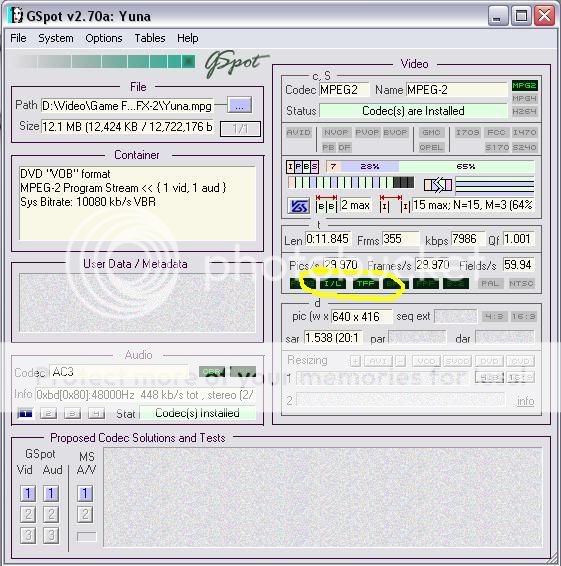
nope. that's the original video from the game.... aryt. so there are really times wherein progressive vids are encoded as interlaced... but what's really wierd is that gspot read it as a Top Field First. here i put a screenshot.
.. or is this just a mistake?
+ Reply to Thread
Results 31 to 60 of 78
-
-
Your video has progressive frames that were encoded as interlaced MPEG.
-
ohh ok thanks got it.
.. and the only way to see if it is, is to look at the video closely right?
-
To determine whether the frames contain interlaced images (ie, two separate half pictures per frame) you look at them with a program like VirtualDubMod. To determine how the frames were treated by the MPEG encoder a program looks at the interlace flags within the MPEG data. Internally MPEG treats the chroma channels differently when it's told the video is interlaced. It's also possible to see this yourself if you look very closely at the decoded frames.Originally Posted by _migz_
-
ok got that!
thanks for all the help and info guys. now i understand stuff a bit better. 
-
It's got progressive frames encoded as progressive. The progressive flag is set. As near as I can tell, GSpot is just plain wrong. Maybe it was capped incorrectly, not sure.
-
I've never heard of a game system that renders to 24p video. I've only seen 29.97 (NTSC) and 25 (PAL) video renders. Maybe the PS3 or XBox360 are capable of 480p or 720p at 50 or 59.94 fps but I've never heard it mentioned.
Recommends: Kiva.org - Loans that change lives.
http://www.kiva.org/about -
Gspot, MediaInfo, KMPlayer, and MPEGValidator all say it's interlaced, TFF.
-
And ReStream, BitRate Viewer, and DGIndex say it's progressive. Sure, it's TFF. I never said it wasn't. The only one of yours I have installed is GSpot, although I'll take your word about what they say. But I'll believe DGIndex before just about anything. Maybe those others just assume anything 29.97fps is by definition interlaced.
Edit: I just reencoded it in CCE using this script:
LoadPlugin("D:\AviSynth Stuff\Dlls\DGDecode.dll")
MPEG2Source("I:\Test\Test\Yuna.d2v")
ConvertToYUY2()
making sure the Progressive box was checked. The MPV shows in DGIndex as NTSC Progressive, but is still showing as Interlaced in GSpot. -
I don't really depend on some program telling me whether a video stream is encoded progressive anymore...I'll trust my eyes more often than not. If I see original full frames come right after another, then to me the video stream is progressive.
-
The discussion isn't about whether or not the source material is progressive, but how it's been encoded, which is often a different thing entirely. Just ask any knowledgeable PAL person. The vast majority of their movies on DVD use progressive source material, but are encoded as interlaced. The distinction isn't insignificant. As jagabo says, how it's encoded determines how the color is sampled (hope I said that right), and if you reencode it incorrectly, you can blur it a bit. It isn't nearly as much of a problem for NTSC, unless you have some progressive 29.97fps material, as is the case here. That stuff is usually encoded as interlaced for NTSC DVD, although I've seen it both ways.
You also get PAL newcomers to encoding who see that DGIndex, or GSpot, or some other app shows their movie to be interlaced, and decide to deinterlace it. Bad move. Then I tell them to do what you said, Pinstripes23 - use your eyes. -
haha yeah. i guess using your eyes is the best way to do it.... but is it better to deinterlace the video, as in the one i posted?? or leave it as it is and encode it as progressive?
-
Haha! I did the same thing with TMPGEnc Plus, encoding as both progressive and interlaced. All the tools I mentioned reported the progressive encoding as progressive and the interlaced encoding as interlaced with the correct field order! And DGIndex reports my files correctly but shows Yuna.mpg as progressive.Originally Posted by manono
The video does look cleaner than your usual progressive-frames-compressed-as-interlaced-video though. -
TMPG Plus?
taking grandpa out for a walk? -
I've performed manono's experiment with CCE and repeated mine with TMPGEnc Plus. Here's what I've found.
When encoded with TMPGEnc Plus all tools, DGIndex, GSpot, Media Info, and KMPlayer reported the progressive encoding as progressive and the interlaced encoding as interlaced.
When encoded with CCE only DGIndex correctly identified the progressive file as progressive. The other tools reported both files as interlaced.
So it appears that DGIndex is more reliable than the others.
I'm not absolutely sure about this yet, but after opening the progressive encoding from CCE in VirtaulDubMPEG2 and VirtualDubMod, it appears those two programs also incorrectly determine the video as interlaced. Neither tools report the field order but if you look closely at how they render the images to the screen (in RGB) you can see the artifacts of incorrectly converting progressive YV12 as if it is interlaced YV12. -
So I also reencoded it, this time as Interlaced in CCE. And my 3 apps all show the reencoded progressive one as progressive and the reencoded interlaced one as interlaced. All show it as TFF. GSpot shows both as interlaced. Based on what you said, though, I don't know what to think.
Now I see you've posted again. Me not refreshing the screen for awhile explains the time delay. And I'm completely befuddled. It's over my head, and gives me a headache.
@_migz_
No, you don't want to deinterlace that beautiful video. -
oh aryt thanks for all the help!
hehehhehe sori if it was a drag.
-
Actually it's been quite interesting. We've all learned something about MPEG encoders and the various video info programs.
Through some experiments I've been running to examine this issue I've accidentally discovered that VirtualDubMod has a colorspace conversion problem with MPV files from CCE, but not with MPG files from TMGPEnc. It appears to use the rec709 matrix rather than the rec601 matrix when converting from YV12 to RGB. -
glad to hear that.
but, hey jagabo. do you know any place where i can find any good tutorials about colorspaces?? im getting quite confused with them..  couldn't really find any good ones through google. like some kind of introduction to it. how do you know wat colorspace a video uses??
-
Doom9 is probably a good place to start:Originally Posted by _migz_
http://www.doom9.org/index.html?/capture/digital_video_color.html
And Charles Poynton's page:
http://www.poynton.com/notes/colour_and_gamma/ColorFAQ.html -
Yesss!!! thank you jagabo!
this is really good info.
-
By the way, the colorspace problem with VirtualDub effects your yuna.mpg file too. I recommend using VirtualDubMPEG2 if you perform any filtering on it. Or use AVISynth to do all the filtering, then any version of VirtualDub in Fast Recompress mode for compression. Here's a sample with VirtualDubMPEG2 on the left, VirtualDubMod on the right:

The difference isn't huge but it's noticeable. -
oh yeah.. i just learned now that in VDub, if you use anythin other than "Fast Recompress", it would convert the YV12 video into RGB?? did i say it right?? haha... so as you said, its really better to use AVISynth for filters...
does VirtualDubMPEG2 also have this colorspace problem?I recommend using VirtualDubMPEG2 if you perform any filtering on it -
with a HVS correction it's easily fixable in my opinion
did this convertion was made wit 24 bits(true color)?*** DIGITIZING VHS / ANALOG VIDEOS SINCE 2001**** GEAR: JVC HR-S7700MS, TOSHIBA V733EF AND MORE -
Sorry if I wasn't clear. VirtualDubMPEG2 does not have the incorrect matrix problem (rec709 vs. rec601). It does convert to RGB if you're filtering with it (ie, not using Fast Recompress or Direct Stream Copy modes). But if you must filter that video in VirtualDub, it's better to use VirtualDubMPEG2 than VirtualDubMod (the original VirtualDub does not work with MPEG2 sources). As stated earlier, performing all your filtering in AVISynth is the best option.Originally Posted by _migz_
-
I don't understand. Everything out of CCE uses BT.709. That Yuna.mpg also is BT.709. I guess it's TMPGEnc that outputs BT.601? I wouldn't know as I don't use it. But if true, it's the TMPGEnc result opened in VDubMod that looks darker. I think. From the ColorMatrix filter doc:Originally Posted by jagabo
ColorMatrix corrects the colors of MPEG-2 streams of dvds. More correctly, many MPEG-2 streams use slightly different coefficients (called Rec.709) for storing the color information than AviSynth's color conversion routines or the XviD/DivX decoders (called Rec.601) do, with the result that DivX/XviD clips or MPEG-2 clips encoded by TMPGEnc/QuEnc are displayed with slighty off colors (which looks like a small difference in brightness). This can be checked by opening the MPEG-2 stream directly in VDubMod.Open the MPEG/VOB in DGIndex and run the Preview. That will show the colorimetry used. You can get the colorspace used by adding Info() to the bottom of your script, among other ways.how do you know wat colorspace a video uses??
Another reason to frameserve using AviSynth. As long as you know what you have and what your encoder is expecting, just use the ColorMatrix filter.with a HVS correction it's easily fixable in my opinion -
oh thanks guys but hey, uhm i really really can't seem to spot the difference of opening a video in VirtualDubMod normally, from making a d2v project file then opening that in VirtualDubMod using an AviSynth script... if you re-encode the video using each method with a another codec, let's say DivX, will there be differences in the output videos that you will get? because according to the color faq jagabo posted,
...will there be a difference if you just open the video normally in VirtualDubMod or VirtualDubMPEG2 and convert it? rather than making a script?The reason you may care is that the luma range may be handled differently depending upon the method of conversion -
The first thing you'd notice by comparison with DGIndex project is that when an MPEG is opened directly (with internal import filter), VDub/VDubMod/VDubMPEG2 only show key frames (each 15 or 18 for NTSC) for preview. This doesn't allow to 'use your eyes' for identifying the type of NTSC video (true interlaced, telecined, converted from PAL, etc.) and to choose the right processing steps for it.Originally Posted by _migz_
But If you feed a d2v project via AviSynth script (it's just one line in a text file with .avs extension), you'll see EACH frame appearing with arrow button control.
There's also difference in opening MPEG2 between VDubMod and VDubMPEG2: the first one ignores pulldown flags (this helps to find out the actual encoding framerate), the second one uses those flags by default and shows 29.97 in info and in video preview for both telecined 23.976 and true interlaced NTSC. -
I don't understand exactly what's going on. But CCE encoded MPV files have different colors when opened with VirtualDubMod compared to any other program. Here's what I did in my testing:Originally Posted by manono
1) I started with a 24 bit RGB BMP image like this one (converted to lossless PNG here to reduce the size)

2) I made a short uncompressed RGB AVI file out of it with VirtualDub. The colors of this AVI file are exactly the same as the original BMP file when viewed with any program.
3) I opened that uncompressed RGB file in CCE and TMPGEnc Plus and encoded to MPEG2 with NTSC DVD compatible settings. Pretty much the default settings of each program (except the low pass filter was turned off in CCE).
4) When the CCE encoded MPV file is opened with VirtualDubMPEG2 the colors look like the originall image and the original uncompressed RGB file. Exporting a frame and measuring the RGB values indicates that they were all within 1 or 2 of the original image. For example, the green background of the original AVI file was 30,114,30 (R,G,B). Opening the MPV file in VirtualDubMod gave 29,113,28. This is the typical RGB->YUV->RGB conversion error. I opened the MPV file with several other programs and they all looked like this -- except VirtualDubMod.
5) When the CCE encoded MPV file is opened in VirtualDubMod the colors are obviously different. After exporting a frame and checking the RGB values the green background was 22,100,25 instead of the original 30,114,30. The red bar was off color too. The gray patches were all within 2 of the original.
6) DGIndex shows the MPV file's colorimitry to be ITU-R BT.709. Using a simple AVISynth script to open the MPV file:
MPEG2Source("file.d2v")
ConvertToRGB() #equivalent to ConvertToRGB(matrix="rec601")
gives the same colors as the original image, within 1 or 2 on each subchannel.
7) Using the rec709 matrix instead
MPEG2Source("file.d2v")
ConvertToRGB(matrix="rec709")
Gives colors similar to those obtained by opening the the MPV directly with VirtualDubMod.
8) Opening the TMPGEnc Plus encoded MPG file with VirtualDubMPEG2 and VirtualDubMod gave the same colors as the original image within the expect error range of 2 on each subchannel. AVISynth's default ConvertToRGB() also gave the same colors. ConvertToRGB(matrix="rec709") gave the wrong colors just like opening the MPV file with VirtualDubMod. DGIndex reports the colorimetry of the MPG file as "FCC".
9) I repeated the experiments using a HuffYUV compressed (RGB-->YUY2 mode) version of the the uncompressed RGB file instead. All results were exactly the same. So HuffYUV converted to YUV the same way as CCE and TMPGEnc Plus.
In short, all programs open the CCE encoded MPV file and decode to RGB giving colors similar to the original uncomrpess RGB AVI. Only VirtualDubMod gives different colors, colors that correspond to using AVISynth's ConvertToRGB(matrix="rec709"). -
i've got a question for jagabo:
I was taught mpeg color system is YV12 (right?)
So if i've got a source which is coded in yuv2 system i should preferably pick yuv2 to decode it an then pick 4.2.0 planar (yv12) to output it (because i will encode in mpeg via the frameserver)
So far i used vdubmod and used the 24bits c.depth and i hadn't lots of problems with the quality.. but i'm tryin to step up my game
Your help/knowledge is appreciated*** DIGITIZING VHS / ANALOG VIDEOS SINCE 2001**** GEAR: JVC HR-S7700MS, TOSHIBA V733EF AND MORE
 Quote
Quote


Similar Threads
-
Converting a "variable framerate" to constant framerate?
By vieo in forum Video ConversionReplies: 6Last Post: 2nd Sep 2010, 10:05 -
How do I convert xvid framerate 23,967 to xvid framerate 25.000?
By QuickstartDK in forum Newbie / General discussionsReplies: 16Last Post: 4th Nov 2009, 18:57 -
Virtualdubmod
By Irolaan in forum Newbie / General discussionsReplies: 0Last Post: 19th Sep 2009, 13:57 -
MPEG2 to Xvid with Virtualdubmod
By Cazz in forum EditingReplies: 25Last Post: 26th Feb 2008, 14:49 -
Aspect ratio change from DVB-T MPEG2 in VirtualDubMod
By josealberto1975 in forum Video ConversionReplies: 2Last Post: 23rd Dec 2007, 07:27