


 View Profile
 View Forum Posts
 Private Message


Hello,
I'm not an audio expert. I always use Audacity's compression with the default settings, and it's always worked well. Now I'd like to use only Vegas, but I see the voices are missing.
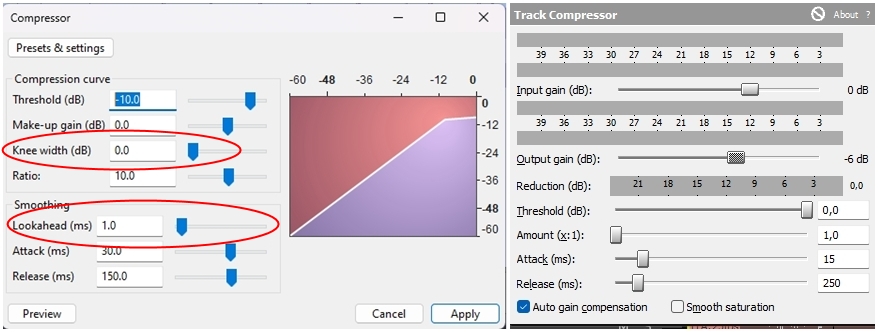
Knee width on Audacity default is set to 5.0.
Lookahead on Audacity default is set to 1.0 (ms).
Are these values essential, or would it be okay if I set the same values on Vegas, leaving these two out?
thanks
+ Reply to Thread
Results 1 to 3 of 3
-
-
Audacity and Vegas do not expose the same compressor controls, so you will not get a 1:1 copy of knee width and lookahead. In Vegas open Track FX or Audio Event FX and add Track Compressor or the Dynamics package Magix ships. Map what you can: Threshold and Ratio to the same numbers you used in Audacity, Attack and Release to the same milliseconds, and start with a soft knee if the plug-in only offers soft/hard. Vegas stock compressors usually have little or no separate lookahead, which is why quiet words can still vanish when louder peaks pull the gain down. Workarounds that actually help dialogue: lower the ratio and raise the threshold a bit so it is gentler, put a mild EQ cut on low rumble before the compressor, or split the voice to its own track with Track Compressor only on that track so music is not driving the ducking. If you need true lookahead and a variable knee, keep Audacity for the voice stem, export WAV, then drop that into Vegas. That hybrid is normal when Vegas stock FX are not enough.
-
thankls you are always very thorough
 Quote
Quote
Similar Threads
-
Vegas Pro 14 available for $20
By aedipuss in forum Latest Video NewsReplies: 29Last Post: 10th Dec 2025, 20:08 -
Rotating in Vegas Pro
By Greatminty in forum EditingReplies: 4Last Post: 25th Feb 2023, 16:49 -
Frameserving to Vegas Movie Studio or Vegas Pro
By stymie in forum Video ConversionReplies: 22Last Post: 5th Jan 2023, 23:58 -
Audacity and Vegas wav files
By E King in forum AudioReplies: 9Last Post: 10th Dec 2021, 13:53