


 View Profile
 View Forum Posts
 Private Message


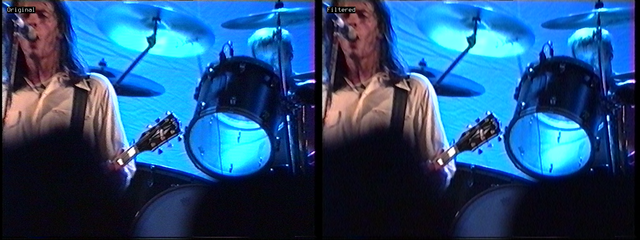
I received a transfer of a Video8 tape which throughout I can see faint diagonal lines across the whole image, through most of the video. At some points it also seems to go in both diagonals. You can't really see them at smaller sizes but they're very obvious at larger viewing windows. They're most obvious over the large drape backdrop, but also still slightly over the people.
The exact transfer chain was:
Sony CCD-TRV66E > S-Video > DataVideo TBC-1000 > ATI TV Wonder 600 USB > VirtualDub 1.10.4 > ffmpeg (FFV1)
The tape had been transferred before but I only ever had a smudgy encoded MPEG-2 DVD, so I don't know if they were always there but I suspect not. They seem like interference somewhere in the capture chain to me, perhaps from the mains. It was transferred in France FWIW.
Either way, a new transfer is not currently possible, at least not any time soon, so I was wondering if there was any way I could reduce these a little without softening the overall image too much?
[Attachment 93194 - Click to enlarge]
+ Reply to Thread
Results 1 to 12 of 12
-
-
The hatches are probably due to the oversaturation causing dotcrawl during capturing.
Quick attempt: Does this look any better to you? (I kept it interlaced). -
Seems plausible, you can't see them as much when there isn't the bright blue or red lights.Originally Posted by Sharc

They've certainly mostly gone but it's the other problem I wanted to avoid, the whole image now looks very soft and smoothed out. Something in between is preferred I guess, only toning the lines down a bit so the image stays a bit sharper.
[Attachment 93197 - Click to enlarge]Last edited by Killer3737; 26th Jul 2026 at 04:48. Reason: adding image in darker scene, no lines
-
Yep. Here a better compromise of the same. Are you on Avisynth?Originally Posted by Killer3737
(Footnote: The dots/cross hatches may also have been caused by a poorly screened 2$ S-Video cable producing chroma->luma crosstalk.)Last edited by Sharc; 26th Jul 2026 at 07:20. Reason: Footnote added
-
users currently on my ignore list: deadrats, Stears555, marcorocchini
-
Yes, using Avisynth+.Originally Posted by Sharc
-
Yes, the diagonal noise is dot crawl. It can be reduced in AviSynth with something like:
Since this is from consumer quality video tape the loss of resolution on the underlying picture is negligible.Code:Spline36Resize(400, height).Spline36Resize(width, height)
The video has residual hanover bars too. Those can be eliminated with:
A full script might look like:Code:SeparateFields() MergeChroma(Blur(0.0, 1.0).Sharpen(0.0, 0.7)) Weave()
Code:LWLibavVideoSource("sample_ffv1.mkv", cache=false, prefer_hw=2) AssumeTFF() Spline36Resize(400, height).Spline36Resize(width, height) SeparateFields() MergeChroma(Blur(0.0, 1.0).Sharpen(0.0, 0.7)) Weave() QTGMC() -
Interesting approach, thanks, I like the results. I combined this with my existing script which was already fixing a green vertical bar chroma issue, I realise that wasn't in the sample. Also guess I forget to specify the target output is a watching copy, de-interlaced and x264 encoded. FFV1 capture will be archived.Originally Posted by jagabo
Anyway, this is what my script is currently looking like based on this example. I nudged the resize up a little, going to test a few values to find a sweet spot.
Looking good? Attached a raw image to show the chroma column issue I was fixing.Code:mainclip = ffvideosource("[].mkv").AssumeTFF().trim(76,0) # Fix vertical chroma bleed green/purple bar strip_height = 10 strip = mainclip.Crop(684, 0, strip_height, 576).BilinearResize(strip_height*2, 576) fixed = Overlay(mainclip, strip, x=688, y=0, mode="chroma") # Fix dot crawl / Hanover bars fixed = fixed.Spline36Resize(460, 576).Spline36Resize(720, 576) fixed = fixed.SeparateFields() fixed = fixed.MergeChroma(fixed.Blur(0.0, 1.0).Sharpen(0.0, 0.7)) fixed = fixed.Weave() # Deinterlace fixed = fixed.QTGMC() # Crop fixed = fixed.Crop(6, 2, -12, -10) # Contrast/Color Tweaking fixed = fixed.Tweak(hue=0.0, sat=0.72, bright=4, cont=0.97, coring=false, sse=false, startHue=0, endHue=360, maxSat=150, minSat=0) return fixed.ConvertToYV12()
[Attachment 93201 - Click to enlarge] -
I recommend sticking with mod 4 frames sizes, not mod 2. Some players have problems with mod 2. Your are cropping the width down to 702 pixels. Crop to 704 or 700 instead.
That discolored band at the right of the frame is quite common. One thing I've done is stretch the colors from just to the left of the band over to the right. You can probably find posts here where I've shown how to do it with AviSynth.
Here are a few:
https://forum.videohelp.com/threads/354425-Hi8-capture-using-Digital8-camcorder-Edge-c...es#post2227582
https://forum.videohelp.com/threads/401841-Correcting-green-pink-tint-near-edge-of-vid...VD#post2619894Last edited by jagabo; 28th Jul 2026 at 10:18.
-
I had a little time so I went ahead and wrote the script to fix your sample image. This script reflect normal colored areas near the right edge, onto the discolored area at the right edge:
Code:ImageSource("unity-3006273.png", start=0, end=23, fps=23.976) ConvertToYUY2() patch=Crop(668,0,-16,0).FlipHorizontal() Overlay(last, patch, x=684, mode="chroma") -
Here is the chroma patch applied to the video in post #1:
Code:LWLibavVideoSource("sample_ffv1.mkv", cache=false, prefer_hw=2) AssumeTFF() Spline36Resize(400, height).Spline36Resize(width, height) # reduce diagonal line noise SeparateFields() MergeChroma(Blur(0.0, 1.0).Sharpen(0.0, 0.7)) # reduce hanover bars Weave() QTGMC() # deinterlace Crop(4, 2, -12, -10) # crop, leaving mod 4 Tweak(hue=0.0, sat=0.72, bright=1, cont=0.94, coring=false, sse=false, startHue=0, endHue=360, maxSat=150, minSat=0) # tweaks, lots of illegal colors left though patch=Crop(width-32,0,-16,0).FlipHorizontal() Overlay(last, patch, x=width-16, mode="chroma") # fix chroma a right edge
 Quote
Quote
 Visit Homepage

Similar Threads
-
Multi Color Diagonal Lines Across Output Video in VDUB2
By vGt3 in forum Capturing and VCRReplies: 1Last Post: 23rd May 2026, 18:31 -
Panasonic AG-1980P - Diagonal Lines in certain colors.
By ENunn in forum RestorationReplies: 8Last Post: 2nd Sep 2025, 17:17 -
HELP NEEDED! Crosshatch "Diagonal Line" Interference!!
By mike981 in forum Capturing and VCRReplies: 25Last Post: 20th Aug 2024, 17:07 -
Diagonal lines when sharpening
By mike981 in forum RestorationReplies: 12Last Post: 24th Mar 2024, 10:33 -
From VHS to digital: Diagonal lines even after using QTGMC
By origliante in forum Video ConversionReplies: 4Last Post: 11th Jun 2022, 07:23