


 View Profile
 View Forum Posts
 Private Message


Quick question? Why won't any dvd's I burn using nero play in my xbox. I will play anywhere else. The xbox will play any dvd burned using any other program. Any ideas?
Thanks in advance.
Brak
+ Reply to Thread
Results 1 to 15 of 15
-
-
I have been successful burning DVDs with Nero that play fine in the xbox. However, the media must be -R not +R.
Burn Baby Burn
It's a Disk-o Inferno -
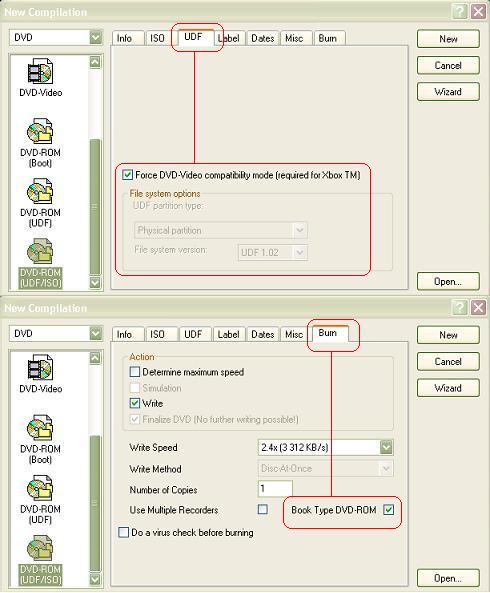
In nero ther is also some sort of a force compatability for the X-Box. I have never user id cause i done have a box, so i cant test it, have you been selection this option. I am at work now and i cant remember what the function is called exactly, but it us under the burn ISO UDF function.
-
Generally speaking, "compatibility mode" means the book type code is set to a value that fools players into thinking it is a replicated / retail disc. This helps the disc to be compatible on some players but does nothing for newer ones. This may be the scenario that applies to the Xbox.
-
YES, there isOriginally Posted by PyrosofT
NO, they are two different things.Originally Posted by freestyler
You definitely do.Originally Posted by freestyler
Sorry freestyler, I was just jokingYou stop me again whilst I'm walking and I'll cut your fv<king Jacob's off. -
@ tompika:
where is the "Book Type DVD-ROM" option??
i am using nero 5.5.10.42
another question.
if i check the "Force DVD-Compatibility mode (required for Xbox TM)", will the dvd-r's play on standalone dvd players as well? -
-
It appears when a capable plus drive is detected. Ricoh types so far.Originally Posted by deh707
It should play.Originally Posted by deh707
The differece between
- DVD-Video
- DVD-ROM (UDF/ISO) 1.02
- DVD-ROM (Force DVD-Video comp. mode for Xbox)
compilations is one of Ahead Nero's mysteries
You need to find out wich one works for you.You stop me again whilst I'm walking and I'll cut your fv<king Jacob's off. -
LET'S SEE HOW CORRECT YOU AREOriginally Posted by freestyler
1. The original poster uses NERO and have a question about how he can improve the compatibility with XBox.
2. Pyrosoft tells him there is an option in NERO toForce XBox compatibility mode
3. Your answerCOMPATIBILITY BITSETTING andGenerally speaking, "compatibility mode" means the book type code is set to a value that fools players into thinking it is a replicated / retail disc. This helps the disc to be compatible on some players but does nothing for newer ones. This may be the scenario that applies to the Xbox.
FORCE XBOX COMPATIBILITY MODE (NERO)
ARE NOT THE SAME!!!
You're obviously talking about a DIFFERENT thing that has nothing to do with Nero's XBox option (as shown on the picture) and not entirely correct.
What do you mean "does nothing for new ones"
I've tested dozens of players with DVD+R and DVD+R(with ROM booktype) so I really know what different it makes. Lots of brand new models would play DVD+R only as DVD-ROM.
I suggest you visit www.dvdplusrw.com for more information
And get some firsthand experience before stating something
From version 5.5.10.15 Nero has been able to change the booktype and that option comes up when selecting a Ricoh type drive as recorderOriginally Posted by freestyler
If I squeeze the jam out of your dick you're gonna have to quit your belovedOriginally Posted by freestyler
Penis Club, MY FRIEND
Regards, tompikaYou stop me again whilst I'm walking and I'll cut your fv<king Jacob's off. -
YOU TOOK THE ******* JAM OUT OF MY DOUGHNUT . . . YOU DID . . .
 Mr Tompika is getting nutty here with his CAPS LOCK PROBLEMS. I was twisting around your obscene "jam" signature just like you twisted my "penis club" signature.
I'm referring to a totally different compatibility mode that helps readability on older standalone players, HP +R drives inherently write in this mode and quite possibly a few others, contact HP support if you're a disbeliever.DVD-ROM (Force DVD-Video comp. mode for Xbox)
compilations is one of Ahead Nero's mysteries -
Originally Posted by freestyler
 Its hardly visible.
I do not blame you freestyler, you probably just got into this business.Originally Posted by freestyler
You still do not want to understand the difference between
Compatibility Bitsetting and Force Compatibility Mode for Xbox.
The message you PMed me refers to the default booktype of HP100 HP200 and HP300
The HP100 is an OEM Ricoh 5120, the HP 200 is an OEM Ricoh5125A,
the HP300 is an OEM NEC drive.
I happend to know a couple of things about these drives. Not everything of course. ( I bought one last year and I'm really interested in its compatibility)
Please click HERE
Now, HP modified their firmware to write DVD-ROM booktype on DVD+R media by default for maximum compatibility. They also have a compatibility utility that does the same on rewritable plus media.
http://h20015.www2.hp.com/en/document.jhtml;jsessionid=PJT2ZEFAGYQFNQEXGR3UOSQ?reg=na&...pg41418&lc=en&
But this is different than Force compatibility mode for XBOX that Pyrosoft was telling the original poster.
Since the original poster did not mention whether he had a capable Ricoh type drive and you mixed those two things above.......
All these three settings give you UDF 1.02 formatted DVD-Video compliant recording.Originally Posted by tompika
As I said one needs to find out what works for him/her.
If you really know what differences they phisically make let me know please.
Regards, tompikaYou stop me again whilst I'm walking and I'll cut your fv<king Jacob's off. -
I'm not a proponent of +R discs, but its nice to know that you've personally researched and are aware of information that is vital to your end of this "business."
I only wish I could call myself a Nero-Certified X-Box Compatible DVD+R Movie Burning Specialist. -
Yes, I like to take care of my stuffs.
PEACE... You stop me again whilst I'm walking and I'll cut your fv<king Jacob's off.
 -
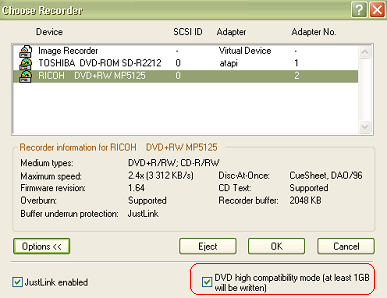
Nero has been able to create DVDs playable on the XBOX since, v5.5.10.7. You must tick high compatability mode though. Also use the latest version of Nero possible. I don't use v6, I'll wait a little while for the bugs to iron out, I use 5.5.10.42
I also use DVD-R and along with my version of Nero play happily on my XBOX. -
As shown on the screenshot I posted above.Originally Posted by roach1976
The high compatibility option is a different story and I think it's selected by defaultOriginally Posted by roach1976
And it should be selected
 You stop me again whilst I'm walking and I'll cut your fv<king Jacob's off.
 Quote
Quote
 Visit Homepage


Similar Threads
-
DVD -> PC -> Xbox + 5.1
By Tony Jenkins in forum Media Center PC / MediaCentersReplies: 3Last Post: 11th Apr 2011, 07:18 -
Help capturing xbox 360 video when xbox is connected to monitor with vga
By laldabomb8 in forum Capturing and VCRReplies: 0Last Post: 23rd Jul 2010, 02:05 -
how do you record xbox 360 gameplay while using microsofts xbox 360 vga ?
By rushinplaya in forum Capturing and VCRReplies: 18Last Post: 3rd Apr 2010, 06:19 -
Xbox - JUST DO IT!
By yoda313 in forum Off topicReplies: 4Last Post: 15th May 2009, 23:57 -
Xbox
By gjordan12198 in forum Newbie / General discussionsReplies: 2Last Post: 5th Jun 2008, 22:23