


 View Profile
 View Forum Posts
 Private Message


Hi, whenever I convert an avi with tmpgenc and author with tmpgenc author I get a jumpiness in my video. Quality is outstanding, but i get a little bit of a 'skip' in the video. Am I doing something wrong? I check the fps and codecs before I convert them, I must be missing something...Can anyone tell me if this is a common noob problem and what should I do about it?
+ Reply to Thread
Results 1 to 8 of 8
-
-
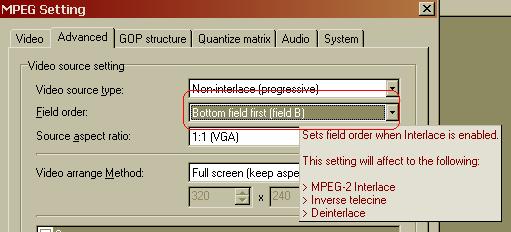
I hear you should make sure the framerate matches (which you did), and then change the field order.
Hello. -
the field order? not quite sure I follow. Can you fill me in a little bit? I mean, how do I know what field order to use...
-
Here's the avi codec information:
File : 627 MB (627 MB), duration 1:22:37, type AVI, 1 audio stream(s), quality 54 %
Video : 552 MB, 934 Kbps, 29.970 fps, res. 512*384 (4:3), DIV3 = DivX v3 MPEG-4 (Low-Motion), Supported
Audio : 75 MB, 128 Kbps, 48000 Hz, 2 chan., 0x55 = MPEG Layer-3, Supported
I dont know if that helps but how can I tell what field order I should use? -
There are only two field orders, Bottom field first and Top field first.
 Hello.
 -
Ah, yes I see...But how do I know which to use?
-
you don't...it's from personal experience...Originally Posted by tsantsa
even till this day...i keep RW's handy when field order makes a difference... (i.e. if i make my SVCD output video interlaced). i usually do a test run on a CD-RW to make sure field order is correct before burning on R discs....
usually, field order is consistent from movie to movie..but i've encountered many exceptions, so you should prolly test on some RWs first...
-----
btw, if field order is your problem...you won't notice it on your computer monitor..because it's a progressive display and displays both fields at the same time...you will only see the problem on your interlaced TV... -
Yeah, I just found that one out by doing a little research. I am going to follow the dvdhq guide on tmpgenc and reverse my field order this time. I'll post my results tomorrow. (going to let it go tonite and burn tomorrow)Originally Posted by poopyhead
That is, unless someone doesnt like that guide...
 Quote
Quote

Similar Threads
-
Jumpy video from Nikon d300s
By Owen1 in forum Newbie / General discussionsReplies: 19Last Post: 2nd Jun 2011, 03:27 -
NEWBIE - Video jumpy after converting
By jaco33 in forum Newbie / General discussionsReplies: 0Last Post: 6th May 2010, 10:00 -
Jumpy video with animated films - like there are frames missing!
By junks in forum Authoring (DVD)Replies: 8Last Post: 10th Jan 2009, 09:27 -
Jumpy Video with DVD Flick
By matthewjohn23 in forum Newbie / General discussionsReplies: 2Last Post: 16th Jul 2008, 21:24 -
hd video files are jumpy / jerky
By adamvfb in forum Newbie / General discussionsReplies: 3Last Post: 2nd Oct 2007, 12:12