


 View Profile
 View Forum Posts
 Private Message


i just purchased the Artec 16x drive from staples, based on the fact that some of you guys have been able to rip at speeds close to 8-10x...but I can't get it higher than 2x...I have DMA if Available enabled, and still only goes about 2.4x
any ideas?
+ Reply to Thread
Results 1 to 27 of 27
-
-
i also looked back to my device hardware list after enabling DMA...and for some reason it won't put the drive into DMA mode...the drop down box says "DMA if available" but the box underneath says "PIO Only"
why won't the drive enable DMA?
and most harddrives are supposed to be DMA enabled right? i thought my 60 gig WD drive was DMA enabled, but now it just shows up as PIO only while my 100 gig still has Ultra DMA...any ideas what could've happened? or maybe i was wrong about it being DMA enabled in the first place -
You should fill out your computer details. Without knowing your OS it'll take too many guesses to solve your problem.
Try to enable DMA again for your devices, reboot. If it still isn't enabled, it could be turned off in your BIOS.
Got a P4 with an Intel chipset? Donwload Intel's application accelerator from Intel's web site.
Using VIA? Get a P4 with and Intel chipset Really though, make sure you have all of the patches and other updates VIA had rolled out.
-
sorry about leaving all the hardware info out...i've got an Athlon 1.1 Ghz with 512 megs of ram, running Windows 2000 Professional
2 hardrives, Western Digital 60 GB, and Western Digital SE 100 GB with 8 mb cache
Cendyne DVR-105 DVD-RW (slave) and Artec 16x DVD-ROM (Master)
after looking back in the DMA settings, i can't tell which drive is which...one is PIO only and one is Ultra-DMA enabled...is the DVR-105 capable of having Ultra-DMA mode?
and still not able to rip higher than 2.4x using DVD Decryptor -
Your Cendyne might be hardware locked just like the A03, and A04.
In the hardware settings, they're listed as Primary IDE, and Secondary IDE. Your DVD's should be on the secondary channel. In advanced settings Device 0 is your primary device, and Device 1 is your Secondary Device.
Check for firmware updates for all of your drives (use google to search for "firmware update Artic" or what ever). And make sure your using an 80 pin IDE cable. Some drives only come with a 40 pin cable.
For all I know, the A05's use UDMA.
Here's a pic of my Primary channel. Device 0 is my system harddrive, Device 1 is my Pioneer 116 DVD-ROM
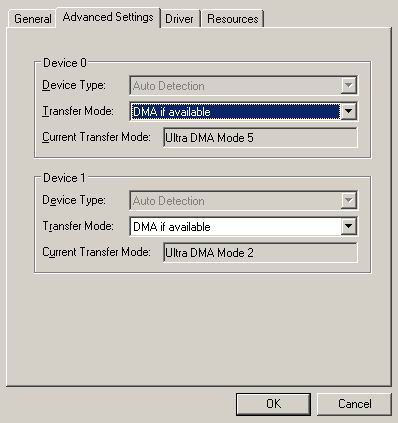
Here's my Secondary Device 0 is my CDRW and Device 1 is my Pioneer A03.
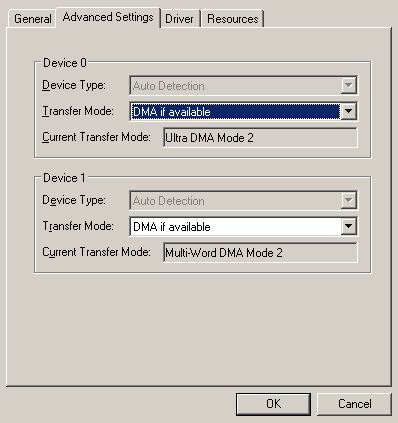
I also have an add in card that has 4 hard drives attached to it. -
Are you using an ATA100 cable? The IDE connector will be blue if it is ATA100.
-
I have the exact same DVD-ROM drive and I rip at 8x-10xOriginally Posted by pimp97max
It is very inportant that DMA is enabled. You won't be able to rip at higher speeds if it isn't. -
the IDE connector going into the motherboard? that one is blue, but the other two, going into the drives are black and grey i thinkOriginally Posted by Bob W
-
the ATA cables shouldnt matter for your case. Those DVD-ROM drives do NOT operate at DMA-100 they only operate at DMD-33 onlyOriginally Posted by pimp97max
-
so any idea as to why it won't enable DMA? it is enabled in the BIOS, but not in Win2kOriginally Posted by IBJanky
-
what updates can i/should i run?
there might be a firmware update for the drive, i might try that, but are there any things in Win2k that can be updated to maybe allow it to recognize the drive as DMA capable? -
Do you have the latest IDE drivers installed. Like VIA 4in1 or SIS chipset or Intel?
-
i'm assuming i don't, as i have never manually updated them...where do i find out exactly what chipset i have and where to get the updated drivers?Originally Posted by Bob W
-
http://www.viaarena.com/?PageID=2
Get 'em there.
This is for your DVD-ROM, make sure you get the version for your DVD-ROM. Check your hardware properties.
http://forum.rpc1.org/dl_firmware.php?category=1&manufactor=5 -
If you know the manufacturer and model number of your computers motherboard then you will find all the drivers for that board on their website.Originally Posted by pimp97max
-
If the VIA chipset update doesn't work to give you DMA access to your DVD drive, I would swap it with another IDE device, making sure the jumpers are corectly swapped also
-
anyone used these firmware updates before? are they reliable and still enable the drive to work properly? are they downgradable in case of failure?
thanks, and same questions for the Via update...i'll try that out soon -
just to let u know, i never needed to do a firmware upgrade for my DVD-ROM driveOriginally Posted by pimp97max
-
hmm...thanks for that bit of info...i guess my last option then is to just do the VIA updates, but i want to make sure that this won't screw anything up for my computer, so does anyone have experience with this upgrade? and it is downgradable, back to the original if something goes wrong?Originally Posted by IBJanky
-
Hey pimp97, what motherboard are you using with your Athlon?
-
pretty sure it's Tahiti 2.x Asus A7V-VMOriginally Posted by IBJanky
-
it's an HP model XL866
according to this site: http://www.elhvb.com/mboards/Intel/HP.html
that's the mobo model listed, and i'm pretty sure that's the right one, i haven't taken the time to reopen the case right now though -
to tell you the truth, i dont know why it isnt enabling DMA automatically on your DVD-ROM drive
I'm pretty sure that once you get that enabled, you'll be able to use the drive to its full potential.
good luck -
alright, thanks a bunch guys...i finally went ahead and updated the VIA 4 in 1 drivers, and now it recognizes both my first harddrive and this DVD-rom as Ultra DMA, so it was a problem with the IDE drivers...thanks a lot for your help, now i'm ripping at about 6-7x, hopefully it might speed up a bit later, but i'm happy with this
i'll probably switch the drives around now, see if it'll recognize the DVD-ROM in the slave position now, but again, thanks everyone for their help
and IBJanky, do you rip at a constant 8-10x? -
hey man, congrats. you finally solved yer problem.Originally Posted by pimp97max
And no, i dont rip at 8x-10x constantly. it might start at 5x then get higher as it starts ripping.
but hey... 6x-7x is much better than 2x right?
-
oh yeah, definitely a lot better...especially since the update also increased the performance of my HDDs, so i'm much happier, and i didn't let it perform a full rip yet, only ran it for about 2 minutes, so i don't know if the speeds would have increased, but i'm sure they will...now i got another problem, this noise coming from my heater unit in the attic...but i guess this isn't the right forum for that onehey man, congrats. you finally solved yer problem.
And no, i dont rip at 8x-10x constantly. it might start at 5x then get higher as it starts ripping.
but hey... 6x-7x is much better than 2x right?
-
i have a Artec 16x, and sometimes, he don't go more than 2x, but seems like it be lock...
When not, he goes from 5,5x to 10x, and works great...
I've ASPI from Adpatec, 4.7.1.2 (i think, it's the last ones) and XP Pro
I see one thing, that might be the problem, he does many times, the 2x loxk, riping from DVDR, and i usualy mak the unlock opening the DVD with PowerDVD...
Yesterday i did not make like this, and go directly with Smartriper, and, the Artec, don't stay at 2x... make the rip in about 6-7x, going from 5x to 11x...
Sorry my bad english
 Quote
Quote


Similar Threads
-
Force Higher FPS?
By therock003 in forum Software PlayingReplies: 5Last Post: 18th Apr 2012, 18:26 -
Higher Bitrate = Higher Quality? - 20MBPS difference for 1080p file
By SgtPepper23 in forum Newbie / General discussionsReplies: 4Last Post: 6th Dec 2009, 08:57 -
Higher Bitrate = Higher Quality?
By SgtPepper23 in forum AudioReplies: 1Last Post: 5th Dec 2009, 22:33 -
converting it to higher quality
By JTG in forum Video ConversionReplies: 6Last Post: 27th Apr 2009, 18:22 -
I/O Magic DVD ReWritable 16X Drive Not running at 16X
By mmitsch in forum DVD & Blu-ray WritersReplies: 3Last Post: 7th Jul 2007, 00:40