


 View Profile
 View Forum Posts

Hello! I've been trying to restore this source, but the only problem is removing the heavy halo from this source
[Attachment 93115 - Click to enlarge]
The best I got is this script which removes some of it, the heavy parts can still be seen:
Code:LWLibavVideoSource("blah.ts") AnimeIVTC(mode=1, omode=1) vinverse2().vinverse2().vinverse2() QTGMC(preset="Placebo", TR0=2, TR1=2, TR2=3, Rep0=1, Rep1=0, Rep2=5, EdiMode="EEDI3", InputType=3, NoiseRestore=1.0, NoiseProcess=1, Sigma=1.4, StabilizeNoise=True, ProgSADMask=25.0) Crop(180, 0, -180, -0) Debicubic(c=0.33, 720, 540) HQDeringmod(mrad=6, nrmode=3, thr=255, darkthr=0) DeHalo_alpha_mt(rx=1.4, ry=1.4, darkstr=0.0, brightstr=1.8, lowsens=20, highsens=75, ss=1.4) nnedi3_rpow2(rfactor=2, nsize=5, nns=4, qual=2, cshift="BicubicResize")
[Attachment 93116 - Click to enlarge]
Can anyone help me out here? Thank you!
(I know I've been posting here a lot lately, this will be my post for a while)
https://drive.google.com/file/d/1OveTNcJksBGXbDYKexv088Q_e2XbpkB7/view?usp=sharing
+ Reply to Thread
Results 1 to 15 of 15
-
Member
- Nov 2025
- Unites States of America


-
Seems like some contrast sharpening or similar was applied to the image.
Maybe first decrease the highlights,... before doing anything else.
In Vapoursynth I would use:
which would give me:Code:# lessen highlights mod = clip for _ in range(2): mod = core.std.Expr(mod,expr=["x 180 > x 0.80 * 35 + x ?", "", ""] ) # Edge mask edges = core.std.Prewitt(clip.std.ShufflePlanes(0, vs.GRAY)) # expand edgemask mask = core.std.Maximum(edges) mask = core.std.Maximum(mask) mask = core.std.Maximum(mask) # blur edgemask mask = core.std.BoxBlur(mask, hradius=3, vradius=3) # Apply only where mask is active clip = core.std.MaskedMerge(clip, mod, mask)
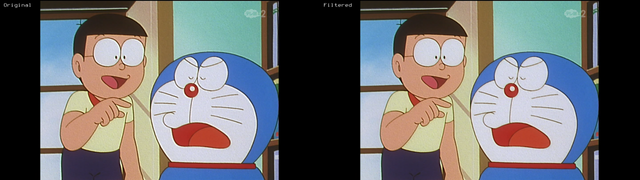
In Avisynth this should be (untested):
and just require MaskTools2Code:src = last # Reduce highlights mod = src for (i=0, 1) { mod = mt_lut(mod, expr="x 180 > x 0.80 * 35 + x ?") } # Edge mask mask = mt_edge(mode="prewitt", Y=3, U=1, V=1) # Expand mask mask = mt_expand(mask) mask = mt_expand(mask) mask = mt_expand(mask) # Blur mask mask = Blur(mask, 1.5) # Merge last = mt_merge(src, mod, mask)
This will not remove all highlights/halos, but probably make them more managable.
Cu Selur
Ps.: maybe add something like DeHalo_alpha(rx=3.00, ry=3.00, brightstr=1.50) for the halos after the above and try adjusting the expressions.Last edited by Selur; 20th Jul 2026 at 09:05.
users currently on my ignore list: deadrats, Stears555, marcorocchini -
double post - that a mod could delete
 users currently on my ignore list: deadrats, Stears555, marcorocchini
 -
Member
- Nov 2025
- Unites States of America
-
I tested out editing the DeHalo_alpha script, and I get better when I useOriginally Posted by Selur
DeHalo_alpha_mt(rx=1.7, ry=2.4, darkstr=0.0, brightstr=1.3, lowsens=0, highsens=0, ss=1.4)
(Full code):
Code:LWLibavVideoSource("blah.ts") AnimeIVTC(mode=1, omode=1) vinverse2().vinverse2().vinverse2() QTGMC(preset="Placebo", TR0=2, TR1=2, TR2=3, Rep0=1, Rep1=0, Rep2=5, EdiMode="EEDI3", InputType=3, NoiseRestore=1.0, NoiseProcess=1, Sigma=1.4, StabilizeNoise=True, ProgSADMask=25.0) Crop(180, 0, -180, -0) Debicubic(c=0.33, 720, 540) HQDeringmod(mrad=6, nrmode=3, thr=255, darkthr=0) DeHalo_alpha_mt(rx=1.7, ry=2.4, darkstr=0.0, brightstr=1.3, lowsens=0, highsens=0, ss=1.4) nnedi3_rpow2(rfactor=2, nsize=5, nns=4, qual=2, cshift="BicubicResize")
[Attachment 93127 - Click to enlarge]
[Attachment 93128 - Click to enlarge]
There could be a better script for DeHalo_alpha for this source, but this is the best I got (so far)
(Also, wdym by "double post"?) -
I accidentally posted my last post twice, couldn't delete the second one and thus edited it to 'double post' let the moderators know that this one can be deleted(Also, wdym by "double post"?)
and you ignored the important part about the highlightsI tested out editing the DeHalo_alpha script, and I get better when I use
¯\_(ツ)_/¯users currently on my ignore list: deadrats, Stears555, marcorocchini -
Member
- Nov 2025
- Unites States of America
-
I really couldn't find anything different when I used the highlight script you made unless I made any mistakesand you ignored the important part about the highlights -
The effect should be clearly visible,..
only applied the highlight lessening and TFM:
 users currently on my ignore list: deadrats, Stears555, marcorocchini
 -
Member
- Nov 2025
- Unites States of America
-
For me, I didn't notice anything different, are there any plugins that needs to go with the script?Originally Posted by Selur
-
Bu you see the difference in the screenshot (just to make sure, you know what to look for)
Only masktools2 is needed, Avisynth would throw an error, if a dll was missing..users currently on my ignore list: deadrats, Stears555, marcorocchini -
had another quick go at it, adding YAHR to the mix
script: https://pastebin.com/fWj7Nanwusers currently on my ignore list: deadrats, Stears555, marcorocchini -
Slight mod of your script:
Code:LWLibavVideoSource("heavyhaloremovalogsample.ts", cache=false, prefer_hw=2) TFM() TDecimate() DeBicubicResizeMT(720, 540) Dehalo_alpha(rx=2.7, ry=2.5, BrightStr=1.3, lowsens=0, highsens=0, ss=1.4) aWarpSharp2(depth=5) nnedi3_rpow2(rfactor=2, nsize=5, nns=4, qual=2, cshift="BicubicResize") aWarpSharp2(depth=5) Sharpen(0.5) -
Member
- Nov 2025
- Unites States of America
-
Wow, the dehalo_alpha script works really good!Originally Posted by jagabo
I still see some halo-ing left over if that can be fixed
[Attachment 93148 - Click to enlarge]
(I only used the Dehalo_alpha script instead of the full script you sent because the rest was unnecessary such as the aWarpSharp since it doesn't need to be used (There is some dark halo-ing/ringing seen from some outlining which that needs to be removed if possible) -
Try cranking up DarkStr. Maybe 1.3 like BrightStr.Originally Posted by themon-master
-
Member
- Nov 2025
- Unites States of America
-
If I crank up the DrarkStr, I lose a whole lot of detail washing out the outliningOriginally Posted by jagabo
[Attachment 93155 - Click to enlarge] -
But that's probably what the thin lines looked like in the original SD video. And why they applied the oversharpening that caused the halos.
Maybe you can use some masking to protect thin black lines.
 Quote
Quote Visit Homepage

Similar Threads
-
fixing chromableeding and halo
By jupiter82 in forum Video ConversionReplies: 6Last Post: 8th Jan 2025, 13:45 -
Halo or not halo?
By taigi in forum RestorationReplies: 4Last Post: 11th Dec 2024, 12:01 -
Heavy rainbows on video
By kenator18 in forum RestorationReplies: 16Last Post: 13th Mar 2023, 10:21 -
Excessive dark halo
By Andreselos in forum RestorationReplies: 0Last Post: 5th Jul 2022, 15:47 -
FFmpeg removing pulldown from DVD source
By BlueTech in forum Newbie / General discussionsReplies: 1Last Post: 3rd Jun 2022, 22:28