


 View Profile
 View Forum Posts
 Private Message


Hi Friends,
Have you ever wanted to tidy up your MKV collection but never had the time or energy?
Remove unwanted tracks to save storage space? Or add external tracks to create a clean, neat collection?
If the answer is yes, you're in the right place!
I'm excited to share a batch script I created to remux MKV files: "SamA MKV Batch Script".
This script allows you to do all the following at the same time:
1) Remove/keep only audio and subtitle tracks using their IDs and Languages
2) Remove/keep only audio and subtitle tracks using their Names!
3) Add external audio and subtitle tracks
Filtering tracks using their Names is useful when the IDs are not consistent and
the Languages are missing or not unique, like with some commentary tracks.
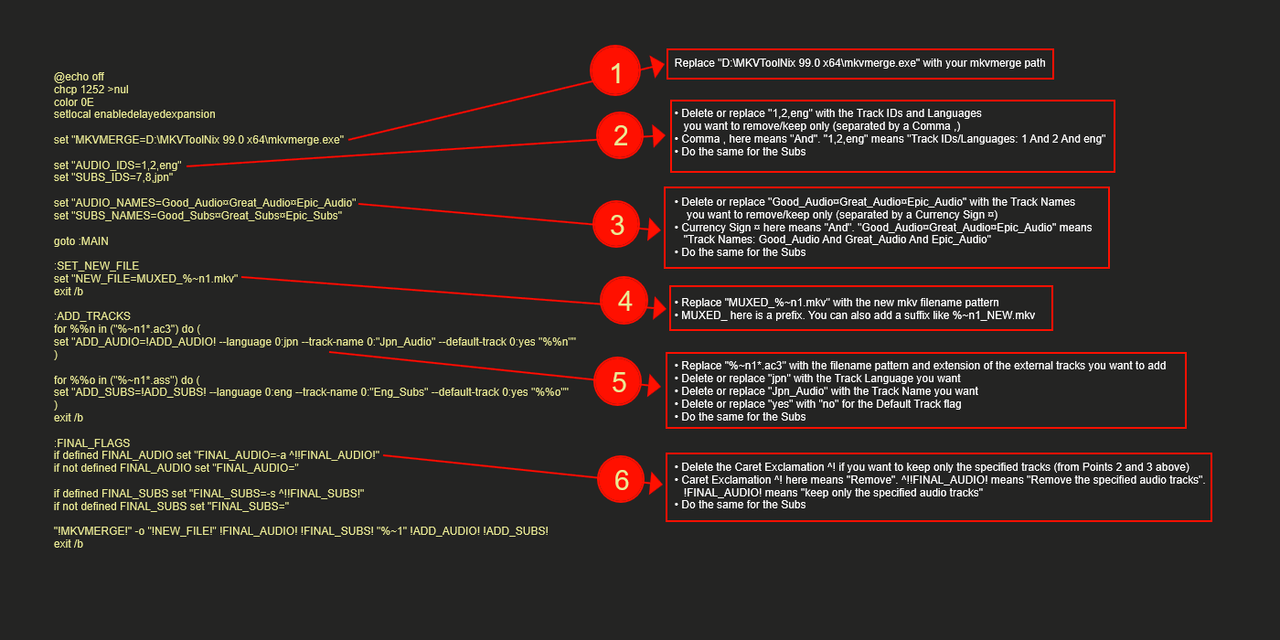
------------------------------------EDITING INSTRUCTIONS------------------------------------
1) Replace "D:\MKVToolNix 99.0 x64\mkvmerge.exe" with your mkvmerge path
2) • Delete or replace "1,2,eng" with the Track IDs and Languages
you want to remove/keep only (separated by a Comma ,)
• Comma , here means "And". "1,2,eng" means "Track IDs/Languages: 1 And 2 And eng"
• Do the same for the Subs
3) • Delete or replace "Good_Audio¤Great_Audio¤Epic_Audio" with the Track Names
you want to remove/keep only (separated by a Currency Sign ¤)
• Currency Sign ¤ here means "And". "Good_Audio¤Great_Audio¤Epic_Audio" means
"Track Names: Good_Audio And Great_Audio And Epic_Audio"
• Do the same for the Subs
4) • Replace "MUXED_%~n1.mkv" with the new mkv filename pattern
• MUXED_ here is a prefix. You can also add a suffix like %~n1_NEW.mkv
5) • Replace "%~n1*.ac3" with the filename pattern and extension of the external tracks you want to add
• Delete or replace "jpn" with the Track Language you want
• Delete or replace "Jpn_Audio" with the Track Name you want
• Delete or replace "yes" with "no" for the Default Track flag
• Do the same for the Subs
6) • Delete the Caret Exclamation ^! if you want to keep only the specified tracks (from Points 2 and 3 above)
• Caret Exclamation ^! here means "Remove". ^!!FINAL_AUDIO! means "Remove the specified audio tracks".
!FINAL_AUDIO! means "keep only the specified audio tracks"
• Do the same for the Subs
• To Remove All Audio Tracks:
Replace the value of FINAL_AUDIO on both lines with "-A". So it becomes...
:FINAL_FLAGS
if defined FINAL_AUDIO set "FINAL_AUDIO=-A"
if not defined FINAL_AUDIO set "FINAL_AUDIO=-A"
• To Remove All Subs Tracks:
Replace the value of FINAL_SUBS on both lines with "-S". So it becomes...
if defined FINAL_SUBS set "FINAL_SUBS=-S"
if not defined FINAL_SUBS set "FINAL_SUBS=-S"
------------------------------------SamA MKV BATCH SCRIPT------------------------------------
Code:@echo off chcp 1252 >nul color 0E setlocal enabledelayedexpansion set "MKVMERGE=D:\MKVToolNix 99.0 x64\mkvmerge.exe" set "AUDIO_IDS=1,2,eng" set "SUBS_IDS=7,8,jpn" set "AUDIO_NAMES=Good_Audio¤Great_Audio¤Epic_Audio" set "SUBS_NAMES=Good_Subs¤Great_Subs¤Epic_Subs" goto :MAIN :SET_NEW_FILE set "NEW_FILE=MUXED_%~n1.mkv" exit /b :ADD_TRACKS for %%n in ("%~n1*.ac3") do ( set "ADD_AUDIO=!ADD_AUDIO! --language 0:jpn --track-name 0:"Jpn_Audio" --default-track 0:yes "%%n"" ) for %%o in ("%~n1*.ass") do ( set "ADD_SUBS=!ADD_SUBS! --language 0:eng --track-name 0:"Eng_Subs" --default-track 0:yes "%%o"" ) exit /b :FINAL_FLAGS if defined FINAL_AUDIO set "FINAL_AUDIO=-a ^!!FINAL_AUDIO!" if not defined FINAL_AUDIO set "FINAL_AUDIO=" if defined FINAL_SUBS set "FINAL_SUBS=-s ^!!FINAL_SUBS!" if not defined FINAL_SUBS set "FINAL_SUBS=" "!MKVMERGE!" -o "!NEW_FILE!" !FINAL_AUDIO! !FINAL_SUBS! "%~1" !ADD_AUDIO! !ADD_SUBS! exit /b :MAIN set "AUDIO_COUNT=0" if not defined AUDIO_NAMES goto :AUDIO_PARSED :PARSE_AUDIO for /f "tokens=1,* delims=¤" %%a in ("!AUDIO_NAMES!") do ( set /a AUDIO_COUNT+=1 set "AUDIO_MATCHES[!AUDIO_COUNT!]=%%a" set "AUDIO_NAMES=%%b" ) if defined AUDIO_NAMES goto :PARSE_AUDIO :AUDIO_PARSED set "SUBS_COUNT=0" if not defined SUBS_NAMES goto :SUBS_PARSED :PARSE_SUBS for /f "tokens=1,* delims=¤" %%c in ("!SUBS_NAMES!") do ( set /a SUBS_COUNT+=1 set "SUBS_MATCHES[!SUBS_COUNT!]=%%c" set "SUBS_NAMES=%%d" ) if defined SUBS_NAMES goto :PARSE_SUBS :SUBS_PARSED for /f "delims=" %%e in ('dir /b *.mkv') do ( set "ID=" set "TRACK_NAME=" set "TYPE=" set "SUPER_AUDIO_IDS=" set "SUPER_SUBS_IDS=" set "ADD_AUDIO=" set "ADD_SUBS=" call :SET_NEW_FILE "%%e" echo. echo ============================================================================================================== echo *** PROCESSING FILE: "%%e" *** echo ============================================================================================================== echo. for /f "tokens=1,* delims=:" %%f in ('cmd /c ""!MKVMERGE!" -J "%%~fe""') do ( set "KEY=%%f" set "VAL=%%g" for /f "tokens=* delims= " %%h in ("!KEY!") do set "KEY=%%h" for /f "tokens=* delims= " %%i in ("!VAL!") do set "VAL=%%i" set "KEY=!KEY:"=!" set "VAL=!VAL:"=!" if "!VAL:~-1!"=="," set "VAL=!VAL:~0,-1!" if "!KEY!"=="id" set "ID=!VAL!" if "!KEY!"=="track_name" set "TRACK_NAME=!VAL!" if "!KEY!"=="type" ( set "TYPE=!VAL!" if "!TYPE!"=="audio" ( for /L %%j in (1,1,!AUDIO_COUNT!) do ( echo("!TRACK_NAME!"| findstr /I /C:"!AUDIO_MATCHES[%%j]!" >nul && ( REM FOR FULL MATCHES, REPLACE LINE ABOVE WITH... if /I "!TRACK_NAME!"=="!AUDIO_MATCHES[%%j]!" ( if defined SUPER_AUDIO_IDS (set "SUPER_AUDIO_IDS=!SUPER_AUDIO_IDS!,!ID!") else set "SUPER_AUDIO_IDS=!ID!" ) ) ) if "!TYPE!"=="subtitles" ( for /L %%l in (1,1,!SUBS_COUNT!) do ( echo("!TRACK_NAME!"| findstr /I /C:"!SUBS_MATCHES[%%l]!" >nul && ( REM FOR FULL MATCHES, REPLACE LINE ABOVE WITH... if /I "!TRACK_NAME!"=="!SUBS_MATCHES[%%l]!" ( if defined SUPER_SUBS_IDS (set "SUPER_SUBS_IDS=!SUPER_SUBS_IDS!,!ID!") else set "SUPER_SUBS_IDS=!ID!" ) ) ) set "ID=" set "TRACK_NAME=" set "TYPE=" ) ) call :ADD_TRACKS "%%e" set "FINAL_AUDIO=" if defined AUDIO_IDS set "FINAL_AUDIO=!AUDIO_IDS!" if defined SUPER_AUDIO_IDS ( if defined FINAL_AUDIO ( set "FINAL_AUDIO=!FINAL_AUDIO!,!SUPER_AUDIO_IDS!" ) else ( set "FINAL_AUDIO=!SUPER_AUDIO_IDS!" ) ) set "FINAL_SUBS=" if defined SUBS_IDS set "FINAL_SUBS=!SUBS_IDS!" if defined SUPER_SUBS_IDS ( if defined FINAL_SUBS ( set "FINAL_SUBS=!FINAL_SUBS!,!SUPER_SUBS_IDS!" ) else ( set "FINAL_SUBS=!SUPER_SUBS_IDS!" ) ) call :FINAL_FLAGS "%%e" ) echo. echo ============================================================================================================== echo *** MISSION ACCOMPLISHED *** echo ============================================================================================================== echo. pause
------------------------------------USE INSTRUCTIONS------------------------------------
1) You need to have MKVToolNix as the script uses mkvmerge
2) Copy everything starting with @echo off and ending with pause
3) Paste it into Notepad
4) Choose ANSI encoding before saving
5) Save it as a .bat file
6) Place the batch file inside the folder containing your MKV files
7) Open the file to run the script
8) • IMPORTANT: Check the "REM FOR FULL MATCHES, REPLACE LINE ABOVE WITH..."
parts for full Track Name matching
• If left unchanged, "Comm" (or any other part of "Commentary") will match Track Name "Commentary"
• If replaced, only "Commentary" will match Track Name "Commentary"
9) External Tracks to be added must be in the same folder as your MKV files and must start with
the same filename. For example: Episode01.mkv, then Episode01.ac3 and Episode01_Subs01.ass
10) Avoid editing anything else unless you know what you're doing
11) Always test the new MKV files before deleting the originals
------------------------------------FINAL NOTES------------------------------------
1) I've attached an archived copy of SamA MKV Batch Script.bat here for your convenience
2) The script should work reliably with most MKV files. The only requirements are:
• The mkvmerge JSON structure remains consistent across MKVToolNix versions.
If the JSON structure changes in a future version, the parsing logic may need to be updated
• The Currency Sign ¤ (which is extremely rare) is not used in Track Names.
If it is used, simply change the delimiter to another rare character
3) The !MKVMERGE! command can be customized to add extra functions,
like track ordering, chapter handling, and attachment support. For example:
4) Feel free to share or modify the scriptCode:"!MKVMERGE!" -o "!NEW_FILE!" !FINAL_AUDIO! !FINAL_SUBS! "%~1" !ADD_AUDIO! !ADD_SUBS! --track-order 0:2,0:1
+ Reply to Thread
Results 1 to 1 of 1
-
Last edited by SamA89; 23rd Jun 2026 at 16:14.
 Quote
QuoteSimilar Threads
-
New application for processing .MKV file tracks - Allows batch processing.
By tronx in forum Video ConversionReplies: 5Last Post: 19th Mar 2026, 21:00 -
Mkvmerge, batch to mkvmerge add multiple audio tracks
By SrBills in forum Newbie / General discussionsReplies: 5Last Post: 15th Mar 2024, 12:03 -
Add Subtitle Tracks and Audio Tracks to Videos
By Jay123210599 in forum Newbie / General discussionsReplies: 5Last Post: 17th Dec 2023, 18:49 -
How To Batch Remove-Clear All Individual Tracks' "Track name:" In .Mkv's
By LouieChuckyMerry in forum Newbie / General discussionsReplies: 5Last Post: 21st May 2023, 15:42 -
How to remove subtitle tracks from videos?
By Siluso in forum EditingReplies: 1Last Post: 24th May 2022, 04:32