


 View Profile
 View Forum Posts
 Private Message


I posted on doom9.org my little denoise comparation test. Source is very very bad VHS tape with much noise.
So go to:
http://forum.doom9.org/showthread.php?t=116261
see result and try with your way to get better result.
Source is here:
http://rapidshare.de/files/34141924/dv_avi.avi
+ Reply to Thread
Results 1 to 10 of 10
-
-
Here is attempt one
PeachSmoother at reasonably aggressive settings (NoiseLevel = 11.515, Baseline = 7.3, NoiseReduction = 60, Stability = 30, Spatial = 100), followed by Convolution3d at a light clean
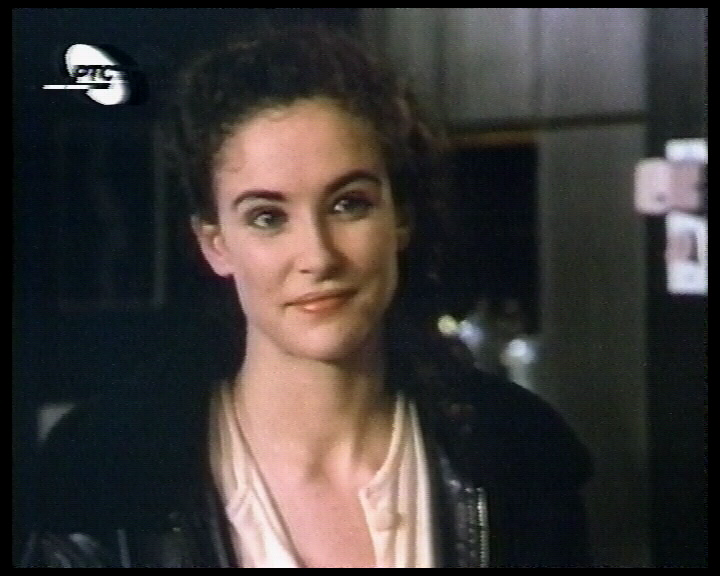
It's not perfect, but it is late here and I don't have time to play now. I would like to play around with DotCrawl and VagueDenoiser a little, and there are a few glitches in the tape that throw PeachSmoother off it's game for a few frames, but a little more tweaking should fix those.Read my blog here.
-
How in peach smoother to accurate NoiseLevel and Baseline?
I mean how to turn off peach smother automatic detection of noise?
That sample is look good.
And when you have time you can upload filtered clip -
Hi there, thought I'd give a little crack at this..
Coming from a noisy VHS is always discouraging at first, heh. I would actually suggest (after noise reduction, etc) to going back to 'vhs quality' by scaling down to 352x240 (*288 using PAL). Since videotape is 'vhs quality' anyway, you'll end up finding you've got a nice clean VHS picture afterward. 8)
Here is a version after putting it through:
- Deinterlace (virtualdub)
- Dynamic Noise Reduction, 25 (virtualdub)
- compression/clean with DivX (ExtremeSetting) (virtualdub)
- scale/compress to Quarter-DVD/VHS (352x288) (tmpg/mainconcept)
at
http://media.putfile.com/VHS-Test-Noise-NR352
Good luck!

-
In PeachSmoother, remove the references to NoiseLevel and Baseline, and put in Readout=True, Dot=True. Play the clip, and you should see two figures in the top left corner, along with a single pixel green dot. When the dot is solid, PS has a good fix on the noise. If the clip is short, or you have time, let it play through the full clip. If the numbers vary wildy throughout, consider using trim to break the clip down for seperate settings. If the baseline (bottom number) remains fairly constant, you may be able to get away with a single set. As you watch, note the highest the two number reach. Use these to fill in the NoiseLevel and Baseline numbers in the filter, and also remember to turn off Dot and Readout (either remove them, or set them to false)
Read my blog here.
-
Do you have any video examples showing that you are not loosing deatail because every test I have run has confirmed the exact opposite. I lose detail whenever I scale it down from full D1.Originally Posted by Shadarr
-
I put Readout=True and Dot=True and have two numbers on left corner and i have little green pixel. See pic:

I am intersting few things about peach:
1. firstly number 10.345 is NoiseLevel and 7.133 is Baseline.
2. When testing script with peach, does i need just to write in script Readout=True and Dot=True without filter parametars (like noise reduction,spatial...)
3. How do i now that dot is sold. And if is sold what to do? Because in some frames i see green dot and in others i dont see green dot.
4. In movie if i found the highest number(for noiselevel and baseline) than i need to fill that in script, right?
5. And when using another filter in conjuction with Peach, what you prefer, first to find noiselevel and baseline and than apply another filter(convolution or vague....)
6. Do you think that this is better method using peachsmoother instead his "automatic" mode.
Once again, sorry for many question but i am interesting to understand best way to use pich smoother.
this is clip eachsmoother (NoiseLevel = 10.345, Baseline = 7.133, NoiseReduction = 80, Stability = 30, Spatial = 100)
http://rapidshare.de/files/34246162/Peachsmoother.mpg.html -
I'm sorry, I did not mean to suggest that you wouldn't 'lose detail', I was trying to help a situation when there is extreme interfering noise.Originally Posted by thecoalman
Since VHS quality is similar to QuarterDVD, I often scale back down to that resolution after filtering. You DO get better results when you record larger (in order to filter) versus recording QDVD and filtering at that resolution.
You are correct however, as with filtering/adjustments, scaling down of any sort will lose sharp details.
-
-
Correct. I usually find the Baseline number is pretty good, but the NoiseLevel number is sometimes too low in practise. It is a good starting point.1. firstly number 10.345 is NoiseLevel and 7.133 is Baseline.
My understanding is that with Readout=True, the other values are ignored. With the exception of NoiseLevel and Baseline. These must be omitted if Readout=True.2. When testing script with peach, does i need just to write in script Readout=True and Dot=True without filter parametars (like noise reduction,spatial...)
When the green dot is visible, PeachSmoother has picked up the noise levels and is estimating. The longer the dot is visible for, the better the estimates. When the ot is not visible, PS is searching for a hold. Usually this happens after a major shift in the image. Your sample is very noise (based on the readout figures) and has a few glicthes that throws the estimates out the window.3. How do i now that dot is sold. And if is sold what to do? Because in some frames i see green dot and in others i dont see green dot.
If the numbers vary wildy from scene to scene, consider using multiple PS statements with Trim, and seperate NoiseLevel and Baseline numbers in each. If the numbers remain relatively stable then use the highest they reach as your starting point.4. In movie if i found the highest number(for noiselevel and baseline) than i need to fill that in script, right?
It depends on the order of the filters in your script. It is easier to put PS before convolution3D as PS doesn't need the fields seperated first. In this case, find the numbers before running any other filters. If you have any filters set to run before PS, then you need to find the numders after the first filter has been applied. Assuming avisynth applies the filters in the order they appear in the script in all cases, you shouldn't really get lost doing this.5. And when using another filter in conjuction with Peach, what you prefer, first to find noiselevel and baseline and than apply another filter(convolution or vague....)
I think it is a valid tool to have in the kit. If the numbers aren't drifting too much, and you get a constant green dot during testing, then automatic might well be strong enough. If you have any sudden shifts in lighting, colour saturation or noise levels in the image, then often there is a period where the automatic filtering has to re-esitmate, and noise levels revert to normal for a number of frames. In this case, having a preset baseline and noiselevel can stop this noise pulse appearing. It really is clip dependent.6. Do you think that this is better method using peachsmoother instead his "automatic" mode.Read my blog here.
 Quote
Quote


Similar Threads
-
avisynth denoise filter applied only from frame x to frame y
By codemaster in forum Video ConversionReplies: 1Last Post: 26th Apr 2012, 12:22 -
Sharp VCR (or similar) S-VHS quality for best capture of my VHS tape?
By ruehl84 in forum Capturing and VCRReplies: 0Last Post: 19th Feb 2012, 15:52 -
Denoise filter ? which one is the best ?
By cd090580 in forum Newbie / General discussionsReplies: 35Last Post: 19th May 2011, 09:34 -
Help with Denoise Filter
By skorpinok in forum Video ConversionReplies: 0Last Post: 1st Jan 2011, 02:59 -
Camcorder Color Denoise Filter for VirtualDub
By Soopafresh in forum Camcorders (DV/HDV/AVCHD/HD)Replies: 0Last Post: 17th Mar 2008, 13:30