


 View Profile
 View Forum Posts

I have at least 3 or 4 concerts recorded off broadcast tv years ago. They were broadcast in stereo, and recorded to B1s (Beta) HifFi. They would be quite difficult to find today, and if available at all would probably be among your more expensive DVDs. They run up to as much as an hour each, with no commercials. My intention was to transfer them to DVD at some point. While I do not have any sort of home theater setup at this time, or separate speakers in lieu of the tv, I have heard this material over a good pair of headphones, and I think the audio quality of the music is quite good. So, I'd like to maximize the quality obtained in the transfer to DVD. What is the best you can hope for in this situation, and are there any things that can be done to get the best results ? Like maybe using better than standard audio cables ?
+ Reply to Thread
Results 1 to 4 of 4
-
Member

- Jul 2005
- drifting, somewhere on the Sea of Cynicism


-
The easiest option (you don't mention the recording method) - would be a standalone DVD recorder. With my standalone DVD recorder, the 1 hour setting is the highest quality level you can set. With that setting, you'll get 8Kbps video and also 48Khz PCM (uncompressed) sound. I'd use the highest setting you can get, and only fit up to 1 hour on each disc. I use a Pioneer DVR-320, but I think all of the standalone DVD recorders will have similar settings. You might want to use decent cables, just don't fall for the Monster scam.
-
Member
- Jul 2005
- drifting, somewhere on the Sea of Cynicism
-
Thanks. I would be using my Pioneer 520H. The Fine (or "MN32") speed is what I assumed I'd be using, but I was unaware of what Audio recording options might be available. So I will check in the menus and the manual.Originally Posted by akrako1 -
I believe PCM sound is only available in the Fine mode (MN32) but you can check your manual. The following chart has been posted here before (for a dvr-531 - for nearly all Pioneer dvdr's)
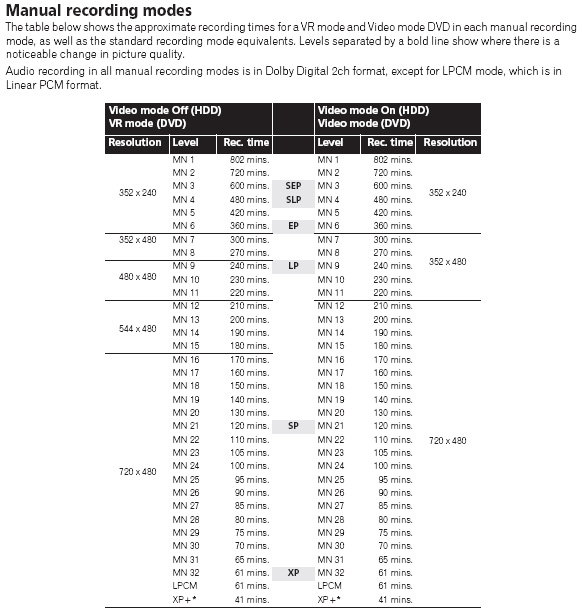
It shows PCM there at the bottom of the list (equivalent to the MN32 setting), but nowhere else. I've used MN32 and it does give PCM sound.
 Quote
QuoteSimilar Threads
-
VCR S-VHS Blaupunkt RTV-915 HiFi
By mammo1789 in forum RestorationReplies: 4Last Post: 7th Mar 2012, 06:40 -
Cheapest way to xfer vhs tapes to pc or dvds
By majax79 in forum Capturing and VCRReplies: 4Last Post: 20th Jul 2010, 10:46 -
VHS Xfer editing questions
By NorthStar7 in forum EditingReplies: 2Last Post: 15th Mar 2010, 15:10 -
Best Quality approach for xfer of home video
By ironman. in forum Newbie / General discussionsReplies: 1Last Post: 13th Feb 2010, 11:45 -
Seeking Advice: xfer files and pgms from old PC to new rig....
By stedyone in forum ComputerReplies: 6Last Post: 6th Mar 2009, 13:44