


 View Profile
 View Forum Posts
 Private Message


Hi
I have two burners, one for reading and one for burning. (Pioneer 107 & 110)
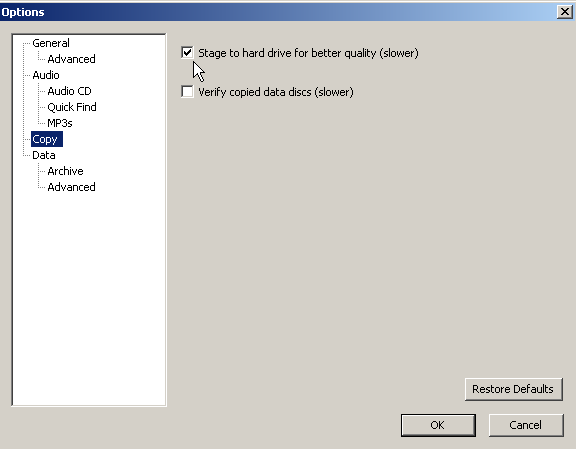
When I try to do a copy, it always wants to do it "on the fly". How do I change it so I read to the HD and then to blank disk ?
There must be a way of doing this ???
Thanks for any help !!!
PS .... does RecordNow 4.5 recognise Pioneer 110 burners ? I want to go back to it !!!
+ Reply to Thread
Results 1 to 8 of 8
-
-
To get RN 4.5 to work with DL writers* read this article:
www.dvd-recordable.org/Reviews+index-req-showcontent-id-137.phtml
*RN 4.5 will NOT burn DL media. -
Sure, don't use RN's Copy function. First copy ("Rip") your disc to somewhere on your hard drive, then use Data Disc or Audio CD or Jukebox CD or whatever and select the files you copied to hdd.Originally Posted by rumy
-
My options screen is different to your ??? How do I do screen shots like you have ?
-
Use "Save as image" then choose "Burn image." Burn image defaults to the last disc image you created on the HD. You have a choice of saving as either ISO or GI files -- it doesn't make any difference which you choose, practically speaking. Works equally well either way. You will wind up with a clone of the
original disc. -
I think rumy that MOVIEGEEK must have posted 4.5 options or something.Originally Posted by rumy
You are correct--RN7.3 does not look like that. -
I have MyDVD Studio Deluxe and I assumed it was similar to v7.3,I would do what MaxBlack recommended above.
-
Now got RecordNow 4.5 back on and working ... thanks

 Quote
Quote
Similar Threads
-
Re using old Sonic hardware - little help?
By Pentos in forum Capturing and VCRReplies: 9Last Post: 17th Oct 2012, 10:34 -
Has anyone used Sonic Scenarist or DVDit pro HD?
By jbandy1 in forum Authoring (Blu-ray)Replies: 16Last Post: 18th Feb 2009, 01:08 -
Sonic Vegas
By m baqar in forum Authoring (DVD)Replies: 9Last Post: 3rd Apr 2008, 04:29 -
Sonic Vegas
By m baqar in forum Authoring (DVD)Replies: 6Last Post: 3rd Apr 2008, 00:11 -
sonic vegas
By m baqar in forum Authoring (VCD/SVCD)Replies: 1Last Post: 2nd Apr 2008, 01:29