


 View Profile
 View Forum Posts
 Private Message


is it possible to put 20 avi files of +\- 200 mb on a dvd and be able to watch in on a dvd player? they are all running about 30 minutes each.
maybe by converting it to mpeg2 and authoring it and then shrinking it in size or something like that. any imput would be great.
thanks
+ Reply to Thread
Results 1 to 25 of 25
-
-
Hello,
Yes depending on the bit rate when you convert to mpeg2. Use a bitrate calculator found in the tools section.
If you have a divx capable dvd player you SHOULD be able to play the avi's straight off the dvd when burned as avi's.
KevinDonatello - The Shredder? Michelangelo - Maybe all that hardware is for making coleslaw? -
10 hours on a DVD as mpeg video would be pretty crappy. At VCD quality (the lowest DVD resolution) you can get about 7.5 hrs.
Use Divx if you can."Art is making something out of nothing and selling it." - Frank Zappa -
It's best to convert to the needed size, not converting and shrinking.Originally Posted by dude112
A Bitrate Calculator is what you need."Art is making something out of nothing and selling it." - Frank Zappa -
actually
if you use the KVCD Half-D1 template
it'll be good
great even
yeah -
Originally Posted by funkguy4
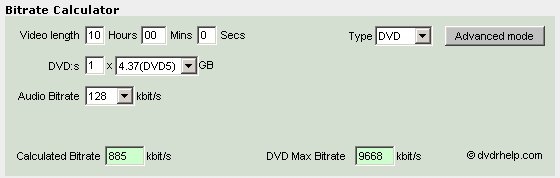
Half D1 @ 885/128 and you think it's good/great even ?
oh well, your opinion I guess .... If in doubt, Google it.
 -
(Post edited. Previous sample quality was marginal.)Originally Posted by jimmalenko
How about 737KBps average?
http://up1.fastuploads.info/kvcd_gf.mpg
But don't take my word for it. Burn it on a cd and watch it on your SA player
And that looks really good for that bitrate.
Edited: This was encoded from a TV capture, so the source is not the best, and heavy filtering had to be used. Still, not bad for the very low bitrate result.
@dude112 (original poster)
I fit about 18 hours (KDVD 352x240 MPEG-2), mostly TV episodes on one DVD.
I use 1,800KBps maximum bitrate for that resolution, and never use 1,150KBps.
Then I use the tool calcumatic from kvcd.net to calculate the number of streams I want to fit on each DVD.
After I get the numbers, I input them into their other tool, cqmatic, and start the encoding process. I use CQ mode.
I don't know how long each of your avis is, but you really have to figure out in time and not in quantity per media.
At half d1, you should be able to fit about 10 hours on a DVD with the process mentioned.
Don't forget to use kwags motion adaptive script and kvcd matrix, or the FUPP scripts, also discussed at kvcd.net and at doom9. If you download one of their templates, the matrix is already included.
@All,
Best wishes, Merry Christmas and a new happy 2005 !!! -
I will admit that the video clip was pretty good for the bitrate used...but it was still pretty crappy looking to me.
Why bother going to all the time and effort to cram so much on a single disk when you get much better quality by spreading it over another disk or two? Disks are cheap, seems like a waste of time to me. My $0.02"Art is making something out of nothing and selling it." - Frank Zappa -
If, by avi, you mean diivx or xvid, you could just put them on a DVD and use a divx capable player.
-
That's part of the fun and challengeOriginally Posted by ZippyP.
 Because that was just to prove that even at that low bitrate, 737KBps average, it can look ok and very watcheable. So half d1 at 885KBps, as jimmalenko posted, is a very descent bitrate on kvcd encodings.Disks are cheap, seems like a waste of time to me. My $0.02
And btw, a KVCD of at least 900KBps @704x480 (full movie on one CD) does look extremely good.
KDVDS at around 1,500KBps average are indistinguishable from original source.
And just like you say that disks are cheap, even DVD media, but why would you put one movie on one DVD, if you can put three movies on one DVD with the same quality? Even full anamorphic!
I'm averaging close to 5 hours full d1 per DVD, with no difference from original source. That's for movies. For musicals, I average 4 hours of MPEG-2 interlaced sources per DVD. Even zooming in on virtual dub to 300% to compare against the source.
Here's a little taste of roughly 1,700KBps average full d1, equivalent to about 5 hours worth of video on one DVD at that rate.
http://up1.fastuploads.info/good_fellas.m2v.zip
And that's not filtered at all! That's just a straight KDVD encode from a D2V file, and it's basically identical to the original VOB.
For comparison.
Source (VOB) frame:
http://up1.fastuploads.info/s.jpg
Destination (encoded KDVD) frame:
http://up1.fastuploads.info/d.jpg
Destination frame looks lighter, because YUV->RGB was set to "TV" scale on dvd2avi during project creation.
So once again, for the original poster who wants to fit 10 hours on a DVD, now you have one more options to think about
600 minutes total? Put it on two DVDs at full d1, or one DVD at half d1
@funkguy4,
I agree that half d1 is a better choice for avi to kdvds.
Full d1 is better for dvd encodes, unless you want to cram more space on your DVD. -
[quote="animatron"]
Thanks for the corroboration. I wouldn't overgeneralize about AVI -> DVD being good @ Half D1 though....depending on the source, it maybe very good idea to go w/ Full D1...and, for me, ~4hrs of Full D1 w/ high quality AC3 sounds is wonderful.Originally Posted by ZippyP.
Now if only they came up w/ an otimized set up for KDVD on CCE....i've just been using the matrix w/ two pass VBR, it's been pretty damn good, but i wanna squeeze a lil more out of it
sry for that rambling...getting off topic -
I'm with him.Originally Posted by ZippyP.
Not my cup of tea to go through all the time and effort of heavy filtering and cramming. For what I do, 1 DVD with "standard" MPEG-2 matrices does the job for me
FWIW, it's funny how every now and again a Kwag-ist or two finds their way over here  If in doubt, Google it.
 -
And exactly what is that supposed to meanOriginally Posted by jimmalenko

-
Nevermind.Originally Posted by animatronIf in doubt, Google it.
-
They already didOriginally Posted by funkguy4

You can patch CCE wth kvcd matrix, and it works very well.
You'll have to search their forum because I don't remember exactly how it's done.
It also works with mencoder/ffmpeg/NuEnc/FreeEnc/QEnc and YMPEG.You should give CQ mode a try. It blows 2-pass away!.i've just been using the matrix w/ two pass VBR, it's been pretty damn good, but i wanna squeeze a lil more out of it -
To each his own.Originally Posted by animatron
I guess what jim was referring to was that those who favour KDVD can seem zealous in their promotion of it. It is not favoured by most of the experienced people that frequent this site and it has led to a few confrontations in the past (back when it was KVCD). Generally when people ask about it now they are referred to the KDVD site for more information. I'm not looking to start a dispute, everyone is entitled to their own way of doing things, but you won't find many KDVD boosters here.Originally Posted by animatron"Art is making something out of nothing and selling it." - Frank Zappa -
I see.Originally Posted by ZippyP.
Maybe that's why the (real) most experienced developers don't frequent this site, but frequent doom9 and kvcd?
Which btw, I don't see any of them posting here.
I wonder why
-
im converting a series of 25 min per episode with tmpg
mpeg-2 720X576 pixels
bitrate of 2150
audio bitrate 392
the outcome it says is about 10.82% which is about 450 mb
when i author it will it be that size so that i can put 9 episodes on one dvd or will authoring make it bigger/smaller? -
Authoring will add only a little to the disk b/c of the menus, you should be OK.Originally Posted by dude112
2150 kbps is too low for 720x576, change the resolution to 352x576 and it will be much better."Art is making something out of nothing and selling it." - Frank Zappa -
hey can you tell me what prog is the best and fasts to convert mpeg to dvd. ( new to convert dvd ) dvdSanta, VSO DivxToDVD ???? thanks
-
If it was me I would LOWER the audio bitrate to 192 or maybe 224 or 160 (why do you need 392?..I bet the source is at best 128 mp3 ) and use the extra headroom to increase the video bitrate slightly........my own testing of avi to mpeg (dvd full res) show good results at 2200+ bitrates for video...cropping off the end titles will also save space (but your still looking at a max of around 4hrs playing time).....but £30 will buy a nice .avi enabled DVD player......so whats the point?,,,spend a few pounds/dollars/euros/yen/whatever and get an .avi enabled DVD player if you want to fit 10hrs per DVD....or... stop being a TIGHT ARSED SKIN FLINT and spread them over more than one DVD+/-R...is 20p/40c/whatever more than you can afford?.................if you ARE a TASF (tight arsed skin flint) then just use your TV out.Originally Posted by dude112
No2: We want Information.
No6: You wont get it! -
Using a 2-pass VBR I hope.Originally Posted by monzie"Art is making something out of nothing and selling it." - Frank Zappa
-
I agree. The whole point of cramming as much as possible on a disk is beyond me, it seems to be a case of "because they can". To each his own I suppose.Originally Posted by monzie"Art is making something out of nothing and selling it." - Frank Zappa
-
Not reallyOriginally Posted by ZippyP.
It's more like an art, because it takes time to master all the advanced video techniques available, in order to be able to achieve such high compression and quality on such a small footprint, which is just impossible with current (every day/one-click) solutions.
At least that's the """KVCD Spirit""", which some of us "feel", and it does take time to master
Put in another way, you can go to a store and buy a great piece of glass blown ornament.
But if you had the skills to make your own glass blown ornaments, the results would be far better, more polished and more satisfying than just buying it.
I hope this makes sense to you, because it does to me!
Cheers! -
Originally Posted by animatron
Fair enough, one man's art and all that. It's not for everybody but it shows that people enjoy video as a hobby for all kinds of different reasons.
"Art is making something out of nothing and selling it." - Frank Zappa
 Quote
Quote


Similar Threads
-
help me how to make a set of avi files to DVD with menus of each avi file
By mmah in forum Video ConversionReplies: 5Last Post: 9th Mar 2011, 02:07 -
Found DVD/AVI software player that displays Chinese srt subtitles with avi
By jimdagys in forum Software PlayingReplies: 1Last Post: 14th Nov 2009, 19:45 -
Create Root menu for avi's on DVD without converting each avi?
By Ghtpua in forum Authoring (DVD)Replies: 2Last Post: 7th Sep 2007, 23:23 -
I have converted avi to vcd and svcd im looking to convert avi to dvd
By dbztoolkit in forum Newbie / General discussionsReplies: 1Last Post: 11th Jun 2007, 12:14