


 View Profile
 View Forum Posts


All I see are rave reviews for this utility:
https://www.videohelp.com/tools?tool=DVDAuthorgui
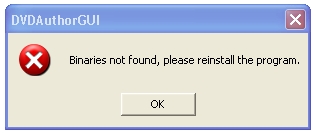
But, experimenting with it, I get nowhere fast. It recognizes the m1v and mp2 files. But, when I click the "Author DVD" button and enter a folder name, I get this:
I don't understand what it means by "reinstall." There is no "installer" for this utility. Anybody have any clues to what's going on here?
+ Reply to Thread
Results 1 to 18 of 18
-
-
Free Flying Soul

- Feb 2002
- United States


You have the 'gui only' version, which is used to upgrade the package as updates are made. Get the full version from the link in my signature.
-
You have probably downloaded the wrong distrobution i.e. the 'upgrade' rather than the whole package. Check in the DVDAuthor folder for a subfolder called 'bin' (I think) with lots of other executables in.
In that case redownload and extract paying more attention to the download description -
Damn Liquid that was some fast posting

-
Nope ... downloaded the whole enchilada (the top link on their download page):Originally Posted by liquid217

. Now what? -
Where and how have you unpacked this program. I'm not sure if it make much difference but something might jump out as wrong. I simply right click and unpack with Winrar onto my desktop into deafault folder and it always works fine.
-
Free Flying Soul
- Feb 2002
- United States
-
make sure you are extracting all of the contents of the package (including the 'bin' folder)
if nothing else, try this installer
http://home.arcor.de/neroplugins/other_progs/dvdauthorgui/ -
I created a folder named DVDauthor and used Unrar to open the RAR file into that folder.Originally Posted by daveoggy
-
Now this might sound stupid but try unpacking directly into a folder on the root of your C drive. you may have something in your existing path which DVDAuthor doesn't like. Make sure the DVDAuthor executable is in that first folder.
Hmmm. Unrar, never used that, is it a command line util? If so there may be a switch to make the program recreate subdirectories. (Thinking like the -d switch in pkunzip) -
That worked ... but ... it keeps giving me warnings about the MP2 file ... saying I need to remultiplex it. Odd ... I've already burned a DVD with another utility using the same MP2 file and it was fine.Originally Posted by liquid217
-
MP2 files are a bitch to do right!!! In my experience you absolutly MUST use toolame.exe and besweet GUI. Also never go from AC3 directly to MP2 always encode like this:
Non-MP2 format ---> WAV Stereo (BeSweet) Then
If required Wav Stereo ---> Wav Stereo 48KHz (SSRC) Then
Wav Stero 48Khz ---> MP2 (Toolame)
Trying to do too many steps at once seems to cause problems. -
Hold on a sec! Are refearing to the verbose stuff that DVDAuthor spits out? I was worried about his at first but now assume that whatever problem it's detecting, it's fixing, as everything I've ever done works 100%
-
I used a variation of the above. First, I loaded the MPEG1 file into VDub. Then, I chose "Save WAV." Then, I used a program I have called Total Recorder to change it to a 48khz WAV. Then, using tooLame, I created a 48/224 MP2 file. Then, I want back to DVDAuthorgui and ran the puppy again. Didn't get any error messages this time. But ...Originally Posted by daveoggy
It created two directories ... VIDEO_TS and AUDIO_TS. The VIDEO_TS has these files in it:
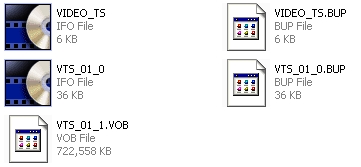
But, the AUDIO_TS directory is empty. Something tells me that's not a good thing. -
Free Flying Soul
- Feb 2002
- United States
-
that is perfectly normal. audio_ts is reserved for DVD-A
-
Well, hehe, I am on a learning curve here. So, if I'm understanding correctly, the ONLY time there'd be files in the AUDIO_TS directory would be if I was creating an "audio DVD." Correct?Originally Posted by liquid217
In any case, DVDAuthorgui is now in my arsenal (grin). While I have other capture software/hardware coming ... and other editing tools ... part of what I want to do is "convert" some of my old VCDs into DVDs. Reason? In my first experiment in doing this (using ArcSoft ShowBiz), I noticed that the quality of the DVD was better than the VCD was on the same player. And, I suspect the reason for this is because my player probably grudgingly plays VCDs (with video/audio artifacts in tow). But reburned to a DVD, my player produces a very good quality considering the MPEG1 source ... with no audio clicks/pops and no video "smearing" as seen when playing the VCD. -
Free Flying Soul
- Feb 2002
- United States
-
That is correct, although the audio_ts folder might be used for some other purpose than just for DVD Audio.Originally Posted by AlecWest
https://www.videohelp.com/dvd#struct -
I'm glad your sorted now. I will have to investigate the tools you used to create your MP2 I've never heard of them.
-
By "VDub" I mean VirtualDub. Total Recorder has been around for years. I'm on v4.2 right now ... v5 is now available from http://HighCriteria.com for just under $12. It's primary function is to capture anything going through a sound card and save it as a WAV file. But, it does a certain amount of cross-conversion between audio formats (not MP2, though).Originally Posted by daveoggy
I use it primarily to capture telephone interviews I do from time to time using a special hookup I got at Radio Shack (no, not a suction cup, hehe) ... then transcribe the interviews for magazines. But, I've found a lot of other neat things to do with it.
 Quote
Quote Visit Homepage

Similar Threads
-
DVDAuthorGUI Problem...
By beckmen in forum Authoring (DVD)Replies: 12Last Post: 1st Jul 2010, 13:34 -
Experimenting with blu-ray decryption advice needed
By adamf154 in forum Blu-ray RippingReplies: 3Last Post: 7th Apr 2010, 16:15 -
DVDAuthorGUI: How do I write?
By videohalp in forum Authoring (DVD)Replies: 1Last Post: 8th Jul 2008, 21:29 -
DVDauthorGUI question
By AlecWest in forum Authoring (DVD)Replies: 2Last Post: 20th May 2008, 13:46 -
DVDauthorGUI question regarding subtitles
By AlecWest in forum Authoring (DVD)Replies: 6Last Post: 6th Dec 2007, 16:05