


 View Profile
 View Forum Posts


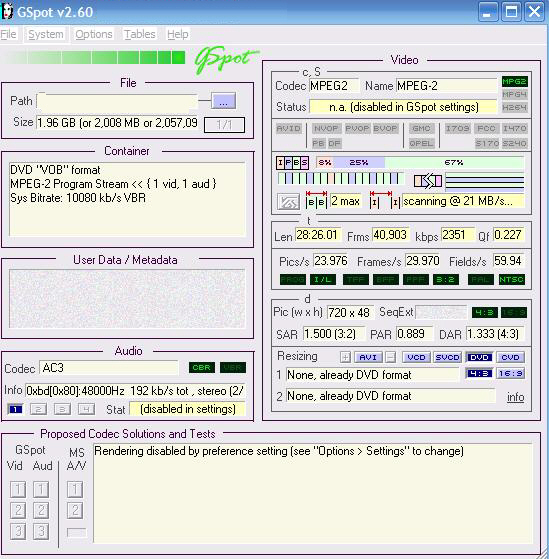
How do u check bitrate of a movie as I have tried gspot but cannot see where it says this
+ Reply to Thread
Results 1 to 9 of 9
-
-
I'm a MEGA Super Moderator

- Aug 2000
- Sweden


To the right under kpbs

-
so in this snapshot bitrate of movie is 29.970 is that kb/sec
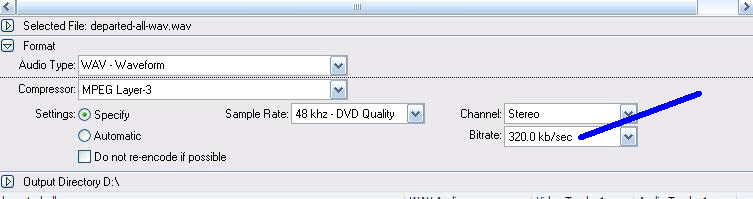
and on river past audio converter is this same thing
-
The bitrate you have indicated on Riverpast is the AUDIO bitrate, which is shown in g-spot on the info line in the audio section (under the codec).
If you look at the image from g-spot that you have posted, have a look at the line that starts Len (length) Frms (Frames) kbps (Bitrate for the video stream)Read my blog here.
-
ok guns1inger thanks also have u not read your pm i sent u about syncview or have u forgot
-
Sorry - one of those days
 . Check your PM in 10 minutes or so.
Read my blog here.
. Check your PM in 10 minutes or so.
Read my blog here.
-
hi thanks for this about syncview now going to test this out is it best to convert my audio to wav 1st also what is this triangle thing about as i dont get this only time i see that is when i downloaded some test files
http://software.sdecnet.com/index.php?option=com_content&task=view&id=18 -
I think that is a feature of the full (payware) version.
Read my blog here.
-
That's a screenshot of one frame from the optional SyncTest media, which consists of a perfectly calibrated WAV and DivX. There are four different frame-rate packages, so those files are not included in the standard installation. They are free, but you have to download them separately.Originally Posted by natty
 Quote
Quote Visit Homepage

Similar Threads
-
Should i put average bitrate or max bitrate in 2pass encoding mode?
By tendra in forum Video ConversionReplies: 28Last Post: 11th Nov 2011, 08:38 -
Using mutiple passes with lower bitrate vs single pass with high bitrate on
By jones24 in forum Newbie / General discussionsReplies: 15Last Post: 14th Aug 2009, 19:17 -
Most compatible codec, Lossless bitrate, and max bitrate
By sevenlayercookie in forum Video ConversionReplies: 2Last Post: 6th May 2009, 21:43 -
Low bitrate source to High bitrate target
By sameerdhiman in forum Newbie / General discussionsReplies: 2Last Post: 8th Nov 2008, 00:54 -
What's the appropriate video bitrate for old home movies?
By Grunberg in forum Newbie / General discussionsReplies: 12Last Post: 3rd Feb 2008, 21:21