


 View Profile
 View Forum Posts
 Private Message


Can someone explain to me why one re-encoder makes a converted .ts file to .vob half the size when using all the same parameters: bit-rate=9.7M, res=720x480, AR=16:9, Sound=AC3-5.1@48Ksample&384bit-rate?
Using SuperC (GUI for FFMpeg) and setting it to the above parameters, a 45sec .ts test file re-encodes to a VOB size of 18MB.
Using HDTV1DVD (cant set the parameters but they happen to be the same as above except HDTV2DVD makes the bit-rate=7.8M. The same 45sec .ts test file is 40-45MB.
With the same parameters except for the bit-rate, why would a high bit-rate with FFmpeg make a smaller re-encode vob file then the lower bit-rate vob of the HDTV2DVD? I thought bit-rate was like the quality of the video?
What am I missing, am new here to this re-encoding stuff?
ThymeJ
+ Reply to Thread
Results 1 to 4 of 4
-
-
SVCD2DVD v2.5, AVI/MPEG/HDTV/AviSynth/h264->DVD, PAL->NTSC conversion.
VOB2MPG PRO, Extract mpegs from your DVDs - with you in control! -
Thx for the responses
I read another post that you said the bit-rate of 7800 was used for compatibility. Does that mean that some dvd players might have a harder time playing back bit-rates that are higher the 7800?
What is a good program to show the true bit-rate of a given vob file?
My SuperC 45sec test in VideoRedo ctrl-L info screen says its 9000+ but HDTV2DVD 45sec test file shows as 7800. If files size = bit-rate * 45sec formula above, the HDTV2DVD seams more true to what VideoRedo is telling me. -
No. ffmpeg can sometimes create bitrate spikes (i.e. bitrate going above the set max). Some players may not like this. Most are oblivious to it. So a cautious setting of 7800 was used to make sure that even these spikes don't go over the DVD max (of ~9800).Originally Posted by thymej
The nominal bitrate is written in the mpeg headers. This is the max value set in the encoder. It really has no bearing on the true bitrate. (you could tell an encoder to encode some end credits @ 8000kbs. This would be the nominal bitrate and you would see this in VRD etc. But the actual bitrate would be lower (as most of the frames a black))
So you get (from VRD):
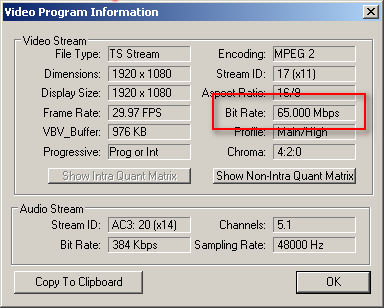
but the actual bitrate needs to be deduced by parsing the file, (from gspot):
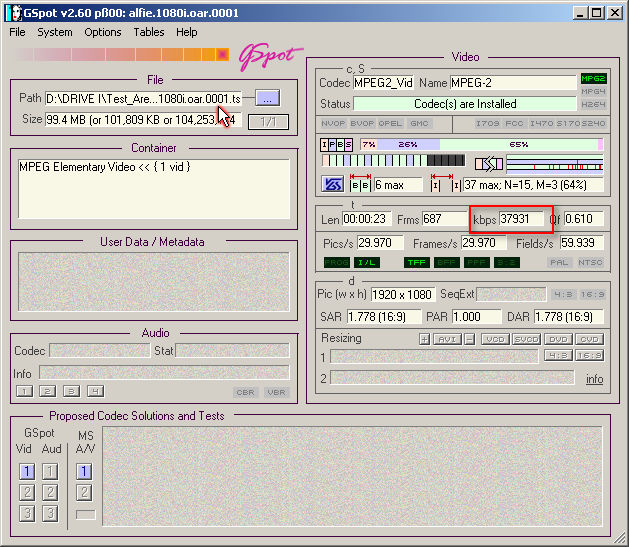 SVCD2DVD v2.5, AVI/MPEG/HDTV/AviSynth/h264->DVD, PAL->NTSC conversion.
VOB2MPG PRO, Extract mpegs from your DVDs - with you in control!
 Quote
Quote
Similar Threads
-
How to get the least loss of video quality when recoding MKV file
By dave in or in forum Video ConversionReplies: 13Last Post: 20th Oct 2015, 22:09 -
Recoding/Remuxing a HD mp4 Video File
By 360 in forum Newbie / General discussionsReplies: 8Last Post: 30th Oct 2011, 00:20 -
Does recoding a 7gb mkv file require a lot of hard disk space?
By dave in or in forum Video ConversionReplies: 3Last Post: 21st Aug 2011, 17:01 -
DVD to DivX Conversion - Recommended File Sizes
By DakotaThrice in forum Video ConversionReplies: 3Last Post: 13th Jun 2010, 07:31 -
DVD to FLV plus need to edit and file sizes are huge.
By mickthetree in forum Newbie / General discussionsReplies: 9Last Post: 6th Dec 2008, 10:07