


 View Profile
 View Forum Posts
 Private Message


Hello,
is there a (small) tool which deletes the PUO's (prohibited user operations) from one or more .IFO/.BUP files and then saves the 'corrected' files?
Now I have to run them one by one with IfoEdit which is quite time consuming.
many thanks!! Porto
+ Reply to Thread
Results 1 to 12 of 12
-
-
-
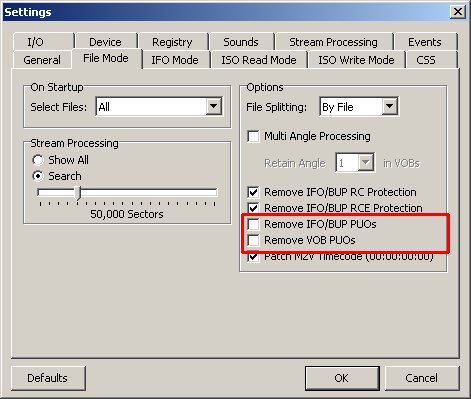
VobBlanker will do it by default. Open the IFO and Process the whole thing. You'll see the Settings box up near the top with the Remove PUOs checked. You can do it to a part of the DVD as well, by just processing what you want and skipping the rest.
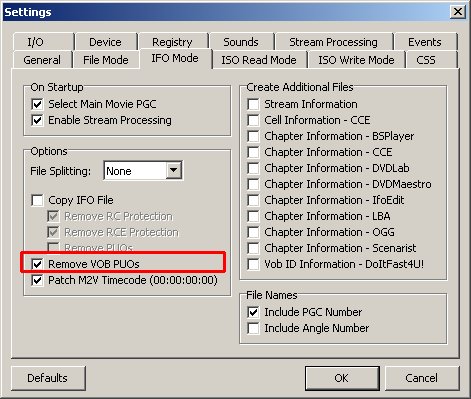
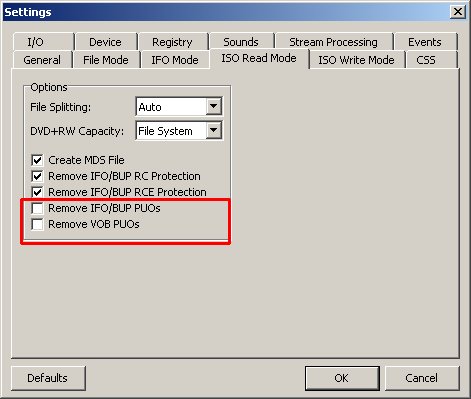
And if this was originally from a DVD, you could have gotten rid of the PUOs at the decrypting stage with DVD Decrypter. -
I have ripped many dvd-5's with DVD Decrypter, burned them right back to dvdr and the PUO's were not removed, on any of them.Originally Posted by manono
-
Check your settingsOriginally Posted by Noahtuck

 If in doubt, Google it.
 -
Don't make me roshambo you!!!!!!Originally Posted by jimmalenko
:P
I usually just use DVD Shrink or VobBlanker for that
Because most of the time i use DVD Decrypter to rip a dvd-9, in which case you always have to use DVD Shrink or something anyways, or to demux video and audio 8)
All the advanced shit i know and along you come just begging for a roshambo :P
Ya can always learn new shit eh
Damn you did that awful fast and late
WTF are you doing ??
Well, it's late here anyway's, 2am
-
Fast ....... yesOriginally Posted by Noahtuck

Late ?
6PM here.If in doubt, Google it. -
Never could work out why they weren't on by default
Read my blog here.
-
Hi!
Thanks for the responses!
I downloaded VobBlanker and it does what I want but with the risk that it does more than I want if the settings aren't configured correctly. Now I use Free DVD and it does EXACTLY and ONLY what I want, remove those darn PUO's from all IFO files before burning; the compilations were already in DVD5 format so using a program as DVDshrink will take too much time for only deleting those bits from the files.
I am satisfy! Great job all! Many thanks!
Porto -
That's why i said it late here anyway's, because i knew it was earlier there, or later the next dayOriginally Posted by jimmalenko

And porto
Even running a full backup dvd-5 through shrink only takes like a minute because it's not compresing any video or taking anything out.
But any way to the final result
Ya know, i was wondering why it was not set up that way as soon as jim pointed it out, you would think it would be set to take them off by defaultOriginally Posted by guns1inger
-
As was shown above, adjusting settings works for me.Originally Posted by manono
 Quote
Quote


Similar Threads
-
Momitsu 799/899 PUO skip
By ojopaj in forum DVD & Blu-ray PlayersReplies: 5Last Post: 14th Mar 2010, 09:46 -
Disable Forward
By modtec in forum Software PlayingReplies: 2Last Post: 27th Jan 2009, 12:46 -
Bookmarking a PUO?
By Hunding in forum Newbie / General discussionsReplies: 0Last Post: 8th May 2008, 22:10 -
player that ignores PUO
By lieven in forum DVD & Blu-ray PlayersReplies: 3Last Post: 20th Sep 2007, 14:48 -
Cannot disable DVD subtitles
By Talayero in forum SubtitleReplies: 8Last Post: 8th Aug 2007, 17:56