


 View Profile
 View Forum Posts
 Private Message


How to edit with Avisynth
Newbies start here
Download
Sample scripts
Introduction
Avisynth is a very useful utility created by Ben Rudiak-Gould. It provides many options for joining and filtering videos. What makes Avisynth unique is the fact that it is not a stand-alone program that produces output files. Instead, Avisynth acts as the "middle man" between your videos and video applications.
Basically, Avisynth works like this: First, you create a simple text document with special commands, called a script. These commands make references to one or more videos and the filters you wish to run on them. Then, you run a video application, such as VirtualDub, and open the script file. This is when Avisynth takes action. It opens the videos you referenced in the script, runs the specified filters, and feeds the output to video application. The application, however, is not aware that Avisynth is working in the background. Instead, the application thinks that it is directly opening a filtered AVI file that resides on your hard drive.( http://www.lukesvideo.com/avisynth.html )
Avisynth is a scripting language and a collection of filters for simple non-linear editing tasks. Avisynth is unusual in that it does not generate output files.
Instead, Avisynth scripts, which have the extension .AVS, can be opened directly
in applications which read AVI files. When an AVS file is opened, Avisynth runs in
the background, generating video and audio data according to the script and feeding
it to the application as needed.
Original Avisynth homepage (Ben Rudiak-Gould)
Avisynth doc (updated by dividee)
more guides how to use Avisynth with Adobe Premiere, DVDx, etc.
Download:
Avisynth 1.0beta7d (dividee)
Avisynth 1.0beta6 (Edwin van Eggelen)
Plugins
SpatialSoftenMMX (fixed by dividee)
Mpeg2Dec (original by M.Born)
MPEG2DEC (modified by dividee, added some filters, e.g. TemporalSmoother)
MPEG2DEC2 (modified by Tom Barry)
Vobsub / TextSub (Gabest)
Avisynth BMP loader (dvd2svcd)
Decomb / Tweak (Donald Graft)
VirtualDub filters import script
Avisynth subtitler (dvd2svcd)
GreedyHMA (Tom Barry)
GreyYUY2 (Steady)
ImageSequence (bzzz)
IVTC (Wizard)
Merge 1.0 (Klaus Post)
MJPEGcorrect
SimpleResize 0.3 (Tom Barry)
SmoothHIQ 1.0 (Klaus Post)
TemporalSoften2 (dividee)
UnFilter (Tom Barry)
VScope 1.1 (Randy French)
There are some tools, that help you to write basic scripts.
GordianKnot
D@rk$oul's AVSGen
MPEG2DEC GUI (esby)
AVStool (french)
FitCD (shh)
more links on request
Sample scripts
Make the text roll
Video fade in/out. Dissolve
Add subtitles
Crop and split screen
Resize and add borders
Zoom in/out
Picture in Picture
Full animated menu
Insert a blank clip
Make a video clip from a still image
Clean up a clip captured from VHS tape
Cut and join
Add a logo
Video/audio Reverse SlowMotion FastMotion
more scripts on request
__________________________________________________ ______________________________________
Make the text roll
The following sample scripts create credits of a home-made video. Source is 720x576, 25 fps.
Zoom out the main movie title
Zoom in the titleCode:AVISource("D:\video\jack.avi") Animate(0,100,"subtitle","Little Jack's",-1000,500,0,150,"Arial", \ 1000,$FF0000,"Little Jack's",70,300,0,150,"Arial",60,$FF0000) Animate(0,100,"subtitle","birthday party",-1000,500,0,150,"Arial", \ 1000,$FF0000,"birthday party",70,350,0,150,"Arial",60,$FF0000)
Simple text (credits)Code:AVISource("D:\video\jack.avi") Animate(0,100,"subtitle","Little Jack's",240,300,0,150,"Arial", \ 0,$FF0000,"Little Jack's",70,300,0,150,"Arial",60,$FF0000) Animate(0,100,"subtitle","birthday party",240,300,0,150,"Arial", \ 0,$FF0000,"birthday party",70,350,0,150,"Arial",60,$FF0000)
Rolling text (upwards)Code:AVISource("D:\video\jack.avi") Subtitle("starring",180,300,150,200,"Arial",40,$FFFFFF) Subtitle("Jack",200,360,150,200,"Arial",40,$FFFFFF) # Subtitle("co-starring",150,300,225,275,"Arial",40,$FFFFFF) # Subtitle("mum",180,300,300,350,"Arial",40,$FFFFFF) Subtitle("and",205,340,300,350,"Arial",20,$FFFFFF) Subtitle("dad",190,390,300,350,"Arial",40,$FFFFFF)
Rolling text (downwards)Code:AVISource("D:\video\jack.avi") Animate(400,600,"subtitle","editor.......Bob",100,500,400,600,"Arial", \ 40,$FFFFFF,"editor.......Bob",100,100,400,600,"Arial",40,$FFFFFF) Animate(420,620,"subtitle","camera.......Jim",100,500,420,620,"Arial", \ 40,$FFFFFF,"camera.......Jim",100,100,420,620,"Arial",40,$FFFFFF) Animate(440,640,"subtitle","regie.......susi",100,500,440,640,"Arial", \ 40,$FFFFFF,"regie.......susi",100,100,440,640,"Arial",40,$FFFFFF) Animate(460,660,"subtitle","producer......Ed",100,500,460,660,"Arial", \ 40,$FFFFFF,"producer......Ed",100,100,460,660,"Arial",40,$FFFFFF) Animate(480,680,"subtitle","drinks.......Mag",100,500,480,680,"Arial", \ 40,$FFFFFF,"drinks.......Mag",100,100,480,680,"Arial",40,$FFFFFF) Animate(500,700,"subtitle","breakfast...Will",100,500,500,700,"Arial", \ 40,$FFFFFF,"breakfast...Will",100,100,500,700,"Arial",40,$FFFFFF) Animate(520,720,"subtitle","sponsor......mum",100,500,520,720,"Arial", \ 40,$FFFFFF,"sponsor......mum",100,100,520,720,"Arial",40,$FFFFFF) Animate(540,740,"subtitle","party..mcDonalds",100,500,540,740,"Arial", \ 40,$FFFFFF,"party..mcDonalds",100,100,540,740,"Arial",40,$FFFFFF) # Animate(750,950,"subtitle","Bob",100,500,750,950,"Arial",40,$FFFFFF, \ "Bob",100,100,750,950,"Arial",40,$FFFFFF) Animate(770,970,"subtitle","Jim",100,500,770,970,"Arial",40,$FFFFFF, \ "Jim",100,100,770,970,"Arial",40,$FFFFFF) Animate(790,990,"subtitle","susi",100,500,790,990,"Arial",40,$FFFFFF, \ "susi",100,100,790,990,"Arial",40,$FFFFFF) Animate(810,1010,"subtitle","Ed",100,500,810,1010,"Arial",40,$FFFFFF, \ "Ed",100,100,810,1010,"Arial",40,$FFFFFF) Animate(830,1030,"subtitle","Mag",100,500,830,1030,"Arial",40,$FFFFFF, \ "Mag",100,100,830,1030,"Arial",40,$FFFFFF) Animate(850,1050,"subtitle","Will",100,500,850,1050,"Arial",40,$FFFFFF, \ "Will",100,100,850,1050,"Arial",40,$FFFFFF) Animate(870,1070,"subtitle","Max",100,500,870,1070,"Arial",40,$FFFFFF, \ "Max",100,100,870,1070,"Arial",40,$FFFFFF) Animate(890,1090,"subtitle","Mike",100,500,890,1090,"Arial",40,$FFFFFF, \ "Mike",100,100,890,1090,"Arial",40,$FFFFFF) Animate(910,1110,"subtitle","Cate",100,500,910,1110,"Arial",40,$FFFFFF, \ "Cate",100,100,910,1110,"Arial",40,$FFFFFF) Animate(930,1130,"subtitle","Trent",100,500,930,1130,"Arial",40,$FFFFFF, \ "Trent",100,100,930,1130,"Arial",40,$FFFFFF) Animate(950,1150,"subtitle","Mark",100,500,950,1150,"Arial",40,$FFFFFF, \ "Mark",100,100,950,1150,"Arial",40,$FFFFFF) Animate(970,1170,"subtitle","Tom",100,500,970,1170,"Arial",40,$FFFFFF, \ "Tom",100,100,970,1170,"Arial",40,$FFFFFF) Animate(990,1190,"subtitle","Rick",100,500,990,1190,"Arial",40,$FFFFFF, \ "Rick",100,100,990,1190,"Arial",40,$FFFFFF) Animate(1010,1210,"subtitle","Bruce",100,500,1010,1210,"Arial",40, \ $FFFFFF,"Bruce",100,100,1010,1210,"Arial",40,$FFFFFF) Animate(1030,1230,"subtitle","Laurence",100,500,1030,1230,"Arial",40, \ $FFFFFF,"Laurence",100,100,1030,1230,"Arial",40,$FFFFFF) Animate(1050,1250,"subtitle","Larry",100,500,1050,1250,"Arial",40, \ $FFFFFF,"Larry",100,100,1050,1250,"Arial",40,$FFFFFF) Animate(1070,1270,"subtitle","Andy",100,500,1070,1270,"Arial",40, \ $FFFFFF,"Andy",100,100,1070,1270,"Arial",40,$FFFFFF) Animate(1090,1290,"subtitle","Barry",100,500,1090,1290,"Arial",40,$FFFFFF \ ,"Barry",100,100,1090,1290,"Arial",40,$FFFFFF) Animate(1110,1310,"subtitle","J.R.",100,500,1110,1310,"Arial",40,$FFFFFF \ ,"J.R.",100,100,1110,1310,"Arial",40,$FFFFFF) Animate(1130,1330,"subtitle","Anne",100,500,1130,1330,"Arial",40,$FFFFFF \ ,"Anne",100,100,1130,1330,"Arial",40,$FFFFFF) Animate(1150,1350,"subtitle","Jane",100,500,1150,1350,"Arial",40,$FFFFFF \ ,"Jane",100,100,1150,1350,"Arial",40,$FFFFFF) Animate(1170,1370,"subtitle","Tarzan",100,500,1170,1370,"Arial",40, \ $FFFFFF,"Tarzan",100,100,1170,1370,"Arial",40,$FFFFFF) Animate(1190,1390,"subtitle","David",100,500,1190,1390,"Arial",40,$FFFFFF \ ,"David",100,100,1190,1390,"Arial",40,$FFFFFF) Animate(1210,1310,"subtitle","Don",100,500,1210,1410,"Arial",40,$FFFFFF \ ,"Don",100,300,1210,1410,"Arial",40,$FFFFFF) # Subtitle("and",200,300,1420,1500,"Arial",20,$FFFFFF) Subtitle("Josephine",100,360,1420,1500,"Arial",40,$FFFFFF) # BilinearResize(448,542).AddBorders(16,17,16,17)
Rolling text (left<----right)Code:AVISource("D:\video\jack.avi") Animate(400,600,"subtitle","editor.......Bob",100,100,400,600,"Arial", \ 40,$FFFFFF,"editor.......Bob",100,500,400,600,"Arial",40,$FFFFFF) Animate(420,620,"subtitle","camera.......Jim",100,100,420,620,"Arial", \ 40,$FFFFFF,"camera.......Jim",100,500,420,620,"Arial",40,$FFFFFF) Animate(440,640,"subtitle","regie.......susi",100,100,440,640,"Arial", \ 40,$FFFFFF,"regie.......susi",100,500,440,640,"Arial",40,$FFFFFF) Animate(460,660,"subtitle","producer......Ed",100,100,460,660,"Arial", \ 40,$FFFFFF,"producer......Ed",100,500,460,660,"Arial",40,$FFFFFF) Animate(480,680,"subtitle","drinks.......Mag",100,100,480,680,"Arial", \ 40,$FFFFFF,"drinks.......Mag",100,500,480,680,"Arial",40,$FFFFFF) Animate(500,700,"subtitle","breakfast...Will",100,100,500,700,"Arial", \ 40,$FFFFFF,"breakfast...Will",100,500,500,700,"Arial",40,$FFFFFF) Animate(520,720,"subtitle","sponsor......mum",100,100,520,720,"Arial", \ 40,$FFFFFF,"sponsor......mum",100,500,520,720,"Arial",40,$FFFFFF) Animate(540,740,"subtitle","party..mcDonalds",100,100,540,740,"Arial", \ 40,$FFFFFF,"party..mcDonalds",100,500,540,740,"Arial",40,$FFFFFF)
__________________________________________________ ______________________________________Code:AVISource("D:\video\jack.avi") X2=-1500# adjust the speed of the subtitles by changing X2 Animate(400,740,"subtitle", \ "editor: Bob camera: Jim regie: susi producer: Ed etc.", \ 480,500,400,740,"Arial",40,$FFFFFF, \ "editor: Bob camera: Jim regie: susi producer: Ed etc.", \ X2,500,400,740,"Arial",40,$FFFFFF)
Video fade in/out. Dissolve
Source is a home made video 720x576, 25 fps
Simple Fade out (fades the last 150 frames lineary to black at the end
and adds 1 pure black frame, audio also fades lineary to silence)
Simple Fade inCode:AVISource("D:\video\jack.avi") FadeOut(150)
Cover a part of the video with fade out/inCode:AVISource("D:\video\jack.avi") Reverse.FadeOut(150).Reverse
Cover a part of the video with fade out/in without fading the soundCode:AVISource("D:\video\jack.avi") part1=Trim(0,5000).FadeOut(150) part2=Trim(5001,10000).Reverse.FadeOut(150).Reverse.FadeOut(150) part3=Trim(10001,0).Reverse.FadeOut(150).Reverse UnalignedSplice(part1,part2,part3)
Code:AVISource("D:\video\jack.avi") part1=Trim(0,5000).Animate(4850,5000,"Letterbox",0,0,288,288) part2=Trim(5001,10000).Animate(0,150,"Letterbox",288,288,0,0). \ Animate(9850,10000,"Letterbox",0,0,288,288) part3=Trim(10001,0).Animate(0,150,"Letterbox",288,288,0,0) UnalignedSplice(part1,part2,part3)Dissolve - Fade the last 150 frames of the first part into the firstCode:AVISource("D:\video\jack.avi") part1=Trim(0,5000).Animate(4850,5000,"Levels",0,1,255,0,255,0,1,0,0,0) part2=Trim(5001,10000).Animate(0,150,"Levels",0,1,0,0,0,0,1,255,0,255). \ Animate(9850,10000,"Levels",0,1,255,0,255,0,1,0,0,0) part3=Trim(10001,0).Animate(0,150,"Levels",0,1,0,0,0,0,1,255,0,255) UnalignedSplice(part1,part2,part3)
150 frames of the next part. Audio is blended as well.
This filter is rather useless, if you have only one source, but it
is great if you want to join several sources. Check the "cut/join" sample.
__________________________________________________ _________________________________________________Code:AVISource("D:\video\jack.avi") part1=Trim(0,5000) part2=Trim(5001,10000) part3=Trim(10001,0) Dissolve(part1,part2,part3,200)
Crop and split screen
Source is 720x576.
Crop 20 pixels off the left side.
Crop 20 pixels off the right side.Code:AVISource("e:\cap.avi") Crop(20,0,700,576)
Crop 20 pixels off the top.Code:AVISource("e:\cap.avi") Crop(0,0,700,576)
Crop 20 pixels off the bottom.Code:AVISource("e:\cap.avi") Crop(0,20,720,556)
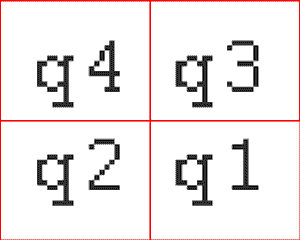
Split screen. The source resolution is 720x576.Code:AVISource("e:\cap.avi") Crop(0,0,720,556)
Do nothing.
Code:AVISource("e:\cap.avi") q1=crop(0,0,360,288) q2=crop(360,0,360,288) q3=crop(0,288,360,288) q4=crop(360,288,360,288) l1=StackHorizontal(q1,q2) l2=StackHorizontal(q3,q4) StackVertical(l1,l2)
Code:AVISource("e:\cap.avi") q1=crop(0,0,360,288) q2=crop(360,0,360,288) q3=crop(0,288,360,288) q4=crop(360,288,360,288) l1=StackHorizontal(q4,q3) l2=StackHorizontal(q2,q1) StackVertical(l1,l2)
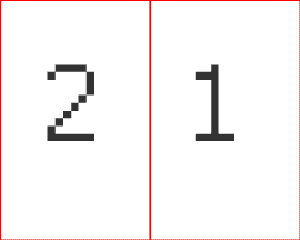
Code:AVISource("e:\cap.avi") h1=crop(0,0,360,576) h2=crop(360,0,360,576) StackHorizontal(h2,h1)
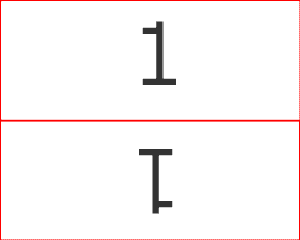
__________________________________________________ ______________________________________Code:AVISource("e:\cap.avi") h1=crop(0,0,720,288) h2=h1.FlipVertical StackVertical(h1,h2)
Resize and add borders
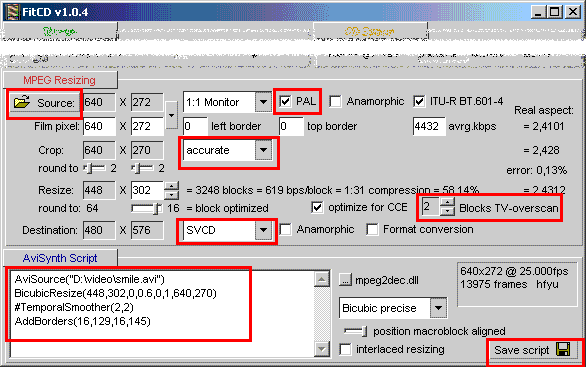
Probably the most used Avisynth filters. Calculate how to resize properly with FitCD.
Read the FitCD dokumentation.
__________________________________________________ _________________________________________________
Zoom in/out
Zoom into the middle of the picture.
Zoom out from the middle of the picture.Code:AVISource("e:\cap.avi") Animate(0,150,"BicubicResize",720,576,0,0.5,0,0,720,576,720,576,0,0.5,280,241,160,94)
Zoom work with Animate, Crop and Resize only. If you want to zoom in/out the entire image,Code:AVISource("e:\cap.avi") Animate(0,150,"BicubicResize",720,576,0,0.5,280,241,160,94,720,576,0,0.5,0,0,720,576)
i.e. without cropping, you have to resize and add borders frame by frame, because Animate
refuses start-args and end-args, that lead to different frame sizes.
__________________________________________________ ________________________________________
Picture in Picture
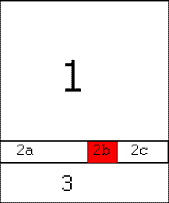
The background of this procedure is, that you split the image into several pieces
with the CROP filter and join them again with STACKHORIZONTAL/VERTICAL.
Source is here MPEG-2, dvd2avi project, cropped with dvd2avi 672x424
The 2nd source is AVI (hope you don't mind, that I resized wrong, because it is just an example.)
__________________________________________________ _______________________________________Code:LoadPlugin("mpeg2dec2.dll") big=mpeg2source("D:\matrix\matrix.d2v").BicubicResize(448,318). \ AddBorders(16,129,16,129)# final size 480x576 small=AVISource("D:\video\jack.avi").BicubicResize(68,48). \ AddBorders(6,6,6,6)# final size is 80x60 height1=400 height2=60 height3=116 width1=250 width2=80 width3=150 part1=big.crop(0,0,480,height1) part2a=big.crop(0,height1,width1,height2) part2b=small part2c=big.crop(width1+width2,height1,width3,height2) part2=StackHorizontal(part2a,part2b,part2c) part3=big.Crop(0,height1+height2,480,height3) StackVertical(part1,part2,part3)
Full animated menu
This is an "extended" version of the script above. This sample script creates a full animated menu.
The background is any part of the video (10000 frames). Assuming, that I want to create
9 chapters later, I add 9 thumbnails to the video clip. Each thumbnail contains 10000 frames of the
video, e.g. the first 10000 of each chapter.
All 10 videoclips play simultaneously. After a while it starts to zoom into the first
thumbnail, a message appears (Chapter 1- Jack's first kiss"- please press key 1 ;-)).
The message disappears and it zooms out to the menu. Then it starts to zoom into the 2nd thumbnail
etc. etc.
I did not add audio to the script and I wont even try it. It should be easier with an audio editor.
In practice 6:40 might be too long for a menu and zooming into such a small part (96,108) is not
the best idea, because a from 96x108 to 480x576 resized image is very unsharp. This is just an example.
Loading the AVS into an application takes a couple of minutes, be patient.
Converting takes several hours, be even more patient. :LOL
big=AVIsource("D:\video\jack.avi").BicubicResize(448,542).AddBorders(16,17,16,17).T rim(0,9999)
small=AVIsource("D:\video\jack.avi").BicubicResize(96,108)
small1=Trim(small,0,9999)
small2=Trim(small,10000,19999)
small3=Trim(small,14401,24400)
small4=Trim(small,45000,54999)
small5=Trim(small,48000,57999)
small6=Trim(small,60000,69999)
small7=Trim(small,72000,81999)
small8=Trim(small,65432,75431)
small9=Trim(small,90000,99999)
x=480
height1=48
height2=108
height3=48
height4=108
height5=48
height6=108
height7=108
width1=48
width2=96
width3=48
width4=96
width5=48
width6=96
width7=48
part1=big.crop(0,0,x,height1)
part2a=big.crop(0,height1,width1,height2)
part2b=small1
part2c=big.crop(width1+width2,height1,width3,heigh t2)
part2d=small2
part2e=big.Crop(width1+width2+width3+width4,height 1,width5,height2)
part2f=small3
part2g=big.Crop(width1+width2+width3+width4+width5 +width6,height1,width7,height2)
part2=StackHorizontal(part2a,part2b,part2c,part2d, part2e,part2f,part2g)
part3=big.Crop(0,height1+height2,x,height3)
part4a=big.crop(0,height1+height2+height3,width1,h eight4)
part4b=small4
part4c=big.crop(width1+width2,height1+height2+heig ht3,width3,height4)
part4d=small5
part4e=big.Crop(width1+width2+width3+width4,height 1+height2+height3,width5,height4)
part4f=small6
part4g=big.Crop(width1+width2+width3+width4+width5 +width6,height1+height2+height3,width7,height4)
part4=StackHorizontal(part4a,part4b,part4c,part4d, part4e,part4f,part4g)
part5=big.Crop(0,height1+height2+height3+height4,x ,height5)
part6a=big.crop(0,height1+height2+height3+height4+ height5,width1,height6)
part6b=small7
part6c=big.crop(width1+width2,height1+height2+heig ht3+height4+height5,width3,height6)
part6d=small8
part6e=big.Crop(width1+width2+width3+width4,height 1+height2+height3+height4+height5,width5,height6)
part6f=small9
part6g=big.Crop(width1+width2+width3+width4+width5 +width6,height1+height2+height3+height4+height5,wi dth7,height6)
part6=StackHorizontal(part6a,part6b,part6c,part6d, part6e,part6f,part6g)
part7=big.Crop(0,height1+height2+height3+height4+h eight5+height6,x,height7)
vid=StackVertical(part1,part2,part3,part4,part5,pa rt6,part7)
chap1in=Trim(vid,0,999).Animate(700,900,"BicubicResize",480,576,0,0.5,0,0,480,576,480,576,0,0.5,48,48,96, 108)
chap1out=Trim(vid,1000,1499).Animate(100,300,"BicubicResize",480,576,0,0.5,48,48,96,108,480,576,0,0.5,0,0,480, 576)
chap2in=Trim(vid,1500,1999).Animate(200,400,"BicubicResize",480,576,0,0.5,0,0,480,576,480,576,0,0.5,192,48,96 ,108)
chap2out=Trim(vid,2000,2499).Animate(100,300,"BicubicResize",480,576,0,0.5,192,48,96,108,480,576,0,0.5,0,0,480 ,576)
chap3in=Trim(vid,2500,2999).Animate(200,400,"BicubicResize",480,576,0,0.5,0,0,480,576,480,576,0,0.5,336,48,96 ,108)
chap3out=Trim(vid,3000,3499).Animate(100,300,"BicubicResize",480,576,0,0.5,336,48,96,108,480,576,0,0.5,0,0,480 ,576)
chap4in=Trim(vid,3500,3999).Animate(200,400,"BicubicResize",480,576,0,0.5,0,0,480,576,480,576,0,0.5,48,204,96 ,108)
chap4out=Trim(vid,4000,4499).Animate(100,300,"BicubicResize",480,576,0,0.5,48,156,96,108,480,576,0,0.5,0,0,480 ,576)
chap5in=Trim(vid,4500,4999).Animate(200,400,"BicubicResize",480,576,0,0.5,0,0,480,576,480,576,0,0.5,192,204,9 6,108)
chap5out=Trim(vid,5000,5499).Animate(100,300,"BicubicResize",480,576,0,0.5,192,156,96,108,480,576,0,0.5,0,0,48 0,576)
chap6in=Trim(vid,5500,5999).Animate(200,400,"BicubicResize",480,576,0,0.5,0,0,480,576,480,576,0,0.5,336,204,9 6,108)
chap6out=Trim(vid,6000,6499).Animate(100,300,"BicubicResize",480,576,0,0.5,336,156,96,108,480,576,0,0.5,0,0,48 0,576)
chap7in=Trim(vid,6500,6999).Animate(200,400,"BicubicResize",480,576,0,0.5,0,0,480,576,480,576,0,0.5,48,360,96 ,108)
chap7out=Trim(vid,7000,7499).Animate(100,300,"BicubicResize",480,576,0,0.5,48,360,96,108,480,576,0,0.5,0,0,480 ,576)
chap8in=Trim(vid,7500,7999).Animate(200,400,"BicubicResize",480,576,0,0.5,0,0,480,576,480,576,0,0.5,192,360,9 6,108)
chap8out=Trim(vid,8000,8499).Animate(100,300,"BicubicResize",480,576,0,0.5,192,360,96,108,480,576,0,0.5,0,0,48 0,576)
chap9in=Trim(vid,8500,8999).Animate(200,400,"BicubicResize",480,576,0,0.5,0,0,480,576,480,576,0,0.5,336,360,9 6,108)
chap9out=Trim(vid,9000,0).Animate(100,300,"BicubicResize",480,576,0,0.5,336,360,96,108,480,576,0,0.5,0,0,48 0,576)
chap1=UnalignedSplice(chap1in,chap1out)
chap2=UnalignedSplice(chap2in,chap2out)
chap3=UnalignedSplice(chap3in,chap3out)
chap4=UnalignedSplice(chap4in,chap4out)
chap5=UnalignedSplice(chap5in,chap5out)
chap6=UnalignedSplice(chap6in,chap6out)
chap7=UnalignedSplice(chap7in,chap7out)
chap8=UnalignedSplice(chap8in,chap8out)
chap9=UnalignedSplice(chap9in,chap9out)
UnalignedSplice(chap1,chap2,chap3,chap4,chap5,chap 6,chap7,chap8,chap9)
Subtitle("Chapter selection",100,500,0,500,"Arial",40,$FFFFFF)
Subtitle("chapter 1",150,150,950,1050,"Arial",40,$FFFFFF)
Subtitle("_press 1_",150,450,950,1050,"Arial",40,$FFFFFF)
Subtitle("chapter 2",150,150,1950,2050,"Arial",40,$FFFFFF)
Subtitle("_press 2_",150,450,1950,2050,"Arial",40,$FFFFFF)
Subtitle("chapter 3",150,150,2950,3050,"Arial",40,$FFFFFF)
Subtitle("_press 3_",150,450,2950,3050,"Arial",40,$FFFFFF)
Subtitle("chapter 4",150,150,3950,4050,"Arial",40,$FFFFFF)
Subtitle("_press 4_",150,450,3950,4050,"Arial",40,$FFFFFF)
Subtitle("chapter 5",150,150,4950,5050,"Arial",40,$FFFFFF)
Subtitle("_press 5_",150,450,4950,5050,"Arial",40,$FFFFFF)
Subtitle("chapter 6",150,150,5950,6050,"Arial",40,$FFFFFF)
Subtitle("_press 6_",150,450,5950,6050,"Arial",40,$FFFFFF)
Subtitle("chapter 7",150,150,6950,7050,"Arial",40,$FFFFFF)
Subtitle("_press 7_",150,450,6950,7050,"Arial",40,$FFFFFF)
Subtitle("chapter 8",150,150,7950,8050,"Arial",40,$FFFFFF)
Subtitle("_press 8_",150,450,7950,8050,"Arial",40,$FFFFFF)
Subtitle("chapter 9",150,150,8950,9050,"Arial",40,$FFFFFF)
Subtitle("_press 9_",150,450,8950,9050,"Arial",40,$FFFFFF)
Subtitle("Chapter selection",100,500,9500,0,"Arial",40,$FFFFFF)
#ResampleAudio(44100)
__________________________________________________ _______________________________________
Insert a blank clip
Insert a 5 sec blank clip between two scenes of the movie movie. Framesize,
framerate and colour space of the blank clip must match the properties of the movie.
__________________________________________________ _______________________________________Code:LoadPlugin("MPEG2DEC.dll") AudioDub(mpeg2source("D:\matrix\matrix.d2v"), \ WAVSource("D:\matrix\matrix.wav")). \ BilinearResize(448,404,0,0,720,576).AddBorders(16,80,16,92) clip1=Trim(0,999).FadeOut(100) clip2=Trim(1000,0).Reverse.FadeOut(100).Reverse black=BlankClip(125,480,576,"YUY2",25,1,44100,true,true,$000000) UnalignedSplice(clip1,black,clip2)
Make a video clip from a still image
Source is a 100x100 BMP. This image will be converted to a 10 sec video clip
and inserted between two scenes of the movie movie.
__________________________________________________ ______________________________________Code:LoadPlugin("MPEG2DEC.dll") AudioDub(mpeg2source("D:\matrix\matrix.d2v"), \ WAVSource("D:\matrix\matrix.wav")). \ BilinearResize(448,404,0,0,720,576).AddBorders(16,80,16,92) clip1=Trim(0,999).FadeOut(100) clip2=Trim(1000,0).Reverse.FadeOut(100).Reverse LoadPlugin("Avisynth BMP Loader.dll") BlankClip(250,100,100,"YUY2",25,1,44100,true,true,$000000) pic=AvisynthBMP_Loader("C:\Pics\","smile.bmp"). \ BilinearResize(448,404).AddBorders(16,80,16,92).Reverse. \ FadeOut(100).Reverse.FadeOut(100) UnalignedSplice(clip1,pic,clip2)
Clean up a clip captured from VHS tape
Source is 640x480.
Cover garbage on the bottom of the clip.
Crop garbage off the bottom of the clip. To keep the proper framesize and aspect ratio,Code:LoadPlugin("MPEG2DEC.dll") mpeg2source("I:\cap\cap.d2v") Letterbox(0,16)
add as many border count lines as you croped before.
You prefer a centered image....Code:AVISource("D:\video\jack.avi") CropBottom(16) AddBorders(0,0,0,16)
You hate borders at all...., then you have to sacrifice a bit left and/or right and resizeCode:AVISource("D:\video\jack.avi") Crop(0,0,640,464) AddBorders(0,8,0,8)
to a valid framesize.
is the same asCode:LoadPlugin("MPEG2DEC.dll") mpeg2source("I:\cap\cap.d2v") BicubicResize(480,480,1/3,1/3,4,0,632,464)
If you have a very old and noisy source, you may try to clean it with some denoiseCode:LoadPlugin("MPEG2DEC.dll") mpeg2source("I:\cap\cap.d2v") Crop(4,0,632,464) BicubicResize(480,480)
filters. The SpatialSoften plugin work quite well. Try different filters and values.
__________________________________________________ ______________________________________Code:LoadPlugin("MPEG2DEC.dll") LoadPlugin("AVISynth_Spatial.dll") Avisource("I:\cap\cap.avi") Crop(4,0,632,464) SpatialSoftenMMX(2,4,6,false,false,4,4,6,8) TemporalSmoother(3,3) SpatialSoftenMMX(2,4,6,false,false,4,4,6,8) BicubicResize(480,480)
Cut and join
You have captured a TV show. Cut out the commercials.
Join captured clips in a new orderCode:AVISource("d:\cap\cap.avi") Trim(0,30000)+Trim(36000,65000)+Trim(71000,0)
Join several clipsCode:AVISource("d:\cap\cap.avi") Trim(0,30000)+Trim(71000,0)+Trim(36000,65000)
You have captured several shows and want to extract some scenes of each show and joinCode:AVISource("d:\cap\cap1.avi")+AVISource("d:\cap\cap2.avi") \ +AVISource("d:\cap\cap3.avi")
it to a new compilation.
You may add some fade in/out/cross effects.Code:LoadPlugin("mpeg2dec.dll") LoadVFAPIPlugin("c:\mpegtool\TMPGEnc\m2v.vfp","m2vsource") v1=AVISource("d:\cap\cap1.avi").BilinearResize(480,576) v2=ConvertFPS(AVISource("d:\cap\cap2.avi"),25) v3=AVISource("d:\cap\cap3.avi") v4=m2vsource("d:\cap\cap.mpg") v5=AudioDub(mpeg2source("d:\cap\cap.d2v"),WAVsource("d:\cap\cap.wav") v6=SegmentedAVISource("d:\cap\cap4.avi") Trim(v4,4836,8463)+Trim(v1,100,5000)+Trim(v6,10000,0)+Trim(v6,2000,7000)+ \ Trim(v2,1000,9000)+Trim(v5,0,6543)+Trim(v5,6550,0)+Trim(v3,4836,8463)
Another way to cross fade... At the end of the first clip the image moves to the leftCode:LoadPlugin("mpeg2dec.dll") LoadVFAPIPlugin("c:\mpegtool\TMPGEnc\m2v.vfp","m2vsource") v1=AVISource("d:\cap\cap1.avi").BilinearResize(480,576) v2=ConvertFPS(AVISource("d:\cap\cap2.avi"),25) v3=AVISource("d:\cap\cap3.avi") v4=m2vsource("d:\cap\cap.mpg") v5=AudioDub(mpeg2source("d:\cap\cap.d2v"),WAVsource("d:\cap\cap.wav") v6=SegmentedAVISource("d:\cap\cap4.avi") c1=Trim(v4,4836,8463).Reverse.FadeOut(100).Reverse.FadeOut(100) c2=Trim(v1,100,5000).Reverse.FadeOut(100).Reverse.FadeOut(100) c3=Trim(v6,10000,0).Reverse.FadeOut(100).Reverse c4=Trim(v6,2000,7000) c5=Trim(v2,1000,9000) c6=Trim(v5,0,6543) c7=Trim(v5,6550,0) c8=Trim(v3,4836,8463).FadeOut(100) c3_8=Dissolve(c3,c4,c5,c6,c7,c8,100) UnalignedSplice(c1,c2,c3_8)
side followed by the image of the 2nd clip. The sound of both clips is faded linearly
into each other.
zoomCode:Split the video and audio to separate files. videoclip1=AVIsource("D:\cap1.avi")# no audio videoclip2=AVIsource("D:\cap2.avi")# no audio audioclip1=WAVsource("D:\cap1.wav") audioclip2=WAVsource("D:\cap2.wav") v1=Trim(videoclip1,0,3849) a1=Trim(AudioDub(videoclip1,audioclip1),0,3849) v2=Trim(videoclip1,3850,3999) a2=Trim(AudioDub(videoclip1,audioclip1),3850,3999) v3=Trim(videoclip2,0,149) a3=Trim(AudioDub(videoclip2,audioclip2),0,149) v4=Trim(videoclip2,150,7499) a4=Trim(AudioDub(videoclip2,audioclip2),6150,7499) # s2_3=StackHorizontal(v2,v3) v2_3=Animate(0,299,"CROP",s2_3,0,0,720,576,s2_3,1440,0,720,576) video=UnalignedSplice(v1,v2_3,v4) audio=Dissolve(a1+a2,a3+a4,150) AudioDub(video,audio)
letterboxCode:v1=AVISource("e:\cap1.avi") v2=AVISource("e:\cap2.avi") c1=Animate(10000,10150,"BicubicResize",v1,720,576,0,0.5,0,0,720,576,v1,720,576,0,0.5,280,241,160,94) c2=Animate(0,150,"BicubicResize",v2,720,576,0,0.5,280,241,160,94,v2,720,576,0,0.5,0,0,720,576) Dissolve(c1,c2,50)
Code:LoadPlugin("C:\WINNT\system32\MPEG2DEC2.dll") v1=AVISource("e:\cap1.avi"). \ Animate(9949,10000,"subtitle","________________________",0,0,9949,10000,"Arial",60,$000000, \ "________________________",0,288,9949,10000,"Arial",60,$000000). \ Animate(9949,10000,"subtitle","________________________",0,576,9949,10000,"Arial",60,$000000, \ "________________________",0,288,9949,10000,"Arial",60,$000000) v2=AVISource("e:\cap2.avi"). \ Animate(0,49,"letterbox",288,288,0,0) UnalignedSplice(v1,v2)
__________________________________________________ ______________________________________
Add a logo
There is no Avisynth logo filter. That's why I use Donald Graft's logo filter for
VirtualDub. Also I added this example to show how to use VirtualDub plugins.
Static logo fades in (frame #100-199) and fades out (frame #401-500). It will appear
in the very upper left corner of the image.
Static logo (100x100) appers in the middle of the image (480x576). It is flashing 1 timeCode:LoadPlugin("mpeg2dec.dll") AudioDub(mpeg2source("D:\matrix\matrix.d2v").BicubicResize(448,318). \ AddBorders(16,129,16,129).Trim(0,9999),WAVSource("D:\matrix\matrix.wav")) function VD_Logo(clip clip, int "x", int "y", int "alpha", bool "transparent", \ int "xr", int "xg", int "xb", int "tolerance", string "filename", \ bool "animate", int "start", int "duration", int "loops", \ int "fadeinlen", int "fadeoutend", int "fadeoutlen") { LoadVirtualdubPlugin("c:\program files\VirtualDub-1_4_10\plugins" \ +"\logo.vdf", "_VD_Logo", 1) return clip._VD_Logo(default(x,0), default(y,0), default(alpha,128), \ default(transparent,true)?1:0, default(xr,0), default(xg,0), \ default(xb,255),default(tolerance,0), default \ (filename,VirtualDub_plugin_directory+"\logo.bmp"), \ default(animate,false)?1:0, default(start,0), default(duration,0), \ default(loops,0),default(fadeinlen,0), \ default(fadeoutend,200), default(fadeoutlen,0)) } ConvertToRGB() VD_logo(0,0,128,true,0,0,0,0,"D:\MyLogo.bmp",false,100,500,0,100,500,100) ConvertToYUY2()
per second and will disappear after 12 seconds.
To make an animated logo, create a series of bitmap files *0000.bmp, *0001.bmp, *0002.bmp, etc.Code:LoadPlugin("mpeg2dec.dll") AudioDub(mpeg2source("D:\matrix\matrix.d2v").BicubicResize(448,318). \ AddBorders(16,129,16,129).Trim(0,9999),WAVSource("D:\matrix\matrix.wav")) Import("D:\vdub_filters.avs") ConvertToRGB VD_logo(190,238,128,true,0,0,0,0,"D:\MyLogo.bmp",false,1,25,0,12,25,12) VD_logo(190,238,128,true,0,0,0,0,"D:\MyLogo.bmp",false,26,25,0,12,50,12) VD_logo(190,238,128,true,0,0,0,0,"D:\MyLogo.bmp",false,51,25,0,12,75,12) VD_logo(190,238,128,true,0,0,0,0,"D:\MyLogo.bmp",false,76,25,0,12,100,12) VD_logo(190,238,128,true,0,0,0,0,"D:\MyLogo.bmp",false,101,25,0,12,125,12) VD_logo(190,238,128,true,0,0,0,0,"D:\MyLogo.bmp",false,126,25,0,12,150,12) VD_logo(190,238,128,true,0,0,0,0,"D:\MyLogo.bmp",false,151,25,0,12,175,12) VD_logo(190,238,128,true,0,0,0,0,"D:\MyLogo.bmp",false,176,25,0,12,200,12) VD_logo(190,238,128,true,0,0,0,0,"D:\MyLogo.bmp",false,201,25,0,12,225,12) VD_logo(190,238,128,true,0,0,0,0,"D:\MyLogo.bmp",false,226,25,0,12,250,12) VD_logo(190,238,128,true,0,0,0,0,"D:\MyLogo.bmp",false,251,25,0,12,275,12) VD_logo(190,238,128,true,0,0,0,0,"D:\MyLogo.bmp",false,276,25,0,12,300,12) ConvertToYUY2
Here the logo will appear from start to the end of the movie, because it loops forever.
Code:AviSource("e:\movie.avi") Import("D:\vdub_filters.avs") ConvertToRGB VD_Logo(20,20,255,true,0,0,0,0,"D:\logo0001.bmp",true,0,1,0,0,0,0) ConvertToYUY2
__________________________________________________ ______________________________________________
Video/audio Reverse SlowMotion FastMotion
Simple reverse
Simple slow motion (5 times as slow)Code:Avisource("c:\video.avi") Reverse
Simple fast motion (5 times as fast)Code:Avisource("c:\video.avi") ConvertFPS(125).AssumeFPS(25,sync_audio=true).ResampleAudio(44100)
The following sample scrip combines the 3 scripts above.Code:Avisource("c:\video.avi") ConvertFPS(5,zone=80,vbi=49).AssumeFPS(25,sync_audio=true).ResampleAudio(44100)
The video starts and plays 5 minutes with normal speed. Then the image freezes 2 seconds.
Fast motion back to 4:00 followed by slow motion to 5:00.
Fast motion back to 4:00 followed by fast motion to 5:00.
After that it plays normally till the end (6:40).
You will end with a 10:26 clip. Audio is in sync all the time.
Also try ChangeFPS instead of ConvertFPS.
__________________________________________________ _________________________________________________Code:vid=AudioDub(AVIsource("c:\video.avi"),WAVSource("c:\audio.wav")) clip1=Trim(vid,0,7499)# 7500 frames clip2=FreezeFrame(Trim(vid,0,49),0,49,7499)# 50 frames clip3=Trim(vid,6500,7499).Reverse.ConvertFPS(5,zone=80,vbi=49).AssumeFPS(25,sync_audio=true) \ .ResampleAudio(44100)# 200 frames clip4=Trim(vid,6500,7499).ConvertFPS(125).AssumeFPS(25,sync_audio=true) \ .ResampleAudio(44100)# 5000 frames clip5=Trim(vid,6500,7499).Reverse.ConvertFPS(5,zone=80,vbi=49).AssumeFPS(25,sync_audio=true) \ .ResampleAudio(44100)# 200 frames clip6=Trim(vid,6500,7499).ConvertFPS(5,zone=80,vbi=49).AssumeFPS(25,sync_audio=true) \ .ResampleAudio(44100)# 200 frames clip7=Trim(vid,7500,9999)# 2500 frames UnalignedSplice(clip1,clip2,clip3,clip4,clip5,clip6,clip7)
+ Reply to Thread
Results 1 to 30 of 56
-
-
Hi Truman, I use Avisynth to prepare my captured videos so I don't need to cut after TMPGEnc. This works fine all the time.
I would like to do the same with the project file generated by DVD2AVI but I don't know how to open this file from Avisynth, can you help me?
Thanks -
Copy MPEG2DEC.dll to winnt\system32 (windows\system).Originally Posted by asnamlar
Create the dvd2avi project.
LoadPlugin("mpeg2dec.dll)
mpeg2source("C:\dir\filename.d2v")
You have to use avisynth 1.0beta3 or later. -
Great guide! The links to all the various versions of avisynth and related filters is worth the read alone. There are so many out there it gets very confusing. Thanks!
-
****deleted by Truman****
-
Once I changed "mpeg2dec2.dll" to "mpeg2dec.dll" it appeared to be loading successfully until it gave an error on line 84 that said the arguments to function "UnalignedSplice" were wrong.
Does this script require the newest version of Avisynth? -
Hi Kinneera, thank you for testing the script. I used mpeg2dec2.dll instead of mpeg2dec.dll. Avisynth version is 1.0beta6. Well, I re-read the script and have found a bunch of errors. I will update it soon. Currently I am encoding to MPEG. It takes about 8 hours ! Remember, the clip is 6min 40sec only.

edit: I have added it to first post. -
Wow! what a GREAT guide! This is one I've been waiting for! Thankyou!...
Big_Jit -
Nice Guide. I would have never though making menus were possible with the available filters in avisynth.
I guess now would be a good time to mention that I'm working on new set of avisynth filters to make making menus simple. THe following script is an example:
background=AVISource("background.avi")
clip1=AVIsource("clip1.avi").BicubicResize(252,168)
clip2=AVIsource("clip2.avi").BicubicResize(252,168)
clip3=AVIsource("clip3.avi").BicubicResize(252,168)
#let's make this one circular
clip4=AVIsource("clip4.avi").BicubicResize(252,168).AlphaMask("circle_alpha_mask.png",0,0)
# lay out four clips on a background video stream, and then superimpose
# a PNG image containing the chapter titles
tmp=background.VideoOverlay4(clip1,70,30,clip2,400 ,30,clip3,70,280,clip4,400,280)
tmp.StillFrameOverlay("mytitles.png",0,0)
The picture below is a sample of how far I've gotten. All three images are full video streams. Notice the overlap and the shape of the center video (featuring that lovable zim character, 'the blotch').

-
This is perhaps one of the most worthwhile guides posted here. Great source of information and the added links put the icing on tha cake. Terrific intro for anyone looking to get rid of the vfapi turtle. Thanks for putting in the time.
-
Impressive. This is the style of guide we should have more of on
this site - well done! -
Wow, that looks very promising. I would love to test it.Originally Posted by phelix
-
Great article and wel written!
And speaking of old VHS tapes, I have a very old VHS tape that has some broken fields (eg. odd lines ok, but even lines are just noise). So I converted the thing to 50fps uncompressed AVI, sized 352x288 and did all the cleaning/editing needed. Now, I understand that I could Re-interlace it from 50fps progressive to 25fps Interlace using the Weave command, but for some reason I just get a 352x288 25fps file without re-interlacing. I use the following:
a = avisource ("e:\test.avi")
AssumeFieldBased(a)
Weave(a)
Any idea what I'm doing wrong? -
@ ABS
a = avisource ("e:\test.avi")
AssumeFieldBased(a)
Weave
or
avisource ("e:\test.avi")
AssumeFieldBased
Weave
should work fine. -
Great! Works as charm!

Thanks! -
ABS, I am not an expert on interlaced video, but i was surprised to hear that the odd fields are OK and the even fields are noisy. Is that a common problem with interlaced video or old VHS tapes?
btw, hope you did the editing/cleaning with Avisynth
-
Well, I was giving it an All-too-perfect description!Originally Posted by Truman

It's actually a Compact VHS tape from my old videocamera (tape is about 7 years old) and for some reason you have alot of frames where one field (not necceraly the odd or the even) is quite ok, and the other field is just noise. Now, it was easy if there was a simple repeating pattren, but there wasn't, so I had to split it into 50fps and simply remove all the noisey fields, filling them up with interpulation of the Previous and next field. (Did it in Ulead MSP6.5) and the result was quite good.
I might put up a page on my site with small "before and after" video clips to show extactly how it is...
ABS -
Dear Truman:
I tried to get your animated menu to run. Since I do not have Jack.avi, I decided to use some avi clips from my Civilization II game.
I received some address erors, so I tried to change the values in the first two lines. Now it tells me the StackHorizontal Values are wrong. The avi files I want to use are 320x240. Can you help me?Hello. -
Frame size of "big" is 480x576.
x= width1+width2+width3+width4+width5+width6+width7=4 80.
height1+height2+height3+height4+height5+height6+he ight7=576.
If you did not change a StackHorizontal value, the script is correct.
To test the script you can simply replace d:\video\jack.avi with your path\filename.
Well, at the beginning the framesize may be wrong, but you can load it into an application without error message. Then you have to adjust the values of the resize filters.
btw, there are typo's in line 63, 65 and 67. Replace 156 with 204. -
I did as you said and left the values as they were, only changing the path and file names and the typos you listed. I get this error message. What am I doing wrong?
 Hello.
 -
 the infamous access violation message... I don't know, make sure, you use Avisynth 1.0 beta6 and try to load a different AVI, maybe there is a corrupt frame. Also try to load the avs into TMPGEnc or an other app.
-
Is it possible to use DeLogo in an Avisynth script?
-
You should be able to use any VDub tool.
Hello. -
The problem is that the VD Delogo filter has a rather extensive GUI and I don't know how to apply it via Avisynth.
-
The VirtualDub filters import file contains a sample script and a description of DeLogo 1.2.1.
Also have a look at the online manual. -
dear truman.
I am trying to use this guide to make my own animated menu. As you know i am realy new to the Avisynth thing. I hope you don't laught at my question.
can you possible explain to me the those arguments numbers(what they represent) in the following line to me?
vid=StackVertical(part1,part2,part3,part4,part5,pa rt6,part7)
chap1in=Trim(vid,0,999).Animate(700,900,"BicubicResize",480,576,0,0.5,0,0,480,576,480,576,0,0.5,48,48,96,1 08)
chap1out=Trim(vid,1000,1499).Animate(100,300,"BicubicResize",480,576,0,0.5,48,48,96,108,480,576,0,0.5,0,0,480,5 76)
Thank you very much. -
The filters work as follows:
Animate(start-frame,end-frame,"filtername",start-argument,end-argument)
BicubicResize(frame-target-width,frame-target-height[,b,c],
crop-sorce-left,crop-source-top,
frame-source-width,frame-source-height)
b and c are parameters to adjust the properties of two-part cubic (by Mitchel and Netravali read more about it if you like).
Frame 0-700 the framesize is 480*576chap1in=Trim(vid,0,999).Animate(700,900,"BicubicResize",480,576,0,0.5,
0,0,480,576,480,576,0,0.5,48,48,96,108)
chap1out=Trim(vid,1000,1499).Animate(100,300,"BicubicResize",480,576,
0,0.5,48,48,96,108,480,576,0,0.5,0,0,480,576)
From frame 701 to 900 the frame will get cropped lineary to a frame size of 96*108 of the original framesize. (crop left48,top48,right336,bottom420). At the same time the cropped frame will get resized lineary to keep a framesize of 480*576.
Short said, it zooms into a small part of the frame.
chap1out=zoom out this way.
It is quite hard to understand, because there are hundreds of numbers in the script. Also I think there might be a better solution than using the original Avisynth filters, because this method is damn slow. I am still testing Avisynth2. Maybe it is easier to do with the layer filter or even a logo filter. However, working with this script (a lot of trial and error, I know) will help to understand how Avisynth works.
Hope it helps so far. -
HOLY CHEESECAKES BATMAN,
THIS IS SOME GREAT INFO!!!!
Thanxcheck out http://www.geocities.com/eatin_sammiches/sprucecreations.html to download additonal buttons and backgrounds for SPRUCE-UP menu creation -
thank you so much for the explanation. It helps a lot. I have figured everything else except for this. I checked the reference guide for the arguments formats of both animation and bicubicresize, but couldn't figure out what is what. Now it is under my control cause i know what they are now.
thanks again.
Yes it is very slow. if you ever come up with something faster, please let us know.
This is by far the best guide i have ever seen in this forum. I am trying on other example you put here, hope they all work out. I also hope you will produce more guides like this for this forum.
I have another question regarding the "trim" filter of Avisynth. It started as i designed. But it won't stop until the whole clip is finished. for example, in the animated menu. the 6 small pictures. they don't finish at the same time ( they are of the same number of frames). in stead, the number 9 finishes first (cause it starts last), the number 1 will finish last. And they all will end up at the same frame?
Can you help me with that as well?
big=AVIsource("F:\video\Clips\sanxia.avi").Trim(0,600)
small=AVIsource("F:\video\Clips\sanxia.avi").BicubicResize(180,120)
small1=Trim(small,0,150)
small2=Trim(small,151,300)
small3=Trim(small,301,450)
small4=Trim(small,451,600)
x=720
height1=80
height2=120
height3=80
height4=120
height5=80
width1=120
width2=180
width3=120
width4=180
width5=120
part1=big.crop(0,0,x,height1)
part2a=big.crop(0,height1,width1,height2)
part2b=small1
part2c=big.crop(width1+width2,height1,width3,heigh t2)
part2d=small2
part2e=big.Crop(width1+width2+width3+width4,height 1,width5,height2)
part2=StackHorizontal(part2a,part2b,part2c,part2d, part2e)
part3=big.Crop(0,height1+height2,x,height3)
part4a=big.crop(0,height1+height2+height3,width1,h eight4)
part4b=small3
part4c=big.crop(width1+width2,height1+height2+heig ht3,width3,height4)
part4d=small4
part4e=big.Crop(width1+width2+width3+width4,height 1+height2+height3,width5,height4)
part4=StackHorizontal(part4a,part4b,part4c,part4d, part4e)
part5=big.Crop(0,height1+height2+height3+height4,x ,height5)
vid=StackVertical(part1,part2,part3,part4,part5)
chap1in=Trim(vid,0,75).Animate(5,55,"BicubicResize",720,480,0,0.5,0,0,720,480,720,480,0,0.5,120,80,18 0,120)
chap1out=Trim(vid,76,150).Animate(5,55,"BicubicResize",720,480,0,0.5,120,80,180,120,720,480,0,0.5,0,0,72 0,480)
chap2in=Trim(vid,151,225).Animate(5,55,"BicubicResize",720,480,0,0.5,0,0,720,480,720,480,0,0.5,420,80,18 0,120)
chap2out=Trim(vid,226,300).Animate(5,55,"BicubicResize",720,480,0,0.5,420,80,180,120,720,480,0,0.5,0,0,72 0,480)
chap3in=Trim(vid,301,375).Animate(5,55,"BicubicResize",720,480,0,0.5,0,0,720,480,720,480,0,0.5,120,280,1 80,120)
chap3out=Trim(vid,376,450).Animate(5,55,"BicubicResize",720,480,0,0.5,120,280,180,120,720,480,0,0.5,0,0,7 20,480)
chap4in=Trim(vid,451,525).Animate(5,55,"BicubicResize",720,480,0,0.5,0,0,720,480,720,480,0,0.5,420,280,1 80,120)
chap4out=Trim(vid,526,600).Animate(5,55,"BicubicResize",720,480,0,0.5,420,280,180,120,720,480,0,0.5,0,0,7 20,480)
chap1=UnalignedSplice(chap1in,chap1out)
chap2=UnalignedSplice(chap2in,chap2out)
chap3=UnalignedSplice(chap3in,chap3out)
chap4=UnalignedSplice(chap4in,chap4out)
UnalignedSplice(chap1,chap2,chap3,chap4)
Subtitle("Chapter selection",200,450,0,45,"Arial",40,$FFFFFF)
Subtitle("chapter 1",250,150,50,100,"Arial",40,$FFFFFF)
Subtitle("_press 1_",250,450,50,100,"Arial",40,$FFFFFF)
Subtitle("chapter 2",250,150,200,250,"Arial",40,$FFFFFF)
Subtitle("_press 2_",250,450,200,250,"Arial",40,$FFFFFF)
Subtitle("chapter 3",250,150,350,400,"Arial",40,$FFFFFF)
Subtitle("_press 3_",250,450,350,400,"Arial",40,$FFFFFF)
Subtitle("chapter 4",250,150,500,550,"Arial",40,$FFFFFF)
Subtitle("_press 4_",250,450,500,550,"Arial",40,$FFFFFF)
Subtitle("Chapter selection",200,450,551,600,"Arial",40,$FFFFFF)
#ResampleAudio(44100)
 Quote
Quote
 Visit Homepage


Similar Threads
-
Is there a program to edit HDDVD like Clown_BD can edit Blu-ray?
By c627627 in forum Authoring (Blu-ray)Replies: 0Last Post: 3rd Jan 2011, 23:35 -
AVSTODVD: Avisynth script edit - colorspace conversion question...
By JRM75 in forum Video ConversionReplies: 2Last Post: 26th Jul 2010, 18:43 -
Why does the video I edit in Cyberlink look darker after I edit it and post
By Chubby Johnson in forum Newbie / General discussionsReplies: 1Last Post: 30th Jun 2010, 05:08 -
Edit, add, extract WAVE and edit file tags with new Machete 3.5
By MacheteSoft in forum Latest Video NewsReplies: 0Last Post: 23rd Dec 2009, 10:05 -
need help in choosing a format after video edit (DV then edit then DVD)
By shade_2 in forum Newbie / General discussionsReplies: 5Last Post: 5th Jul 2008, 13:13