


 View Profile
 View Forum Posts
 Visit Homepage

This guide will describe how to record streaming flash video(from sites like Youtube, MySpace, Google videos, DailyMotion, Porkolt, iFilm, DreamHost, etc), how to edit it and save it as AVI Xvid, MP4 h264, AVI huffyuv, FLV, etc.
Tools required
Guide
Record/Capture/Copy the video
Edit the video
Problems[/list]
Tools required:
VideoCacheView (free) or DownloadHelper(free) or it might require Replay Media Catcher($40)
AVIDemux (free)
Guide:
Start Internet Explorer(it wont work with Firefox, use DownloadHelper instead read here) and go the webpage with the video and start playing it. You can check if the video on a website is flash by right click on the video and it should say Flash Player at the bottom.
Wait until it has played or cached it.
Record/Capture/Copy the video
Start VideoCacheview.
In VideoCacheView click on F5 to refresh and then click on the Last Access-tab(1.) to order by date and you should see a new file. If not then you have try other tools to capture the video, see the problems here.
Right click on it and select Copy Selected Files To... and save the file(2.).
Edit the video
Start AviDemux and open your video file.
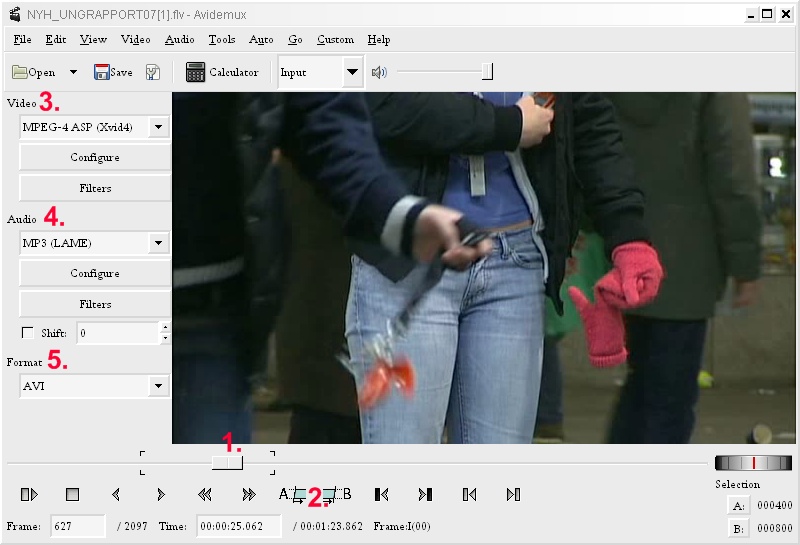
To edit drag the bar at the bottom(1.) and click on the A to set the start and B the end(2.). If you instead want remove parts then set the A and B and press delete.
You can now save the video as AVI(for DivX DVD Players and portable devices), under Video set it to MPEG-4 Xvid(3.), Audio to MP3(4.) and set the Format to AVI(5.).
Or save as MP4 H264 (newer portable devices), Video to MPEG-4 x264, Audio to AAC and Format to MP4.
Or save as FLV (without any conversion), Video to Copy, Audio to Copy and Format to FLV.
Or save as AVI huffyuv (for further editing or converting to DVD using another software), Video to huffyuv, Audio to WAV PCM and Format to AVI.
Last save the video, File->Save->Save video. You have to add the file extension when you save the video like video.avi, video.mp4, video.flv, etc.
Done.
Problems
I want to batch convert several flv files to AVI?
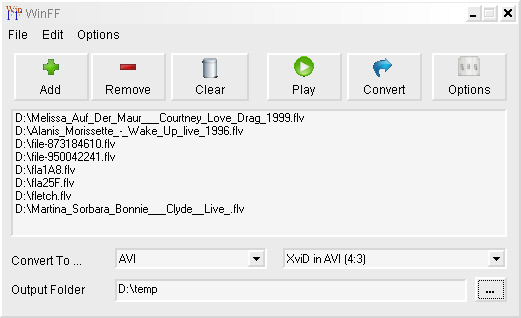
Then use WinFF(free) and load your FLV files and convert.
I don't get any file in VideoCacheView or DownloadHelper?
Then is the flash stream probably a RTMP stream and you need another tool like the Replay Media Catcher($40) or check our tools section under Video Streaming recording
Using Replay Media Catcher:
Start Replay Media Catcher and click on start Recording.
Go to the webpage with the video and play it.
Check in Replay Media Catcher and it should now start recording a file.
You can now close your browser and Replay Media Catcher will continue download the file.
Wait until it's done or right click on the file and choose stop and save recording if you don't need the entire clip.
The file is saved under your My Documents\My Recordings folder or you can change it under Tools>Settings.
DownloadHelper
If you are using FireFox as your browser then get the DownloadHelper Add-on. After installation just go to the webpage with the video and you should now see a new icon, click on it and you can select to save the flv video. If you can't save the video you can try Internet Explorer/VideoCacheView or Replay Media Catcher as described above.
+ Reply to Thread
Results 1 to 4 of 4
-
I'm a MEGA Super Moderator

- Aug 2000
- Sweden


-
Another Firefox addon that works is DownThemAll.
-
There are a number of free resources that can do this. The free RealPlayer gives you one-click capability to download FLV videos.
Here’s how to save Flash video:- Select a flash video on a website.
- Play it.
- Hover the cursor within the frame.
- The RealPlayer “Download This Video” box appears in the upper right.
- Click on it.
- RealPlayer Downloader opens and shows the progress of the download.
- The flash video is automatically saved to the RealPlayer Library.
- That’s it. You’re done.
-
This helped me a lot. Followed this step by step and works like a charm!




 Quote
QuoteSimilar Threads
-
Modify playback speed of .mp4 video and or .flv and save.
By jsvez2010 in forum Newbie / General discussionsReplies: 0Last Post: 16th Sep 2011, 18:18 -
How do you Record/save streaming videos
By jace89 in forum Video Streaming DownloadingReplies: 13Last Post: 22nd Sep 2008, 14:17 -
converting video to h264(mp4) for flash player streaming
By ricardouk in forum Video ConversionReplies: 0Last Post: 1st Nov 2007, 13:58 -
How to Save FLV and Flash Videos From On Line Sites?
By devilcoelhodog in forum Newbie / General discussionsReplies: 15Last Post: 2nd Jul 2007, 03:39 -
Is it possible to save streaming flash video from web site?
By tigerb in forum Newbie / General discussionsReplies: 1Last Post: 5th May 2007, 17:08