


 View Profile
 View Forum Posts
 Visit Homepage

How to convert video from sites like youtube, google, iFilm, putFilm to DVD. It wont work with all kind of flash videos though like some newer flash videos, see Problems section for tips how to convert newer flash videos.
Tools
www.keepvid.com or videodownloader plugin for firefox, see https://forum.videohelp.com/viewtopic.php?t=307707
ConvertXtoDVD or SUPER or Total Video Converter
Problems
Read the problems section if you can't download or convert!
Guide
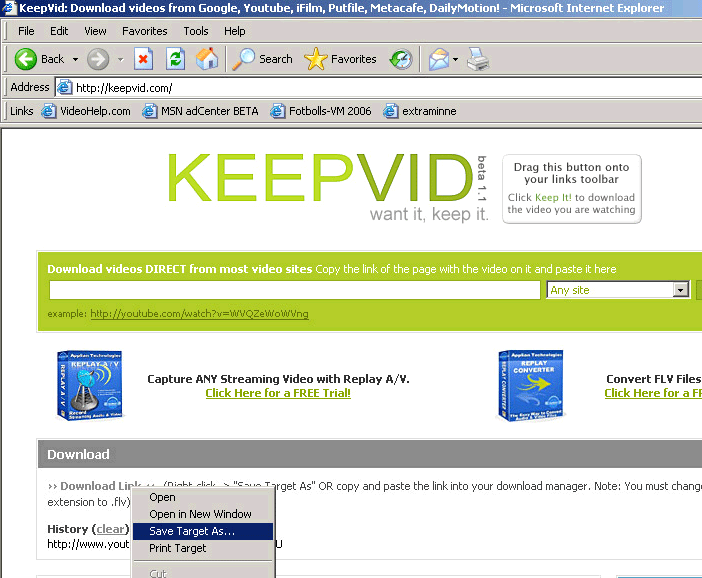
Download video with www.keepvid.com
1. Copy the link(http url) from the page with the Video
2. Paste the link into www.keepvid.com input box and hit download and waaaaaait
3. Right Click on Download Link and select Save Target As
If it wont work try Videodownloader with Firefox, see https://forum.videohelp.com/viewtopic.php?t=307707
Convert with ConvertXtoDVD
Add the flv(s) in ConvertXtoDVD and convert and burn!
or
Convert with SUPER
1. Right click in SUPER to open the file you just downloaded, Add Multimedia File(s)
2. Select vob DVD Compliant under Select the Output Container
3. Set Video Scale Size, 720x480 for NTSC or 720x576 for PAL
4. Set Aspect to 4:3
5. Set frame/sec, 29.97 for NTSC or 25 for PAL
6. Encode
( If you want smaller output file size lower the video and audio Bitrate, you can calculate the bitrate and output file size using a bitrate calculator like www.videohelp.com/calc )
7. Add the DVD VOB file in for example Tmpgenc DVD Author or NeroVision or Ulead DVD Workshop and author and burn it to a DVD.
Done.
Problems
I can't download the flv
Try Videodownloader with Firefox, see https://forum.videohelp.com/viewtopic.php?t=307707
ConvertXtoDVD or SUPER won't encode the video
It is probably newer FLV with the VP62 codec,
Try Total Video Converter, convert to AVI or MPG DVD Directly.
or
Install this FLV Splitter, extract the file to a folder and then Start->Run and type regsvr32 c:\folder\FLVSPlitter.ax to install it.
Extract the video and audio from the FLV with FLV Extract.
Open the new avi and mp3 with Tmpgenc Plus and encode to DVD MPG file.
+ Reply to Thread
Results 1 to 30 of 70
-
I'm a MEGA Super Moderator

- Aug 2000
- Sweden


-
wow -- you out did yourself on this guide !!!
 :P :P
:P :P
j/k i hope you know"Each problem that I solved became a rule which served afterwards to solve other problems." - Rene Descartes (1596-1650) -
I'm a MEGA Super Moderator
- Aug 2000
- Sweden
-
I have spent all day making this comphrensive guide....
 ....
....
-
the guide is for PAL only - some people will ask how do i make a ntsc instead .... also 5:4 aspect ratio would be for square pixel..
many flv are using the newer on2 codecs - the quality is amazing compared to the older flash / flv formats ..."Each problem that I solved became a rule which served afterwards to solve other problems." - Rene Descartes (1596-1650) -
I'm a MEGA Super Moderator
- Aug 2000
- Sweden
-
i wouldn't call it a guide yet...just two screenshots...

-
I'm not sure about converting YouTube vids to DVD format...but this guide made me take another harder look at SUPER.
Downloading it now.
Thanks Baldrick -
Looks like Baldrick updated his original post: now NTSC and PAL are covered.Originally Posted by BJ_M
 Frank Zappa: "People wouldn't know a good movie if it smacked 'em in the face."
 -
Member

- Jul 2005
- drifting, somewhere on the Sea of Cynicism
-
> Download video with www.keepvid.com
All well and good. However, I don't think you can capture stuff from sites like Atom Film. Is KeepVid the only game in town ?Originally Posted by bmwracer -
not the only way -- but the easy way
"Each problem that I solved became a rule which served afterwards to solve other problems." - Rene Descartes (1596-1650) -
Originally Posted by bmwracer
Last edited by Baldrick on Jul 20, 2006 04:22, edited 13 times in tota"Each problem that I solved became a rule which served afterwards to solve other problems." - Rene Descartes (1596-1650) -
Yup, saw that.Originally Posted by BJ_M
Frank Zappa: "People wouldn't know a good movie if it smacked 'em in the face."
-
You can use Firefox (instead IE) and its VideoDownloader extension to download video.
Maybe it's faster than keepvid.com.
-
Doubt It.Originally Posted by AngusMacGyver
-
it would be easier to convert to vcd instead of dvd..alot of the videos on youtube.com are compressed videos resulting in some pixelating..putting it on dvd won't improve the video quality but just for dvd compatabilty purposes.
-
I followed the instructions and it does seem to work. However, when I view the file before burning (in Nero), it seems the audio is off 1/2 - 1 second. Is there a way to correct this?
-
You are better off just keeping the .flv files(videos) on your computer and watching it whenever you want.
-
A timely post since the kids wanted to be able to watch some video offline. But found Super a bit flaky at times - it would abort and the log would point to some message about DirectShow, or CPU shortage or some other arcane problem.
Decided to use ffmpeg directly from the command line and it works every time converting flv files to AVI or MPEG2 as well as being faster. -
You can still watch them offline.
Keep them as .flv files and download a free .flv player. -
The kids want to watch on a TV, not a PC so there is need to transcode and burn to DVD
-
i downloaded a video from youtube and super can't encode it. i think because of its file format.... take a look at the picture
untitled.bmp -
I'm a MEGA Super Moderator
- Aug 2000
- Sweden
-
image doesn't work. save as jpg and upload instead.
-
here is is..

-
I'm a MEGA Super Moderator
- Aug 2000
- Sweden
-
try add a .flv extension, rename the file to video.flv. super might require that.
-
whta do i write? how do i save it in flv format?
-
Just rename (hit f2) and give it .flv extension.
-
After I pasted the link and hit Download, this message came up "Unable to select database. Please try again in a few minutes". Is this the way?
-
I downloaded "videodownloader-1.0-fx.xpi" but it is not openable. How can I install this .xpi?
-
I'm a MEGA Super Moderator
- Aug 2000
- Sweden
-
It is a firefox plugin. But please continue in your other topic https://forum.videohelp.com/viewtopic.php?p=1557416#1557416 . No need to post same msg everywhere.


 Quote
Quote


Similar Threads
-
How to capture/record streaming Google, youtube,Flash, ASF,WMV,RM,Quicktime
By Baldrick in forum Newbie / General discussionsReplies: 219Last Post: 21st Feb 2012, 22:41 -
Why won't YouTube convert a video that was downloaded from YouTube?
By brassplyer in forum Video Streaming DownloadingReplies: 0Last Post: 5th Dec 2008, 04:47 -
Take video from a dvd, shorten it, convert to YouTube format?
By gary.brook in forum Newbie / General discussionsReplies: 3Last Post: 31st Jul 2008, 19:38 -
PAL & settings for YouTube & Google Video?
By dADDo in forum Newbie / General discussionsReplies: 0Last Post: 5th May 2008, 22:25