


 View Profile
 View Forum Posts
 Visit Homepage

How to open/import MP4,MKV,WMV,RM,MOV,OGM with any editor,encoder like Virtualdub, Tmpgenc, Windows Media Encoder, etc using Avisynth. It may not work for all above formats, it depends what kind of audio and video codec that is used.
Be sure that you can play the video in Windows Media Player.
Install Windows Media Player 10 for WMV9.
Install haali media splitter for MP4, OGM, MKV.
Install xvid codec or divx codec for MP4,MKV with divx,xvid.
Install ffdshow for MP4,MKV with h264/x264.
Install Real Alternative for RM,RMVB,RAM video.
Install Quicktime Alternative for MOV video.
Install avisynth, http://prdownloads.sourceforge.net/avisynth2/Avisynth_256.exe?download
Start notepad.
Type
DirectShowSource("c:\locationto\video.mp4")
replace c:\locationto\video.mp4 with the location to your video file.
File>Save as
Select Save as type: All files
Save as video.avs
Open the video.avs with Windows Media Player and it should play.
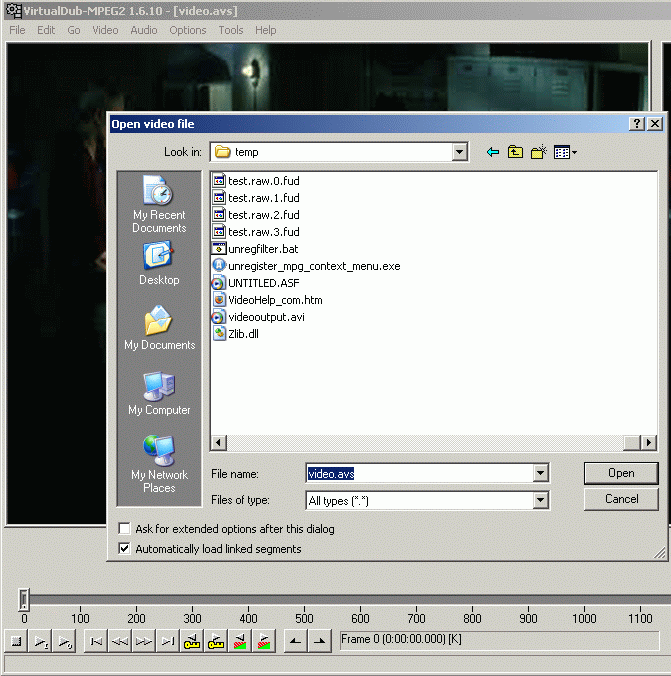
You can now import the video.avs file in for example Virtualdub, Tmpgenc, Windows Media Encoder or most other editors. When you import the file in your tool select All files under Files of type to see the .avs file.
+ Reply to Thread
Results 1 to 30 of 79
-
I'm a MEGA Super Moderator

- Aug 2000
- Sweden


-
Great!
And it works for the MOV out of my Digital Camera in conjunction with Quicktime Alternative. Now I can finaly edit them in Virtualdub.I stand up next a mountain and chop it down with the ledge of my hand........ I'm a Voodoo child.... Jimi Hendrix, -
doesnt seem to work with premiere, vegas, avid ....
"Each problem that I solved became a rule which served afterwards to solve other problems." - Rene Descartes (1596-1650) -
Probably because they don't support AVS. I know Premiere Pro does'nt.
Wax2 handles AVS just fine.I stand up next a mountain and chop it down with the ledge of my hand........ I'm a Voodoo child.... Jimi Hendrix, -
Would something like this work? (i'm not a Premiere user)doesnt seem to work with premiere
http://videoeditorskit.sourceforge.net/
It appears to be an attempt to update this project;
http://neuron2.net/www.math.berkeley.edu/benrg/avisynth-premiere.html
. -
if it said: I can't determine the frame rate of the video, you must use the "fps" parameter...
what should i do? -
I'm a MEGA Super Moderator
- Aug 2000
- Sweden
-
vfapi reader ->open avs -> premiere?
gimami: try DirectShowSource("F:\test.rmvb", fps=24, convertfps=true) -
do i need to install vfapi reader?
-
"Each problem that I solved became a rule which served afterwards to solve other problems." - Rene Descartes (1596-1650)
-
FFDSHOW also comes with a program called MakeAVIS for creating dummy AVI files, but it's dependent on using FFDSHOW for decoding.
"Just another sheep boy, duck call, swan
song, idiot son of donkey kong - Julian Cope" -
I'm a relative newbie at this, so maybe someone could answer a question for me. I tried this out on a wmv HD file. I could open up the file and edit it fine with virtualbub. The problem comes when I try to save the edited file. I go to "Save as AVI" and then change the file type to "All files", then specify the file name as ****.wmv. It proceeds to save but starts creating a huge file... many times bigger than the original. I have the video options in virtual dub set to "direct stream copy" that normally works fine for avi files. I tried other video options too, but couldn't get it to work.
Can anyone tell me the procedure to save the wmv file without creating an enormous file?
Thanks -
I'm a MEGA Super Moderator
- Aug 2000
- Sweden
-
you can't use direct stream copy(no reencoding) for wmv files or avisynth frameserved files. use a compression under video->compression.
-
Wow, hold it.Originally Posted by veloslacker
Your mistake is trying to 'force" a filetype by renaming the extension. AVI is NOT WMV, so that by itself would have already messed you up, as the result will NOT be readable.
VDub by default saves an AVI file as "Uncompressed RGB" which results in a huge file size. Direct Stream Copy only works when you are NOT using AVISynth to trick VDub into accepting other formats. If you are using AVISynth, you pretty much HAVE to use full processing and select a codec for compression. I've found that the Microsoft MPEG4 V3 codec seems to work well enogh, as well as DIVX5.1 codec. Of course, generating those files through codecs will take time.It proceeds to save but starts creating a huge file... many times bigger than the original. I have the video options in virtual dub set to "direct stream copy" that normally works fine for avi files.
Thanks[ -
Thank you everyone for the replies to my question. Ok I think I sort of understand you... the virtualdub/avisynth method won't work for editing wmv files without compressing/re-encoding, right? Is there another tool that can be used for editing wmv that is reasonably user-friendly, and does it in as few steps as possible. I usually just need to remove a few sections from the files.
Thanks in advance -
I'm a MEGA Super Moderator
- Aug 2000
- Sweden
-
you can try asfbin if you want to cut wmv.
-
This method worked to get Virtualdub to play the file, but the video has a severe delay behind the audio.....
-
If you let VDUB do the full render to a file the file should play fine.
-
Still no luck with MP4 video (Diggnation epsidoes in m4v to be exact)....I've tried Graphedit, Virtual Dub, and Canopus - all process with the audio way out of sync - evn though they all show the total time of the audio and video to be the same. I tried doing the cideo seperate from the audio - they both show the same time...but both end up wildly out of sync.....
-
M4V? That thing may be using AAC audio codec. You may need to turn that back into MP3 or even PCM, then mux them back. Use VideoDetective on the file first...
-
I've tried doing this with a real media file but it doesn't seem to work, I keep getting an error that says Avi synth open failure: Script error: (C:\Documents and Settings\baconharvester\Desktop\video.avs, line 1, column 1) Someone also recommended that I add in the frame rate, but how would I find it? And is it ok if I use wordpad instead of notepad, because I don't have notepad on this computer anymore.
-
Here's my version, replace the bolded section with your own filenameOriginally Posted by baconharvester
Note the fps parameter, and the convertfps parameter. This is for NTSC 29.97 fps, so that's why the setting. If you are outputing to some other fps then you'll need to change it.#ASYNTHER DirectShow_NTSC, just a comment
DirectShowSource("C:\My Documents\SomeVideoName.rmvb", fps=29.97, convertfps=true)
As long as you use TEXT/ASCII format you're fine, but how can you NOT have Notepad on your machine? Download a replacement like EDITPAD or something. You can't live without it! -
I'm sure I've seen a number of apps of similar ilk to TweakXP that allow you to uninstall a lot of Windows "optional" features and accessories. Heck, even Add/Remove Programs > Windows Components would probably let you uninstall it too.Originally Posted by kschang
... the minute you start doing any scripting/coding, that's for sure !Originally Posted by kschangIf in doubt, Google it. -
freeware version of notepad
http://www.flos-freeware.ch/notepad2.html"Each problem that I solved became a rule which served afterwards to solve other problems." - Rene Descartes (1596-1650) -
Video Restorer

- Jun 2003
- dFAQ.us/lordsmurf
-
Good guide.
 Want my help? Ask here! (not via PM!)
FAQs: Best Blank Discs • Best TBCs • Best VCRs for capture • Restore VHS -
I have a MKV video file that plays back A-OK with MEDIA PLAYER CLASSIC but it will not play with WMP 10 or BSPlayer or anything else.
I tried this (rather simple) AviSynth script but I get a "no-go" trying to open it up in VirtualDubMod as well as TMPGEnc Plus.
Any ideas?
- John "FulciLives" Coleman"The eyes are the first thing that you have to destroy ... because they have seen too many bad things" - Lucio Fulci
EXPLORE THE FILMS OF LUCIO FULCI - THE MAESTRO OF GORE
-
Two ideas

1. MPC has filters built into it doesn't it?
The file might play with MPC even though your system doesn't have a DirectShow decoder for it.
2. Occasionally, multiple audio streams appear in Matroska files. I've had trouble in the past using AviSynth with them. Remux to a single Audio/Video stream.
. -
I installed MKVtoolnix and then MKVEXtractGUI
This combo allowed me to take that MKV file and demux it into what became 3 files. An AVI video file, a MP3 audio file and a SRT subtitle file.
The AVI file is strange though and I only got it to load into VirtualDubMod and TMPGEnc Plus using the following:
DirectShowSource("C:\video.mkv", fps=23.976, convertfps=true)
Only problem is I have no idea what the fps should be (it is a downloaded anime file).
Anyways it ain't the biggest deal that I convert this to DVD format but it was something I was fooling around with and then I saw this thread so I figured "oh a new project to work on" LOL ... see I've never worked with MKV files before so ...
It looks like it will work now. I just have to use VobSub or TextSub or whatever to burn the subs in as I find that easier than trying to author with selectable subs. If I run into problems I will report back otherwise I assume it is A-OK now. I just have to remember how to add the subs via AviSynth (it's been a while).
- John "FulciLives" Coleman"The eyes are the first thing that you have to destroy ... because they have seen too many bad things" - Lucio Fulci
EXPLORE THE FILMS OF LUCIO FULCI - THE MAESTRO OF GORE
-
MKVToolnix package has another tool, command line usually, but it has a hidden GUI.Only problem is I have no idea what the fps should be (it is a downloaded anime file).
If you make a shortcut to it, then edit it like so;
In the package MKVToolnix is a command line tool "mkvinfo.exe" that HAS a hidden GUI built in. To access the GUI use a "-g" at the command line or make a shortcut with;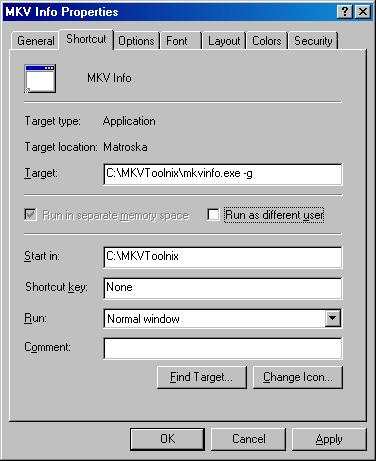
...it should give all the specs of the file.
. -
Baldrik,
Just one simple question : I read all the DirectShowSource help part in AVISynth help file and I could not find any citation on parameter convertfps. Can you please tell me how you got to know the existence of this parameter and what it does ? Is there a program that shows all the parameters in AVISynth filters.
Regards -
Hmm, I found it right on this page:Originally Posted by OutSiderBR
http://www.avisynth.org/DirectShowSource
6th item under "Description".
Jim

 Quote
Quote


Similar Threads
-
how 2 open mp4 & mkv video files in vdub
By naveenkrish in forum EditingReplies: 2Last Post: 19th Jun 2010, 22:14 -
troubles with MKV/OGM to MP4
By ironmaidens in forum Video ConversionReplies: 6Last Post: 23rd Aug 2008, 13:18 -
Codec problems with mov, mp4 and wmv
By lyrd in forum LinuxReplies: 15Last Post: 29th Jul 2008, 14:30 -
.MKV to .MP4 (or .MOV) for AppleTV
By RevMayhem in forum Video ConversionReplies: 3Last Post: 3rd Feb 2008, 17:37 -
.wmv/.mov to psp mp4 not working
By JJeweler17 in forum ffmpegX general discussionReplies: 11Last Post: 4th Aug 2007, 00:35