


 View Profile
 View Forum Posts
 Visit Homepage

This guide will show you how to reencode an AVI/DivX/XviD to XviD or DivX that should work on most DivX DVD Players like the Philips 642. If you have problem playing the avi,divx,xvid on your standalone try this.
Tools required
Latest AutoGK beta.
Guide
Install AutoGK.
Install the AutoGK beta update.
Start AutoGK
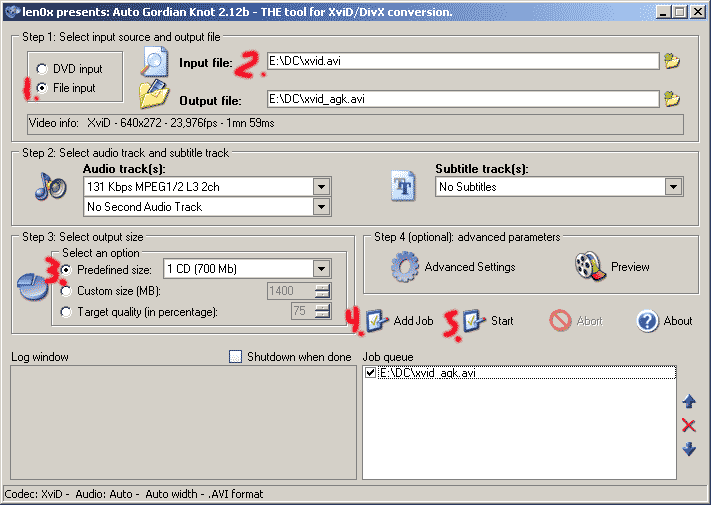
1. Change to File
2. Open the avi
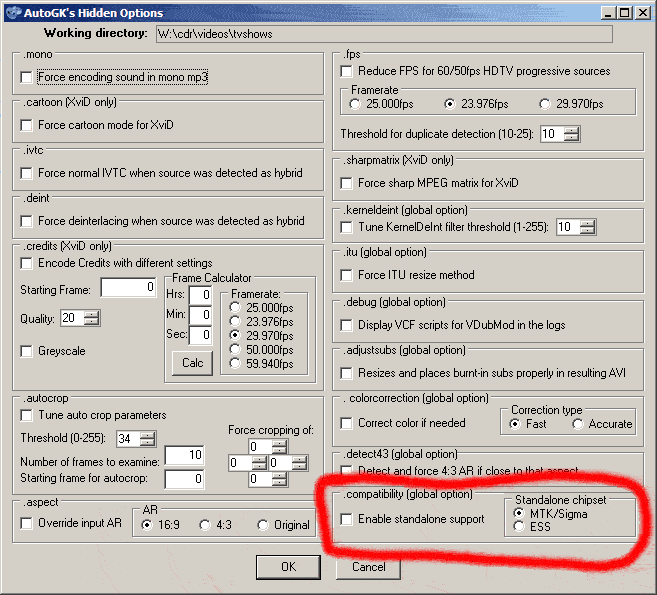
2a. Press CTRL-F9 and select Enable standalone support and ESS under .compatibility and Standalone chipset
3. Set the output size
4. Add job
5. Start
DonE!
Problems and Tips
Click on Advanced settings to change to DivX, you must install the DivX codec first.
If you can't open AVI be sure to install the latest AutoGk beta.
Audio sync problems, usually if the audio is VBR(variabel bitrate)
Use Virtualdub to convert the audio to WAV, open the video and
select Video->Direct Stream Copy
select Audio->Full processing mode
select File->Save AVI and save as a new AVI
Only the audio will be reconverted to WAV, the video will be copied. Use this new video in AutoGK.
+ Reply to Thread
Results 1 to 30 of 36
-
I'm a MEGA Super Moderator

- Aug 2000
- Sweden


-
2a. Don't forget to actually enable ESS/MTK standalone support with Ctrl-F9...
-
this way you rencode the avi though and you have possible quality loss right?
-
This works like magic!!!!!!!!!!! Thanks

-
I'm a MEGA Super Moderator
- Aug 2000
- Sweden
-
therock: yes.
hilljack: thanks. thought it was enough to select ess support when you installed the stable version. -
What does ESS support do in this case? Can it affect the audio sync or overscan?
-
The audio is out of sync after I convert them. Why?
I am using XviD and the latest AutoGK beta. -
Try ripping in IFO mode and RIP just the video you want to encode. For the main movie just do the main movie files etc.Originally Posted by digitalevk
- John "FulciLives" Colema
vv"The eyes are the first thing that you have to destroy ... because they have seen too many bad things" - Lucio Fulci
EXPLORE THE FILMS OF LUCIO FULCI - THE MAESTRO OF GORE
-
What does ESS support do in this case? Can it affect the audio sync or overscan?
By default, AutoGK uses a couple of Custom Quant Matrices when doing XviD encodes. ESS chipset based players don't support much in the way of CQM, and if the ESS box is checked, it then switches to either the MPEG or H.263 matrix which all standalones support. Which it uses depends mostly on the results of the compress test. It's nothing to do with audio synch or overscan. -
-
help! my audio is out of sync everytime I encode with this program, I followed the guide exactly, and checked my avi in Virtualdub and in Gspot, and the avi looks ok. BUT when it come outta autogk the audio is off by 2-3 seconds even
-
I had this happen once using FILE MODE in DVD Decrypter because somehow a snippet of a menu got into the start of the file and threw the audio off by a couple of seconds.Originally Posted by Googi
I ripped it again using IFO mode and got just the video without that snippet of menu at the start and of course the audio was in sync.
- John "FulciLives" Coleman"The eyes are the first thing that you have to destroy ... because they have seen too many bad things" - Lucio Fulci
EXPLORE THE FILMS OF LUCIO FULCI - THE MAESTRO OF GORE
-
i have a norcent dp220 it play xvid fine but stop after a few sec. is there a way to fix it? i tried to burn on dvd and cd the result are the same. please help me...
-
Follow the guide. Try the ESS option as well as the MTK/SIGMA option. One or the other is bound to work.Originally Posted by punk
- John "FulciLives" Coleman"The eyes are the first thing that you have to destroy ... because they have seen too many bad things" - Lucio Fulci
EXPLORE THE FILMS OF LUCIO FULCI - THE MAESTRO OF GORE
-
i will try it once i get home from work. i try to convert it to avi yesterday but the quality come out not too good way worser than the xvid. why? and does it matter if i burn it on a dvd or cd?
-
i am 0 for 3 getting the audio and video in sync. any luck yet?Originally Posted by Googi
-
could someone help explain the 4:3 features in the hidden menu? I would like to convert my 2.20+ ratio xvids to 4:3 xvids, to play on my standalone.Originally Posted by HillJack
1 .aspect - check 'Overide'?
check 4:3?
2 .detect 43(Global Option) - check 'Detect and force...'? -
Hi-
It's definitely not 1. That's for when DGIndex says it's 16:9 and it's really 4:3, or vice versa. Those instances are very rare.
As for 2, I'm pretty sure it's for those times that AutoGK takes a 1.33:1 movie and hands you back something slightly different. So, you use it to force a true 1.33:1.
You can do what you want in AutoCrop->Force Cropping Of, and fill in the numbers. You'll have to know what you're doing to get it just right, though. And it's a damn stupid idea if you ask me, chopping off the sides of a movie. But you didn't ask that.
What you want to do is much easier in the full Gordian Knot. -
Does this strategy work if your standalone does not support divx?
-
I found out why my audio was out of sync every time I used AutoGK.
It's because the audio stream of the AVI was VBR so I had to extract the full WAV audio stream. -
When someone figures out the dub issue, please let me know. I'm new to all of this. I converted to DivX and the quality is excellent, but the audio is out of sync by one or two seconds. I am trying both ESS and MTK. It would be nice if it worked.
-
I'm a MEGA Super Moderator
- Aug 2000
- Sweden
-
Ambimom:
Use Virtualdub
select Video->Direct Stream Copy
select Audio->Full processing mode
select File->Save AVI and save as a new AVI
Only the audio will be reconverted to WAV, the video will be copied. Use this new video in AutoGK.
mr-scarface: No. -
The Old One

- Aug 2000
- Hellas (Greece), E.U.
-

I capture a VHS tape (~4 Hours) with virtualdub.
I use picvideo mjpeg for video codec and PCM audio for Audio
I run the file through AutoGK (latest betas always) to convert the whole VHS tape (with no drop frames / problems etc) to XviD
The audio after 90 min turns out of synch
I use the same avi file to encode to mpeg 2. No problem
So, there is something wierd with AutoGK and long files. Tested on 15 tapes so far -
The virtual dub utility that activates with the Auto GK is 1.5.4.1 but I took your advice and downloaded the latest version 1.6.10.
I ran the file through Virtual Dub first; and then Auto GK.
Unfortunately, same result. The first 5 minutes are in sync, and then it just goes off by 1 or 2 seconds.
Thanks anyway. -
This is not the way to do this, sound sync is always a problem and AutoGK is far too slow.
Use this
http://www.download.com/VSO-DivXtoDVD
It's free, it has never failed to convert any problem .AVI file I have ever come across, and it's very fast. A one hour video takes approx 30 mins to convert. There are no options to choose. You can stream or burn the resulting .VOB files. -
Thanks for the advice but I already have software that converts to DVD. I just wanted to watch on a standalone DivX player instead of on my computer without having to do the conversion to DVD.
It all got too frustrating...
so I returned the DivX player to the store... and I'm back watching on my DVD player or on my computer.
I appreciate everyone trying to help. I guess I'm not technical enough to figure all this out yet.
THANKS EVERYONE! -
i don't know why but i can't install AutoGk, i mean i can install them but when i open it, it said something like problem occured...
-
Found a way to get audio in sync.
take ur avi file. the one that works in sync, even if it has gmc etc.
go into Vdub and open it.
on video-> full process mode. and hit compression. use xvid (xvid.dll)
on audio-> full process mode. hit compression . lame MP3 with 32kb seemed fine for me.
hit save avi. and it should work. check with mpeg4modifier and see if gmc, qpel is gone and mpeg custom is listed.
the new file might be a bit bigger than the original.
tried to do what baldrick said, ie do that vdub configuration mentioned above, no luck.
hope this helps-And All that could have been... -
Does AGK understand .sub and .idx files?
I have an avi called myvideo.avi together with myvideo.sub and myvideo.idx but there's nothing in the subitle dropdown list.
Am I missing something?
If I can get that fixed, I want to burn the subtitles into the avi. Do I just set the Target Quality to 100% or is there more to it than that?
Thanks
-
yeah, how exactly do you add the subtitle into the video? the dropdown list has nothing.
 Quote
Quote


Similar Threads
-
Philips DV624/37 AVI (XviD) Problems (Not QPEL/GMC)-could it be the codec?
By wingalls in forum Newbie / General discussionsReplies: 4Last Post: 2nd Nov 2008, 00:13 -
Easiest way to re-encode GMC avi?
By fayewolf in forum Newbie / General discussionsReplies: 7Last Post: 24th Sep 2007, 13:49 -
Converting DV AVI to xVid AVI (with AutoGK)
By foochuck in forum Newbie / General discussionsReplies: 6Last Post: 5th Jul 2007, 00:56 -
Problem Converting AVI to xvid AVI (using AutoGK)
By foochuck in forum Newbie / General discussionsReplies: 2Last Post: 3rd Jul 2007, 09:57 -
XviD: Qpel, GMC, Max consecutive B-VOPs, and N-VOP ??
By GangstaRap in forum Video ConversionReplies: 17Last Post: 20th May 2007, 03:59