


 View Profile
 View Forum Posts
 Visit Homepage

This guide will explain the basic steps to stream live TV over the internet or your local network using Windows Media Encoder (wmv video).
Hardware required
Capture card with TV-in/Video-in
Tools Required
Windows Media Encoder 9 (freeware)
Guide
Start Windows Media Encoder and close the Wizard.
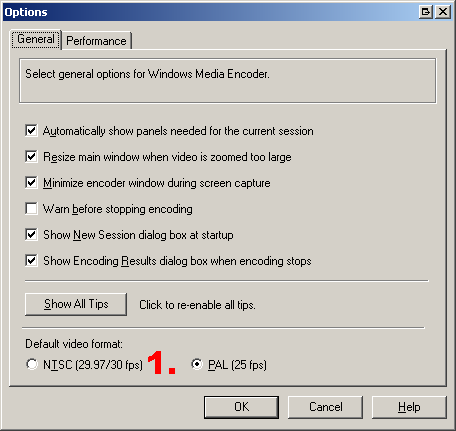
1. Under Tools->Options change to NTSC if you live in a NTSC country(USA, Canada, Japan) and PAL if you live in a PAL country(basicly the rest of the world)
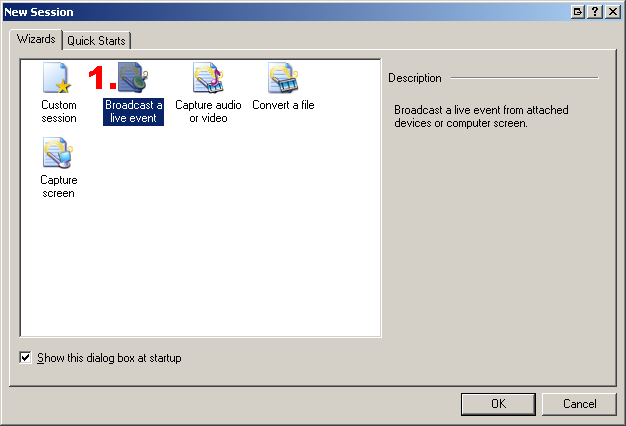
Make a new session by click on New session or under File->New
1.Select Broadcast a live event
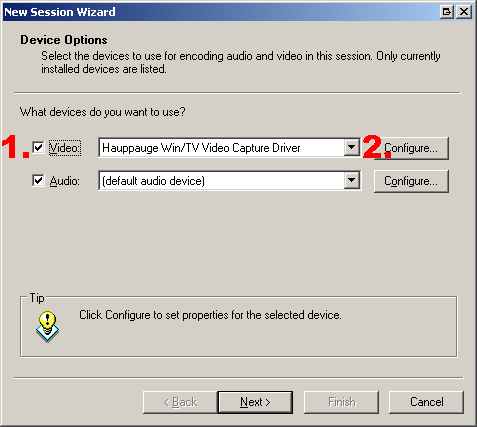
Configure Capture device options
1.Change to your default capture device.
2.Click on configure to change capture device default settings, this is different between capture devices. I usually use low resolutions for streaming over the net so 352/320x240(NTSC) or 384/352x288(PAL) should be enough.
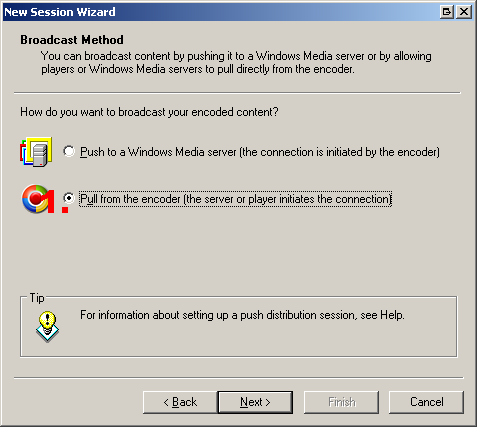
Broadcast Method
1. Select Pull from the encoder
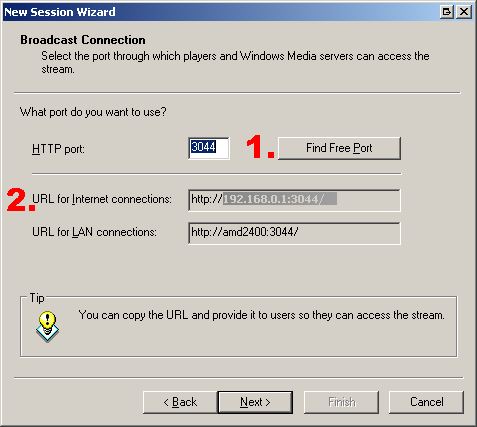
Broadcast Connection
1. Click on Find Free Port
2. Copy the URL (this is your IP and you must be online when you do this)
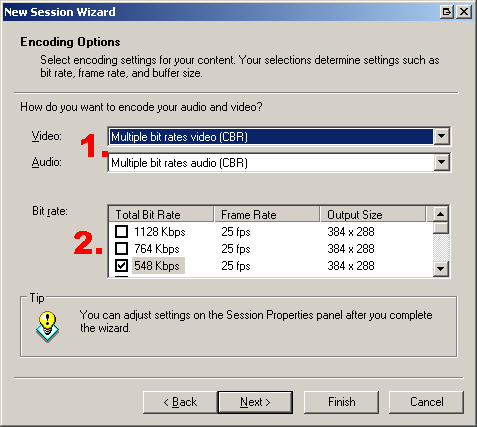
Encoding options
1. Under Video and audio you can select different video and audio quality templates, I usually use low quality like VHS templates.
2. Choose the bitrate, higher bitrate means better quality but it requires faster internet.
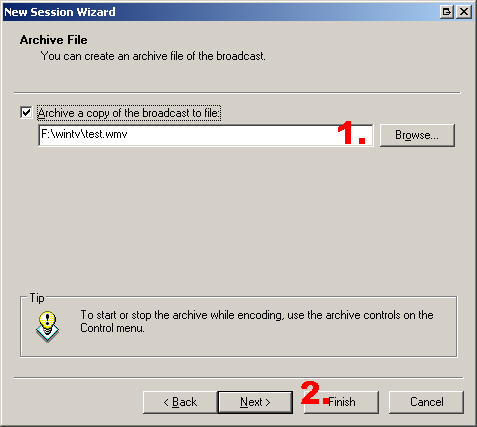
Archive
1. If you want to archive the capture specify a location
2. Hit Finish
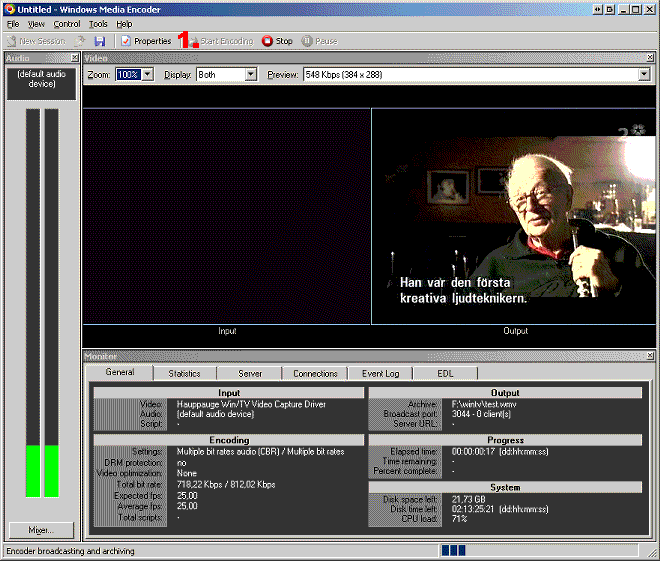
Encoding and streaming
1. Start the Encoding
View stream
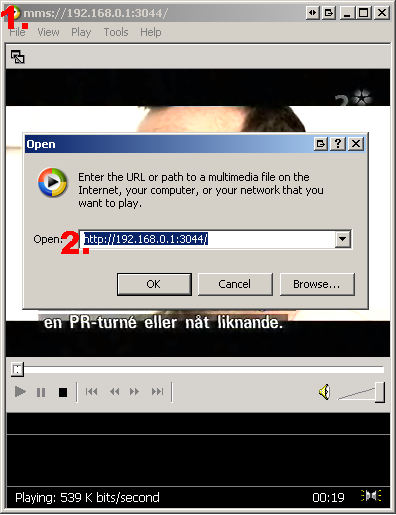
1. To view the stream just use the URL you copied above and paste it in Windows Media Player using File->Open URL. You can play it in some other Video Players also but it may require that you replace the http:// in the url with mms://, like mms://192.168.0.1:3044 .
Done.
+ Reply to Thread
Results 1 to 30 of 92
-
I'm a MEGA Super Moderator

- Aug 2000
- Sweden


-
Never mind. Test 'Pull' in progress...

-
very nicely done B. Will definitely keep this for future reference.
-
How do you remotely change the channel? At least without using some clunky VNC to take over the streaming computer?
Got to be able to surf channels while I surf the web.
That is the question I have been trying to solve for a little while now.
I found the AIW Player has potential, but it is still rough around the edges.
-Suntan -
Does the capture card driver have to be WDM? I cannot get the wintv pvr250 to output to wme 9.
-
The basic part of the guide is good, but it doesn't cover the port mapping you need to do with most home systems, which are behind a router with built in firewall. In my case, I have a D-Link 614+ router, with 5 PC's. You must go into the router's configuration and set a virtual service for the PC that you have WME running on, and map the broadcast port to the PC. I use both TCP and UDP.
Another issue is that most broadband providers block a lot of the outgoing ports, so you need to find open ports that you can map the broadcast to. In my case, I have Cox, which blocks most outgoing ports, except those above 8000. I setup WME to use one of those ports (e.g. 8085), configure the router to direct that port as a virtual service to the PC running WME, and I'm able to watch TV from anywhere on the Internet.
If you want channel changing, get SnapStream, which has its own web interfact that controls the tuner. You will still have to keep the port mapping considerations for WME in mind when configuring SnapStream, the same limitations apply. -
Yes, I know about Snapstream, I should have clarified. Changing channels with freeware programs.
Not that I am cheap (well I am but) it is mostly that the reception I get from my tvtuner is not good enough to justify paying money for anything, but from a 'trying to get it to work for the fun of it' point of view I am interested.
-Suntan -
This is great.... I manage a pubic web server that we post windows media files on for playback / download --- and now we can offer live streaming if need be.
Now when I had our IT dept configure this server for me I had them install Windows Media Server components... I would think it will enhance playback vs being problematic with the above settings. -
This is great info.
Anyone know how to get the server to start streaming on startup? I don;t want to have to go into windows media encoder to start up each stream everytime the server is booted.
Maybe a batch file in the windows Startup folder? Does this encoder have command line options that could be called from a batch file? or is there another way?

-
Hmm. With WME, you create capture profiles, which you could put into your startup folder so that the capture session would start on boot - BUT - you have to click "start encoding" to get the encoder to go. I'm not aware of a command line option that will automatically start the encoder, but I'll bet it exists.
-
I tried it tonight, but before I start messing with command line options I have to try to get the basic encoding to work! I can select my source, set my parameters, and start encoding just fine. But as soon as a client tried to connect I get:
"The encoder was unable to keep up with the amount of supplied data"
in the WME error log and the encoding stops.
I have set my encoded output to the lowest possible type (Security Camera, which is still frames). So I am definitely not using a lot of bandwidth. I am wondering if the ATI tv tuner signal is just too much for my AMD XP1500+ to handle?
KK. -
With regard to command-line options, look in WME Help for "command line", you'll see references to the Encoder Utilities. Windows Media Encoding Script can be used to do batch encoding and processing using command-line controls.
-
Newbe here, so bare with me, I'm trying to make this idea work so I can see my house for security reasons. I have followed everything I believe and it seems to be working fine. I check with pasting the URL in my media player(at home) and seems to be great, BUT I can't seem to get it to work outside the house on another computer, What am I missing here?
I have tried alot of port settings including the 8000 area as stated above. I have no idea how to figure out if my broadband is causing this not to work, how do you find out if that is the problem, them not letting out going to be abled?
Thanks for any help.
XP system-2.4g -
Has anyone been able to get this to work at all?
It doesn't even work on the computer I'm running it on!
Gives a Page Not Found Error! What gives? -
Well, I got it to work on it's own computer but it won't send to any others. When I try to connect with a second one on the LAN it says WMP cannot find the specified file, file does not exist or the computer is off line. Any ideas?
-
I had to turn off the Windows XP built-in firewall to get the remote computer to connect. Now when I try to play the stream it says Connecting To Media, Buffering, then Downloading CODEC which fails, then Playing but it never plays anything. Downloaded a WMP update but it didn't help any. Downloaded a complete updated version of WMP. Finally the updated version works! Whew.
-
As long as I know Media Encoder only allows that a session be watched by an audience of only 5 receivers.
Is there any way to allow a wider audience? -
I had the same problem....viewing within my network was ok...but any other computer on the internet couldn´t connect.
What i did was get a No IP account (www.noip.com). You just type a web adress of your choice (for example, http://livetv.hopto.org) and download a small app so if you don´t have a fixed ip, this little app keeps your adress current with your actual ip. So everytime you wanna stream, execute the noip app, refresh the link between your web adress and your ip, and give away your url. (instead of http://222.222.222.222:8001, http://livetv.hopto.org).
The IP redirect i choose was "port 80 redirect". Dunno why but it works.
Another important thing is to configure win XP firewall. Set a streaming session with any given port ( i use 8001). Remember this port when configuring the stream in WME.
And now a question....another app to do live TV streaming??? WME is unstable and requires a lot of cpu power. -
@haznut
Have you tried VLC (Videolan)?
-Suntan -
hey suntan....i didn´t try Videolan....i´m downloading it right now, but before i start using it, i would like you to tell me if it works ok...if the remote PC can change channels and also if the quality is good (resolution plus bitrate).
I also tried Beyond TV 3. My God what an awafull program.
I had to install Microsoft .net Framework to be able to install beyond TV, and now my system is slower and everytime the screensaver starts, you have to logon again after stopping it. Then came Beyond TV....yeiks!!! If a remote PC change channels, some times it takes allmost 40 seconds to do it..and sometimes the audio from the prior channel remains over the audio from the new channel selected....plus, it has serious sync problems. Annnnnd.....you can´t view the channels in good resolution (top is 150x150 or something like that)....
Thanx -
I haven't tried streaming with VLC as my backup PC would not be able to handle it anyway (500mhz k6-2 with mb video) but VLC works well for what I use it for. A compact PC DVD player that does not require installation.
It's deffinitely NOT bloatware, I can tell you that.
Check out the forums at Videolan.org.
-Suntan -
Hi guys, ive followed the guide to a tee, even though my windows media player doesnt show my URL for internet connections I used another computer on my network to find that.
Now problem is I can only play files in the network and have used noip.com with no luck
Anyhelp be appreacited
Cheers. -
Remlap:
Are you using WinXP? if so, have you set an open port for incoming connections? -
Yes I am, please can you tell me how to do thisOriginally Posted by haznut
Thanks -
Ok this is gonna be hard since my WinXP is in spanish...i hope u understand....
You have to go to winXP firewall. I access it through network connections, right click on my internet connection and select properties. If you have a different type of connection, try to find out how to get to the winXP firewall.
Once you do, go to the advanced options tab. Check that the firewall is activated. then press the config button (bottom right). A new window popups....there, click on the "add" button, type a name, and then type the port number you specified in NO-IP. (i recommend 8000 or 8001). Hope it works. -
Tried your advice at still nothing works

-
Anyone able to help at all?
-
What type of connection do you have? Do you use a router?
Can you ping the host machine from the outside world? -
All I get is, "Cannot find a valid output stream from the source.(0xC00D1B70)"
Hauppauge PVR-250, latest drivers.Cheers, Jim
My DVDLab Guides -
This is a great guide, however after following the guide I have the following problem.
I am ready to stream live tv and I press the start encoding button and the picture goes black. The program seems to be working because I can see the the rest of the program, the tabs general, statistics,...etc including the green bars showing the program is streaming, I also asked a friend to connect and he is able to connect but he can not see the picture , I can see the client (friend)connected.
Can you please tell me what can I do to solve this problem.
I have a P4 3.4Ghz Cpu
512 mb memory
the tv tuner is : ATI TV Wonder Elite.
Thanks in advance for your help
Fernando
 Quote
Quote


Similar Threads
-
Windows Media Encoder - How to pause a live stream?
By dsDoan in forum Video Streaming DownloadingReplies: 8Last Post: 5th Mar 2011, 03:42 -
Rebroadcasting Windows Media Encoder live streaming
By FarmerCharlie in forum Video Streaming DownloadingReplies: 0Last Post: 12th Apr 2010, 09:49 -
Live Windows Media Stream (Video) to Mpeg
By russellharrower in forum ffmpegX general discussionReplies: 1Last Post: 27th Dec 2009, 04:36 -
How to add logo in windows media encoder stream
By simpleatif in forum Media Center PC / MediaCentersReplies: 1Last Post: 7th Jul 2008, 02:26 -
Stream to WMV without using harddrive? (windows media encoder)
By spanoj in forum Capturing and VCRReplies: 4Last Post: 20th Aug 2007, 07:37