


 View Profile
 View Forum Posts

Required tools:
Vobsub2.23 http://www.filemirrors.com/search.src?file=VobSub_2.23.exe
If you have vobsub2.23 installed make sure you install the utilities that comes w/ the package. Check your programs menu for VobSub and skip the quick installation.
Quick Installation and what to look for:
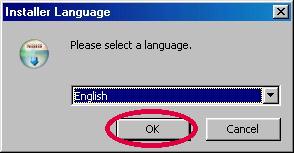
Launch vobsub2.23.exe
Click ok for install window
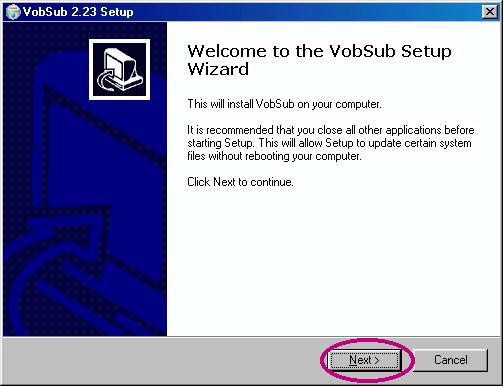
Next for Vobsub setup wizard
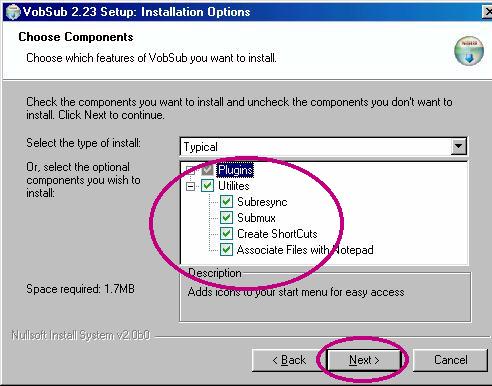
Installations Options: Click + to make - to extend Utilties list.
By default these are checked if not,
Check subresync, submux, create shortcuts & associate files
with notepad, then click next to continue.
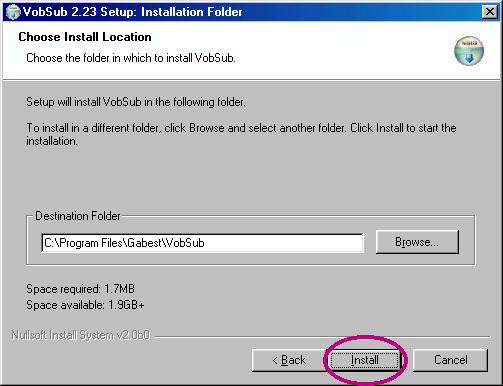
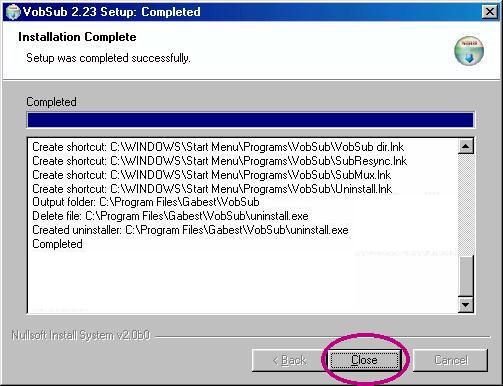
Click install for installation folder
Then close for completed window.
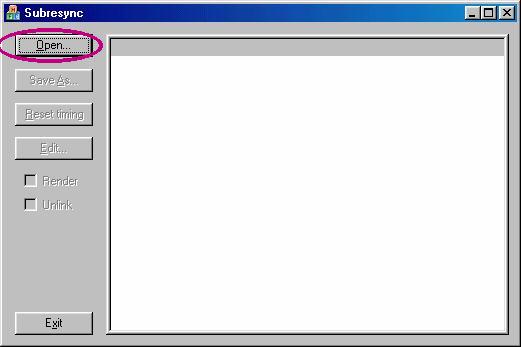
Now that you installed vobsub2.23 files goto your programs menu, look for Vobsub and lanuch subresync.
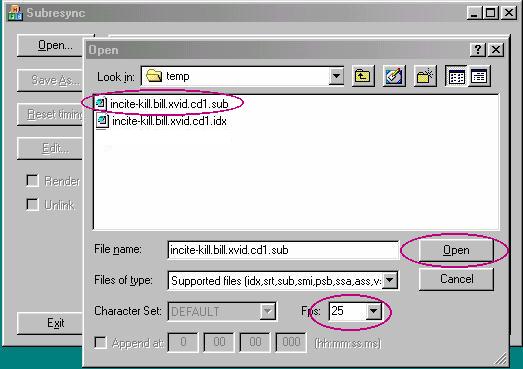
Click open, goto to directory that has your filename.sub
Select your filename.sub by single click then open. By default fps is 25, if your video frames per seconds a different value (23.97, 24, 25. 29.97) select something else.
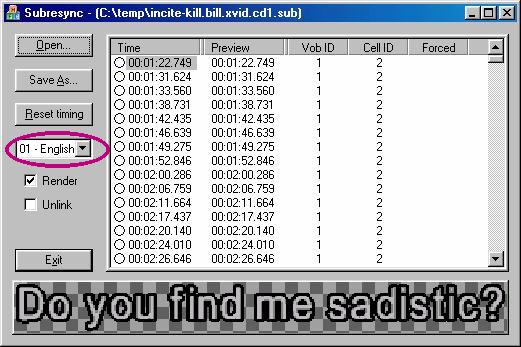
The subresync dialog box appears...by default "Render" checked and "unlink" not checked. From the "drop down menu" it may detect multiple language options(Eq. 00-Japanese, 01-English, 02-Chinese, 03-Not detected, 04-etc.....)
I only comprehend english so 01 was selected.
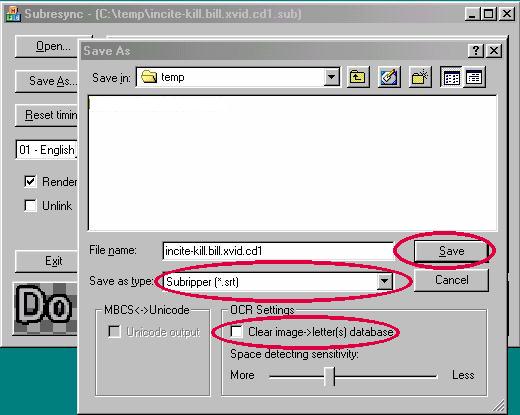
Then clicked Save As, from the "save as type" drop down menu, select your desired output extension.
Note: OCR Setting "clear image->letter(s) database" will build a database of letters you will be typing. If checked this item will clear the database. Click save to begin.
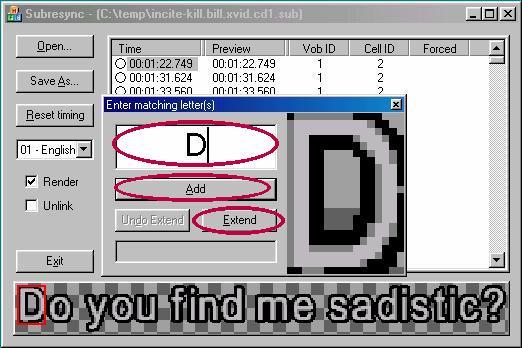
Follow the moving red box below and "enter matching letter/word/(s)." Once letter is typed press enter. This in turn builds a database of the letter/words/(s) you type. Some times the words don't appear properly cause of unknow character or symbol. Click "extend" to find the remain letter/word/(s).
Finally test your new filenname.srt and see if matches with your flix.
Special Tanks to Xtropy for kill.bill sub file
+ Reply to Thread
Results 1 to 15 of 15
-
FireWalker and IceBreaker{BaWp}
of Black and White Productions -
I'm a MEGA Super Moderator

- Aug 2000
- Sweden


You can't direct-link to images at geocities.
-
Corrected direct-link BlackAdders Dog's Body
FireWalker and IceBreaker{BaWp}
of Black and White Productions -
AnonymousGuest
Jesus Christ, I just fixed an entire subtitle file (.sub) for a Korean movie. When I save the file as an SRT or SMI it just converts the text to question marks!!!!!!!!! What the hell is going on? I was hoping that opening in a web browser and changing the encoding would fix it, but apparently subresync just wrote out question marks!!ahhhhhhhhh what am i supposed to do? Is there no better program? It doesn't seem to write out Korean text.
-
Sorry never answered this post in a reasonable time frame. Not sure how to answer this question....i mostly convert movies for english....its hard enough if you don't know the language. I'm not sure if there's other programs like subresync that will convert to foreign language without messing things up.
FireWalker and IceBreaker{BaWp}
of Black and White Productions -
AnonymousGuest
I resolved this issue, but seemed like no one was posting here anymore so I didn't reply.
When saving the file, you have to click a box that says save as unicode or something. -
I downloaded VobSub through this page today
http://www.afterdawn.com/software/audio_video/subtitle_tools/vobsub.cfm
and I did all the steps here.. After I clicked the .sub file and open, nothing happened. Nothing showed up. Not sure what is going on there. -
To your response courtellemont1 :
If your missing the idx file which is the counterpart for the sub files its possible the only screen you will get is the open screen for subresync. Is this the case? If so you need the idx file as well. If i recall right the idx tells subResync the text, color, location, size etc of the subtitle files.
FireWalker and IceBreaker{BaWp}
of Black and White Productions -
WinXP SP3-ASUS P5K-Intel Core2 Quad Q6600-Kingston DDR2-800 4GB-Maxtor STM3320613AS-LG GSA-H42N-PHILIPS SPD6002T-Gainward 9500GT-Pinnacle 700-PCI-Realtek HD
-
If you running IE8 it won't work with the current installation. Download this if you have IE8Originally Posted by Puppybarf

http://css.setti.info/~perplexer/vobsub/vobsub223fix.html -
Member

- Jul 2005
- drifting, somewhere on the Sea of Cynicism
-
Hi Baldrick --
I've noticed a certain anomaly in at least a few VH threads like this one. If I try to save it or to print it out for future reference (color inkjet in this case, but I doubt the particular printer matters), only different parts of it come through. We can use this thread as an example. My 'Go To' capture as PDF is PDFRedirect v. 2, which I've found pretty reliable. But not infallible, as it did not pick up the illustrations, which are the main point of this. Latest FireFox 3 got most or all of the text posts for printing, but none of the graphics except for the very first one. Any idea what's up with that ? Maybe something to do with the
"You can't direct-link to images at geocities." message ?
(Except that I've seen a similar result with some other threads.)
Next, I switched to IE, which did get all of the graphs for printing, but superimposed them over top of text posts. Between FF & IE, I got a messy but apparently complete version.
Am I doing something wrong ? I know there are some web pages that are formatted in such a way that only IE can resolve them (which is largely frowned upon, these days), though I don't think this would be one of those.
My recollection is that I almost never saw this issue with VH in the past . . . but that might have been before the switch to VBulletin.Looking for Rare / Obscure / Hard-to-Find Films ? Check out http://rarefilmm.com/ , and also its Requests & Discussion forum http://rarefilmm.chatango.com -
[QUOTE=Mafamaticks;2058300]
Thank you very much.Originally Posted by Puppybarf
 WinXP SP3-ASUS P5K-Intel Core2 Quad Q6600-Kingston DDR2-800 4GB-Maxtor STM3320613AS-LG GSA-H42N-PHILIPS SPD6002T-Gainward 9500GT-Pinnacle 700-PCI-Realtek HD
 -
After doing until this session, it's Nothing happened or No files appear in my folder!Originally Posted by FireWalker
Am I doing something wrong? Any suggestions..? Thanks in advance.Leo99 -
Is vobsub compatible with Win 7 x64?
-
In case someone is trying to download it from this page as well: I had issue with the antivirus and everything just froze. So I'm not sure what happened either. There's a message that it may include 3d party offers. And I reported the issue to AfterDawn tech support.Originally Posted by courtellemont1
I downloaded VobSub through this page today
http://www.afterdawn.com/software/audio_video/subtitle_tools/vobsub.cfm
and I did all the steps here.. After I clicked the .sub file and open, nothing happened. Nothing showed up. Not sure what is going on there.https://essays.agency/homework-help.html
Sorry for a bump.Last edited by moonkrj; 12th Jul 2019 at 01:05. Reason: typos


 Quote
Quote Visit Homepage


Similar Threads
-
How to convert .smi to .srt ???
By longsasha in forum SubtitleReplies: 6Last Post: 28th Sep 2013, 13:43 -
Convert ASS/SSA to Vobsub (idx/sub)
By thepoolhustlerman in forum SubtitleReplies: 2Last Post: 21st Aug 2011, 04:36 -
How to Convert .SSA/.ASS to .IDX with .SUB?
By rbin in forum SubtitleReplies: 0Last Post: 27th Dec 2010, 22:07 -
How to demux .srt from mkv, then convert .srt to .smi and mux .smi to mkv??
By narayanan in forum SubtitleReplies: 1Last Post: 7th Aug 2010, 22:49 -
How to convert srt/sub/ssa to SON/SCR for "Final Cut Pro" on Mac
By mriddler in forum SubtitleReplies: 18Last Post: 3rd Nov 2009, 07:08