


 View Profile
 View Forum Posts

Hello!
I'm trying to properly deinterlace this source using QTGMC (Since every other deinterlacer failed me), it's giving me difficulties and I don't know what to do.
I've been trying really hard to get the best results as possible by testing out the commands in QTGMC and comparing the two to see if it works better or not, which some did help a little bit, but now I think I'm stuck in a dead end because I haven't figured out to improve any more of the deinterlacing, Which is why I'm reaching out in this forum to see if anyone here could help.
Just a heads up that probably why I haven' gotten good results on deinterlacing is that because the progressive frames have this weird field separation (Look closely at the outlining)
[Attachment 94251 - Click to enlarge]
These frames that have them only shows up during movement, when it's a static frame for about a second it doesn't show up anymore.
This is the current script I have right now.Here's the description on my script:Code:clip = core.vivtc.VFM(clip, 1) clip = core.vivtc.VDecimate(clip) clip = havsfunc.Vinverse2(clip) clip = havsfunc.Vinverse2(clip) clip = havsfunc.Vinverse2(clip) clip = havsfunc.QTGMC(clip, TFF=True, Preset='Placebo', FPSDivisor=2, TR0=2, TR1=2, TR2=3, Rep0=1, Rep1=0, Rep2=5, NNSize=2, NNeurons=4, EdiQual=2, Sharpness=0.0, GrainRestore=0.4, NoiseRestore=0.2, StabilizeNoise=True, ProgSADMask=25.0)
Because this source is anime/animated, it's actually 23.976fps, so I decimated the source with VFM, Vinverse2 seems to fix some of the weird field separation issue I mentioned earlier (I never actually messed around with the commands, so I might get better results if I get help with that as well), and it seems that InputType=0 for QTGMC works better than InputType=2/InputType=3, ", TR0=2, TR1=2, TR2=3, Rep0=1, Rep1=0, Rep2=5" for some configuration, ", NNSize=2, NNeurons=4, EdiQual=2" less compression caused by NNEDI3, I used no sharpening because it's unnecessary, "GrainRestore=0.4, NoiseRestore=0.2, StabilizeNoise=True", I like to keep my noise & grain.
If there's anything you can do to improve this script or any tips I can try, please give me a comment, thank you!
+ Reply to Thread
Results 1 to 2 of 2
-
Member
- Nov 2025
- Unites States of America


-
Looks like someone messed up converting and upscaling and deinterlacing source and then reinterlaced it, but saved it as progressive video.

I doubt that. Seems more like 12000/1001.Because this source is anime/animated, it's actually 23.976fps
I would probably use:
for deinterlacingCode:clip = core.std.SetFrameProps(clip=clip, _FieldBased=vs.FIELD_TOP) # scan type: top field first clip2clip = clip clip2clip = qtgmc.QTGMC(Input=clip2clip, Preset="fast", TFF=True, FPSDivisor=2) # Deinterlacing using TIVTC clip = core.tivtc.TFM(clip, clip2=clip2clip) clip = core.tivtc.TDecimate(clip, mode=7, rate=11.98890, dupThresh=0.04, vidThresh=3.50, sceneThresh=15.00) # new fps: 11.9889
then I would crop,
for some anti-aliasing andCode:clip = antiAliasing.santiag(clip, strh=3, strv=3, type="sangnom", aa=128)
to address the line flickering and degrain.Code:clip = degrain.TemporalDegrain2(clip, degrainTR=3, degrainPlane=4, postFFT=0, fftThreads=10, DCT=1)
If you want to avoid the degrain in other areas aside from the lines,
seems to work fine.Code:clipMask = clip clipMask = core.resize.Bicubic(clip=clipMask, format=vs.GRAY8, range_in_s="limited") clipMask = core.std.Prewitt(clip=clipMask) for i in range(2): clipMask = core.std.Maximum(clipMask) clipMask = core.std.ShufflePlanes(clips=[clipMask], planes=[0], colorfamily=vs.GRAY) clipFiltered = clip # removing grain using TemporalDegrain2 clipFiltered = degrain.TemporalDegrain2(clipFiltered, degrainTR=3, degrainPlane=4, postFFT=0, fftThreads=10, DCT=1) # Resolution: clip: 1080x1080 and clipFiltered: 1080x1080 and clipMask: 1080x1080 # Color: clip: YUV420P8 and clipFiltered: YUV420P8 and clipMask: GRAY8 # Merging: clip and clipFiltered based on clipMask clip = core.std.MaskedMerge(clip, clipFiltered, clipMask) # PrewittEdgeMask
full script I used: https://pastebin.com/aqsLFKvR
Depending on personal taste on could also use some line darkening (i.e. with proToon).
The problem with that approach is that you still end up with frames like:
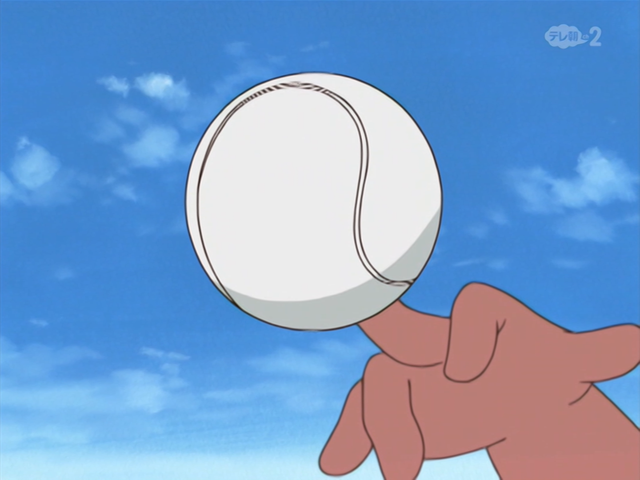
Only way to fix something like this, that comes to mind, would be do lower the resolution (descale) and upscale again, but since you wanted "to keep my noise & grain", this should only be done to the fields and only to the to the pixels around the lines and then sharpen the lines.
=> seems to be too much hassle for me now, but that would be something you can look into
Don't think there is any classic filter that can fix something like:
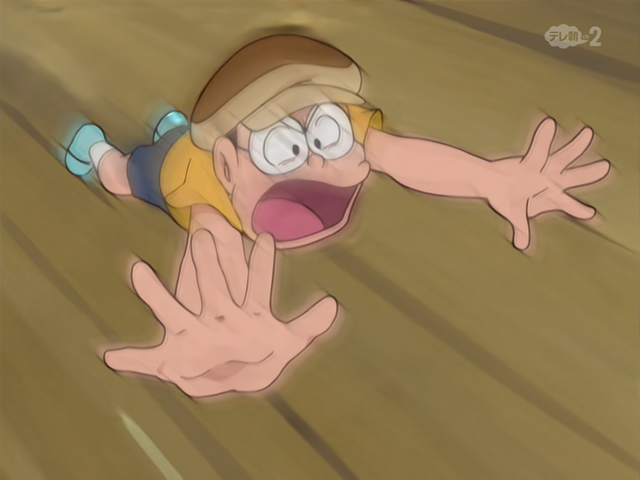
there are quite a few of these messed up interpolation deinterlacing frames in 'high action' shots.
Cu Selurusers currently on my ignore list: deadrats, Stears555, marcorocchini
 Quote
 Visit Homepage

Similar Threads
-
QTGMC deinterlace?
By marcorocchini in forum Newbie / General discussionsReplies: 5Last Post: 1st Apr 2026, 09:58 -
How to write a slideshow script for browsing pictures using 'vapoursynth'?
By avhp in forum Video ConversionReplies: 7Last Post: 26th Oct 2024, 09:33 -
QTGMC (deinterlace problem)
By rgr in forum Video ConversionReplies: 8Last Post: 22nd Nov 2023, 10:17 -
Strange issue DeInterlacing DV capture - QTGMC-Bob (Hybrid Vapoursynth)
By SupermanTV in forum Capturing and VCRReplies: 23Last Post: 17th Sep 2023, 18:00 -
Solved: Deinterlacing with QTGMC blends frames together
By PRAGMA in forum Newbie / General discussionsReplies: 6Last Post: 15th Apr 2023, 04:19