


 View Profile
 View Forum Posts
 Private Message


Hi, I need some information.
i have VCD ( in VOB files ) and would like to edit there are some spelling mistake need some editing like borader, etc etc.
Is there any program to edit those mistake? at least made them corrects. thanks.
Second question, Can i burn two movies in one dvd? If yes what program i need?
i had dl one movie of 1.36 GB, and second 1.12 GB
and would like both in one dvd. if you could explain in detail I will appreciate your help.
+ Reply to Thread
Results 1 to 11 of 11
-
bobybell
-
Hi. Welcome to the forums.

Where are the mistakes? In the menus, in the actual video? Somewhere else?Originally Posted by bobybell
Yes, it is possible to get more than one movie on to a DVD. But, before we get into that, we need to know what format they are in at the moment, and how long they each run for. Knowing this will help decide what the best approach is.Originally Posted by bobybell
Use GSpot v2.52 beta on both files and post screen shots of the information back in this thread.There is some corner of a foreign field that is forever England: Telstra Stadium, Sydney, 22/11/2003.
Carpe diem.
If you're not living on the edge, you're taking up too much room. -
Thanks very much, !
Ok the mistakes, it is family ceremony video in the beginning some titiles like names and venue and there are spelling mistakes. And also i would like to edit some shoots because the boarder i don't like, i would like to edited some new boarder.
about the movies, i did dl avi files. i have AVI MPEG RM WMV Joiner, and as well VSO DivxToDVD, i have also nero. Actually i saw some dvd in store which have 2 or three movies in one dvd, and thought if i could try and avoided wast space. I would be really thankful if you could help me.
"Use GSpot v2.52 beta on both files and post screen shots of the information back in this thread."
are you talking after joining 2 or 3 movies in dvd?
thanks for your help.bobybell -
It sounds like the spelling mistakes are in the actual video rather than subtitles, and the border will definitely be a part of the video. The short answer is that it will be extremely difficult, if not impossible, to correct the spellings or borders unless you have the original video files that were used to make the video you have.Originally Posted by bobybell
Think of it like trying to correct a mistake in a painting by Van Gogh (one of your guys) and changing the canvas it's on - that's what you're wanting to do with your video. I'd suggest you live with it as it is unless, like I say, you have access to the original files that were used to make your video.
We still need to know what format they are (Divx, Xvid, RM, MOV, MPEG1, MPEG2 etc.) and how long they run for. The tool GSpot (v2.52 beta) will provide that information. See below...Originally Posted by bobybell
No. Download the tool GSpot (the 2.52 beta version). Using this tool, select the files you've downloaded and it will give you a load of information. Take a screen shot of that and post the image here for each file.Originally Posted by bobybellThere is some corner of a foreign field that is forever England: Telstra Stadium, Sydney, 22/11/2003.
Carpe diem.
If you're not living on the edge, you're taking up too much room. -
daamon, hi thanks again for reply me. here are the files' screen shot which i want to join in DVD.
untitled%20-%203.ufo
untitled%20-%204.ufobobybell -
above those files i want to join and made dvd. i try to join them but not able to.
secondly, below are also some files, let me know how can i join these files ( i have 4 files)
untitled%20-%205.ufobobybell -
Hi. I downloaded one of the "ufo" files, but I couldn't see anything when I opened it with my picture viewer.
Check this out: https://forum.videohelp.com/viewtopic.php?t=271697
...it's the best way of getting screenshots in a thread.There is some corner of a foreign field that is forever England: Telstra Stadium, Sydney, 22/11/2003.
Carpe diem.
If you're not living on the edge, you're taking up too much room. -
Daamon i am very sorry, Ok i try once again. Here it again both files which i want to join, i want to join them then burn into dvd. ( i am doing step by stem same process which you mentioned)
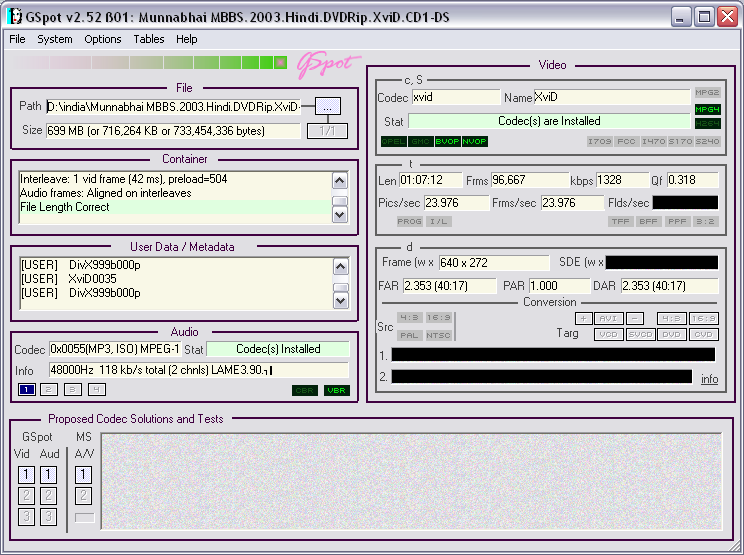
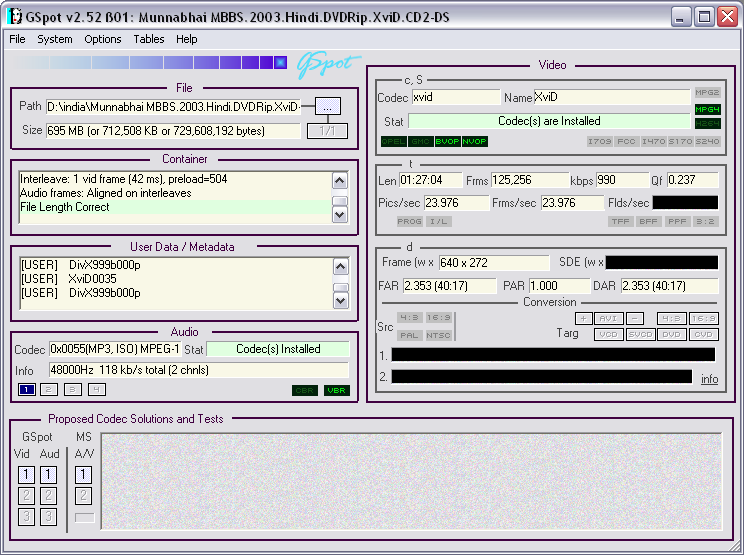 bobybell
 -
Daamon above both files i want to join and burn in dvd.
that was a file from home movie which need some title changes.
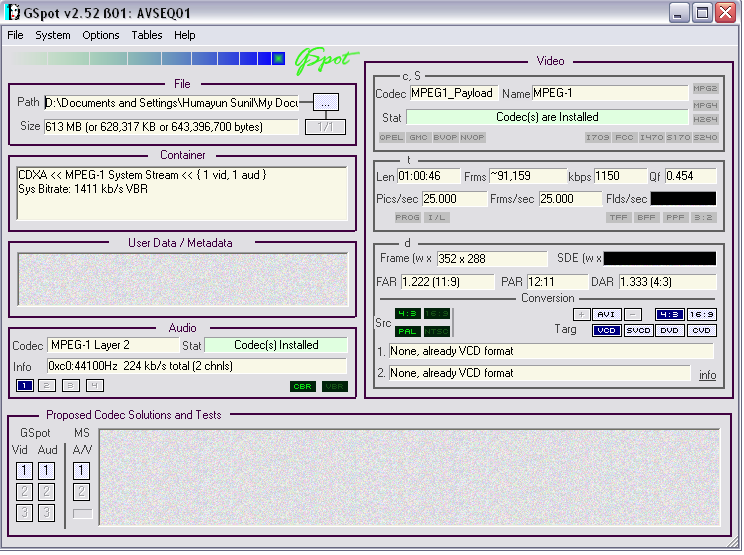 bobybell
 -
Encode them seperately to MPEG2 for DVD and then join them during the authoring stage. If you're not sure how to do this, or with what tools, there are loads of guides telling you how to encode and author, and which tools are available. Also, check out the tools section.Originally Posted by bobybell
You'll need the source files that were used to create the MPEG1. As far as I know, it'll be extremely difficult to make the changes you want to make within any MPEG file. Sorry...Originally Posted by bobybellThere is some corner of a foreign field that is forever England: Telstra Stadium, Sydney, 22/11/2003.
Carpe diem.
If you're not living on the edge, you're taking up too much room. -
Thanks alot, i will try as soon as possible.
bobybell
 Quote
Quote
Similar Threads
-
Video Editing Software: mkv, h264 & DTS Editing?
By techdls in forum EditingReplies: 8Last Post: 28th May 2011, 01:29 -
What is the best editing software for editing head
By sonic12345 in forum EditingReplies: 1Last Post: 4th Jul 2010, 21:05 -
Editing as a career / editing freelance jobs
By ayim in forum Newbie / General discussionsReplies: 8Last Post: 15th May 2010, 21:31 -
Basic editing: which Mac program for my DVD editing situation?
By Nuevonik in forum MacReplies: 4Last Post: 8th Jan 2009, 07:06 -
DV Editing
By m baqar in forum Camcorders (DV/HDV/AVCHD/HD)Replies: 4Last Post: 21st Apr 2008, 01:48