


 View Profile
 View Forum Posts


Hi I'm using TMPGEnc to convert 2 mpg files I have from an SVCD to MPEG2. Now when I burn the first 1, it equals to about 3.2GB. My question is.... is there anyway I can get both files to fit on 1 disc? thanx in advance.
+ Reply to Thread
Results 1 to 18 of 18
-
-
I'm a MEGA Super Moderator

- Aug 2000
- Sweden


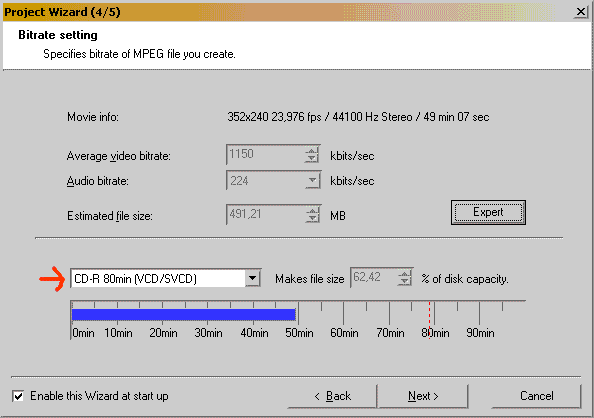
Lower the video bitrate or use the wizard mode and you can specify the output size.
-
That sounds rather superflous, as SVCD mpegs are already mpeg2...Originally Posted by buckeejit
If you want to author them as DVD Video, see svcd2dvdmpg
/Mats -
I'm a MEGA Super Moderator
- Aug 2000
- Sweden
-
Not if you want 1000000000% COMPLIANT dvds.
 .
.
-
thanx Baldrick but I already tried this and it cut some of the sound out.
mats.hogberg, is SVCD2DVD a good way of making DVD's out of SVCDs? I thought I had to convert the SVCD mpeg2 file to make it dvd compliant? -
You do, sort of. SVCD is already mpeg-2 but is not DVD compliant. SVCD2DVD is a way of getting SVCD video to be authored as DVD and play on many, but not all players. Try it, it might work for you.Originally Posted by buckeejit
If it does not, then reducing the bitrate is the way to reduce the size. I never use the TmpGenc wizrd, I set it up manually. Maybe you could try the same, or use the 'expert' button, which I believe allows you to do pretty much the same thing. -
Correct, but I'm satisfied with just 99.9999999999%Originally Posted by Baldrick

/Mats -
...or use the method used by those who can't understand/get to grips/don't want to bother with bitrate settings and bitrate calculators: Go ahead and author anyway to HDD, then use DVDShrink to get it down to DVD5 size.
/Mats -
ok thanx, I think I'll go down the SVCD2DVD road first then if that doesn't work I'll go down the other road. I just remembered that the person I'm making a DVD for does not have a widescreen tv (I know, strange....eh?) so what would be the best setting?
-
Well, SVCD does not support widescreen (16:9) anyway.Originally Posted by buckeejit
SVCD is 480 * 480 (NTSC). DVD supports 720 * 480, 704 * 480 or 352 * 480.
SVCD uses bitrates up to 2520Kbps, DVD goes up to 9800Mbps.
So, if re-encoding, I would reccomend 352 * 480, bitrate of 2500Max. If using TmpGenc, CQ mode or 2-pass VBR should be used. -
You sure about that? IIRC, you can create 16:9 and 4:3 DAR SVCD... At least there's a flag in the mpeg2 header.Originally Posted by bugster
/Mats -
well that would be a 16:9 letterboxed. to a 4:3 frame, i.e. a 4:3 frame with black bars at the top and bottom in order to fit the widescreen source in the fullscreen window.
Numerically: 480x480(576) with 60(72)pixels of black encoded in the mpeg at the top and bottomSorry, I had to go see about a girl -
ok I just tried it with lowering the video bitrate but as I said before, it takes a chunk of the audio out of the film. can anyone help me?
-
You have made me think now.Originally Posted by mats.hogberg
I am fairly sure that standard SVCD does not support the 16:9 DAR, but I can't currently find any reference to back that up. So I could be wrong.
I have never seen a 16:9 DAR SVCD, only letterboxed 16:9 (or other widescreen AR's). -
Lowering the video bitrate should have no effect on the audio. What exactly do you mean by "takes a chunk of the audio out of the film". Can you explain further.Originally Posted by buckeejit
-
yeah. there's audio missing all throught the film, like 12 mins for a little while and then 37 mins etc. there's just vid and no sound.
-
-
Neither could I, so let's call it a draw!Originally Posted by bugster
/Mats
 Quote
Quote Visit Homepage


Similar Threads
-
Authoring oversized DVD, then shrink to fit on a disc?
By adamberkey in forum Authoring (DVD)Replies: 1Last Post: 28th Apr 2012, 00:39 -
what do i do to make a dvd movie small enough to fit in one disc?
By polka in forum Authoring (DVD)Replies: 3Last Post: 24th Mar 2012, 02:53 -
how many MB equal GB/ how many episodes can i fit on disc?
By janeydoll in forum Video ConversionReplies: 6Last Post: 21st Oct 2010, 10:20 -
DVD file too large to burn to disc..how can I make it fit?
By Natalie88 in forum Newbie / General discussionsReplies: 4Last Post: 18th May 2010, 09:14 -
Merging MPEG2 stream with its AC3 audio... or converting MKV to MPEG2
By cwt in forum Video ConversionReplies: 2Last Post: 5th May 2010, 15:18