


 View Profile
 View Forum Posts
 Private Message


Hello all,
Read about the program 'Cinepaint' awhile ago...any of you familiair with this program?
I downloaded it and tried to install it, but without good luck...
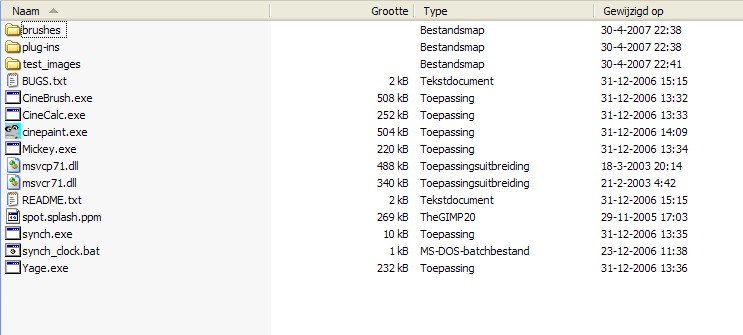
See the pic below...what do I need to do next to make the program work / install on my computer? I did try cinepaint.exe but it did not start the installation. The readme.txt file does not say a whole lot :(
+ Reply to Thread
Results 1 to 7 of 7
-
-
That looks like the 'Glasgow' version. It's a development tool version and not complete, and apparently mostly non-working. It doesn't install, just runs from the .exe. But read the 'BUGS.txt' file.

The original version says,
So it appears you need the Mac OS, or Linux. The Windows version is not completed.CinePaint runs on all popular flavors of Linux and on Mac OS X as an
X11 application. The Windows port of CinePaint is currently broken, sorry. -
Thanks, that explains a lot

I think my husband is going to have a BIG smile on his face today, because he sure is PRO Linux...
Redwudz, do you think the windows version is going to completed soon? My guess is not, if I look at the website and how much traffic is generated...
Any other 'similar' program I could use in between?
Thanks! -
From what I saw on their site, I doubt a Windows version will be completed any time soon.

I'm not sure if there is a similar program, what process are you wanting to accomplish? -
Yeah, I doubt it too...I see an e-mail address on the website...I might send them an e-mail asking what is going to happen.
I would like to accomplish things as described on their website:
CinePaint is a collection of free open source software tools for deep paint manipulation and image processing. CinePaint is used for motion picture frame-by-frame retouching, dirt removal, wire rig removal, render repair, background plates, and 3d model textures. -
I haven't really used it, but I did get CinePaint 0.16 installed and running. It seems to require the GTK+ runtime to be installed first. I think that was version 2.0 for me, on WinME, but probably a different version for XP. Hope that helps.
-
You can do that with a graphics program like Photoshop, but you would have to extract out the individual frames, process them and place them back in the video. Think of it this way: 30 frames per second X 2 hours of video=216,000 frames. Unless you really need to manipulate individual frames, or your video is quite short, it's a monumental task.
Most of the time you can use filtering to clean up a video and not have to resort to working on each frame.
Or if CinePaint is what you want, set up a dedicated computer with Linux installed. That would at least be faster than Photoshop. You can dual boot a existing computer with Linux on a separate partition and still keep your other OS installed. A earlier post about Ubuntu Linux might be worth looking into: https://forum.videohelp.com/viewtopic.php?t=328586&sid=04b0f5003075feb8bcd5f4e13ba242a9
EDIT: Actually, after looking at the CinePaint site again, they have a link to Grafpup that would allow you to run the regular CinePaint, at least for demo purposes, on a Windows computer. I might try that out myself.
http://www.cinepaint.org/
 Quote
Quote


Similar Threads
-
usefull dvd authoring tools for linux
By savignien in forum LinuxReplies: 1Last Post: 12th Jun 2007, 05:21