


 View Profile
 View Forum Posts
 Private Message


i want to know what programs i can attach subtitles to .mkv with and how to do this
+ Reply to Thread
Results 1 to 30 of 76
-
-
Use mkvmergegui in the mkvtoolnix kit
-
can you explain in details how to attach?Originally Posted by poisondeathray
-
What are your input files? .srt subtitle? what video / audio streams? Do you have raw streams?
Or do you have a pre-existing .mkv container with video/audio already in it?
It's pretty easy, all you have to do is push the add button, and select whatever you want to put into the .mkv container, then push start muxing.
For the subtitles to work, you might have to rename them to the same filename as the video file before muxing -
i attached subtitles... and it seems working... thank you
-
mkvmergegui, It's don't support Unicode, I can add subtittle Unicode to mkv, plzz help me

-
What format are your subs in?Originally Posted by seaboy
mkvmergegui just "packages" it in the .mkv container
You need something like DirectVobSub to be able to play them back on PC -
my sub format is *.srt, I use mkvmergegui to add permanent subtitle in *.mkv, it work with subtittle normal, but my sub is use font Unicode, so it don't accept it.
-
mkvmerge does not hardcode permanent subtitles, it softcodes them.Originally Posted by seaboy
You have to re-encode with vsfilter for permanent subtitles
If you want to softsub (selectable), it should accept .srt, just enter the unicode type in the subtitle charset (in the "format specfic options" tab). I am using version 2.2.0 for mkvmerge
You could also convert them to .ssa subs, then you could specify fonts, colors, sizes and more effects
If you still can't figure it out, upload your subs here, and I'll have a look at it
Cheers

-
Oh, my subtittle format is Unicode, use fonts such as: Arial, News Time Roman..v...v... It's not format UTF-8, UTF-8 is format Unicode but usually on Web, I don't undetstand more between Unicode and UTF-8 . I solved my problem to add sub on mkv by way covert subtittle Unicode to UTF-8, but when i output file, The subtittle isn't display
.
_And i have one more problem, about vsfilter, it's only a file *.dll, how do i use it ? -
Please upload a full~copy of your "problematic" .srt
-
What format is your video stream in? Can you get subs to play back outside of the .mkv container?
vsfilter is for hardcoding subs, you have to use avisynth and an encoder.
directvobsub is just for playing it back.
If you want to hardcode your subs (permanent), don't use mkvmerge, use these guides
https://forum.videohelp.com/topic316471.html
https://forum.videohelp.com/topic272736.html -
First of all, get the version 2.33about vsfilter, it's only a file *.dll, how do i use it ?
Then, copy it into c:\windows\system32\
3rd, run "regsvr32 vsfilter.dll"
4th, run "rundll32 vsfilter.dll,DirectVobSub"
(or create a desktop shortcut with these parameters)
5th, tweak it as needed. -
This is full my subtittle, you can download here, i use vietnamese:
http://www.box.net/shared/cbsi9t6as0
What format is your video stream in?
_I don't know. How can i view it ?
Can you get subs to play back outside of the .mkv container?
_Yes, i can.
_I understand your saids,and I want to add sub to mkv (softsub), because i want my video (mkv) look clean-lembed. -
_Thanks, after i follow this way, my Video (mkv) can display subtittle.Originally Posted by Midzuki

-
seaboy wrote:
_Thanks, after i follow this way, my Video (mkv) can display subtittle.

Thanks. I have just checked it, and it is a 100%-healthy 16-bit text fileThis is full my subtittle, you can download here, i use vietnamese:
[ u r l ]
I thought that MKVmerge might be having issues with non-SSA unicode,
but you have just shown it's not the case.
-
I have one more problem.
_It's subtittle 1 (Unicode):
http://www.box.net/shared/7j0k8v668k
_It's subtittle 2 (Unicode):
http://www.box.net/shared/ayx6xtmgw0
Both of them are likeness. But Subtittle 1 can work with mkvmerge, and sutittle 2 isn't . I dont' understand.
_If i try add subtittle 2 on mkvmerge, it will report error follow:
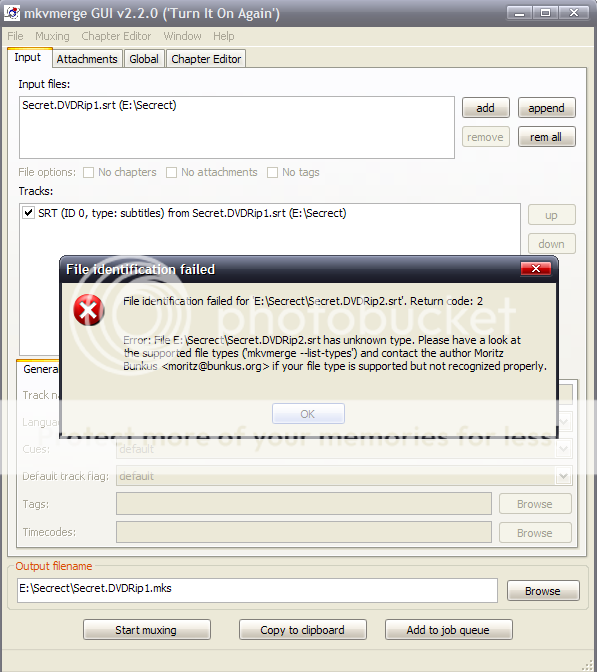
-
It has to do with the numbering sequence. I don't know the technical explanation for it.
Your working file starts with "1"
The not-working file starts with "0"
If you delete the 1st entry, or edit it to start with "1", mkvmerge will accept it -
You can download subtittle 2 again at here:
http://www.box.net/shared/wb1tar0o44
_I repaired it, but it still no work
-
The second subtitle file has two byte-order-marks

Try this one:
modified-secret.dvdrip2.srt.zip -
To Midzuki: Oh, your file is working, thank u so much, but How did you do it? In fact,I only want to know control this software (mkvmerge), is not simple make correct my subtittle
.
-
Midzuki, can u please guilde me the way to correct a sub? . actually, i still don't know what wrong is my subtittle 2 have ?
.Sorry, I'm so noob
-
I used a hex editor to examine your .SRTs (Hexplorer, to be specific).
The first two bytes of a Unicode-text are its "Unicode-ID", so to speak.
It can be either "FF FE" (little-endian) or "FE FF" (big-endian). I suppose
that a write-error occurred when that second .srt file was being saved
on the hard disk, take a look at the picture below:

I just deleted the redundant bytes (the underlined ones),
saved the result as a new .srt file, and "uêba!" ^_^ -
Hi poisondeathray,
what do you mean with that mkvmerge does not hardcode permanent subtitles, it softcodes them?
Can i use mkvmerge to attach a subtittle to a movie (mkv format), so i can watch the movie with the subtittle on my LCD-TV? -
Yes you should be able to play it if you have it set up correctlyOriginally Posted by ihnn
Hardcoding subtitles means permanently burning them in while re-encoding. This is destructive and cannot be undone and are always present (cannot be switched off)
Attaching subtitles by "softcoding" is reversible. You can always undo them, change the subs (e.g. different language), turn them on/off etc.... -
How can i set it up corretly?
I have done like you said, but the subtittle are not shown when i played it with media classic player.
Do you know any program that can hardcode subtittle to mkv files? -
What kind of subs are they? (.e.g srt?, idx/sub etc..)
Install DirectVobSub, and set the output options in MPC to VMR9/7 renderless
If you want you could use another media player eg.. kmplayer or vlc
If you want to hardcode, you will lose quality. But you could use xvid4psp for example. -
the reason that i want to hardcode sub is I want to burn the mkv movie on a DL dvd og play it in my bluray-player, I'm just afraid that the sub is not shown by my bluray-player when i use mkvmerge.
I have tried to use XviD4PSP to hardcode the sub, and i got this error when i try to add a sub: "File don't have video stream".
The sub is *srt -
nevermind, it works on my bluray-player, thank you very much for your help
-
Hi your help was helpful tyvm. Just a question. So the MKV i start off with is 330,548 KB and once I add the SRT sub file and MUX it the output fil is much smaller, 102,460 KB. Does that mean i'm losing video quality?
 Quote
QuoteSimilar Threads
-
How to attach .ass subtitle with a .mkv file
By varun in forum SubtitleReplies: 7Last Post: 16th Nov 2020, 05:56 -
How to attach a (.smi) subtitle to .mkv?
By posthuman in forum SubtitleReplies: 7Last Post: 27th Sep 2011, 17:23 -
Attach .ass sub file to .mkv problem!
By Jacks in forum SubtitleReplies: 11Last Post: 22nd Jul 2010, 13:52 -
How to attach subtitles to mkv file?
By dallylama in forum Video ConversionReplies: 7Last Post: 17th May 2010, 22:49 -
Conver MKV with ENG audio/subtitle to AVCHD or Blu-ray with subtitle help?
By teaberry in forum Video ConversionReplies: 2Last Post: 3rd May 2010, 17:03