


 View Profile
 View Forum Posts
 Private Message


I've recently come across a High-Def media player Hard Drive enclosure that supports 720p video output, the picture and audio quality is amazing. Now, the demo videos are nice, but I want to put some of my own videos on the box. Unfortunately, the device only seems to read .tp video format files.
If I understand correctly, .tp is the extension used for ripped HDTV via a graphics card? Regardless, obviously most of my video footage is in a more common format, such as .AVI, .MKV, .WMV, etc. What I need is a method to convert from these common formats, to the .tp format. Storage is not an issue, as the device has a 500 gig internal drive. All I want it to retain the high quality of my videos, and be able to play them on this device.
Google searches and my own research have pulled no leads on this type of conversion, so any help would be much appreciated.
+ Reply to Thread
Results 1 to 18 of 18
-
-
Hi Tim, welcome

This requires several steps, outlined below:
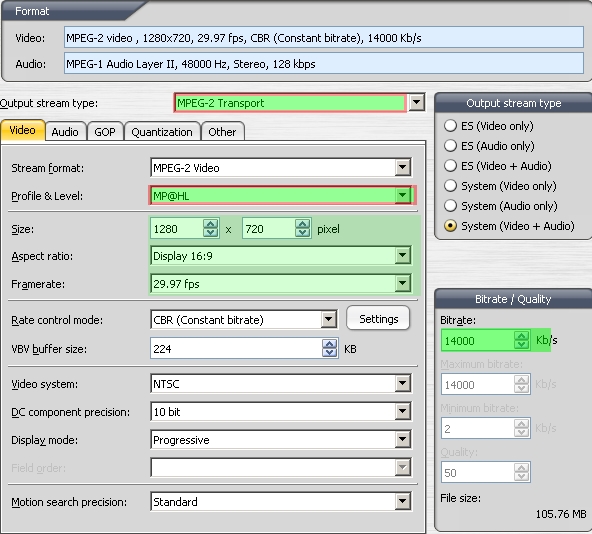
1) Conversion of Source file to HD res Mpeg2
2) Conversion of Muxed MPEG2 to TS format. (TS and TP are the same thing, they both are transport streams)
A relatively easy way is to use TmpgencXpress or Procoder (not sure if they accept MKV files)
A free method requires several more steps to accomplish the same
1) Encode to Mpeg2 HD 1280x720 with HCenc
2) Mux the audio and video together with Mplex GUI
3) Convert to Transport Stream with Avidemux
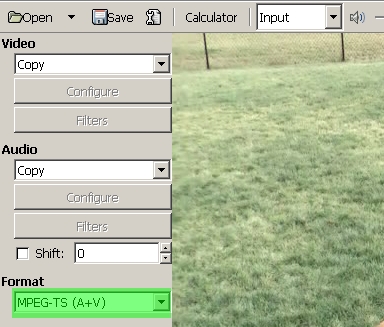
4) Fixup Transport Stream with Mpeg2Repair
You can also convert MPEG2 Program Streams to Mpeg2 Transport streams with VideoRedo Plus (a great program) or with MpegVCR. Neither is free, but both have 2 week trials.
It'll be a learning curve to get up to speed on creating Transport Streams, but after you've done it a few times it'll get much easier. -
Thank you very much for the quick reply!
So far I have tried using VideoRedo Plus to load a mpeg video, save as a .ts file, then rename it to .tp. The video works, but there seems to be no audio when played on the Media Streamer. When played on my computer via VLC, the audio is fine. I assume there are some restrictions to the audio formats. I attempted the recommended steps you posted here, but to no avail. Also, after about 6 or 7 seconds, the video freezes one the unit. The entire unit is still operational after the freeze, because I can return to the menu, pause the frozen video, etc. I have a feeling the settings readable by my box are very specific.
Below is a link to a small video file that works fine with the box (it came on hard drive of the streamer). Maybe you know of a way to compare its settings to another videos? Say the one you recommended here?
Original Video from Unit: wc3campaigns.net/tim/mp80s/qb_dan_marino.tp
Thank you for your help and reccomendations.
Tim. -
What's the name of the streamer? Brand, model #, etc.
The TP file you pointed to uses PIDs 21 and 24. Set VideoRedo to output TS at those channels. Other properties:
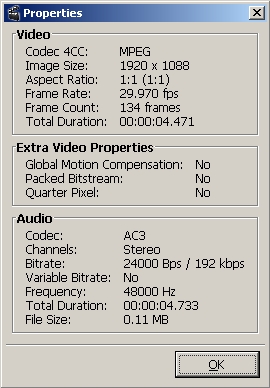
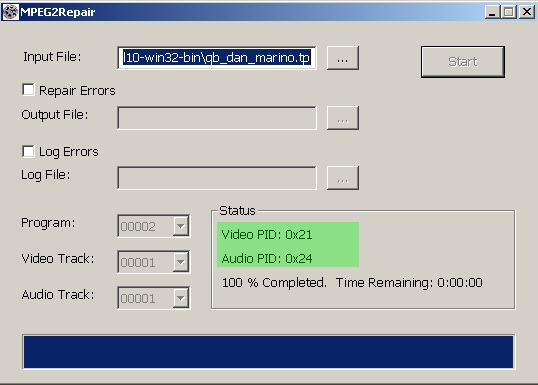
The audio might have to be AC3, but I doubt it has to be only Stereo (2channel) AC3. It would be kind of silly if it didn't support 5.1 audio.
As far as the video stuttering/stopping, that could be due to variable bitrate encoding. Try Mpeg2 encoding at CBR (constant bitrate). Also, run your problematic TP files through Mpeg2Repair and see if it works any better. -
I'll try your suggestions and get back to you tomorrow.
As far as the brand and model goes it is a Samsung MP-80S.
I have thus far had no luck finding a user manual, product info, etc. -
Sorry for the double post, just wanted to add the new information from my test instead of editing.
I was already trying the PIDs, and that did not solve the problem. I just tried again with a new mpg source file and had the same problem. I ran Mpeg2Repair and that did not help either. Granted, the audio on my mpg's is not AC3, but I don't know how to convert the audio to AC3 in this fashion, so any help there would be much appreciated.
Any other ideas? -
Post one of your homebrewed .TP files and let's take a look at the specs.
Try some of the .M2T files on this page. Just rename the extension to .TP and see if it plays correctly
http://dvinfo.net/conf/showthread.php?t=52060 -
After some fidgeting around with TMPGenc I got the audio to work along with the video. Looks and sounds perfect. The freezing after some time problem still occurs. I checked Mpeg2Repair and it found no errors.
Below is the clip I am playing with.
http://wc3campaigns.net/tim/mp80s/POTC.tp
It freezes on the box after about 10 seconds. No shuddering or other visible video problems.
Again, thanks for your help. -
Downloaded it. Looks correct to me, unless it MUST be 1920x1080 due to a hardware requirement of the player.
Mpeg2Repair Report:
Sequence Frame 1547(6-B) / Time 0:00:51 :
Info: End of MPEG2 sequence
Sequence Summary:
File Size Processed: 89.82 MB, Play Time: 00h:00m:51s
1280 x 720, 29.97 fps, 14.00 Mbps (14.00 Mbps Average).
Average Video Quality: 57.00 KB/Frame, 0.51 Bits/Pixel.
AC3 Audio: 2/0 Channels (L, R), 48.0 kHz, 192 kbps.
Dialog Normalization: -31.0 dB
0 of 1547 video frames found with errors.
0 of 1613 audio frames found with errors.
0 corrupted video bytes in file.
0.000000 seconds of video timestamp gaps.
0.000000 seconds of audio timestamp gaps.
That should work just fine. It plays on my HD hardware decoder. I even noticed your set the PIDs correctly. Did you try any of the M2T files I pointed to above?
Sometimes the problem can be due to to high a bitrate or muxrate, but in your case it looks correct. Weird. We've got to find a copy of the manual for the player. Perhaps there's a setting that it requires.
I don't know. I wish I was more help. Perhaps someone else can find the error.
Edit: Found it - http://downloadcenter.samsung.com/content/UM/200605/20060502215358671_MD68-00290A-00En..._0628_book.pdf
"The MP-80S only supports MPEG2 transport stream files distributed by Samsung Electronics."
WTF is that supposed to mean ? -
Awesome job on finding that manual, I looked all over the Samsung site for it.
The reason it says that it only supports Samsung TS files is because this is a vendor supplied unit used for demoing Samsung HD TV's. It's designed to play specific video files which advertise the high resolution of their TV's as well as the brand name.
I work for a company which is no longer using this unit, so I decided to try and set it up to play my own HD movies, expecting it to be a bit less specific on file types, obviously.
In any event I got the video to work fine now without freezing, I just had to add/delete another video, guess the box needs to reset its cache or something. However the video I put on (a feature length film) is listed on the screen as having a duration for 14:11 minutes. There are video files on it which last over 20 minutes, so it does not seem the box is specific on duration.
I guess I'll keep playing with the file to try and get it working. It seems this unit is just extremely temperamental.
EDIT: Wow I'm pretty dumb, I just realized VideoRedo Plus has a 15 min max on the trail version! That explains why the file is not complete. I'll get back to you once I convert the whole thing. -
Okay so just to close off this thread, thank you so much Soopafresh for all your help and recommendations. I now have full length 720p videos playing seamlessly on my HDTV. I used TMPGenc to convert to MPEG2 then used VideoRedo to convert the MPEG to TS and renamed it to TP. Everything is perfect.
My only other concern is the audio. At the moment I do not have a 5.1 system, however this box does have a digital audio output, so I assume it supports 5.1 of some sort. TMPGEnc's audio setting for DolbyDigital only allows stereo. Is MPEG2 limited to stereo, or is it just that the program does not offer it?
Again, you're amazing, and thank you for all your help! -
No probs.
You are quite right about TmpgencXpress and the 2.0 only AC3. I wonder why there's no "copy audio" choice. -
Hi!
I just got a MP-80S from a friend! Really great quality output.
Any luck in getting it to work with other formats than .TP? I also should need the system files, any chance of getting them from you Tim?
Cheers.. -
HELLO!
I have a Samsung MR-16AS1 (160GB)
And I thank you all for solving these problems.
Now for a new problem
How do I convert different types of files to .tp ?
Like .mkv and other stuff (Blu-ray rips). -
Try TSmuxer
-
I was praying that you could share the exact settings you used in TMPEGnc to get this to work, i am having the freeze after 10sec just like you had in the beginning.Originally Posted by Tim.
Thanks in advance -
I have this unit as well, I have gotten some progress them BAM! HD goes out. I put in a 160, but need the system files, can someone link, email or get them to me please?
fdgsdfg sdfgsd fsd dfgsdf
 Quote
Quote


Similar Threads
-
MKV guide, Play MKV, MKV to AVI, MKV to DVD, MKV to MP4, MKV to Blu-ray
By Baldrick in forum Newbie / General discussionsReplies: 55Last Post: 29th Jun 2012, 11:19 -
mkv to wmv hd with 5.1 sound and hardsubs
By oguime in forum Video ConversionReplies: 4Last Post: 1st Feb 2010, 18:50 -
MKV with DTS to WMV
By mobon in forum Video ConversionReplies: 2Last Post: 10th Jan 2010, 04:59 -
Converting MKV to WMV for the XBOX360
By zilbermm in forum Video ConversionReplies: 4Last Post: 29th Oct 2009, 09:29 -
WMV HD to MKV HD
By tonycrew in forum Video ConversionReplies: 2Last Post: 1st Jul 2009, 08:53