


 View Profile
 View Forum Posts


oh why must u force this placebo effect on us?...*sigh* now i dont know WHAT im seeing. Ok to save us all this trouble, how about you upload the vid that YOU consider to be this "abnormal HQ vid..with BRAINS of it's OWn" to rapidshare so that we may download and see. SOUND GUD?...i think YES?...so that i may now SLEEP!?..and wake up to da LIES TOMORROW?!!?
+ Reply to Thread
Results 391 to 420 of 1969
-
-
On Windows, I use a program called Hobocopy to copy all the flash videos (fla*.tmp) from my temp folder, since Flash locks them read-exclusive. On other systems it's a simple drag and drop from /tmp/.
A YouTube specific video downloader which generates the appropriate url for the 320x240 video and downloads it, rather than retrieving the video you already downloaded, will always get the 320x240 video at the 320x240-specific url it generated, until they update them to support the new video url scheme.
I've already posted sendspace links to 6 videos that you can watch and compare to their 320x240 counterparts. -
guys,
all this discussion about streaming capabilities is off topic.
you can discuss it elsewhere.
and you may start by asking if anyone outside the US has seen this upgrade effect,
i doubt it,
which is another reason why it interests me very little right now.
you don't have to use the installer,Originally Posted by ricardouk
find the zipped version and unzip somewhere...
tripp -
yes, i was using the portable version of it, and it still messed up some icons, it takes over mp4, ifo, bup and some other ones....
nothing at the moment, trying to find something that doesn have the above side effectsso what do YOU use to tell the Kbps?I love it when a plan comes together! -
thanks ric
so can you give us the links?Originally Posted by dtfinch
aww man this awesome thread is done already? i was jus starting to have funOriginally Posted by 45tripp -
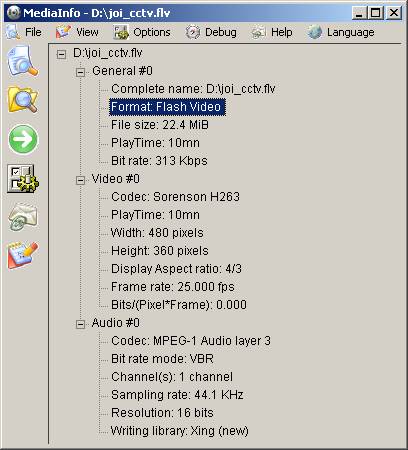
I have used the following command to generate flv file, and have modified the HEX code to duration to 10mins.
But after I upload to youtube, it still re-encode and produce bad quality video. Anyone can correct me?
Code:mencoder.exe "F:\JOI\joi_cctv.avs" -srate 44100 -oac mp3lame -lameopts abr:br=64:mode=3 -ovc lavc -lavcopts vcodec=flv:vqscale=7 -of lavf -lavfopts format=flv -o "d:\joi_cctv.flv"
-
The HQ hack is OBSOLETE. Read the title of thread.Originally Posted by yawoo
-
Strange.. I have always been able to simply copy YT flv from cache. The firefox cache, IE cache, and Opera cache. I use TotalCommander in Windows. It does nothing special while copying.Originally Posted by dtfinch
What exactly would be "read-exclusive"? Or is this something strange from Vista? I use XP x64, 2003 or Longhorn/2008. the read-exclusive thing is something I've never noticed.
Nothing special happening here.Originally Posted by wonderpierrot
This is a trace to the particular source data for the flv:
(YT is firewalled)Code:Tracing route to ash-v93.ash.youtube.com [64.15.118.214] over a maximum of 30 hops: 1 0 ms 0 ms 0 ms gbll881.--.net [192.168.88.1] 2 3 ms 3 ms 3 ms 0.ge-0-3-5.xr3.3d12.xs4all.net [194.109.7.37] 3 16 ms 7 ms 19 ms 0.so-7-0-0.xr1.tc2.xs4all.net [194.109.5.14] 4 47 ms 6 ms 6 ms po1.ccr01.ams03.atlas.cogentco.com [195.69.144.124] 5 109 ms 14 ms 14 ms te1-1.mpd02.lon01.atlas.cogentco.com [130.117.1.170] 6 117 ms 237 ms 171 ms te2-2.ccr04.jfk02.atlas.cogentco.com [154.54.5.122] 7 107 ms 92 ms 109 ms te3-3.mpd01.jfk01.atlas.cogentco.com [154.54.24.149] 8 90 ms 202 ms 92 ms vl3490.mpd01.ewr03.atlas.cogentco.com [154.54.1.30] 9 301 ms 209 ms 193 ms you-tube-llc.demarc.cogentco.com [38.101.84.66] 10 * * * Request timed out.
-
Now that is really strange. I first watched it on Firefox and it showed the higher quality version on the first time. I actually went reloading because I expected better. Then I opened it in IE7 because that should have opened the HQ version. And then I saw that what I first saw is actually the HQ version and now I saw a blocky, just ugly video. I kept reloading it but the HQ version wouldn't return. Then I opened it in FF again, and now it doesn't want to show up again anymore on FF too... Veeeeeeeery strange.Originally Posted by reez
-
IMO all this wud be solved if the people who "got" this HQ version from there CACHE wud just POST DOWNLOAD LINKS
-
@yawoo
yes the hack has been patched.
but
1. you can still upload your stream with bitrates under 350k and have them pass through untouched
2. you can still cheat duration, if you're willing to pad the stream with still images.
3. you can use an alternate service.
4. you can wait for the youtube upgrade
tripp -
How would doing that prove its existence? Anyone can take a video and convert it to high quality 1000kps FLV and upload it.Originally Posted by reez
If already 5 people, including myself, has witnessed the high quality videos then that should prove that it is out there.
Unfortunately I am unable to upload a 6th high quality video after the 5th one, and I attempted nearly everything possible to get it working (change video format, resolution, compression settings, uploading 5 more low quality vids, waiting days). If anyone is able to figure out the process of how YouTube is creating and presenting these alternate high quality versions of videos then I and everyone else would greatly appreciate it. -
Member

- Feb 2008
- United States


Wait a minute. If the HQ trick is blocked, how are these videos still possible? Note that this one was uploaded only 5 days ago from now.
http://youtube.com/watch?v=dgISAjQsNCg
If someone could give me specs for that kinda vid, I'd be very gracious. -
Originally Posted by SpongeFreak52Originally Posted by 45tripp
-
Member
- Feb 2008
- United States
-
Hm...this is strange. See, I had uploaded a series of 121 videos for a video game, and now that I go back to earlier numbers, I see that some of them are much larger than normal as stated above with the resize button.
The weird thing is that let's say we have videos 1, 2, 3, 4, and 5.
1 is HQ (http://youtube.com/watch?v=aHQ7L14EkJ8&feature=related)
2 is LQ (http://youtube.com/watch?v=MelAAyRcgnk&feature=related)
3 is LQ (http://youtube.com/watch?v=hll_9tn3-so&feature=related)
4 is HQ (http://youtube.com/watch?v=5-rQu80IpYc&feature=related)
5 is LQ (http://youtube.com/watch?v=3212BcRJnWQ)
What I want to know is why numbers 1 and 4 are in better quality. Could it be that those have already made the switch to better quality videos? Because I used the exact same settings for all 5 of those videos, and they were all originally 640 x 480. The bitrates were similar as well.
So this could be a simple "it's made the switch to HQ" scenario, or something very strange is going on. Any ideas? -
They aren't, from where I see them.Originally Posted by SpongeFreak52
What's with all the silly animated stuff here on this forum? What's the average age here?
-
That mean YT has re-encoded some of video if the original uploaded quality is good?
For example, video 4, you can download new re-encoded version from YT.
Play this video,
http://youtube.com/watch?v=5-rQu80IpYc
View the page source, and search for "&t=", u will find that there is a new parameter "fmt_map" nearby.
Copy the "t=" string between two "&", and then use the format of the following string,
http://www.youtube.com/get_video?video_id=5-rQu80IpYc&fmt=6&t=OEgsToPDskIXTTI6RMlDpgSSdqaOHfpJ
You need to change the string behind "&t=" as shown in your page source. As result, u can download the
better quality video from YT directly. -
Just find that a number of video I uploaded to YT at the early of Feb, have been upgraded to good quality also. All uploaded formats I used are 640x480 Xvid + MP3.
-
Member
- Feb 2008
- United States
-
Interesting. While I can't disagree with what you've said, I think the switch's ETA depends on the original format uploaded. For example, I had used WMV formats up until about video #65, and that's the last one that's had good quality so far. After #66, I was using XVID AVI files, and none of those have been upgraded yet. Very strange.
-
First of all, the fmt_map string isn't in the source when I view it here in NL, Europe.Originally Posted by yawoo
Second, the get_video request yields no results here either.
However, using the normal view-string, so:
http://www.youtube.com/watch?v=5-rQu80IpYc&fmt=6
does give me a 448x336 flv of about 650 kbit/s AV in total. With 96 kbit/s CBR mp3 audio at 44.1 kHz in mono
(which is kind of disappointing by the way, but may depend on the upload). I think they should use lame vbr mp3 at least.
Can someone come up with something other than game or animated videos example? -
If it don't show up fmt_map in the page source, it may mean your speed is too low to show up HQ mode, I think.Originally Posted by bayme
Thanks for your guessing the link, it works for forcing the HQ mode. Here is the example for u,
http://www.youtube.com/watch?v=DKw7mu6lzso&fmt=6 -
using this method I've seen some at 480/360...why aren't they consistant with the ratio?Originally Posted by bayme
-
Hey, that's my video :POriginally Posted by SpongeFreak52
(cut a lot of stuff I ended up sending to SpongeFreak52 over IM) -
This seems to be changing all the time. Earlier when I looked, 1 was NOT HQ, but 4 and 5 were. Now, only 1 jumped to HQ while the rest was LQ.Originally Posted by SpongeFreak52
Number 33 is upgraded too: http://www.youtube.com/watch?v=qnUiYKr7p74 -
Ah, OK, 805 kbit/s, but again only mono audio at cbr 96 kbps.Originally Posted by yawoo
The strange thing about the missing fmt_map string in my source (also for this example) is that the video streams in way fast enough here to handle the bitrate. So either YT's calculations are wrong about that (which I doubt they are even doing), or they offer pages based on IP4 source (which is easy to do).
So, concluding this (45 trip is right, it doesn't belong here), it seems YT/Google is test-offering the high quality format as we speak, but only to certain IP-based locations. They might not offer it to Western Europe, simply because (as I wrote earlier) YT-traffic is running at its bottleneck already. We need thicker pipes between YT and Europe to handle the higher quality during peak-hours, or the EU needs more of its own servers, or a better type of clustered proxy for the videos. -
So for my information, we as Dutch can see the HQ movies if they are already 'switched', but not yet foorce them like yawoo did with that Chinese movie because we can't see the 'fmt code' in the source? I don't see it either.
Touchy sensitive dude :D. -
so we start a new thread?
-
Member
- Feb 2008
- United States
-
See, for me though, most of them 1 through about 65 are upgraded. It's probably just because they're my videos though. I'm about to try Yeoz's method now. I'll give you guys the results. ^_^
And yes, I think it would be better if a new thread was started. -
Adding "&fmt=6" behind the watch URL tells you if it is already converted, obviously.Originally Posted by Denizzje
So, for example:
http://www.youtube.com/watch?v=pwAkEaGyRzc
http://www.youtube.com/watch?v=pwAkEaGyRzc&fmt=6
this one clearly isn't offered with the extra quality format (yet?).
OK, I started a new thread: https://forum.videohelp.com/topic346256.html -
Thank you. Indeed, one of my videos is converted too.Originally Posted by bayme
http://www.youtube.com/watch?v=pVAURHf-2MQ
vs
http://www.youtube.com/watch?v=pVAURHf-2MQ&fmt=6
Alright, lets continue in the new thread.
 Quote
Quote
 Visit Homepage


Similar Threads
-
Recommended upload video format for maximum sound quality on youtube
By waigy in forum Video Streaming DownloadingReplies: 25Last Post: 12th Sep 2010, 17:09 -
Youtube - bad upload quality
By therock003 in forum Newbie / General discussionsReplies: 5Last Post: 26th Jul 2010, 02:49 -
Poor quality following upload to YouTube-can anyone assist?
By acceleratorhams in forum Video Streaming DownloadingReplies: 1Last Post: 1st Jun 2009, 15:16 -
Poor Youtube Quality Upon Upload
By JohnSmith1981 in forum Video Streaming DownloadingReplies: 1Last Post: 20th Feb 2009, 12:54 -
Youtube HQ upload slow on normal quality
By seiun in forum Video Streaming DownloadingReplies: 2Last Post: 21st Sep 2008, 13:18