

 View Profile
 View Forum Posts
 Private Message


I downloaded the stable build of relliab on ffmpegX download page.
I don't know why, i followed the instructions, put reallibs folder under library/ffmpegX.
However, I failed to test realmedia's encoding. When i choose a real video or drag a real video to 'drop item box', ffmpegX freezes.
I'm a Mac intel user.
I'm so confused.
Results 1 to 19 of 19
-
-
I don't think that the reallib provided on ffmpegX home page is Intel Mac compatible.
You have to download them on the mplayer main website. Scroll down to the "Binary Codec Package" section and download the package "Mac OS X x86 20060611".
Inside the zip file you'll find the installer that will install the library files in usr/local/lib. Open the installer and proceed with the installation.
Under the finder choose "Go to folder..." in the "Go" menu. Typeand press return. This will open a new window where you will find a "codecs" folder containing the Real binaries. Copy this folder in Library/Application Support/ffmpegX and rename it "reallib" (don't forget the two L). That should make it..Code:/usr/local/lib
Jean-Philippe Schuck
Un générique, un autre jour, le blog sur les génériques de dessins animés
-
thanx so much.Originally Posted by jpschuck
i have fixed this problem.
-
I found this thread and and I have further problems with .
1. I installed the "Binary Codec Package" ("Mac OS X x86 20060611") as said above in the folder /Library/Applicaton Support/ffmpegX/ with the foldername "reallib"
2. Now I can open RealMedia-files (.rm) in ffmpegX
3. I is also possible to encode this file in "AVI DivX" (mencoder) and works fine.
But if I now want to encode the RM-file in h.264 (mencoder), the progress-window shows after one second "finished", but the output isn't ready or readable. I didn't modify anything in ffmpegX - just select the new encoding-kind. And the video is an official dummy from the website mentioned above.
The report bring following message:
Where is the problem??Code:Encoding started on Sun Apr 8 15:09:09 CEST 2007 MEncoder dev-CVS-060307-04:23-4.0.1 (C) 2000-2006 MPlayer Team FIXME:Hardenabling SSE and SSE2 without detection Mac OSX static build for ffmpegX CPU: Intel (Family: 6, Stepping: 8) CPUflags: Type: 6 MMX: 1 MMX2: 1 3DNow: 0 3DNow2: 0 SSE: 1 SSE2: 1 Compiled for x86 CPU with extensions: MMX MMX2 SSE SSE2 Error: dlopen(/Library/Application Support/ffmpegX/reallib/drvc.so, 1): no suitable image found. Did find: /Library/Application Support/ffmpegX/reallib/drvc.so: unknown file type, first eight bytes: 0x7F 0x45 0x4C 0x46 0x01 0x01 0x01 0x00 success: format: 0 data: 0x0 - 0x289cd4 REAL file format detected. Stream description: Audio Stream Stream mimetype: audio/x-pn-realaudio Stream description: Video Stream Stream mimetype: video/x-pn-realvideo Stream mimetype: logical-fileinfo VIDEO: [RV30] 352x240 24bpp 15.000 fps 0.0 kbps ( 0.0 kbyte/s) [V] filefmt:11 fourcc:0x30335652 size:352x240 fps:15.00 ftime:=0.0667 Opening video filter: [expand osd=1] Expand: -1 x -1, -1 ; -1, osd: 1, aspect: 0.000000, round: 1 Error: dlopen(/Library/Application Support/ffmpegX/reallib/drv3.so.6.0, 1): image not found cale w=352 h=192] Opening video filter: [pp=0x33] Opening video filter: [harddup] ========================================================================== Opening video decoder: [realvid] RealVideo decoder Read the RealVideo section of the DOCS! VDecoder init failed :( Opening video decoder: [realvid] RealVideo decoder Read the RealVideo section of the DOCS! VDecoder init failed :( Opening video decoder: [realvid] RealVideo decoder Read the RealVideo section of the DOCS! VDecoder init failed :( Opening video decoder: [realvid] RealVideo decoder Selected video codec: [rv30mac] vfm: realvid (Mac OS X RealPlayer 9 RV30 decoder) ========================================================================== VDec: vo config request - 352 x 240 (preferred colorspace: Planar I420) [PP] Using external postprocessing filter, max q = 6. VDec: using Planar I420 as output csp (no 0) Movie-Aspect is 1.47:1 - prescaling to correct movie aspect.
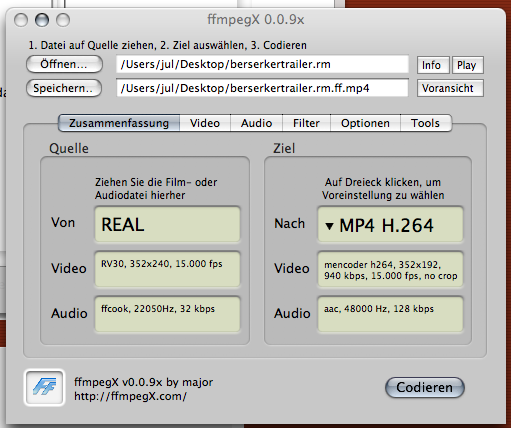 THX JuL!
-
This report seems to be incomplete. Are you sure you posted the complete output result ?Originally Posted by JuL!Jean-Philippe Schuck
Un générique, un autre jour, le blog sur les génériques de dessins animés
-
Yes. I opend ffmpegX. Draged the "berserkertrailer.rm" at the left side of the "summary". Than I selected in the right side "h.264 mencoder" which shows the window as you can see at the picture some posts above. Now I pressed "coding", the progress-window opened and was reading one sec later and said "finished". At the desktop is a file "berserkertrailer.rm.ff.264" but with 0kb.
The report was again following:
Have you another result in your case? Again: If I just drag the .rm-Video on ffmpegX and press encode with the default encoding-prefs (AVI DivX), then it works...Code:Encoding started on Tue Apr 10 12:44:07 CEST 2007 MEncoder dev-CVS-060307-04:23-4.0.1 (C) 2000-2006 MPlayer Team Mac OSX static build for ffmpegX FIXME:Hardenabling SSE and SSE2 without detection (Family: 6, Stepping: 8) CPUflags: Type: 6 MMX: 1 MMX2: 1 3DNow: 0 3DNow2: 0 SSE: 1 SSE2: 1 Compiled for x86 CPU with extensions: MMX MMX2 SSE SSE2 success: format: 0 data: 0x0 - 0x289cd4 REAL file format detected. Stream description: Audio Stream Stream mimetype: audio/x-pn-realaudio Stream description: Video Stream Stream mimetype: video/x-pn-realvideo Stream mimetype: logical-fileinfo VIDEO: [RV30] 352x240 24bpp 15.000 fps 0.0 kbps ( 0.0 kbyte/s) [V] filefmt:11 fourcc:0x30335652 size:352x240 fps:15.00 ftime:=0.0667 Opening video filter: [expand osd=1] Expand: -1 x -1, -1 ; -1, osd: 1, aspect: 0.000000, round: 1 Opening video filter: [scale w=352 h=192] Opening video filter: [pp=0x33] Opening video filter: [harddup] ========================================================================== Error: dlopen(/Library/Application Support/ffmpegX/reallib/drvc.so, 1): no suitable image found. Did find: /Library/Application Support/ffmpegX/reallib/drvc.so: unknown file type, first eight bytes: 0x7F 0x45 0x4C 0x46 0x01 0x01 0x01 0x00 Opening video decoder: [realvid] RealVideo decoder Read the RealVideo section of the DOCS! VDecoder init failed :( Opening video decoder: [realvid] RealVideo decoder Read the RealVideo section of the DOCS! VDecoder init failed :( Opening video decoder: [realvid] RealVideo decoder Read the RealVideo section of the DOCS! VDecoder init failed :( Opening video decoder: [realvid] RealVideo decoder Selected video codec: [rv30mac] vfm: realvid (Mac OS X RealPlayer 9 RV30 decoder) Error: dlopen(/Library/Application Support/ffmpegX/reallib/drv3.so.6.0, 1): image not found ========================================== VDec: vo config request - 352 x 240 (preferred colorspace: Planar I420) [PP] Using external postprocessing filter, max q = 6. VDec: using Planar I420 as output csp (no 0) Movie-Aspect is 1.47:1 - prescaling to correct movie aspect.
Here this report:
strange.Code:Encoding started on Tue Apr 10 12:50:10 CEST 2007 MEncoder dev-CVS-060307-04:23-4.0.1 (C) 2000-2006 MPlayer Team Mac OSX static build for ffmpegX FIXME:Hardenabling SSE and SSE2 without detection CPU: Intel (Family: 6, Stepping: 8) CPUflags: Type: 6 MMX: 1 MMX2: 1 3DNow: 0 3DNow2: 0 SSE: 1 SSE2: 1 Compiled for x86 CPU with extensions: MMX MMX2 SSE SSE2 success: format: 0 data: 0x0 - 0x289cd4 REAL file format detected. Stream description: Audio Stream Stream mimetype: audio/x-pn-realaudio Stream description: Video Stream Stream mimetype: video/x-pn-realvideo Stream mimetype: logical-fileinfo VIDEO: [RV30] 352x240 24bpp 15.000 fps 0.0 kbps ( 0.0 kbyte/s) [V] filefmt:11 fourcc:0x30335652 size:352x240 fps:15.00 ftime:=0.0667 ========================================================================== Opening audio decoder: [ffmpeg] FFmpeg/libavcodec audio decoders AUDIO: 22050 Hz, 1 ch, s16le, 32.0 kbit/9.08% (ratio: 4005->44100) Error: dlopen(/Library/Application Support/ffmpegX/reallib/drvc.so, 1): no suitable image found. Did find: /Library/Application Support/ffmpegX/reallib/drvc.so: unknown file type, first eight bytes: 0x7F 0x45 0x4C 0x46 0x01 0x01 0x01 0x00 Selected audio codec: [ffcook] afm: ffmpeg (FFmpeg COOK audio decoder) ========================================================================== Opening video filter: [expand osd=1] Expand: -1 x -1, -1 ; -1, osd: 1, aspect: 0.000000, round: 1 Opening video filter: [scale w=352 h=240] ========================================================================== Opening video decoder: [realvid] RealVideo decoder Read the RealVideo section of the DOCS! VDecoder init failed :( Error: dlopen(/Library/Application Support/ffmpegX/reallib/drv3.so.6.0, 1): image not found ealVideo decoder Read the RealVideo section of the DOCS! VDecoder init failed :( Opening video decoder: [realvid] RealVideo decoder Read the RealVideo section of the DOCS! VDecoder init failed :( Opening video decoder: [realvid] RealVideo decoder Selected video codec: [rv30mac] vfm: realvid (Mac OS X RealPlayer 9 RV30 decoder) ========================================================================== Forcing output fourcc to 58564944 [DIVX] MP3 audio selected VDec: vo config request - 352 x 240 (preferred colorspace: Planar I420) VDec: using Planar I420 as output csp (no 0) Movie-Aspect is 1.47:1 - prescaling to correct movie aspect. SwScaler: using unscaled Planar YV12 -> Planar YV12 special converter videocodec: libavcodec (352x240 fourcc=58564944 [DIVX]) Writing header... ODML: Aspect information not (yet?) available or unspecified, not writing vprp header. Writing header... ODML: Aspect information not (yet?) available or unspecified, not writing vprp header. Skipping frame! Skipping frame! CBR audio: 16000 bytes/sec, 384 bytes/block Flushing video frames Writing index... Writing header... ODML: Aspect information not (yet?) available or unspecified, not writing vprp header. Video stream: 567.758 kbit/s (70969 B/s) size: 6671156 bytes 94.000 secs 1412 frames Audio stream: 128.000 kbit/s (16000 B/s) size: 1512192 bytes 94.512 secs Encoding completed on Tue Apr 10 12:50:20 CEST 2007
THX JuL!
-
Using the same preset (h264, mencoder) with the same clip (berserkertrailer) on my Mac Mini gives me a complete .264 *video* file only, but no audio and, for this obvious reason, no .MP4 file.Originally Posted by JuL!
The report is the following :
Code:Encoding started on Wed Apr 11 10:35:46 CEST 2007 MEncoder dev-CVS-051126-18:35-3.3 (C) 2000-2005 MPlayer Team Mac OSX static build for ffmpegX AltiVec found CPU: PowerPC success: format: 0 data: 0x0 - 0x289cd4 Error: dlopen(/Library/Application Support/ffmpegX/reallib/drvc.so, 1): image not found REAL file format detected. Stream description: Audio Stream Stream mimetype: audio/x-pn-realaudio Stream description: Video Stream Stream mimetype: video/x-pn-realvideo Stream mimetype: logical-fileinfo VIDEO: [RV30] 352x240 24bpp 15.000 fps 0.0 kbps ( 0.0 kbyte/s) [V] filefmt:11 fourcc:0x30335652 size:352x240 fps:15.00 ftime:=0.0667 Opening video filter: [expand osd=1] Expand: -1 x -1, -1 ; -1, osd: 1, aspect: 0.000000, round: 1 Opening video filter: [scale w=352 h=192] Error: dlopen(/Library/Application Support/ffmpegX/reallib/drv3.so.6.0, 1): image not found pp=0x33] Opening video filter: [harddup] ========================================================================== Opening video decoder: [realvid] RealVideo decoder opening shared obj '/Library/Application Support/ffmpegX/reallib/drvc.so' Read the RealVideo section of the DOCS! VDecoder init failed :( Opening video decoder: [realvid] RealVideo decoder opening shared obj '/Library/Application Support/ffmpegX/reallib/drv3.so.6.0' Read the RealVideo section of the DOCS! VDecoder init failed :( Opening video decoder: [realvid] RealVideo decoder Read the RealVideo section of the DOCS! VDecoder init failed :( Opening video decoder: [realvid] RealVideo decoder opening shared obj '/Library/Application Support/ffmpegX/reallib/drvc.bundle/Contents/MacOS/drvc' Selected video codec: [rv30mac] vfm: realvid (Mac OS X RealPlayer 9 RV30 decoder) ========================================================================== VDec: vo config request - 352 x 240 (preferred colorspace: Planar I420) ssing filter, max q = 6. VDec: using Planar I420 as output csp (no 0) Movie-Aspect is 1.47:1 - prescaling to correct movie aspect. SwScaler: FAST_BILINEAR scaler, from Planar YV12 to Planar YV12 using AltiVec using SAR=4/5 x264 [info]: using cpu capabilities Altivec Flushing video frames Fixing AVI header... Video stream: 300.791 kbit/s (37598 B/s) size: 3539312 bytes 94.133 secs 1412 frames slice I:44 Avg QP:22.00 size: 6101 x264 [info]: slice P:1368 Avg QP:22.00 size: 2385 x264 [info]: mb I I16..4: 27.6% 0.0% 72.4% x264 [info]: mb P I16..4: 6.7% 0.0% 11.2% P16..4: 25.6% 19.0% 8.6% 0.0% 0.0% skip:28.9% x264 [info]: final ratefactor: 8.84 x264 [info]: kb/s:300.1 usage: movtoway -o output.wav movie.mov
Try to activate the "Open a terminal window" item in the "File" menu to see if you can obtain additionnal informations about what is going wrong on your computer.Jean-Philippe Schuck
Un générique, un autre jour, le blog sur les génériques de dessins animés
-
I get in Terminal following output:
I will say, that there are a lot of Errors made. But I don't know what they say...Code:/Applications/ffmpegX.app//Contents/Resources/pbpaste | sh localhost:~ jul$ /Applications/ffmpegX.app//Contents/Resources/pbpaste | sh Encoding started on Thu Apr 12 12:18:48 CEST 2007 MEncoder dev-CVS-060307-04:23-4.0.1 (C) 2000-2006 MPlayer Team Mac OSX static build for ffmpegX CPU: Intel (Family: 6, Stepping: 8) FIXME:Hardenabling SSE and SSE2 without detection CPUflags: Type: 6 MMX: 1 MMX2: 1 3DNow: 0 3DNow2: 0 SSE: 1 SSE2: 1 Compiled for x86 CPU with extensions: MMX MMX2 SSE SSE2 success: format: 0 data: 0x0 - 0x289cd4 REAL file format detected. Stream description: Audio Stream Stream mimetype: audio/x-pn-realaudio Stream description: Video Stream Stream mimetype: video/x-pn-realvideo Stream mimetype: logical-fileinfo VIDEO: [RV30] 352x240 24bpp 15.000 fps 0.0 kbps ( 0.0 kbyte/s) [V] filefmt:11 fourcc:0x30335652 size:352x240 fps:15.00 ftime:=0.0667 Opening video filter: [expand osd=1] Expand: -1 x -1, -1 ; -1, osd: 1, aspect: 0.000000, round: 1 Opening video filter: [scale w=352 h=192] Opening video filter: [pp=0x33] Opening video filter: [harddup] ========================================================================== Opening video decoder: [realvid] RealVideo decoder Error: dlopen(/Library/Application Support/ffmpegX/reallib/drvc.so, 1): no suitable image found. Did find: /Library/Application Support/ffmpegX/reallib/drvc.so: unknown file type, first eight bytes: 0x7F 0x45 0x4C 0x46 0x01 0x01 0x01 0x00 ERROR: Could not open required DirectShow codec drvc.so. Read the RealVideo section of the DOCS! VDecoder init failed :( Opening video decoder: [realvid] RealVideo decoder Error: dlopen(/Library/Application Support/ffmpegX/reallib/drv3.so.6.0, 1): image not found ERROR: Could not open required DirectShow codec drv3.so.6.0. Read the RealVideo section of the DOCS! VDecoder init failed :( Opening video decoder: [realvid] RealVideo decoder ERROR: Could not open required DirectShow codec drv33260.dll. Read the RealVideo section of the DOCS! VDecoder init failed :( Opening video decoder: [realvid] RealVideo decoder Selected video codec: [rv30mac] vfm: realvid (Mac OS X RealPlayer 9 RV30 decoder) ========================================================================== VDec: vo config request - 352 x 240 (preferred colorspace: Planar I420) [PP] Using external postprocessing filter, max q = 6. VDec: using Planar I420 as output csp (no 0) Movie-Aspect is 1.47:1 - prescaling to correct movie aspect. sh: line 1: 2520 Segmentation fault '/Library/Application Support/ffmpegX/mencoder' /Users/jul/Desktop/berserkertrailer.rm -ovc x264 -nosound -ni -sws 0 -x264encopts threads=2:me=2:bitrate=940:qp_min=22:qp_max=51:i4x4:keyint=120:nocabac:deblock:nob_adapt -ofps 15.000 -vop scale=352:192,pp=0x33,harddup -of rawvideo -o /Users/jul/Desktop/berserkertrailer.rm.ff.264
You have said, that your movie wasn't completed, too? Is it a bug?THX JuL!
-
All errors reported between the two lines of "======" are just messages saying that the DirectShow drivers cannot be found, which is perfectly normal because DirectShow is a Windows API. I assume this a due to the crossplatform nature of mencoder. The program sequentially tries a set of drivers until it finds the correct one, which is reported with :I will say, that there are a lot of Errors made. But I don't know what they say...
Code:Opening video decoder: [realvid] RealVideo decoder Selected video codec: [rv30mac] vfm: realvid (Mac OS X RealPlayer 9 RV30 decoder)
The only relevant error is :
I assume this refers to an mencoder bug and that there is nothing that can be done until the next version.Code:sh: line 1: 2520 Segmentation fault
Yes it was not completed but not for the same reason. In my case, there is a problem (which one ? I don't know) during the audio conversion (video is fine) that prevents the building of the final .mp4 file.You have said, that your movie wasn't completed, too? Is it a bug?Jean-Philippe Schuck
Un générique, un autre jour, le blog sur les génériques de dessins animés
-
By the way, you can try the invert mapping setting.
Jean-Philippe Schuck
Un générique, un autre jour, le blog sur les génériques de dessins animés
-
What is invert mapping? What does it change? My result is now an 3,7MB-file, which isn't really finished. I think it is again just the video. But it doesn't seem so, that h.264-mp4 from an rm-file is codable with ffmpegX.
 THX JuL!
-
ffmpegX always expects the tracks to be put in the "regular" way, that is the video first, then the audio. .rm and .wmv files often put them in the reverse order and the purpose of this option is to hint this particularity to ffmpegX.Originally Posted by JuL!
Don't ask me why ffmpegX doesn't automatically check both orders, I'm not the programmer.
Yes it's seems that, at this time, only .rm to divx .avi is possible through ffmpegX.But it doesn't seem so, that h.264-mp4 from an rm-file is codable with ffmpegX.
You'll have :
1/ either to use a two step encoding process -> first divx .avi, then h264 .mp4
2/ either to use a complex method -> separate video to h264 and audio to aac conversions (encode each track separately while disabling the second one), then use MPEGStreamclip to change the audio .mov to audio .mp4, and finally use mp4box in command line to mux .mp4 audio and .264 video in a new .mp4 file.Jean-Philippe Schuck
Un générique, un autre jour, le blog sur les génériques de dessins animés
-
I followed these instructions but it still doesn't play nice with my rmvb files. Library/Application Support/ffmpegX the last folder ffmpegX didn't exist so I had to make it myself and drop the renamed codec folder in it. That was the only part of the install that didn't go as spelled out in your instructions.Originally Posted by jpschuck
Do I have to point the program at the folder or do something similar? Is there a trick to get the program to make the folder that I need to do before I move the renamed codec folder in there?
Thanks for any help in advance.MWDD
-
No.Originally Posted by tawm
Well, there has to be a ffmpegX folder because that's where the mplayer and mencoder binaries are located. This ffmpegX folder should be nested in Application Support in the 'general' Library folder, the one located at the root of your disk, not the one in your home directory (actually, although it shouldn't be there, you can check in your home directory if there is a ~/library/application support/ffmpegX folder, just in case).Is there a trick to get the program to make the folder that I need to do before I move the renamed codec folder in there?Jean-Philippe Schuck
Un générique, un autre jour, le blog sur les génériques de dessins animés
-
Mac OS X has 3 Library folders (more for multiple users):Originally Posted by tawm
Macintosh HD/System/Library/ (Only OS stuff. In general, users should stay out of there.)
Macintosh HD/Library/ (For all users, collective stuff if you will. ffmpegX wants stuff in here. You need to log in as Admin for this.)
Macintosh HD/Users/username/Library/ (For the logged-in user only. This Lib will be visible when you click the Home symbol. ffmpegX doesn't want the support binaries in here.)
Maybe you had the user-Library and the All-users-Library mixed up?
-
After much struggling and only due to the help provided by this thread, I was able to actually convert .rm to .mov. The only way I was able to make it work was by first converting to AVI via the ffmpegx mencoder and then taking that AVI file right back in again into ffmpegx and converting it to MPEG. My only problem now is that the quality degraded with this process. I was thinking to look at the original file and match settings and try the whole process again. Do any of you all have any suggestions? And is there an easier way to do this? FFmpegX is a pain in the butt. I'm willing to pay for a $30 buck application that only required a few hoops and resulted in the same quality that one started out with. Thoughts? Thanks!
-
MOV or MPG, which do you want?Originally Posted by LisaH

RM to MOV with ffmpegX requires two conversions, but RM to MPG with ffmpegX can be done with one conversion (mpeg2enc + Decode with mplayer).
The "solution" to that is to boost the quality (bitrate) for the intermediate file, in order to minimize generation loss in the first step.Originally Posted by LisaH
That won't help (much) due to inevitable generation loss with lossy compression codecs.Originally Posted by LisaH
Can't be done, period. You loose a bit with each conversion, with any app.Originally Posted by LisaH
-
Thank you so much. When I referred to .mpeg and .mov, I basically meant any file that would be recognized by quicktime and more specifically by mpeg streamclip so that I could then import it into final cut for my editing project. I tried upping the bitrate on the .avi file to .mov conversion and it seemed to help a little. I tried doing same on first encoding from .rm to .avi but was unable to encode though my monkeying wasn't exhaustive. Anyway thanks for your help. Is there any other way to transform a .rm file to quicktime compatible that doesn't lose significant quality? Someone mentioned that you can use a screen recorder (ScreenRecord, iShowU, etc.) which will let you capture what is playing on your monitor screen.
-
So your ffmpegX conversions aren't the final version, as you need to go through Final Cut after that.Originally Posted by LisaH
I suppose the final file will be SD (standard definition) resolution? DV would would be an excellent intermediate format, as it is made for editing, and Final Cut won't perform an additional conversion on import, or endless re-rendering while editing.
That should work, if your Mac is fast enough. Those tools need to record, encode and write in real time, while another app reads and decodes the source file.Originally Posted by LisaH

 Visit Homepage


Similar Threads
-
Aiwa HV-MX100 display doesn't light up & stop button doesn't work
By TurboJoe in forum Newbie / General discussionsReplies: 15Last Post: 12th Feb 2011, 19:07 -
ffmpeg doesn't work at all
By Paulo2009 in forum ffmpegX general discussionReplies: 27Last Post: 5th Aug 2009, 00:55 -
Tmpgnc doesn't work
By better life in forum Authoring (VCD/SVCD)Replies: 3Last Post: 27th Nov 2008, 22:29 -
Need camera and conversion package that will work for Fraud Investigation
By StrangeSolutions in forum Newbie / General discussionsReplies: 0Last Post: 10th Nov 2008, 09:26 -
PAL to NTSC..FAVSC doesn't work anymore and BeSweet Doesn't give me some op
By sandman423 in forum Video ConversionReplies: 13Last Post: 11th Mar 2008, 06:58