


 View Profile
 View Forum Posts
 Visit Homepage

With AutoGK can you easily add permanent / embedded / hard coded / burned in subtitles into a video file and convert it to AVI DivX or XviD. AutoGK supports AVI, MPG, DVD, TS input video files and srt, ssa, sub, vobsub idx/sub subtitle formats.
Tools
AutoGK. Download and install the latest stable version and then the latest beta update.
Guide
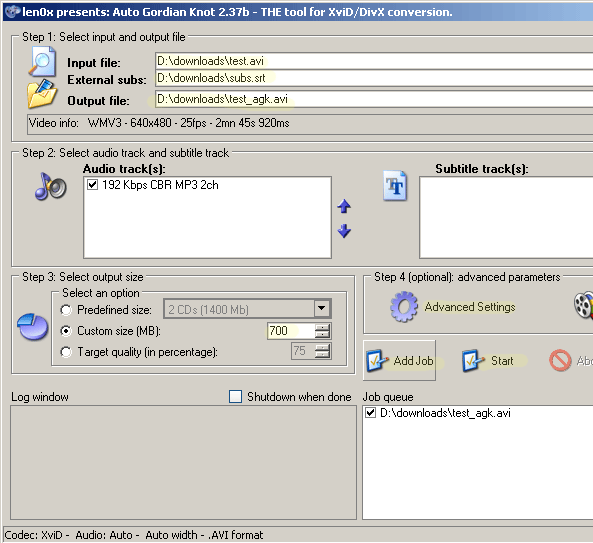
Select the Input File
Press CTRL-F8 on your keyboard to bring up the subtitle load
Select the External subs (If you don't have the subs in correct format or if you would like to write the subs use Subtitle Workshop)
Set the Output file
Set the Output size
Click Advanced Options to change between XviD Codec or DivX Codec
Click Add Job
Click Start!
AutoGK will now run some tools in the background like VirtualdubMOD. Don't close it. Wait until it's done.
+ Reply to Thread
Results 1 to 30 of 264
-
I'm a MEGA Super Moderator

- Aug 2000
- Sweden


-
Edit : sorry just read well

-
After you open the video file in AutoGK:
Press CTRL-F8 on your keyboard to bring up the subtitle load -
I'm a MEGA Super Moderator
- Aug 2000
- Sweden
-
Did you
?Originally Posted by Baldrick -
thanks for the tip did not know of the key combination
-
Hi there,
I have followed instructions to the dot, but without success.
Input File: .AVI
External Subs: .SRT
Output Size: 300 MB
In Advanced Settings I have tried Xvid and DivX Codec
All I get as Output file is: a small AVI file (1.8MB) without video and without audio.
Any help?
Many thanks. -
That's the test file it creates to judge the bitrate settings. There should be a log?
-
Thanks kschang,
Yes I got LOG file (2kb) what about it? -
NVM...weird that you can force external subs, but not choose it in the options without winrar installed.
-
I got the same problem as him, I followed every step and I got two files [a text document and a blank folder] instead of the video I was expecting. Anyone know what I did wrong?Originally Posted by a$h
-
Well, show us the Log file, unless there's something in there that can't be made public...Originally Posted by a$h

-
Originally Posted by kschangthanksCode:
[12/27/2006 4:52:37 PM] AutoGK 2.40
[12/27/2006 4:52:37 PM] OS: WinXP (5.1.2600).2
[12/27/2006 4:52:37 PM] Job started.
[12/27/2006 4:52:37 PM] Input file: C:\Documents and Settings\Sheremeti\Desktop\Prison Break\[tmd]prison.break.s01e01.(lol).tvrip.(1of1).avi
[12/27/2006 4:52:37 PM] Input codec: S-Mpeg 4 v3
[12/27/2006 4:52:37 PM] Source duration: 42mn 48s 766ms
[12/27/2006 4:52:37 PM] Output file: C:\Documents and 01\[tmd]prison.break.s01e01.(lol).tvrip.(1of1)_agk.avi
[12/27/2006 4:52:37 PM] Output codec: DivX
[12/27/2006 4:52:37 PM] Audio 1: 56 Kbps MPEG-2 Audio layer 3 2ch
[12/27/2006 4:52:37 PM] Subtitles: from external file: C:\Documents and Settings\Sheremeti\Desktop\Prison Break\Prison+Break+-+The+Complete+First+Season.srt
[12/27/2006 4:52:37 PM] Format: AVI
[12/27/2006 4:52:37 PM] Target size: 300Mb
[12/27/2006 4:52:37 PM] Audio 1 settings: Auto
[12/27/2006 4:52:37 PM] Started encoding.
[12/27/2006 4:52:37 PM] Source resolution: 352x240
[12/27/2006 4:52:37 PM] Source fps: 14.985
[12/27/2006 4:52:37 PM] Analyzing source.
[12/27/2006 5:00:03 PM] Source has percentage of interlacing in motion areas: 0.00
[12/27/2006 5:00:03 PM] Source has percentage of telecined patterns: 0.00
[12/27/2006 5:00:03 PM] Source has percentage of progressive patterns: 100.00
[12/27/2006 5:00:03 PM] Source has percentage of interlaced patterns: 0.00
[12/27/2006 5:00:03 PM] Source is considered to be progressive.
[12/27/2006 5:00:03 PM] Output will contain 38493 frames
[12/27/2006 5:00:03 PM] Demuxing audio.
*************************************
EXCEPTION: Unsupported audio type.
*************************************
[12/27/2006 5:00:03 PM] Job finished. Total time: 7 minutes 26 seconds
You are in breach of the forum rules and are being issued with a formal warning. Buy prison break on dvd instead.
/ Moderator Baldrick -
I found the problem, in my audio file its in .ogm format. Now I just need to know how to convert the audio. Is there any lessons on how to do that?
Also; How long does the whole conversion take, a day? -
O_O, which audio file? Why for do you need them?Originally Posted by O_O
I have .avi file (video + audio) I just need to add subtitle to it... ?! Any idea? -
I have .avi file (video + audio) I just need to add subtitle to it... ?! Any idea?
Evidently AutoGK doesn't support MP3 audio at such a low bitrate. Strip the audio from the AVI and feed an audioless AVI to AutoGK. Then remux the audio when done. Either that or reencode the audio to a higher bitrate and try again.12/27/2006 4:52:37 PM] Audio 1: 56 Kbps MPEG-2 Audio layer 3 2ch -
I have a different kind of problem. After this subtitle encoding is completed, audio and video aren't synced in output file. Audio is maybe 10 or 15sec behind the video. And this gap is the same all the time, it's not getting bigger towards the end of the movie. What could be the problem?
-
I'm a MEGA Super Moderator
- Aug 2000
- Sweden
-
Are you using LATEST version? some earlier versions had problem with mp3 vbr audio.
Or replace the new audio with the old audio using VirtualDubMOD, open the old video and demux the old audio track under Streams->Stream list. Then open the new video, streams->stream list and delete the new audio and add the old audio. Select Video->Direct Stream Copy and last save as a new avi. -
Thanks Manono.Originally Posted by manono
I have a movie in .AVI format and I wanted to add subtitles to it
I dont have a seperate audio file...
Regards -
I dont have a seperate audio file...
??? You do if you separate the audio from the video, as I said in my last post. First save the audio. Then save the video without the audio. Then feed the audioless video to AutoGK and encode it, leaving enough room for the audio and overhead (overhead = 2-3 MB). When the video is finished encoding, mux the audio back in. If you don't know how to perform these basic VDubMod procedures, then look around for a guide or earlier posts explaining it. -
I successfully added subtitles but they are too small to read. Is it possible to add bigger subtitles?
Thanks! -
How long does it take to add subtitle to an 700 mb avi file? AutoGK has been running now for 8 hours and still there is 30% left ... :/
-
I successfully added subtitles but they are too small to read. Is it possible to add bigger subtitles?
Yes, convert the subs to SSA format (I use SubResynch that comes with VobSub). Then in the header, raise the boldfaced number to whatever you like:
I find that 70 is about right. I'm not positive about this, but I think you can run the Preview and get an idea of the size of the subs.Format: Name, Fontname, Fontsize, PrimaryColour, SecondaryColour, TertiaryColour, BackColour, Bold, Italic, BorderStyle, Outline, Shadow, Alignment, MarginL, MarginR, MarginV, AlphaLevel, Encoding
Style: Default,Tahoma,70,11468799,65535,65535,-2147483640,0,0,1,2,0,2,30,30,25,0,0
How long does it take to add subtitle to an 700 mb avi file? AutoGK has been running now for 8 hours and still there is 30% left ...
The entire video has to be reencoded (and I suspect you're using the default 2-pass Mode). While 10 hours or so does seem like a long time, it's entirely dependent on the resolution used, the length of the movie, and your computer specs. -
Hello again!
It took 19 hours total to put a subtitle to this 700mb avi file, guess my computer isnt handling this very well. But the outcome is perfect, sound, video very good quality and yes manono, i was using two pass mode.
-
Can it support mp4 video file
-
I just got the same problem. I merged a 348Mb .avi with a 61Kb .srt. Sound comes before video.Originally Posted by peko
Does the Output size has to do anything with it? BTW, what is the suggested output file size I should use for the above? -
Ok, I solved it. Here's how:
I unistalled AutoGK and also Avisynth (2.5.6).
I downloaded and installed Avisynth 2.5.7 (www.codecs.com) and reinstalled AutoGK without the Avisynth option.
Then I downloaded the lastest VirtualDubMod 1.5.10.2_b2542_2 and replaced VirtualDubMod.exe and VirtualDubMod.vdi under \Program Files\AutoGK\VDubMod.
I run again AutoGK and subtitle merge did not affect sound/video sync. -
Hey everybody,
I got a little problem. I got an avi file ripped from DVD (res 720X480, 29.97 fps, audio 128Kbps mp3), and a srt file from online (25 fps). I've tried VirtualDub, AutoGK, and Vobsub submux to add the subtitle. The result is the same. The dub always comes out lagging behind the real audio at random rates. Was this because I have DirectVobsub running when I play the file or something else? Thanks a lot for your help. -
You said the DVD source is NTSC and the subtitle source is PAL (25fps). So the subs won't be in synch unless you slow them down to the NTSC framerate (23.976fps).
-
I found this to be a very helpful post. however, i must point out that i am using Auto GK v.2.4. you need to press F8, then Ctrl in order to access the option discussed. I never would have figured it out without that hint, though. thanks.
-
I'm a MEGA Super Moderator
- Aug 2000
- Sweden
-
No, the order doesn't matter and yes I have tested latest version. You must have some other strange problem...Originally Posted by Fluffykins112
 Quote
Quote


Similar Threads
-
Add permanent subtitles to S/VCD,DVD,AVI with ffdshow/vobsub
By Baldrick in forum User guidesReplies: 74Last Post: 4th Oct 2011, 04:11 -
How do I add permanent subtitles 720p MKV video
By Torresinho in forum SubtitleReplies: 1Last Post: 15th Sep 2011, 20:16 -
AUTOGK - Embedded, Permanent Subtitles Not Showing Up? Try This...
By SuperFist in forum SubtitleReplies: 1Last Post: 17th Aug 2008, 08:54 -
How do I add or edit permanent subtitles
By VidHunter in forum MacReplies: 19Last Post: 29th Nov 2007, 14:55 -
Add permanent subtitles to an AVI file using a MAC?
By blueblitz in forum MacReplies: 1Last Post: 15th Oct 2007, 05:10