


 View Profile
 View Forum Posts

Some sites have flash video’s online that play in your browser, if you have the correct plugins.
Thanks to Veblin, I learned that these video’s are stored on your HD (most likely the Temp Internet Files), and that they (sometimes) have the .flv (FLash Video) extension.
The .flv files play fine in the latest VLC player (v 0.81) or a dedicated FLV player like http://www.martijndevisser.com/archives/000021.php
I wanted to try to convert to avi or mpg and could not find a guide on videohelp, so I did some research of my own.
This is A way, it worked for me, and I would like to share it with you (helping this fine board to help others).
I use the RivaFLVencoder;
http://www.rivavx.com/index.php?encoder&L=3
which is freeware and it’s based on the FFMPEG encoder (normally it is used to create .flv files from .avi or .mpg, but it can do the reverse too).
There is also FlixPro by Wildform, but that costs about $150.
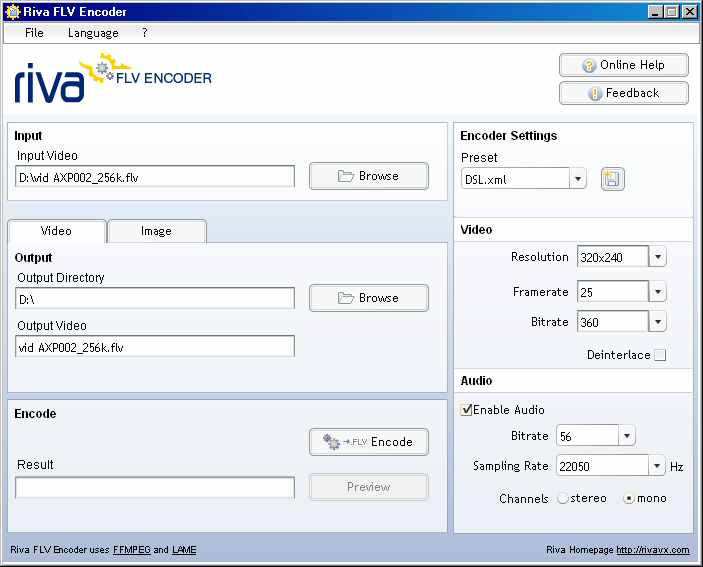
Download, install and open Riva.
Klick the Browse button in the Input tab and locate the .flv file you want to convert.
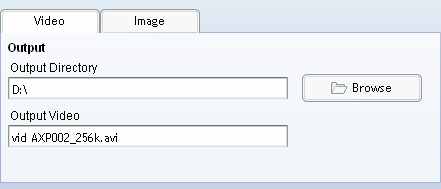
Klick the Browse button in the Output tab to select the location to save your output.
The default outputname will have the extension .flv (after all it is an FLV encoder) but just click it and change the extension to .avi or .mpg
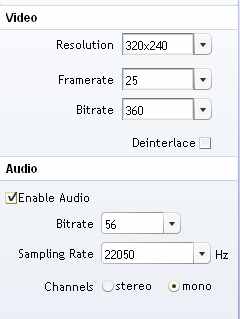
Then adjust the encoding parameters for both video and audio to your liking
Make sure you check the box Enable Audio or you’ll end up with a mute video.
It’s possible that the .flv contains an audiocodec that will not be transcoded. A solution for that is to play the original .flv and record the audio with Audacity (for instance) and to mux that recording with the .avi or .mpg you get from Riva.
Just experiment with the settings, but don’t expect miracles.
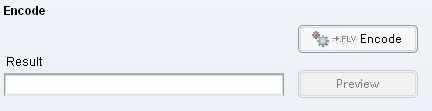
With the correct settings, you can now hit the Encode button
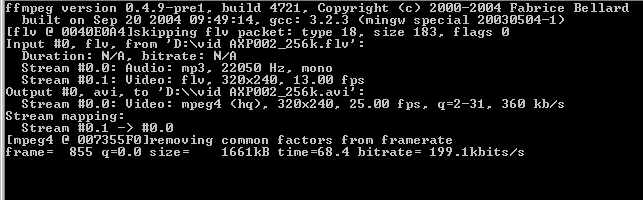
The FFMPEG window will popup
When FFMPEG is done with the encoding, this window will close and (hopefully) you have an .avi or .mpg.
The .avi is compressed with FFMPEG’s divx codec, as far as I know.
Again, this is only a way of converting that I tried and it worked for me.
It might be possible to use only FFMPEG, but I’m not familiar with it’s commandline, so I’m gratefull for the GUI of Riva.
Someone out there might have a much better solution, but he/she did not post a guide.
Special credits and thanks to Veblin of the streaming forum for pointing out some things to me.
Regards,
Hitrec
(Thanks for the BBCode tip Baldrick)
Closed Thread
Results 1 to 30 of 182
-
-
I'm a MEGA Super Moderator

- Aug 2000
- Sweden


you must deselect "disable bbcode". click on edit on your post.
-
Total Video Converter will also do it...
http://www.effectmatrix.com/total-video-converter/index.htm
-
Problem with Riva FLV Encoder is when converted to MPG, there is considerable loss in quality.
Anything which keeps the quality????
-
You're going from equivalent of MPEG4 or better down to MPEG, some sort of quality LOSS and MASSIVE increase in size is expected.Originally Posted by pavandude
-
I can't get Riva to convert a flv to avi (seems like FFMPEG is not kicking in). I get sound, but no video. What am I doing wrong here?
I tried Total Video converter also. It works, but it leaves an annoying watermark.
Thanks!
-
im having the same problem, i dont even know how to install ffmpeg, please helpOriginally Posted by nord117
-
holy cow, that's an awesome program!!!!!Originally Posted by Baldrick
THANK YOU! ty Tyty!!!
-
There are many tools can do it if it costs.
-
It's true that the Riva FLV Encoder does a great job on converting FLV to Avi or Mpg, but not all FLV files are compatible.
I recently download a FLV file that, while it plays perfectly, the Riva program can not convert it to neither Avi or Mpg. It gives out errors relating to codecs compatible and the such.
I even tried CinemaForge and that program can't convert it either.
Just to be sure that the Riva Encoder was still working correctly, I converted another FLV file without any problems. Which now proves to me that the problem is with that FLV file. Was this file made with a newer, updated codec? If so, then what would that codec be????
Is there a way to add updates to the FLV Encoder program? Or is there a better (Superior) program that can also convert FLV to Avi/Mpg but has the latest, newest codecs already installed?
Any help will be appreciated?
-
Super is a terrific tool for flv conversion! Thanks for posting this Baldrick!
-
other program is CinemaForge 2.0
-
that's the message that i got from Virtualdub after converting a flv file with cinemaforge& super and than opening it with VD:
VirtualDub has detected an improper VBR audio encoding in the source AVI file and will rewrite the audio header with standart CBR values during processing for better compatibility. This may introduse up to 0 ms of skew from the video stream. If this is unacceptable, decompress the *entire* audio stream to an uncompressed WAV file and recompress with a constant bitrate encoder. (bitrate: 128.0=0.0 kbps)
-
i used super but theres no sound, how can i fix this?
-
I find that I'm having the same problem as cantckaja in that when I try to encode a file using SUPER, I can encode the video fine but the sound isn't encoded at all... Anybody know why this is so?
-
when i try Riva, if i add ".mpg" it encodes mpeg-2 video, but no sound. if i add ".avi", i get MPEG-2 sound, but messed up (or NO) video. SOLUTION: encode BOTH, them "MUX" using VirtualDub with "Direct Stream Copy" for audio, choose vid codec for AVI. if you encode the MPEG2 file (in Riva) at 2000 kb/s, then re-enc using 1000 kb/s (or less as needed), it should turn out ok.
UPDATE: for some odd reason, if i set the settings to:
.MPG 320x240 framerate:30 bitrate:2000 audio bitrate:128 sampling:44100 STEREO
it converts OK! then i can do whatever with it. i think it was the "STEREO" setting that did it, but it's something to try! good luck all!
-
Hi,
I have two flash video files which are actually .exe files. Is it possible to convert those and how?
-
VH Wanderer

- Jan 2006
- Somewhere on VideoHelp...
-
Perhaps, but you'd need to extract the SWFs from the EXE projectors, first. (Note that there are utilities out there that'll do this for you, but I don't know what they are - I've only ever done it manually.
 )
)
Second, the SWFs have to have FLV video streams within them. (If the FLV streams are encoded using VP6 rather than the FLV codec, that can cause problems with converting as well, I believe.)If cameras add ten pounds, why would people want to eat them?
-
Ai Haibara is right, Gregg, there are programs that can "extract" the SWF data inside other files, but it's rather cumbersome to learn, and quite a process at that! i gave up on trying to learn it after the first DAY! you can try if you like; try searching google for "swf extract" (in quotes), or something similar. you'd be better off though, trying Camtasia Recorder to just screen capture the video (and audio), for this situation. SWF .exe files weren't meant to be decompiled, but quite simply to provide an easy way to play SWF files without a separate player. your PC (P4 3.0Ghz correct?) should be able to handle the moderate load required to screen capture quite well, as i have a similar PC at home.
-
hello...
im new to this program..
i just downloaded this
i read from the guide as above that for input, i choose the flv.file
but why cant i choose flv files ?
when i klik browse (for input), message box will appear
and i try to locate my flv files
but this only shows me video files
and under type of files, there none choice other than "video files'
so how can i use this program to convert flv to avi??
which one better, Riva or Super?
thank you
-
Iv3_imt,
1. be sure you're browsing in the proper folder (the one your FLV is in).
2. be sure your FLV has the .flv extension on it (sometimes you can download them without it adding an extension).
3. you can also drag & drop the file into Riva. this has worked for me.
FLV files SHOULD show up when browsing. they do in mine, this is why i mentioned checking that the filename ends in .flvdarkflux
-
thank alot..
i get it know
what i need to do is by putting .flv in my file' names
it works now..
im so happy..
thank you
mmm im sorry that i ask question which is out of the topic
im looking for freeware to put audio in the video..
i mean.. i have a fanvideo
and i want to change the song in that video with other song..
do u know what software i can use to do so (to separate audio n video and then putting audio into that video)?
hope i make sense
thank you
-
since it's relating to the same problem, i think it's okay...
anyways, VirtualDub works with both avi and mpeg files, however, it only CREATES avis. it's kinda tough to find a freeware MPEG editor, so if your file doesn't NEED to be mpeg, i'd stick with VDub. otherwise, you might try Womble MPEG Video Editor. it's one of the few programs that doesn't need to re-encode the video to add or delete audio files.darkflux
-
so i can use Vdub to add or delete audio files from video?
are there any guides here in regard to this?
thank you
-
here's a basic guide to cutting and editing in VDub: https://www.videohelp.com/virtualdubedit.htm
but basically, for what you need, once you've opened the file in VirtualDub, go to the Audio menu, and click "WAV Audio". then select the file you want to add. this will replace the current file. if you want it re-encoded, the "Compression..." option in that menu will do it.darkflux
-
mm..bit confused here..Originally Posted by darkflux
so first i opened the video file
and do the next step as u told
and then i have to open other file.What file do i need to open?the audio file?
i dont join any video files
and what does re-encode mean?
-
sorry, guess i didn't speak plainly enough


1. open the original fanvid in VDub.
2. replace the existing audio (with your audio) by using the "WAV Audio..." option in the Audio dropdown menu at the top.
3. re-encode means to encode the file differently, like changing it from a WAV file to an mp3, or something...
you see, AVI files are only "containers" for compressed VIDEO and/or AUDIO files. when you "re-compress" a file, it slightly downgrades that file. but if the file you open using VirtualDub is an MPEG file, it MUST be re-compressed (using the "Compression..." option in the Video menu). if you want to change the "Audio Compression" to mp3 or ogg, or whatever else, you first must select "Full processing mode" in the Audio menu, then "Compression..." is no longer "greyed out" in the Audio menu. this may all seem a bit confusing and cumbersome (especially to those who've never done it before), but once you understand the "basics", it seems alot less cumbersome
oh, and if you are using an AVI file to start from, be sure to change the option to "Direct Stream Copy" under the Video menu.
you might consider reading the following to "bone up" on conversions using VDub:
https://www.videohelp.com/avi2divx.htm
http://www.ryan.com.br/virtualdub_en.htm
http://www.doom9.org/virtualdub_procedures.htm#Audio_options
http://www.doom9.org/virtualdub_procedures.htm#audioencoding
if there's anything you don't FULLY understand, you may either disregard it, or if you're TOTALLY lost (we've all been there), or just ask someone here! we're mostly pretty nice, but if you have anymore questions OFF the topic in this thread, of course, you should start your own NEW thread.
i hope this helps
darkflux
-
Thank you provide such good tools,I'm newbie in flash,and search a trick to convert other file such as powerpoint,move to flash all along.I am also want to search more useful imformation here.Hope get some help.Any ideas would be thoroughly appreciated.^_^Originally Posted by citizenwp
Is there other tools except "http://www.flash-on-tv.com/index.php?sid=6 " to help flash work easily?
Someone can contact me by: abelz22@gmail.com
Let's discuss together(Only flash tips)
 Visit Homepage

Similar Threads
-
How to record streaming flash video, edit and save as AVI, MP4, FLV,etc.
By Baldrick in forum User guidesReplies: 3Last Post: 20th Sep 2014, 14:06 -
How to easily convert your video to Flash FLV H264 and host on your site
By Baldrick in forum User guidesReplies: 6Last Post: 8th Oct 2011, 07:40 -
How to convert to Flash FLV Video and add it on your homepage
By Baldrick in forum User guidesReplies: 49Last Post: 7th May 2011, 06:16 -
Convert .FLV to another (.avi or .mpg) WITHOUT re-rendering?
By DW in forum Video ConversionReplies: 4Last Post: 3rd Feb 2011, 18:13