


 View Profile
 View Forum Posts
 Private Message
 Visit Homepage


How to put multiple (S)VCD (or even DVD) on one DVDR in DVDLab.
This guide assumes you have already encoded your (S)VCD mpeg, and they are stored on your hard drive. If not, there are plenty of guides on how to make a proper (S)VCD from an avi, DV, or other source file.
If you are not in the least familiar with DVDLab, I suggest you read my guide to familiarize yourself with it's basic workings. No doubt, you will want to refer to it after this one, to make your chapters, menus and such.
Importing assets, do's, dont's and pitfalls.
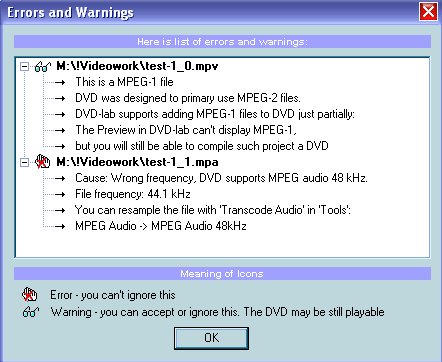
When you import an asset that is not dvd spec compliant, DVDLab will demux the file, then immediately inform you with a popup window.
If the file is mpeg1 (VCD) you will get a warning about partial support, and no preview. Fine. It will still work.
If the file is the wrong framesize, you get a warning about this as well. No problem. It will still work.
You will also get a warning about wrong audio bitrate (unless you encoded it at 48khz). No problem.
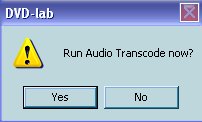
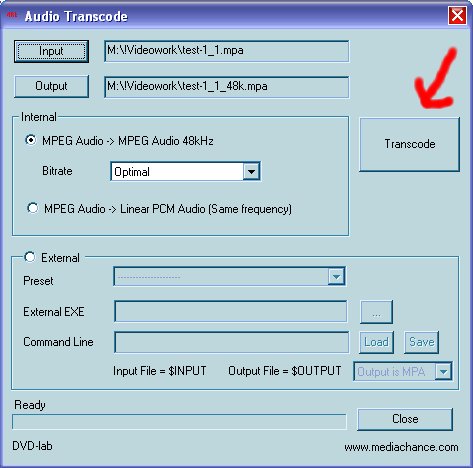
When you click OK, DVDLab will demux the file, then prompt you to run "Audio Transcode"
Just click YES, then click the transcode button.
When it's done, the transcoded audio and corresponding video will be in the assets window.
Drag and drop them to movie1.
Import all assets, transcode all audio, and when done, it's time to start putting it all together.
Making it work, menu linking and testing.
Right click in the project window, and select Add Movie.
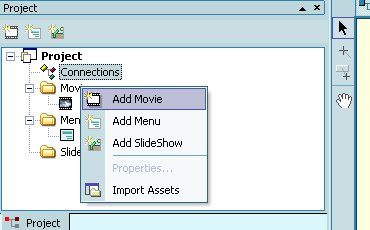
Add as many as you need. One for each movie, or part of a movie (each mpeg you want on this dvdr). Don't be afraid to add more than you need, you can delete ones you don't need, by highlighting them, and hitting the DEL key on your keyboard.
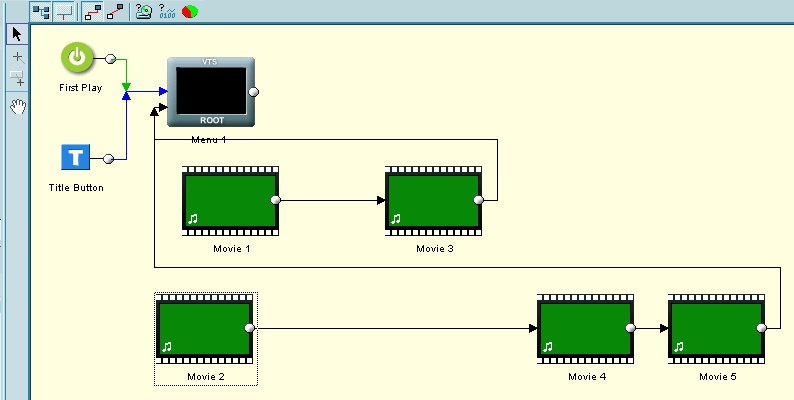
Once you have all your video, and corresponding audio, in the Connections window, it's time to link things properly. If you have any video that is in two or more parts, join them now. You do this by selecting the Draw Links button (the + beside the project window)
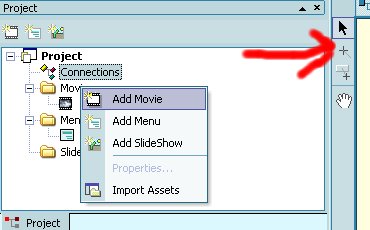
Click on the first part of your movie, drag, and drop on the second part of your movie. Do this again from part 2 to part 3 if necessary. This will make it play as one continuous movie.
In my example, I have 2 movies, the first is 2 parts, the second is 3 parts, and the image below shows only one way you can link them. As I have it, movie 1 and movie 2 are the beginning parts of my movies. How you link the remaining parts is up to you, as long as you don't link part 1 of movie 1 to part 2 of movie 2. Keep things organized
Now create your menus and chapters as needed using this guide.
You may also want to make some fancier buttons, links and such, using this guide.
Compile and burn normally.
I strongly advise you test this on a dvdrw, both to make sure you have your menus and links correct, and to see if your dvd player will play this compilation.
Note: You can mix any combination of mpeg1 and mpeg2 files, and it should still work.
Cheers, and happy dvding
+ Reply to Thread
Results 1 to 30 of 36
-
Cheers, Jim
My DVDLab Guides -
helpfull guide, Thanks!, I was just trying Adobe Encore DVD but DVDLab was much easier.
-
You're most welcome
 Cheers, Jim
My DVDLab Guides -
Now there's a phrase as slippery as a fish dipped in vegetable oil "it should work". And if it doesn't? Why not just make a compliant DVD Mpeg with SVCD2DVDMPG and author that? Of course if you only want to watch the shows or movies on the DVD-+R I just burn them onto a disc and play them on my Philips 642...
-
"It should work" is referring to the particular users dvd players compatibility.
If someone want's to re-encode all their mpegs first, that's fine too, however, the mention of testing on dvdrw is there for a reason.
One could go out and purchase a new(er) dvd player that guarantees compatibility, or one could spend the time re-encoding, or any other number of ways around their particular video problems.
This guide is how to put multiple (S)VCD on to DVDR, not how to do any of the other stuff.Cheers, Jim
My DVDLab Guides -
I am having problems playing my DVDs that I created from SVCDs. My DVD player supports both VCDs and SVCDs, as well as DVD-R's. However, when I play a DVD that I create from an SVCD source using the method decribed in this tutorial, the video comes out squished, on the left hand side of the TV. My TV is not widescreen, and the source video is. When I play the DVD-R on my computer using Power DVD, everything looks fine. Do I have a setting wrong in DVD lab? Here is my procedure:
Extract the file from a .bin file using ISO buster by right clicking the MPEG folder and selecting "Extract but FILTER only M2F2 Mpeg Frames".
I follow along with your tutorial, transcode audio, create the DVD, everything goes great, the menu looks fine, but then I press play and the video is all screwed up. I have played with all the settings I could find, but just cant seem to find the right one. Any ideas as to what would cause this? -
Your dvd player wont play svcd authored as dvd,you will have to re-encode to dvd compliant.
I think,therefore i am a hamster. -
Yup, that's a player fault, not dvdlab.
You should make a note of that in the dvd players section for your player, so others know.Cheers, Jim
My DVDLab Guides -
I get that squashing effect sometimes on discs that are downloaded from Usenet sources. On my Apex and Philips players, all I do is stop the playback and then hit the play button again. This has worked 100% of the time with those discs. Oddly enough, my Panasonic DVD recorder (E80H) just sees the discs as widescreen and plays it without any problems!
-
So i played around with DVDLab, and i linked the movies one after another. my problem is that, when i press forward, it wouldn't skip to the next movie. however, then the current movie ends, it moves on the the next one. is there a way to fix it so that when forward button is pushed it will skip to the next movie?
THank you for your help -
You need to set each movie as a new chapter.
The fwd button reacts to chapter points, not VTS titles.
Set a chapter point at the start of each movie, then create a chapter selection menu.Cheers, Jim
My DVDLab Guides -
hi reboot, thanks for your reply, i however, still don't quite understand what i need to do. I am trying to burn a drama with 8 episode on this dvd. so i have 8 movies in dvd lab. i set chapters in the beginning of the movies and made menus that have 8 different selection pointing to different mvoies. is a menu for chapters necessary in order to have the fwd button jump to the next movie? Thank you in advance
-
A chapter link is different than a movie link.
Use the chapters playlist movie branch button.Cheers, Jim
My DVDLab Guides -
i'm sorry, i still don't know how to do it. perhaps my question was not clear. all i want to do is to make the dvd skip to the next movie when the forward button is pressed. i understand that chapter link is different than movie link. i dont' understand waht the chapters playlist movie branch button is though. Thank you
-
You need to tell your player to go to the next movie when you push the forward button.
Forget the branching then.
Right click on your first movie, select UOPs and Settings.
Take the tick mark OUT of "Strictly Adhere to DVD-3 4.3.2"
Change the NEXT button from default to Follow End Link to Next Movie.
Click OK.
It's all in the help files.Cheers, Jim
My DVDLab Guides -
cna't seem to find UOPs and settings, using version 1.4 beta 1
-
nm i got it, thank you for your help
-
I've read a lot of these guides, and what many people don't seem to realize is that TMPEnc's DVD Author program will take vcd files and treat them exactly as though they were dvd files, creating a dvd which can be played on any player capable of showing dvd-r, but with the bit rate of the original vcds so that the disc can be 6-7 hours long. It even transcodes the audio from 41K to dvd-compliant 48K automatically. There's no need to go through all the steps of converting anything. A vcd movie is the same as a dvd movie as far as DVD Encoder is concerned. A wonderful little program which I use all the time for that purpose.
-
I know that.
What's that got to do with this guide?
If you want to write a guide on how to do this in TDA, feel free
Cheers, Jim
My DVDLab Guides -
You don't need a guide for doing it in TDA, you just open the program and do it. That was my point, suggesting an easier way. Isn't that what these forums are about?
-
Then you start a new post. You don't recommend other software, or different methods, in an already written guide.
Cheers, Jim
My DVDLab Guides -
Hi,
How to use DVDlab to convert Karaoke VCD to DVD while converting 2 stereo audio channel (instrumental and vocal channel) on VCD to 2 language channel on DVD?
Thanks,
Jean -
You must extract the two audio channels separately, as well as the video.
You can then reauthor it in DVDLab with this guide: http://www.mediachance.com/dvdlab/tutorial/amanager.htmlCheers, Jim
My DVDLab Guides -
I have just made my first vcd compilation on dvd using Dvd Lab
But there is something that bothers me. The audio and video transition is way off. There is almost a 10 second delay on video after audio.
Also the screenshot is more centered and cuts off the sides too much. The fps on my original mpg was 25 and it makes it a 29 and some change when it converts it. Is there a way to remedy this problem? -
If you are making an NTSC dvd, then you should have your videos encoded to 29.97fps before importing into dvdlab.
If you're getting sync problems, it's almost always in the method used to create the VCD mpeg's, and if the audio is correctly encoded to 48khz, not 44.1khzCheers, Jim
My DVDLab Guides -
Great forum on DVDlabs.
But can you please provide instructions on how to merge two dvds together with new menus.
Fyi i have a series of dvd animes that i want to copy. ...i used dvdshrinks to merge the two dvds together onto one dvdr for cost/effectiveness. but through this process the burnt dvdr autoplays and i nolonger have any menus to select my chapters.
I will like to create menus for chapter title selections. Can you please list steps on how to do it with dvdlabs. Fyi each original dvd has 4 episodes..the new merge dvd therefore has 8 episodes on it...but when i import movie file from the new dvdr it only has 6VOB files. Can you please explain? I also notice that each episode has 5chapters each when i skip movie with my dvd player. My goal is to create 8 episodes into 8 chapters instead of having 5chapters per episode.
Thanx -
I would do things differently here.
Extract each episode into it's own m2v/mpv, then author with menus, making your own chapters.
Quicker than merging in dvdshrink, then trying to add menu's to existing chapters that are in the wrong place.
You would have to edit the chapter points manually, then link a menu item to each chapter start.Cheers, Jim
My DVDLab Guides -
Can you please list steps on how to extract each episodes bcs i dont know what m2v/mpv are/mean..lol and also how to reauthor them.
My intention is to create a playall buttom and play individual buttom for each episode.
Thanx -
Furthermore to previous post. The original dvds of the anime i have, each have 4VOB files each represting one episode.....I imported these vob files as a movie file and when i do trims end to to save space an error pops up "can't create output file"....Can you please explain?
Thnx -
You sure you got enough disk space? Need 2-5 times the space of the DVD in question.
 Quote
Quote

Similar Threads
-
Home video 8.4GB on Dual Layer DVDr want to put on 2 4.7gb dvdr ??
By rockonvidtrade in forum Authoring (DVD)Replies: 11Last Post: 20th Oct 2013, 00:25 -
Multiple AVI is WINAVI being put on DVD in the wrong order
By richco in forum Authoring (DVD)Replies: 7Last Post: 23rd Nov 2009, 07:50 -
multiple questions here so i'm not sure where to put this
By pmmassacre in forum MacReplies: 10Last Post: 12th Jun 2009, 08:49 -
Question how to put several dvds on one DVDr
By jimdagys in forum Authoring (DVD)Replies: 7Last Post: 24th Nov 2008, 11:29 -
Can I put multiple video files onto one DVD?
By flameout in forum Authoring (DVD)Replies: 4Last Post: 17th Jul 2007, 16:12