


 View Profile
 View Forum Posts
 Visit Homepage

If you have authored, recorded a DVD and you want to reedit or reauthor it without reconverting it again then just "convert" the DVD VOBs back to a MPG file or MPEG2, AC3, MPA, WAV elemantary streams(called demultiplexing) for easier editing and authoring. This does not affect the video or audio quality.
Tools
Some authoring and editing tools can import DVD VOB files directly and reauthor and reedit it:
TMPGEnc DVD Author (editing and authoring)
Ulead DVD MovieFactory (editing and authoring)
Ulead DVD Workshop (editing and authoring)
DVD-lab (no editing only authoring)
MPEG Video Wizard(no authoring only editing)
VideoRedo (no authoring only editing)
Tools that can "convert" the DVD VOB files back to a MPG file or MPEG2, AC3,MPA files (demultiplex):
DVDDecrypter(free, also built-in ripping)
Smartripper(free, also built-in ripping)
Rejig(free)
TMPGEnc DVD Author(DVD to one MPG file, only one audio audio track)
VOBEdit(free)
VOB2MPG (DVD to one MPG file, FREE and VERY VERY VERY VERY EASY TO USE!!!)
Guides
DVD reauthor guides
TMPGEnc DVD Author reauthor
DVD-lab reauthor
DVD demultiplex guides, DVD VOBs to a MPG file
TMPGEnc DVD Author DVD VOB to one MPG file
DVDDecrypter DVD VOB demultiplex
Rejig DVD VOB demultiplex
DVD-lab reauthor
Start DVD-lab and make a new project.
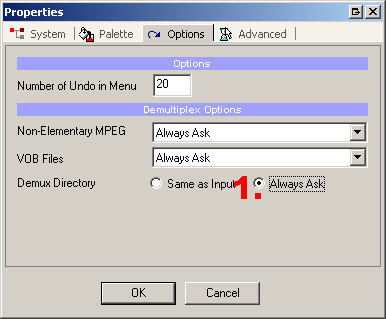
Under Project->Project Properties->Options
1. Choose Demux Directory: Always Ask
Import Media
1. Select the VIDEO_TS folder on your DVD, choose the VTS_01_1, (usually the main movie, play the vobs with a dvd player to check)
Demux options
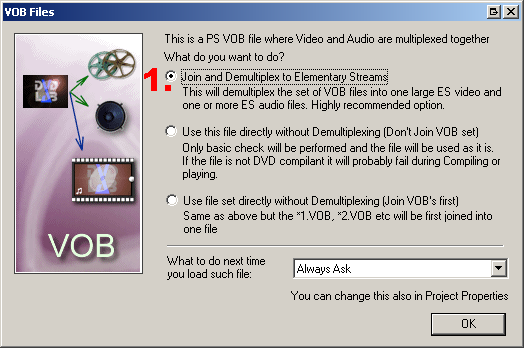
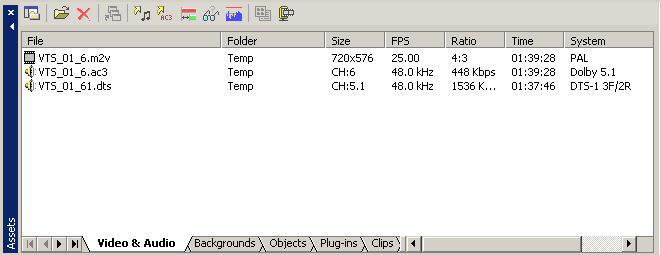
1. Select Join and Demultiplex to elemantary streams, hit okey and specify where to save the new demultiplexed files. It will take some time to copy all video and audio to your hd.
Done. Continue author as usual.
TMPGEnc DVD Author reauthor and DVD to MPG
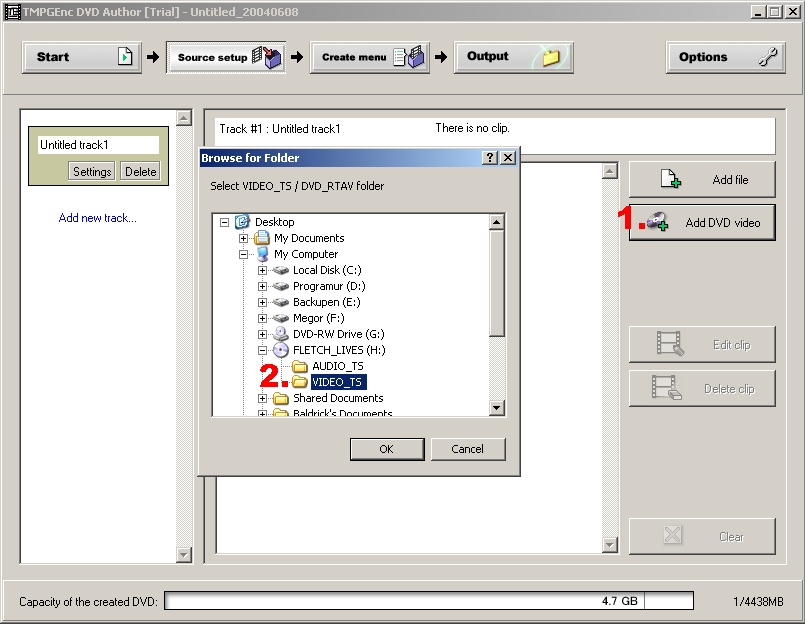
Start TMPGENc DVD Author and make a new DVD
1.Select ADD DVD Video
2.Select the VIDEO_TS folder on your DVD
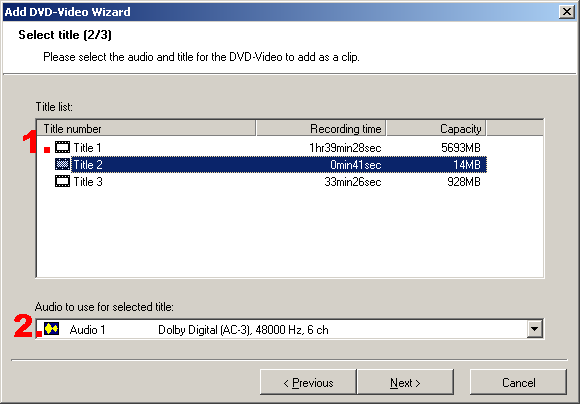
1. Select the Title you want to reauthor or reedit
2. Select the audio track, you can only use one
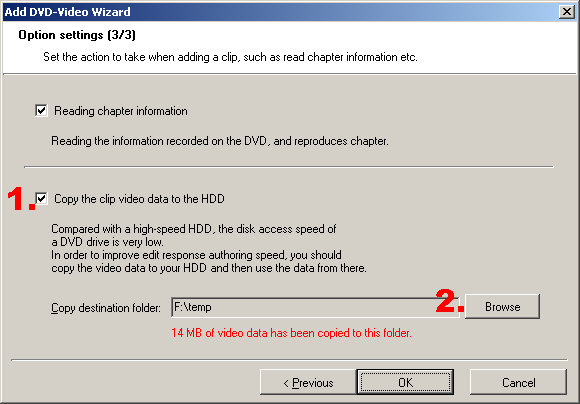
1. 2. Select Copy the clip video data to the HDD if you want to save the video as a MPG file so you can edit with other video tools. Ignore this step if you are going to author with TMPGEnc DVD Author.
Done. You can now either contine use TMPGEnc DVD Author and reedit and reatuthor the DVD or use the MPG clip with another editor or authoring tool.
DVDDecrypter demultiplex
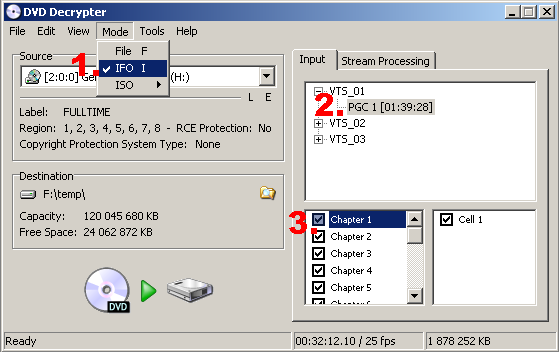
Select the DVD Drive
1. Select Mode->IFO
2. Select PGC, DVD Decrypter selects the "main movie" by default, if you want reedit or reauthor some extra materials select the other VTS PGCs
3. Select or deselect the chapter you want to reedit or reauthor
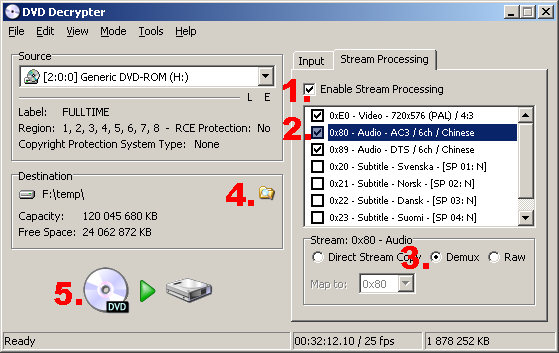
Select Stream Processing
1. Select ENable Stream Processing
2. Select the video and Audio tracks you want to reedit or reauthor
3. Select Demux, you must select each video and audio and select Demux for all separate
4. Select where to save the video and audio files
5. Click on DVD to HD image to "rip" to your HD
Done, you can now import the video and audio files in your favorite authoring or editing tools.
Rejig demultiplex
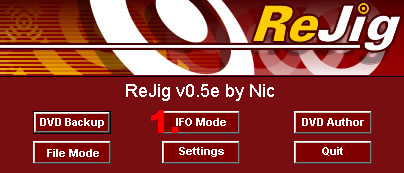
1.Select IFO Mode
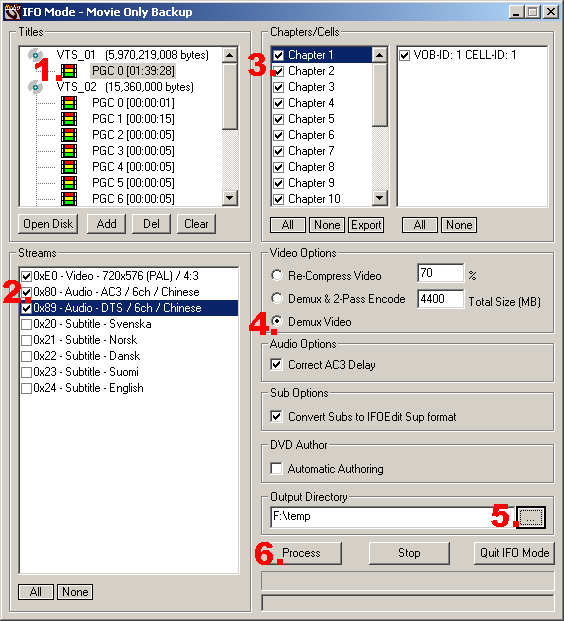
1.Select the VTS PGC that has the longest playtime for the main movie, the other are usually extra materials.
2. Select the Video and Audio tracks you want to keep
3. Select or deselect the chapters you want to keep
4. Select Demux Video
5. Select where to save the video and audio files.
6. Process
Done, you can now import the video and audio files in your favorite authoring or editing tools.
+ Reply to Thread
Results 1 to 30 of 77
-
I'm a MEGA Super Moderator

- Aug 2000
- Sweden


-
I'm looking for a simple solution to select and convert DVD VOBs to MPG files which I can edit in Womble Mpeg Video Wizard.
As you describe, TMPGenc DVD Author does both very nicely.
I can't find the right settings for DVDDecrypter to do the same (if it does).
Is there a setting to do this in DVDDecrypter or is there another freeware program that can? -
You can use the VOB files in Womble MPEG Video Wizard just as they are after ripping them to your hard drive with DVD Shrink, DVD Decrypter, Smart Ripper, etc.
If the DVD is not copyright encrypted, like as in a home video project, you can even edit and save right from the disc without loading to your HDD if you like (moves a bit slower this way, though) -
Yes, however most recordings are split across multiple VOBs where in Mpeg Video Wizard you have to figure out which ones you need, trim into clips, and piece them back together on the timeline. A lot of work, plus I get momentary audio drops as it plays across one clip to the other.
The beauty of DVD Author is it figures out multiple VOB on the disk and presents you with a selection screen of whole tracks to import. Then (and here's the best part) it allow you to create a single MPG file which Mpeg Video Wizard can work with as a single video file.
Still looking for a [free] alternative to DVD Author for ease of track selection and the purpose of making a single MPG file for editing in Mpeg Video Wizard... -
I'm a MEGA Super Moderator
- Aug 2000
- Sweden
-
You can't rip to mpg files with dvd decrypter. But you can multiplex the m2v and ac3/mpa to a mpg after with for example tmpgenc.
-
Help me then with a choice; would it be better to spend $50 to rip & multiplex to a Mpeg2 file with TMPGenc and risk video audio synchronization problems OR spend $70 for TMPGenc DVD Author and not have any sync issues?
Or am I kidding myself because DVD Author is actually demuxing and multiplexing behind the scenes for me and I could have synchronization issues anyway? -
Originally Posted by DoubleACL
TMPGEnc DVD Author is an excellent authoring program. However, it cannot frame accurately edit MPEG2 video files (.MPG, .VOB, .VRO)... Womble MPEG-VCR and MPEG Video Wizard can.
DVD Author can only perform I frame cutting and joining, and there's freeware that does that, too - Chopper XP, Cuttermaran, and MPEG2Schnitt to name a few.
I've personally never had any problems or audio dropouts working with the sequenced VOB files on DVD's as far as editing and joining clips in the MPEG Video Wizard timeline. In fact, that's how I edit DVD-RW transfers made with a standalone DVD recorder to a finished .mpg for the final DVD-R. It is such a fast application, plus does not re-encode the MPEG2 as long as no complex transitions or filters are used.
If you want to, you can use SmartRipper to stream the multiple VOB's into a new single VOB. Load your DVD movie, click on Stream Processing. Select "Extract to new VOB"... click on Settings. Under File Splitting, select "max-filesize" and then adjust the max-filesize to however many MB's you need (can't exceed 4000MB in Win98). Click on OK, select a destination folder then Start. A single large VOB will be extracted.
It's not really necessary to do that, though. Womble should handle multiple video files just fine. -
I also get momentary audio drops between my VOB clips in Womble's Mpeg Video Wizard, and for the same reason as you, decided to use a single big VOB. You can use smartripper as suggested by gshelley61, or DVD Decrypter has the same functionality. I used DVD Decrypter last time I did this and it worked great. I then make my edits, save the mpg, demux with MVW's demux tool into audio and video stream files, then use DVDAuthorGUI to author. Works great.Originally Posted by DoubleACLZakkkkkman
-
Good stuff. Why do you MVW demux to two separate files? Is it because DVDAuthorGUI requires two separate (audio & video) files and can't work with a single mpg from MVW?I used DVD Decrypter last time I did this and it worked great. I then make my edits, save the mpg, demux with MVW's demux tool into audio and video stream files, then use DVDAuthorGUI to author.
-
Yes. As far as I understand it, DVDAuthorGUI can't take a single mpg file, but requires the two separate (Audio and video) files. Demuxing only takes about 5 minutes for a 90 minutes movie on my 1.7 GHz PC, so it isn't a big deal, but it is an extra step.Originally Posted by DoubleACL
By the way, even with MVW, I still have problems once in a while. But I contacted support and they provided a fix within a few weeks. I am currently working with support to get another one of my issues resolved (has to do with encoded mpg missing the end of the file).Zakkkkkman -
When I use TMPGEnc DVD author as suggested I lose the audio.
I says that its saving the video data to the HD.
Rn -
I'm a MEGA Super Moderator
- Aug 2000
- Sweden
-
Is it wav/pcm audio? or dts?Originally Posted by ronhale -
The audio is Liner PCM 48000 2ch.
Ron -
I use TPvr Converter to convert VOB files to Mpeg2, very quick very simple. 3 or 4 minutes a VOB on my box. It Will do all vob's in the series at once, but I tend to get errors if the resultant Mpg tries to go over 4 gig, so I tend to split em up into different directories to keep below that.
Ya just gotta be careful that you are getting the required soundtrack, it just gives you a choice without indicating which is which. Luckily english seems to be the first one 9 out of ten times! -
I'm a MEGA Super Moderator
- Aug 2000
- Sweden
-
Then you can not make a mpg, you must demultiplex to a mpv and wav file. Because mpg do not suppport multiplexed mpeg video and wav/pcm audio.Originally Posted by ronhale -
So then can I assume that DVD author can't do the job aqnd I need to look elsewhere?Originally Posted by Baldrick
Ron -
Hi all,
Your skill and knowledge is above this newbie's level , but am reading through this and other forums to gain and learn from you;appreciate you all's time and contributions.
I have just discovered this site, and have admittedly not read enough, but did find this thread, as I have been needing to take finished DVD's and try to re-edit its video.
However, my editing software, Premiere 6.0, does not accept MPEG video files for editing, nor ac3 audio. It only takes .AVI video and .wav audio.
How do I demux "one more level", to take the demuxed MPEG and ac3 down to avi and wav?
After I do, and edit anew, I am learning about a) encoding the avi into MPEG and the audio into ac3.
Then, I will be looking to b) get clear into taking those and multiplexing them up into VOB files that can last, c) be authored and then burned onto DVD ( i think I got burning down since I've backed up some ripped files already, etc :P
But for now, I need to know how to get avi and wav.
Nevertheless, links to a good guide on each of the phases lettered above, and software recommendations, wold be greatly appreciated and save me time hunting for them and not knowing where to hunt.
Btw, I just got Vegas 4.0, which i hear can encode ac3, or is that just the latest 5.0? I have not yet installed Vegas, so I don't know what it can do; have read much praising it and its features, but for now I need to work with Premiere 6.0, bc it's what our producer works with.
Thanks in advance,
md -
I had this same problem. What I did was import the mpg file into GoldWave and just save it out as MP3. Then I droped the two files into Vegas.
Originally Posted by ronhale -
I've found another easy way to extract multiple VOB's directly from a non-copy protected DVD disc (or from a DVD file ripped to your hard drive)... you can join VOB files and save them as a single .VOB or .MPG (whichever you prefer) in one step with Simple File Joiner. And it's free, too. Check it out:
http://www.peretek.com/sfj.php -
There should be big red warning labels on these DVD Camcorders and DVD Recorders.
"Not intended for computer editing. Edit or reauthor at your own risk." -
That's implied, anyway, isn't it ?Originally Posted by edDVIf in doubt, Google it.
-
I am trying to convert a dvd to a mpg file. Followed the guide listed here for DVDDecrypter DVD VOB demultiplex it gave me an IFO, VOB and M2V files. What do I do with these? I have only worked with mpg before. How do I get MPG files? I want to take home video and reauther it along with photos and background music using Proshow Gold.
Thanks
Chris -
i am also having the same problem as clkirk. I want to alter the soundtrack for a home movie which is on dvd using vegas 5. I have followed the guide listed here for DVDDecrypter,when the DVD VOB is demultiplexed it has given me an IFO, VOB sound and M2V files. How can I convert the VOB sound file to a wav file so that i can edit it.
thank you all. -
Answer to you guys who have been experiencing problems with de-multiplexing using DVD Decrypter (getting audio track ripped into VOB file).
I experienced this problem today too, although I've been sucessfully de-multiplexed DVDs many times. After 1 hour of pure frustration I discovered the problem.
You see, when you go to "Stream Processing" and when you click on 'Demux' option, your first impression will be that, since both video and audio tracks are checked, that Demux option will be applied to both - but it WON'T! The fact that both video and audio streams are checked means only that you want to process them both - nothing else. So once you've chosen 'Demux', try to mark the audio track and you will see that it's still marked as "Direct Stream Copy". Mark it with 'Demux' and start decrypt. Now both video and audio streams will be ripped properly! -
I have no problem converting an existing dvd using TMPGEnc DVD Author. It creates an mpg file very quickly.
When I use this mpeg file in Adobe Encore with the intent on reauthoring the dvd, Adobe doesn't want to recognize the file when I attempt to "build" the dvd.
Any ideas why this is?
Thanks,
Mike -
Thank you for this guide!
I had a chapter in the form of two VOBs that I was able to rip from a faulty homemade DVD (bad media!) with SmartRipper, after unsuccessfully trying with DVD Decrypter and DVD Shrink. Unfortunately, it's only the VOBs I was able to save, nothing else, and I needed to convert them into one single MPG so that I could reauthor it in Ulead DVD Workshop 2.
I monkeyed around for hours with VirtualDubMod and TMPGEnc MPEG Tool, parsing, extracting the audio to WAV, demultiplexing, remuxing, etc., to no avail.
Thanks to this guide, I processed to VOBs through TMPGEnc DVD Author and voilà, a perfect MPEG ready for authoring. Thanks again!
-
cheers Baldrick excellent guide there, just used it and what i wanted, thank yuo.
-
Hi...
Need some help...I followed your instructions for using TmpegDVDAuthor...I wound up with a mpg file BUT when I load that file into Adobe premiere there is no audio track.....obviously Im doing something wrong..
Please any help
Thank You
Nick -
Does your source file have AC-3 audio? Do you have the AC-3 plugin for TMPGEnc DVD Author?
-
Member

- May 2004
- United States
-
As I think other people have tried to explain/ask, when you use normal demultiplex in most programs, you end up with an .ac3 audio file and an .m2v video file. However, many programs will still not open these two file types. This guide says it is to make the files for re-authoring or EDITING, but most normal video editors (e.g. Premiere & Vegas) still can't use these files.
The video needs to be "repackaged" (preferably without recompressing) into a normal .mpg file. The audio needs to be decompressed out to .wav (so as to avoid quality loss). I've found multiple programs and ways to convert the .ac3 to .wav, but have not been able to transcode the video to a normal .mpg that can be opened by Premeire or Vegas (or other video editors not designed specifically for MPEG editing/authoring).
Since this guide claims that it is supposed to show how to extract the video for EDITING as well, could someone please clarify for us all how to do this. I have as yet not been able to find a program that will transcode the .m2v (or the original .vob) to a normal .mpg file (preferably without recompression)... even converting to an .avi with the codec of the user's choice, would work--this way you could use and uncompressed codec like Huffyuv.

 Quote
Quote


Similar Threads
-
How to convert DV avi files to DVD ready MPG files with Win7 powershell.
By findus in forum User guidesReplies: 5Last Post: 19th Dec 2011, 16:42 -
Can StaxRip Rip TV series DVDs or do I need to reauthor?
By nzdreamer55 in forum DVD RippingReplies: 8Last Post: 22nd Oct 2010, 10:18 -
How to convert DVD back to individual files
By mysts in forum Newbie / General discussionsReplies: 1Last Post: 19th Jul 2008, 07:19 -
Easy Freeware to make DVDs out of mpg and avi files?
By gail22 in forum Authoring (DVD)Replies: 13Last Post: 15th Oct 2007, 18:31 -
I want to reauthor DVDs without copying to the hard drive first.
By Big C in forum DVD RippingReplies: 2Last Post: 24th Jul 2007, 19:54